KE-2030使用说明书.pdf - 第467页
6 − 121 6.7 Checking Aft er a component is at tached on a head, use each hardware device to perf orm various types of inspection. 6.7.1 Single/continuous verification check • • • • Single/continuous SOT check Refer to th…
6 − 120
6.6.2 Display of the production status
When the <START> switch is pressed and the production starts, the status of the
production (the same as that of the board production) appears on the screen.
For details, see the section "Display of the production status" of the "PWB
production".
Any production management information is not created.
For the item of "Result", the number increases with the increasing number of
produced boards but it is not loaded into the production management information.
The Pause, Stop, and Exit commands used during blank run operation are the same
as those during the board production.
6.6.3 Monitoring by camera
Same as the "Monitoring by camera" of "Trial run".
6 − 121
6.7 Checking
After a component is attached on a head, use each hardware device to perform
various types of inspection.
6.7.1 Single/continuous verification check •
••
• Single/continuous SOT check
Refer to the supplied "Component Verification Operating Instruction".
6.7.2 Laser height check
6.7.2.1 Checking the laser height
Two mode: "Continuous check" and "Single check" are provided to check the laser
height. See Table below for the function provided in each mode:
Table 6.7.2.1
[Tool] menu Operation mode Description
Single check Checks a component which caused an error in
Continuous check mode individually.
Laser check Continuous check Checks all components or components which satisfy the
specified conditions in a production program. In Single
check mode, you can individually check a component
which the system failed to check for some reason.
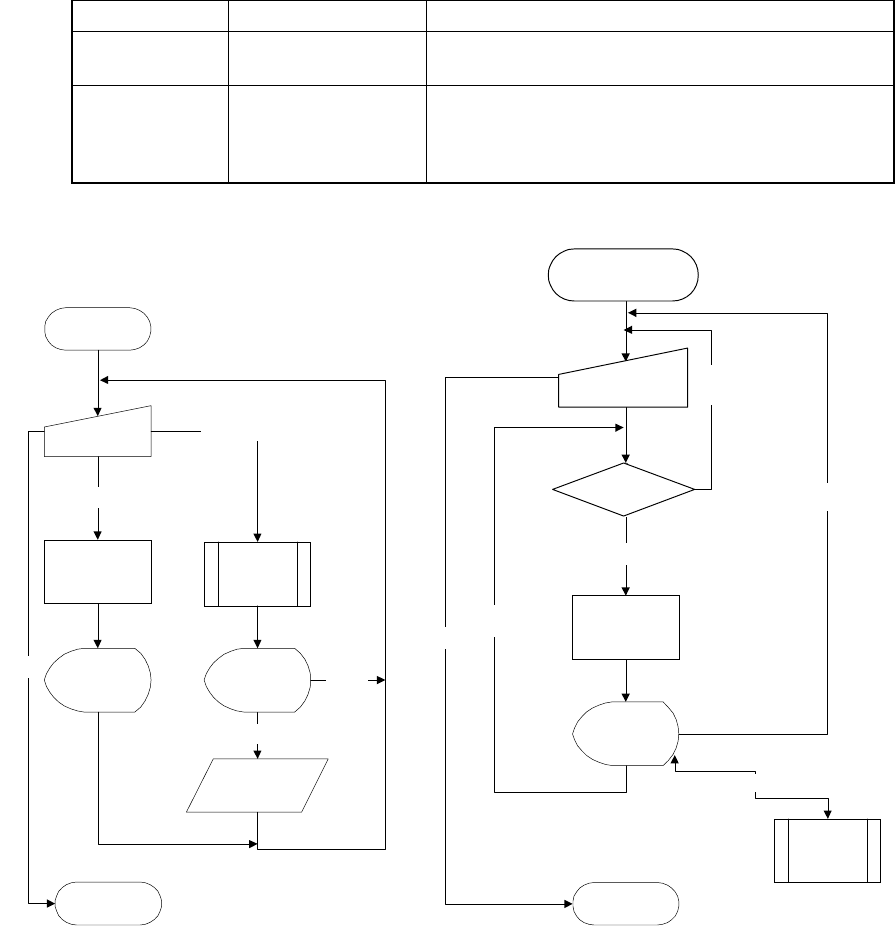
The operation flow for checking laser height is shown below.
レーザー高さ
単独検査開始
検査実行
(ダイアログ)
レーザー高さ
検査
結果表示
(ダイアログ)
レーザー高さ
単独測定終了
検査実行
終了
生産プログ
ラムへ結果
格納
確認
レーザー高さ
測定
レーザー高さ測定実行
結果表示
(ダイアログ)
キャンセル
レーザー高さ
連続測定開始
条件設定
(ダイアログ)
レーザー高さ検査
結果表示
(ダイアログ)
レーザ高さー
連続検査終了
対象部品あり
終了
次部品検査
対象
部品なし
検査対象
部品がある
か?
中止
レーザー高さ
単独検査
検査エラー
Start of laser
height single
check
Check (on the
dialog box)
Measurement of laser height
Execution of check
Check of laser
height
Measurement
of laser
height
Display of the
result (on the
dialog box)
Display of the
result (on the
dialog box)
Cancel
Check
Saving of the
result into a pro-
duction program
End
End of single
laser height
measurement
Figure 6.7.2.1.1 Operation flow for checking
the laser height in Single check mode
Figure 6.7.2.1.2 Operation flow for checking
the laser height in Continuous check mode
Any component
to be checked ?
Start of the continuous
laser height
measurement operation
Setting of the
conditions (on the
dialog box)
No component
satisfying the
conditions
Yes
Check of the
laser height
Display of the
result (on the
dialog box)
Check error
Single check
of the laser
height
Cancel
End
Check of the
next component
End of the
continuous laser
height check

6 − 122
6.7.2.2 Laser height checking method
The system performs the laser centering control operation based on the laser height
set in Component data to check to see if no error occurs. In Single check mode,
you can specify the desired laser height or the laser height obtained after measuring
it to check the laser height.
6.7.2.3 Measuring the laser height
If the system detects an error by checking the laser height, it enters Single check
mode. In Single check mode, you can measure the laser height.
To measure the laser height, the system repeats a check of the laser height under
the conditions described below, and assumes that the laser height which allows it to
center a component with laser is optimum.
Table 6.7.2.3 Conditions for repeating measurement of the laser height
Item Move direction Direction of movement Description
Alternation Start checking the laser height from the current
position to the upper direction, then down direction
alternately.
Up Starts checking the laser height from the current
position to the upper direction only.
1 Present position
Down Starts checking the laser height from the current
position to the down direction only.
2 Pick face of compo.
-> face under compo.
Checks a component from its picked-up side to the
top side continuously based on the component
height.
3 face under compo. ->
Pick face of compo.
Checks a component from its bottom side to the
picked-up side continuously based on the
component height.