KE-2030使用说明书.pdf - 第427页
6 − 81 6.4.15 PW B production w ithout transporting a board Conventionally, a machine has to rem ove a board before pr oduction if it is located on the PW B transport pat h at start of pr oduction. However, this f unctio…
6 − 80
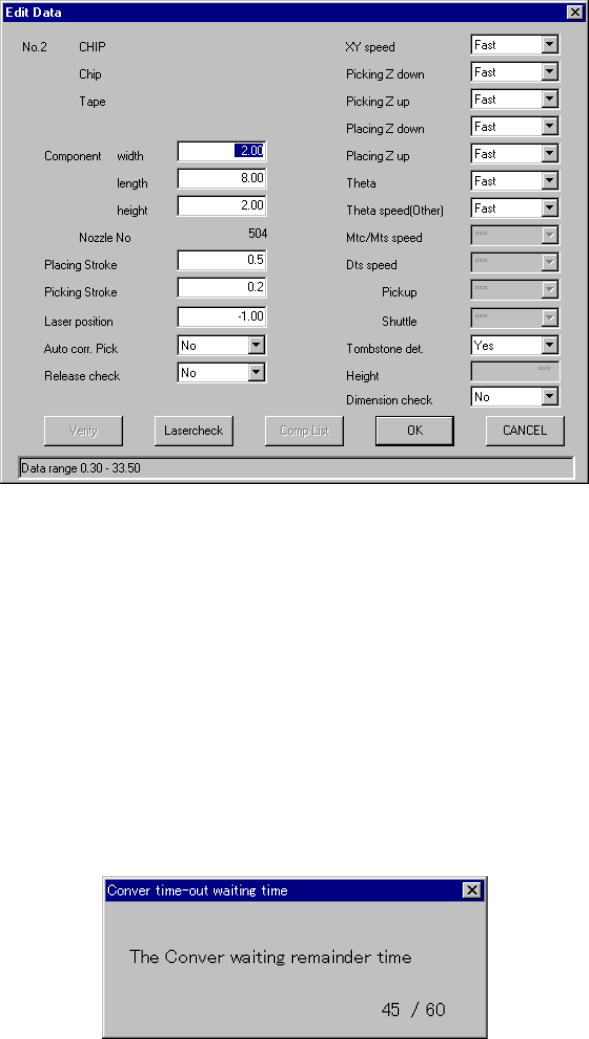
6.4.13 Editing data
You can modify some part of data created on the Component data screen (such as
component dimensions and laser height) without quitting the "PWB production" screen.
Therefore, you can edit data while maintaining the continuous production status which
allows you to abort production.
If you want to change items not provided with the <Edit> button, terminate the current
production, then edit the production program. Note that you cannot resume the
continuous production and you have to start production newly.
You can invoke this editing data function from the men bar before production starts:
by selecting [Tool] command, then [Operation option] command, or invoke it when
production pauses (because the stocked components run out, laser recognition error
occurs, tombstone error occurs or so on).
Figure 6.4.13.1 Edit Data dialog box
6.4.14 Conveyor time-out waiting time
The machine displays the time passed since a board is clamped on the OUT station
until a new board is clamped on the IN station by comparing with the value set as the
menu item “PWB wait time” on the Production conditions dialog box. However, when
the value 5 or lower is set as the “PWB wait time” on the Production conditions dialog
box, the following dialog box will not appear on the screen.
When you click the <Start> key on the “Conveyer time-out waiting time” dialog box,
the machine starts producing PWBs even though not board is loaded onto the IN
station. When you click the <Stop> key, the “Abort” dialog box appears on the
screen and the machine starts aborting production.
Figure 6.4.13.1 “Conveyer time-out waiting time” dialog box
6 − 81
6.4.15 PWB production without transporting a board
Conventionally, a machine has to remove a board before production if it is located on
the PWB transport path at start of production. However, this function allows the
machine to fix (clamp) a board again if it is on the PWB transport path at start of
production, so the machine can start production without loading any board into the
machine.
◇ Normally a board remains on the PWB transport path in the following conditions:
Production is aborted (due to an asynchronous event and so on), or
An operator stops production forcibly.
Use this function to recover the system from the conditions described above.
To execute this function, clamp a board again on the “Processing before
production begins” dialog box, and then start production.
①
If you load a production file to the system and quit the “Production”
screen before starting production, this function cannot obtain the
condition of the PWB transport path when production is interrupted.
Therefore, it may cause some component(s) not to be placed on a board
or to be placed at a wrong position of a board. Be careful to use this
function.
②
If a board size is extremely large or a board is very heavy when the
system performs PWB production without transporting a board, the
system may fail to clamp it.
L
6 − 82
6.4.15.1 Process before production starts
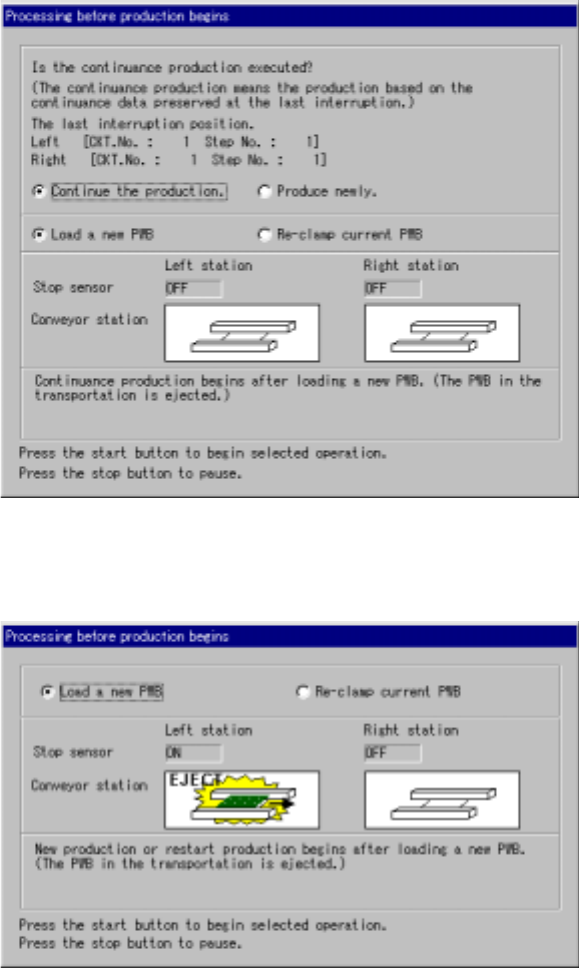
The contents of the screen displayed as “Processing before production begins”
dialog box vary depending on the condition: (a) “if there is a continuous production
file” or (b) “if there is no continuous production file” as shown below.
Figure 6.4.15(a) If there is a continuous production file
Figure 6.4.15(b) If there is no continuous production file
• When you press the <START> switch on this dialog box, the system starts the
selected operation.
• When you press the <STOP> switch on this dialog box, the system enters
Production Idle mode again.