KE-2030使用说明书.pdf - 第463页
6 − 1 17 (2) Oper ation Fig ure 6.6.1 shows the Init ial dry run conditions menu box. Figure 6.6. 1 Initial Dry r un conditions menu box ① Setting it ems selection Switches the dialog box to be displayed among: Product i…
6 − 116
6.6 Blank Run
When you select the [Production conditions] command from the menu bar, then the
[Dry Run] command on the displayed menu, the "Dry Run conditions" menu appears
on the screen.
(1) Setting items
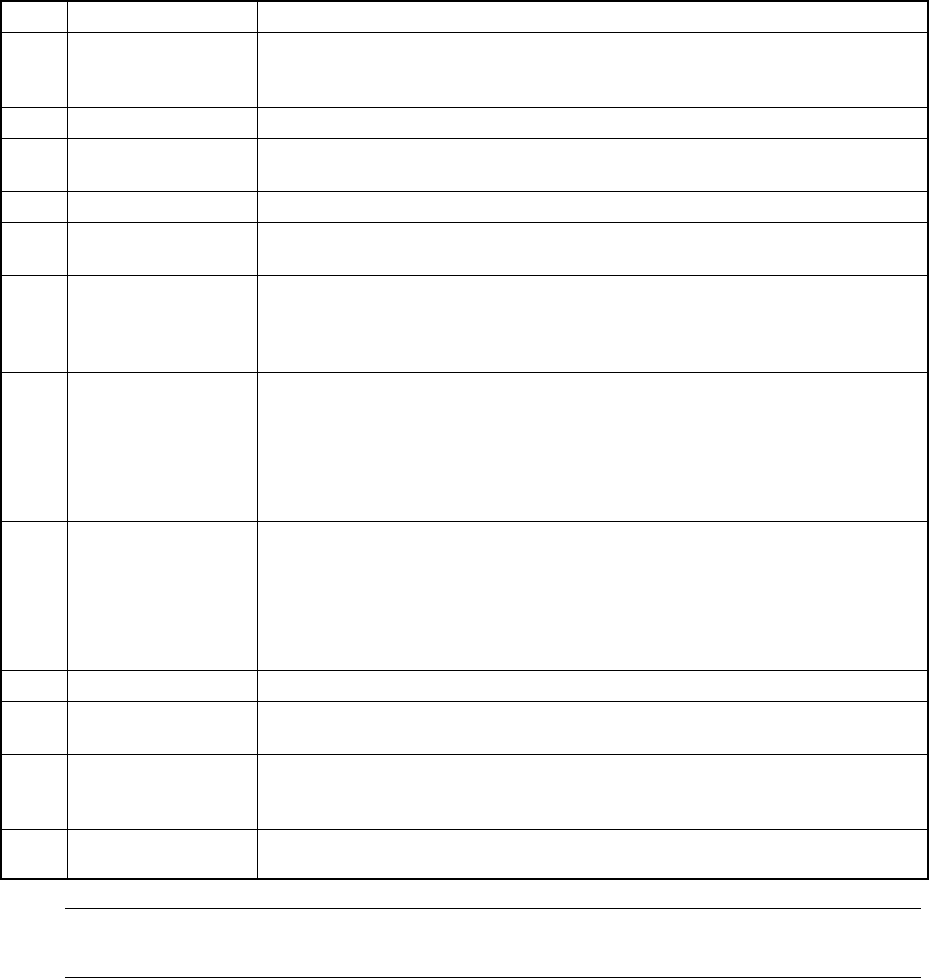
No. Item Description
1 Setting items
selection
Switch the dialog box to be displayed on the screen among: Production
conditions dialog box, Trial Run conditions dialog box, and Dry Run conditions
dialog box.
2 Prod. PWB Set the number of boards for blank run.
3 Sequence Select the order of placement sequence: the input order or Opt. (optimized)
order.
4 Exec. mode Select continuous production or step-by-step production.
5 Placement ofs. Designate offset for all placement positions. This offset is added to the
placement positions for actual component placement.
6 Step No. Designate the start line number and the end line number of the range of the
placement data in the input order.
When "Opt. order" is selected as the "Sequence", the start and end line
numbers are handled as the optimized data numbers also.
7 Place tracking After blank run of a board, designate whether or not to perform placement
tracking by the camera. If performed, set whether it is manual or automatic.
Off: Placement tracking is not performed.
Automatic: Placement tracking is performed automatically.
Manual: Stops at each placement position, and then goes to the next
placement position through a key-in by the operator.
8 Pick tracking Before blank run of a board, designate whether or not to perform pickup position
tracking by the camera. If performed, set whether it is manual or automatic.
Off: Pickup tracking is not performed.
Automatic: Pickup tracking is performed automatically.
Manual: Stops at each placement position, and then goes to the next
pickup position through a key-in by the operator.
9 Tracking Station Designate on which unit is to track the blank run operation: left, right or both.
10 Automatic interval When camera tracking is performed automatically, designate the waiting time
duration at a stop position. (time duration in 10 msec: "1" indicates "10 msec")
11 2nd PWB TimeOut Designate the time-out duration which starts production if the IN sensor does
not detect the board transported by the IN station after it is clamped with the
OUT station.
12
Prod. station
(Production station)
Specify a station that is used for producing PWBs: Left, Right or Both.
Note: The value specified on the Operation option menu is displayed at the item
"Reference pin correction", and cannot be changed on this dialog box.
6 − 117
(2) Operation
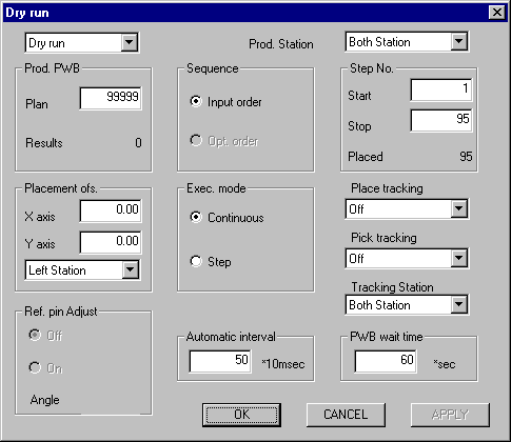
Figure 6.6.1 shows the Initial dry run conditions menu box.
Figure 6.6.1 Initial Dry run conditions menu box
① Setting items selection
Switches the dialog box to be displayed among: Production conditions
dialog box, Trial Run conditions dialog box, and Dry Run conditions dialog
box.
② Prod. PWB
Enter the predetermined number of PWBs to be produced. The number of
"Result" field is displayed according to setting for the number of produced
boards specified on the Operation Options menu.
③ Sequence
Using the corresponding radio button, select the placement sequence: either
input order or optimized order.
④ Exec. mode
Select either "Continuous" or "Step" execution mode with the corresponding
radio button.
⑤ Placement ofs.
In case a certain production lot has a specific offset (in printing process or in
reference holing process), enter the X and Y offsets in this field. The entered
offset is applied to the entered placement position.
⑥ Step No.
Enter the start line number and end line number to specify the range of
placement. The number of placement points on a board is displayed in the
"Placed" field, and the initial value is displayed in each field. When "Opt.
order" is selected as the "Sequence", you cannot change these initial values.
⑦ Place tracking
Using the radio button, set whether or not to perform placement tracking after
6 − 118
blank run by the camera, and also the types of tracking.