KE-2030使用说明书.pdf - 第445页
6 − 99 production file.
6 − 98
(2) If there is a board on the PWB transport path when you select the radio button “Load
a new PWB”, and the system ejects the board
See the previous section “I. When there is a continuous production file”.
◆ If you interrupt production (regardless of whether the system uses a continuous
production file), the system operates in the manner described under ④, ⑤ and
⑥.
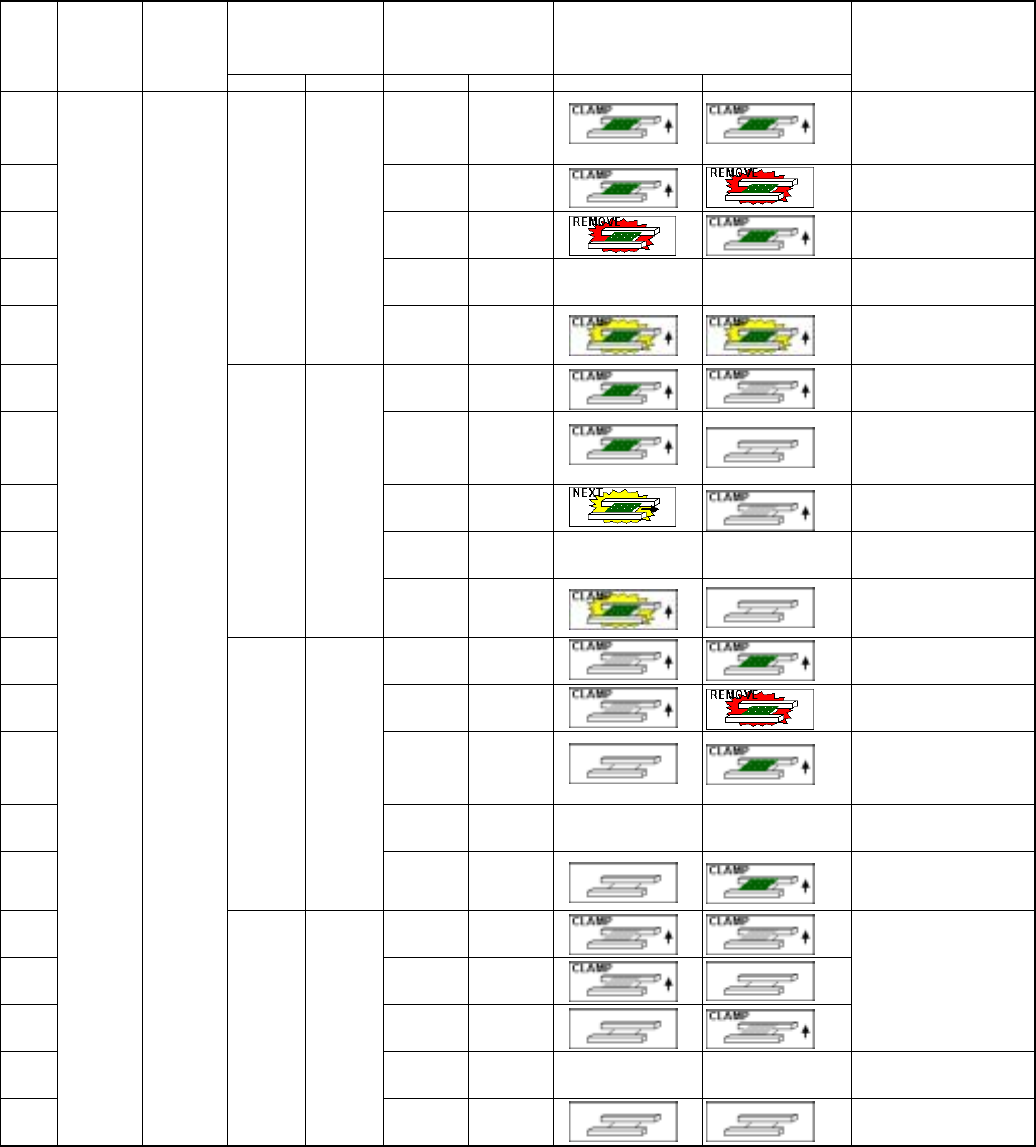
■ When the system starts a new production or resumes the suspended production after
re-clamping a board
Information on the
PWB transport path
obtained when
production was
interrupted
Whether there is a board
on the PWB transport
path
Image of the PWB transport condition
Step
No.
Whether to
resume
production
Production
operation
Left Right Left Right Left Right
Operation after you press
the <START> key
①
Yes
Yes
After a board is clamped
again, the system resumes the
production without loading a
board before starting
production
②
Yes
None
Error
③
None Yes
Error
④
None None
Not selectable
⑤
Yes Yes
No
information
No
information
After re-clamping a board, the
system performs the
continuous production without
loading any board (Be careful).
⑥
Yes
Yes
Error
⑦
Yes
None After a board is clamped
again, the system resumes the
production without loading a
board before starting
production
⑧
None Yes
Error
⑨
None None
Not selectable
⑩
Yes None
No
information
No
information
After re-clamping a board, the
system performs the
continuous production without
loading any board (Be careful).
⑪
Yes
Yes
Error
⑫
Yes
None
Error
⑬
None Yes
After a board is clamped
again, the system resumes the
production without loading a
board before starting
production
⑭
None None
Not selectable
⑮
None Yes
No
information
No
information
After re-clamping a board, the
system performs the
continuous production without
loading any board (Be careful).
⑯
Yes
Yes
⑰
Yes
None
⑱
None Yes
Error (No board)
⑲
None None
Not selectable
⑳
No
Production
after a
board is
clamped
(when you
select
“Re-clamp
current
PWB”)
None None
No
information
No
information
Error (No board)
Note: If you interrupt production when the system requires a continuous production file, the system operates in
the same manner as it does when there is no PWB transport path information if there is no continuous
6 − 99
production file.
6 − 100
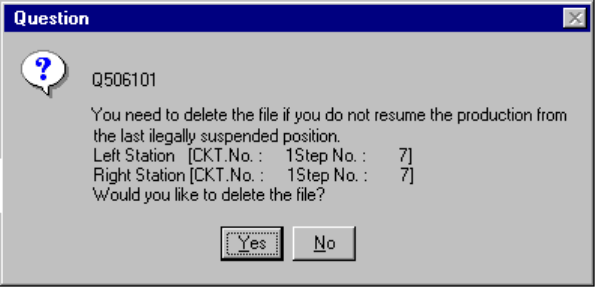
6.4.15.2 Continuous production data delete confirmation dialog box
If you select “Produce newly” when there is a continuous production file, the
“Question” dialog box, which asks you whether to delete a continuous production file,
appears on the screen.
Figure 6.4.15.2 Continuous production data delete confirmation dialog box
• When you select the <Yes> button, the system deletes the continuous production
data. (It deletes the data actually at start of production.) It cannot continue the
production that was aborted the last time.
• When you select the <No> button, the system displays the “Processing before
production begins” dialog box (if there is a continuous production file) when it
loads a file the next time.
◇ When you select either of these buttons on the Continuous production data delete
confirmation dialog box above, it displays the “Production start” (for new
production) dialog box.