CP-7[732-742]-series Mechanical Reference(2.9E).pdf - 第122页
7. Use a cutter to trim off any of the sticker which protrudes beyond the disk. 8. Remove any of the adhesive which may have adhered to the nozzle tube. Nozzle and fluorescent sticker drawing numbers ADCPH751 ✽ ADCPH769 …
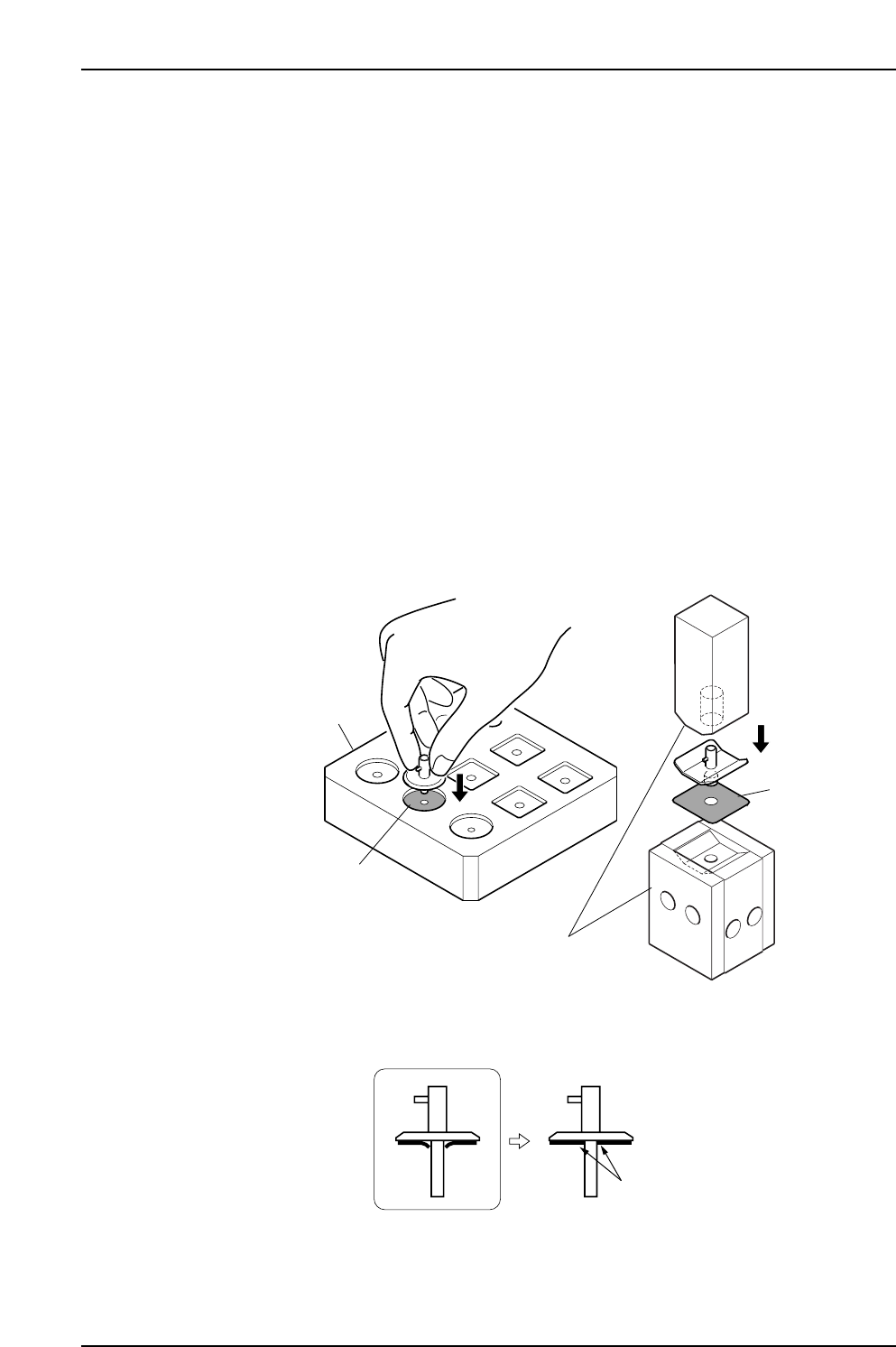
3.2 Replacing the Fluorescent Nozzle Stickers
Point
Fluorescent nozzle stickers which become soiled and cause vision processing errors must
be replaced.
Procedure
1. Wash hands before replacing the sticker.
2. Use a cutter to peel (from outer edge) the old sticker off the nozzle disk.
3. Use a cloth to wipe any residual adhesive off the disk.
4. Verify that the new sticker is not soiled or damaged.
5. Peel the backing off the new sticker, and punch the nozzle tip through from the
fluorescent side.
Note: Punching the nozzle tip through from the adhesive side will destroy the fluorescent
coating around the hole.
6. Align the nozzle and sticker centers, and push the sticker into place using the jig.
Be sure that there is no gap between the nozzle disk and the sticker.
Note: Make sure that the sticker is attached firmly to the nozzle.
Attached neatly without lifting.
C7SM3028
Nozzle seal
Nozzle seal
Jig ( DCPJ0460 )
Jig
( ADCPJ8240 )
C7SM3051a
Part 3 Chapter 3 Replacing Consumable Parts
Edition 2.7 3-3-2 CP-7 series Mechanical Reference
7. Use a cutter to trim off any of the sticker which protrudes beyond the disk.
8. Remove any of the adhesive which may have adhered to the nozzle tube.
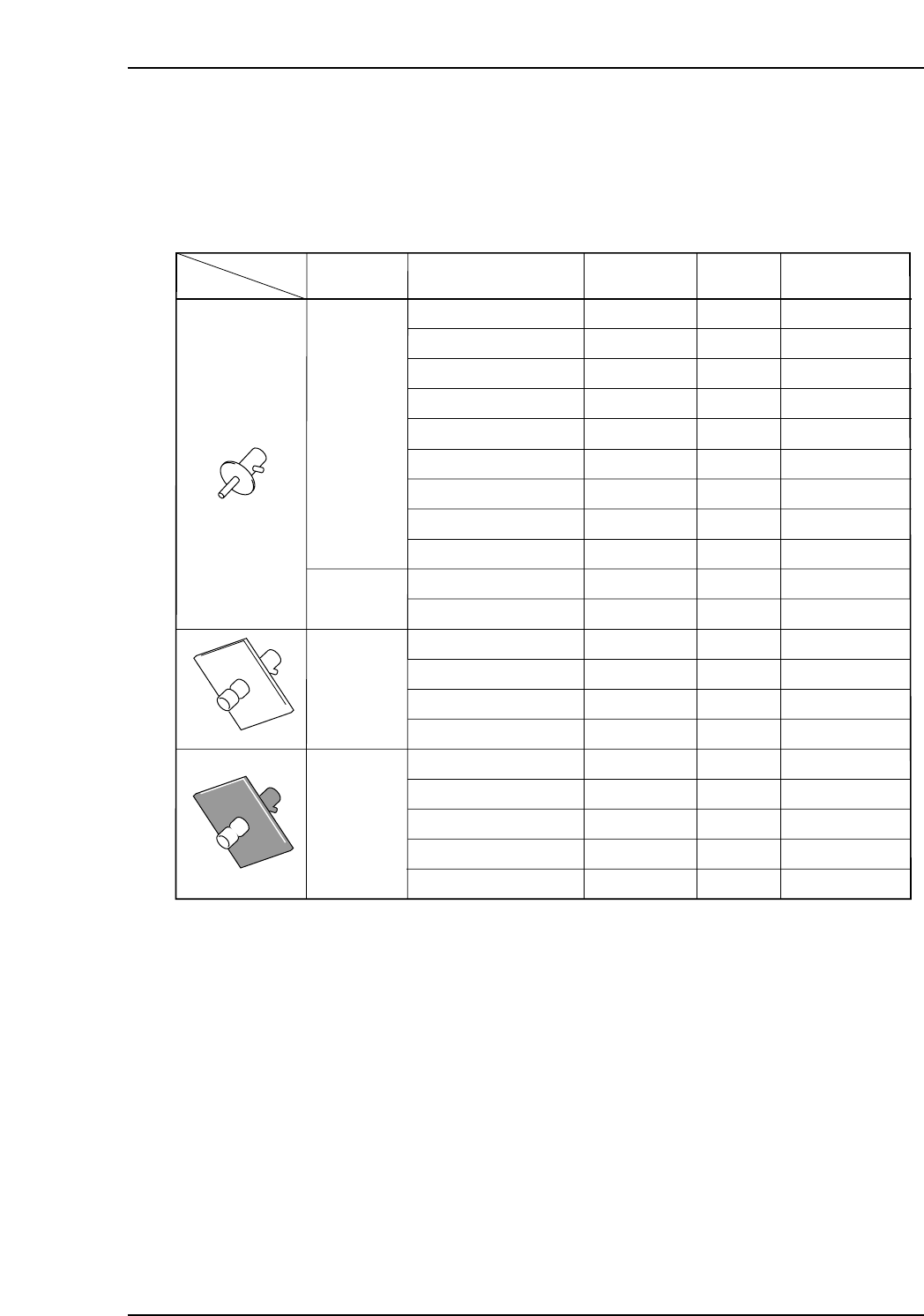
Nozzle and fluorescent sticker drawing numbers
ADCPH751✽
ADCPH769✽
ADCPH752✽
ADCPH753✽
ADCPH754✽
ADCPH955✽
ADCPH956✽
ADCPH957✽
ADCPH958✽
ADCPH770✽
ADCPH971✽
ADCPH959✽
ADCPH961✽
ADCPH963✽
ADCPH965✽
ADCPH960✽
ADCPH962✽
ADCPH964✽
ADCPH966✽
ADCPH968✽
θ8
θ8
θ8
θ8
θ8
θ16
θ16
θ16
θ16
θ8
θ16
16x16
16x16
16x16
16x16
16x16
16x16
16x16
16x16
21x21
DCPH851✽
DCPH851✽
DCPH852✽
DCPH853✽
DCPH854✽
DCPH855✽
WPH820✽
WPH821✽
DCPH856✽
DCPH854✽
WPH820✽
DCPH857✽
DCPH858✽
DCPH859✽
DCPH860✽
DCPH881✽
DCPH882✽
DCPH883✽
DCPH884✽
DCPH885✽
T050a
Nozzle SizeNozzle shape
Round
Round
Round
Melf
Nozzle Assy
Dwg. No.
Disk Size
Fluorescent Seal
Dwg. No.
θ0.4 ( R08-004 )
θ0.4 ( R08-004 )
Short
θ0.7 ( R08-007 )
θ1.0 ( R08-010 )
θ1.3 ( R08-013 )
θ1.8 ( R16-018 )
θ2.5 ( R16-025 )
θ3.7 ( R16-037 )
θ5.0 ( R16-050 )
θ1.3 ( M08-013 )
θ2.5 ( M16-025 )
θ1.8 ( S16-018 )
θ2.5 ( S16-025 )
θ3.7 ( S16-037 )
θ5.0 ( S16-050 )
θ1.8 ( B16-018 )
θ2.5 ( B16-025 )
θ3.7 ( B16-037 )
θ5.0 ( B16-050 )
θ5.0 ( B21-050 )
Part 3 Chapter 3 Replacing Consumable Parts
Edition 2.7 3-3-3 CP-7 series Mechanical Reference
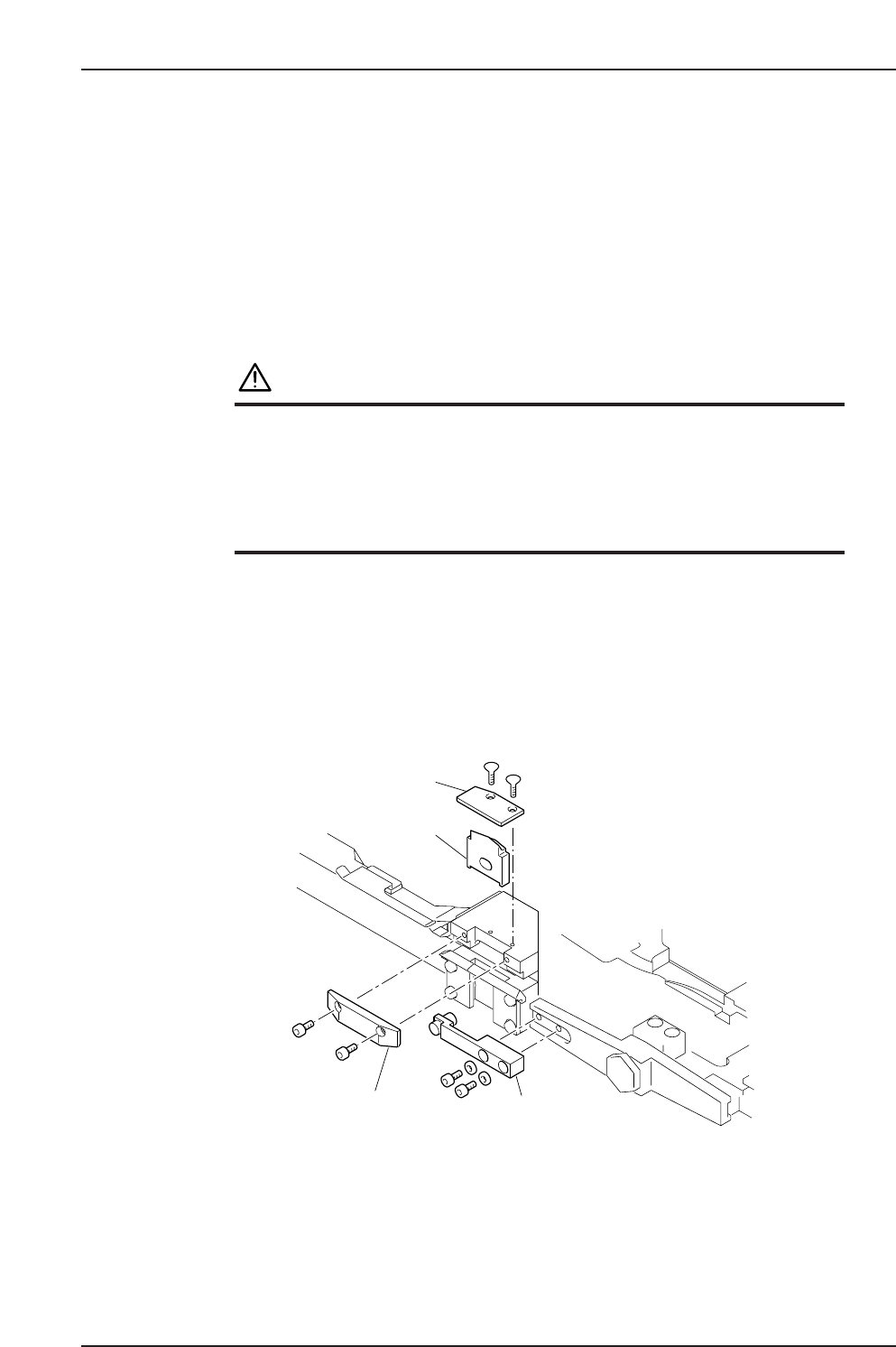
3.3 Replacing the Waste Tape Cutter
Point
A broken or damaged waste tape cutter will be unable to cut the waste tape properly,
causing tape clogging and tape feed problems. The waste tape cutter must be replaced at
such times.
Procedure
WARNING
• Turn the main power off before performing this
procedure.
• Rotation may occur (caused by spring action) if the cam
axis is not at its origin position (0-degrees).
Use special care when working inside the machine as
this is a dangerous area.
1. Remove the plate located above the waste tape cutter.
2. Remove the two bolts which secure the fixed cutter.
3. Remove the two bolts which secure the arm of the moving cutter.
4. Remove the fixed and moving cutters, and mount the new fixed and moving
cutters.
Note: Apply grease to the contact points before attaching the moving cutter.
(See 2.6 Lubricating the Tape Cutter)
C7SM3052a
Moving cutter
Fixed cutter
Arm
Plate
Part 3 Chapter 3 Replacing Consumable Parts
Edition 2.7 3-3-4 CP-7 series Mechanical Reference