CP-7[732-742]-series Mechanical Reference(2.9E).pdf - 第236页
Part 6 Chapter 2 Connecting the Air Supply Edition 2.3 6-2-2 CP-7-series Mechanical Reference Notes:
2. Connecting the Air Supply
Point
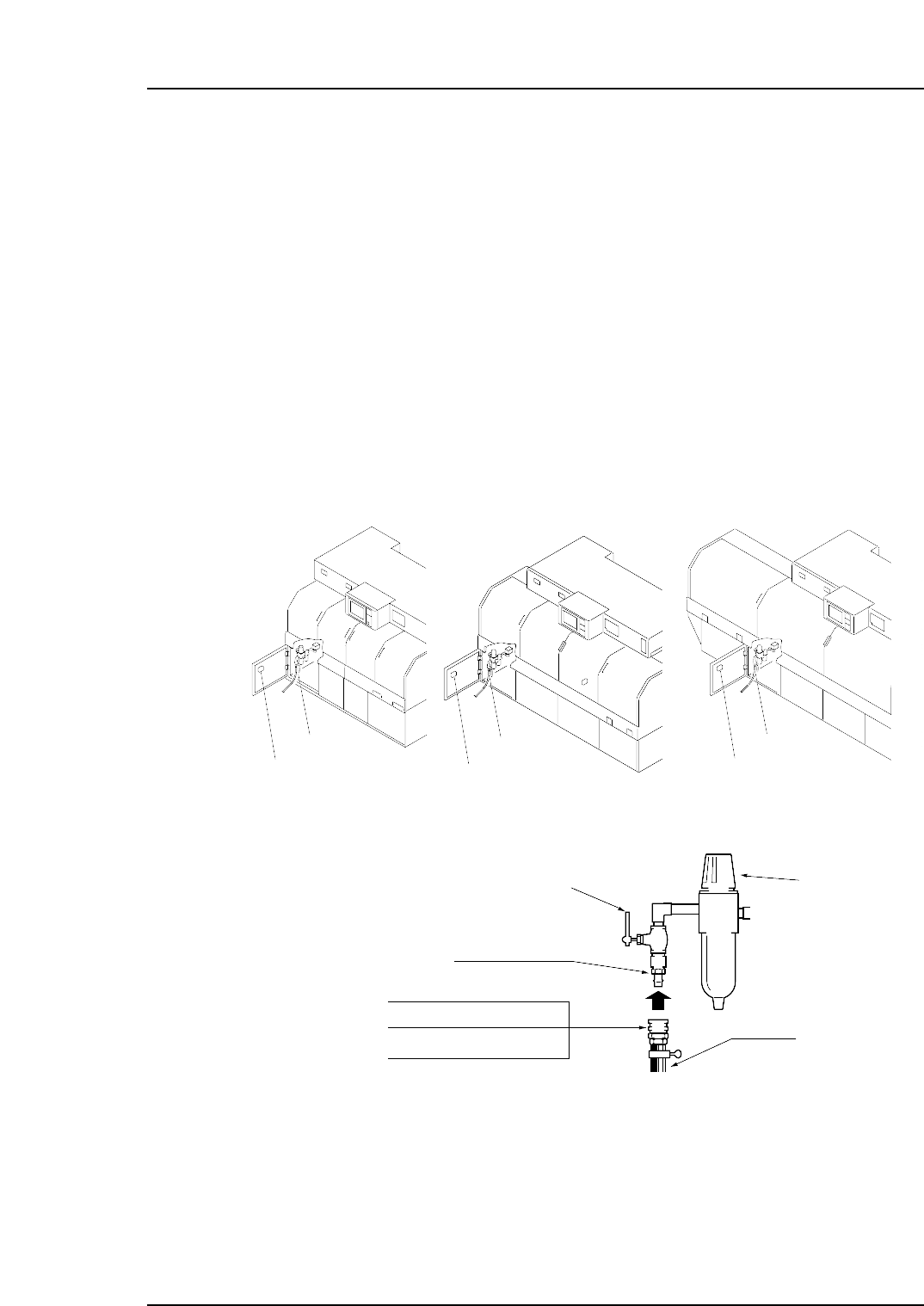
Connect the air hose to the machine, and adjust the regulator to the prescribed air
pressure.
Procedure
1. Connect the air hose to the machine’s air inlet located on the front of the machine.
2. Raise the filter regulator knob to release the lock.
3. Turn the handle to adjust the air pressure until the gauge reads 0.5 MPa
(5kgf/cm
2
).
Note: A digital pressure gauge is attached to the rear cover.
4. Press the filter regulator knob down to engage the lock.
Note: The air hose is not supplied with the machine.
• 30SH ( for 3/8" hose)
• 20SH ( for 1/4" hose)
• 40SH ( for 1/2" hose)
Socket
0.5 MPa (5 kgf/cm )
2
Hose
20PM Plug
Handle
Knob
C7SM5002a
Air inlet
<CP-732E> <CP-742ME>
Air inlet
Air inlet
Digital pressure gauge
Digital pressure gauge
Digital pressure gauge
<CP-742E>
Part 6 Chapter 2 Connecting the Air Supply
Edition 2.3 6-2-1 CP-7-series Mechanical Reference

Part 6 Chapter 2 Connecting the Air Supply
Edition 2.3 6-2-2 CP-7-series Mechanical Reference
Notes:
3. Electrical Power Supply & Transformer Wiring
Point
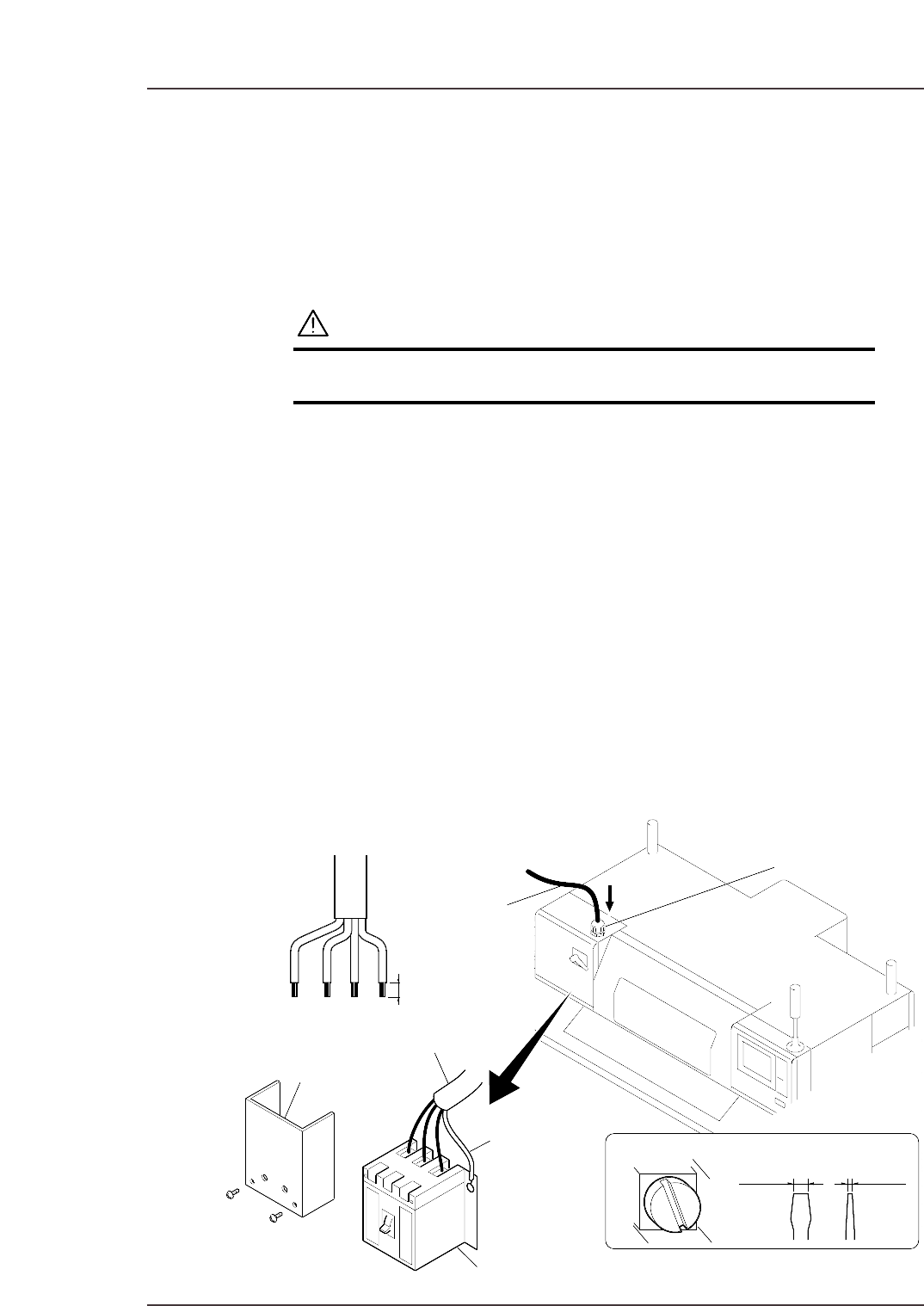
Wire the transformer so that its voltage matches the power supply voltage.
Procedure
DANGER
Verify that the external power supply is off before
performing this procedure.
Connecting the Power Supply
The power capacities are indicated below. Be sure to connect the machine to a power
supply which exceeds this capacity.
• CP-732E : 8.5KVA
• CP-742ME: 9.0KVA
• CP-742E : 9.5KVA
1. Open the main breaker box, then remove the transparent terminal cover.
2. Feed the power cable into the main breaker box from the power cable inlet located
at the top of the main breaker box.
3. Connect the ground cable to the dedicated ground terminal.
4. Connect the 3-phase cable to the main breaker and tighten to the prescribed
torque.
Terminal screw tightening torque: 5.8 N⋅m (58 kgf⋅cm)
Note: Terminal screws should be tightened periodically.
5. After connecting the cable, secure it with the cable lock nut located at the power
cable inlet.
Cable lock nut tightening torque: 7.5 N⋅m (75 kgf⋅cm)
Power cable
Cable lock nut
20 mm
Terminal
screw
Recommended driver
8.0mm 1.0mm
Main breaker
Transparent terminal cover
Three-phase electric wire
Ground wire
C7SM5003
Part 6 Chapter 3 Electrical Power Supply & Transformer Wiring
Edition 2.6 6-3-1 CP-7 series Mechanical Reference