00196351-04_UM_ACT_de_en.pdf - 第104页
ACT - Accurac y Check T ool / User Manual 07/2014 Edit ion 30 Available S - tables: A vailable X - t ables : A vailable tables (setups) for WPC/MTC:
ACT - Accuracy Check Tool / User Manual 07/2014 Edition
29
1)
These programs are also available with suffix "…_CA" respectively for measurement in a
SIPLACE CA-series placement machine.
2)
As of SIPLACE Pro 11.2 and station software version >= 707.1, the CC02-05 glass components
can be used for the camera SST25 (Flip-chip camera) measurement. For this, the
"…_CC02-05_FC" board or component has been created. Thus, it is not mandatory to buy an
optional tray with CC07-500 components for measuring this camera.
As of SIPLACE Pro 11.2, boards, components and tables with CC07-500 are not available
anymore. If required (e.g. because the components are already available), this data can be
imported from previous SIPLACE Pro versions. The data (board with components and component
shapes) is available as an export from SIPLACE Pro 9.x and may be ordered at the Software
License Portal or via the Hotline and then imported into SIPLACE Pro 11.2.
For the setup, you have to copy the respective table with CC02-05 and exchange the component in
the tray.
NOTICE
Placement machines with dual conveyors
When using a dual conveyor, the ACT should be run with both conveyors.
4.1.1 Creating a Setup (Assigning Tables)
► Copy an existing setup of your line.
► Replace the tables by using the prepared tables for ACT that you have already imported. (see
section 3.2.5).
Tables are available for each possible machine.
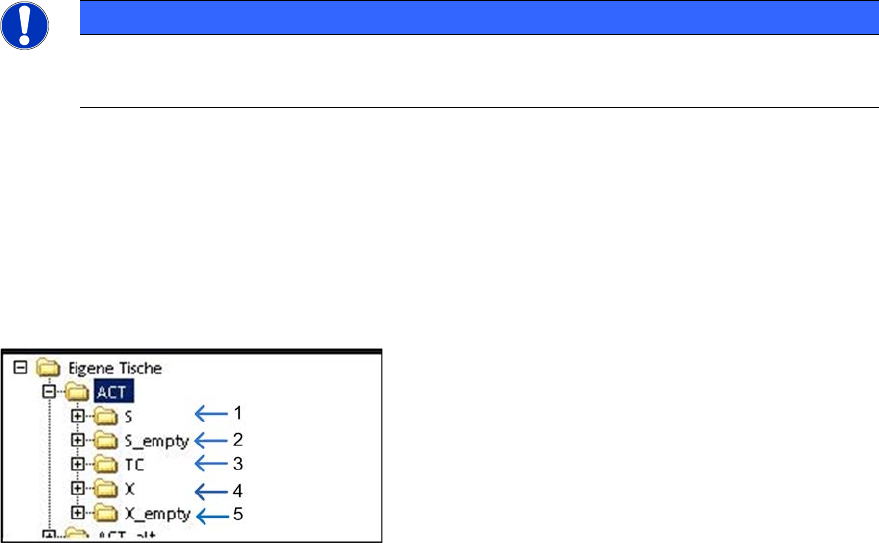
Key:
(1) S-tables with setup (4) X-tables with setup
(2) Empty S-tables (5) Empty X-tables
(3) TC = Tray Changer (WPC/MTC)
ACT - Accuracy Check Tool / User Manual 07/2014 Edition
30
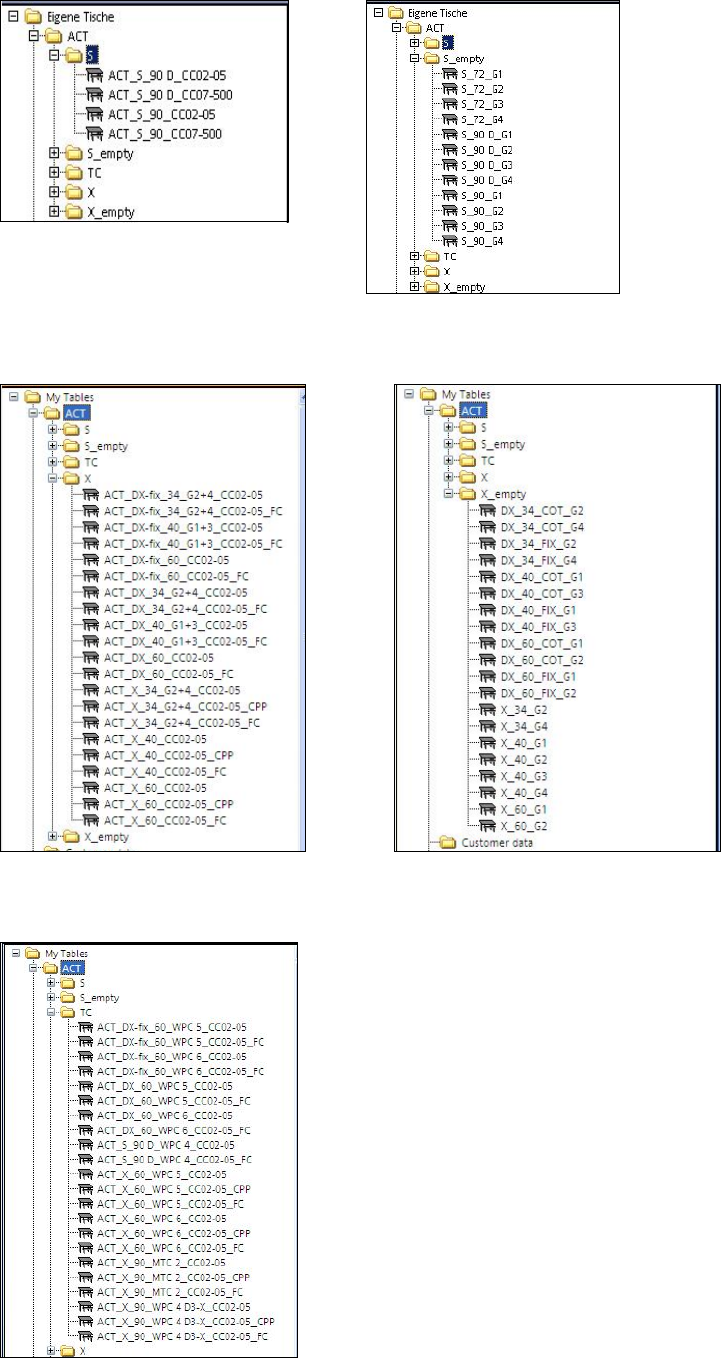
Available S-tables:
Available X-tables:
Available tables (setups) for WPC/MTC:
ACT - Accuracy Check Tool / User Manual 07/2014 Edition
31
► Drag the selected table to the required location.
► Use the empty tables to create a setup for ceramic pads, for instance.
NOTICE
If you create a setup with more than one table with ceramic pads, make sure that the
same component is not set-up at more than one location at the same time.
Predefined tables already exist for setting up the tray with the glass components.
NOTICE
● The X- and Y-offsets for the waffle pack trays on the tables have already been
entered! They may need to be corrected!
● The predefined Arbitrary Carrier tray holder should be left on track 21 and the ACT
X-table (Tray)holder should also be physically placed there. Otherwise, it is not
possible to pick-up with all segments (TH) on all machines.
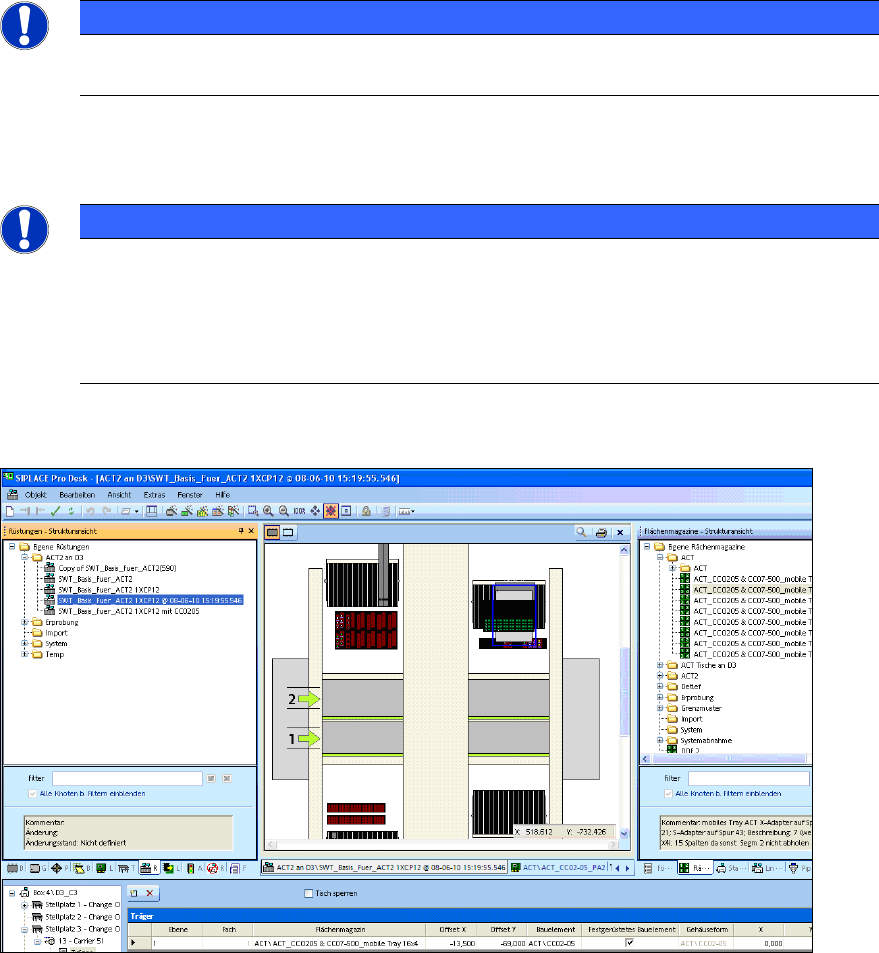
Figure 4-1 displays an example of a setup:
Figure 4-1: Setup on a D3 with Twin Head at gantry 3. Waffle pack tray with 16x4 glass components (CC02-05) on an
S-table