00196351-04_UM_ACT_de_en.pdf - 第108页
ACT - Accurac y Check T ool / User Manual 07/2014 Edit ion 34 NOTICE Due to th e problem s of accessing t he fiduc ials des cribed a bove, ple ase obs erve: If the ACT has to be m eas ured on a m achine of the S X - , DX…
ACT - Accuracy Check Tool / User Manual 07/2014 Edition
33
4.1.2 Selecting the Board (Placement Program)
► Select a suiting placement program for your head configuration from the pre-configured boards
(with the aid of Table 4-1).
NOTICE
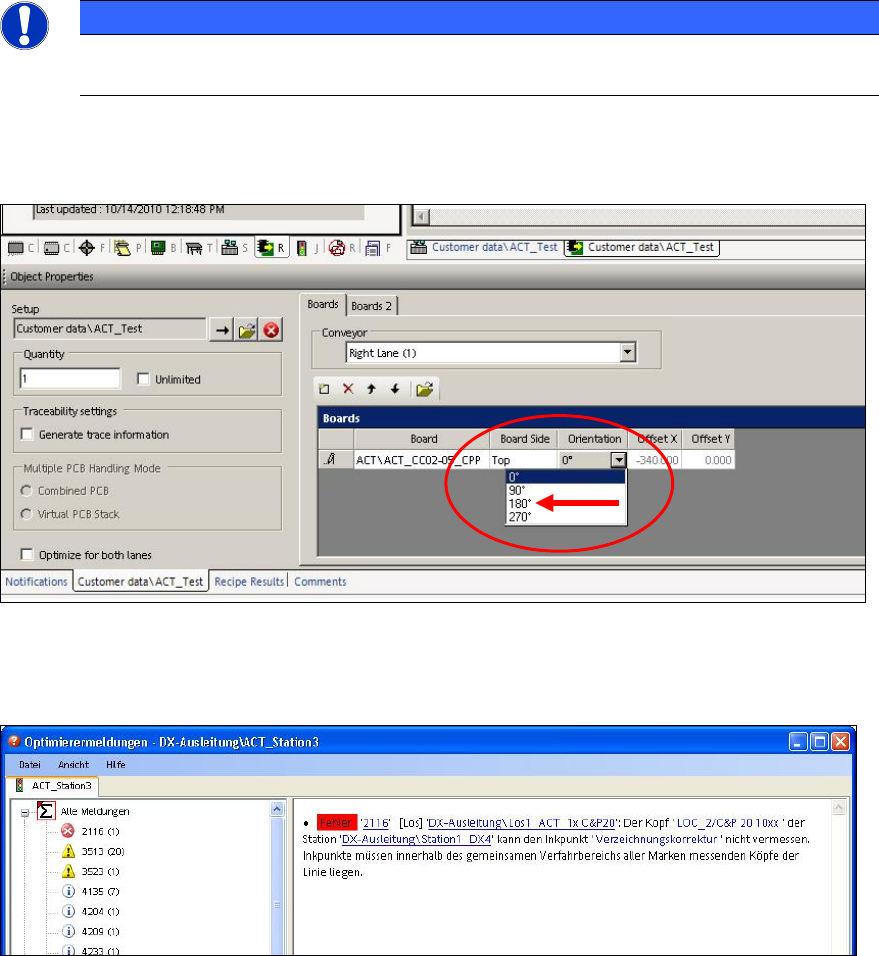
In order to access the fiducials, the ACT measuring plate has to be placed rotated by
180° in SIPLACE SX4 and DX4 machines.
Thus, if an ACT placement program is defined for a SIPLACE SX4 or DX4 machine, the orientation
(position) of the board has to be adapted to 180° in the created recipe.
Figure 4-3: Rotating board orientation by 180°on SX4, DX4
If this adaption of the board orientation is not performed, the following error message (example) is
already displayed on the SIPLACE Pro Line Control GUI during specification:
Figure 4-4: Example: Error message due to unavailable ink spots
ACT - Accuracy Check Tool / User Manual 07/2014 Edition
34
NOTICE
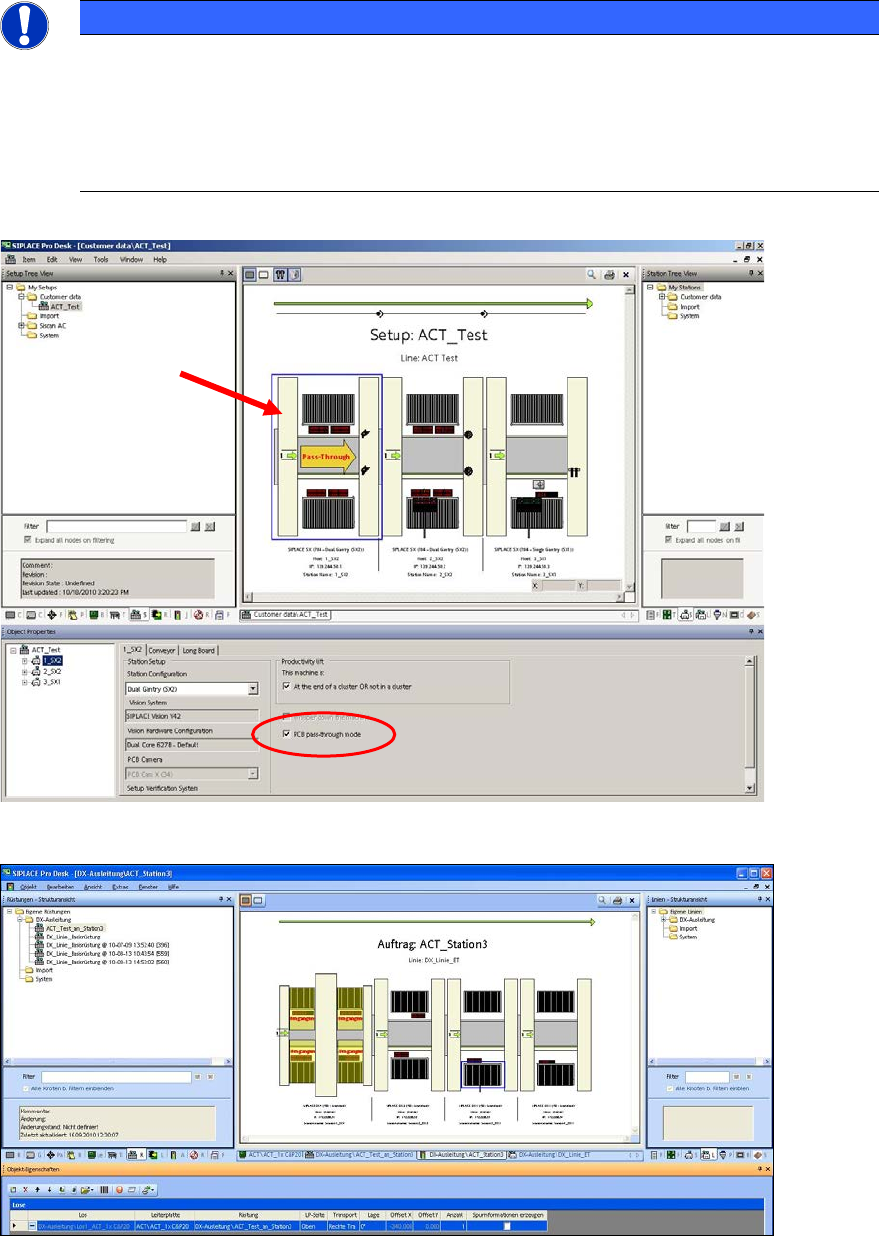
Due to the problems of accessing the fiducials described above, please observe:
If the ACT has to be measured on a machine of the SX-, DX-, or X-series, in front of
which one or more SIPLACE SX4- or DX4-stations are arranged in a line, the Pass-
through function has to be activated on all machines in front of the measuring machine
that require another board orientation (0°/180°). Otherwise errors will occur when trying
to access the fiducials.
The Pass-through function can be activated and deactivated in the setup of the respective station.
Figure 4-5: Pass-through function
Figure 4-6: Specification in Line Control GUI with DX4 in Pass-Through mode
► Specify a job (recipe) in SIPLACE Pro Line Control and send it to the line (download).
ACT - Accuracy Check Tool / User Manual 07/2014 Edition
35
4.1.3 Creating the Setup – Tray Changer (TC)
► You will have to set-up the tray changer manually.
The ACT tray may be used, but has to be positioned in line with the waffle-pack tray carrier (WTC,
tray holder).
Some examples can be found in SIPLACE Pro under My tables \ ACT \ TC \.
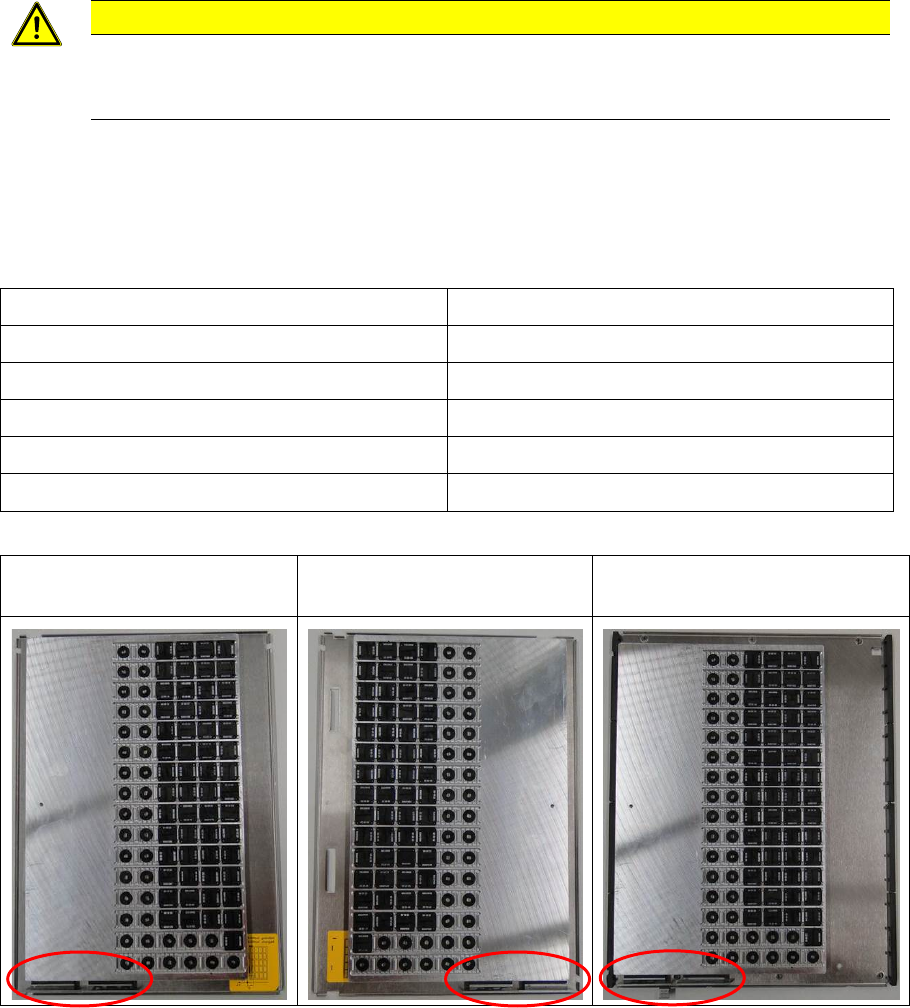
CAUTION
In order to place the ACT tray mechanically safe, it has to be positioned at the stop on
the side without pockets. It can be fastened with two holding magnets (see the marker in
Figure 4-7).
In SIPLACE Pro under My waffle-pack trays \ ACT \ xxx_L ; xxx_R the tray has to be set-up on the
waffle-pack tray carrier depending on if the tray changer has a left or a right stop.
Overview of tray changers with left and right stops
Tray changer Where is the stop?
WPC4 Left ( ACT \ xxx_L)
WPC4 – SIPLACE D3 Left ( ACT \ xxx_L)
WPC 5 Right ( ACT \ xxx_R)
WPC 6 Right ( ACT \ xxx_R)
MTC2 Left ( ACT \ xxx_L)
Table 4-2: Tray changers with left or right stops
FMT WPC4
Left ( ACT \ xxx_L)
FMT WPC5 + WPC6
Right ( ACT \ xxx_R)
MTC2
Left ( ACT \ xxx_L
Figure 4-7: ACT tray on waffle-pack tray carrier