00198150-02_SM_TX_en.pdf - 第116页
6 Gantries 6.4 MHCU, Boards and Camera 116 Service Manual SIPLACE TX Series 06/2017 6.4.2.2 X Base Adapter Twin [03054879-xx] This board is used for Twin heads on SIPLACE X series S, SX4/DX4 and TX series machines. From …
6 Gantries
6.4 MHCU, Boards and Camera
Service Manual SIPLACE TX Series 06/2017 115
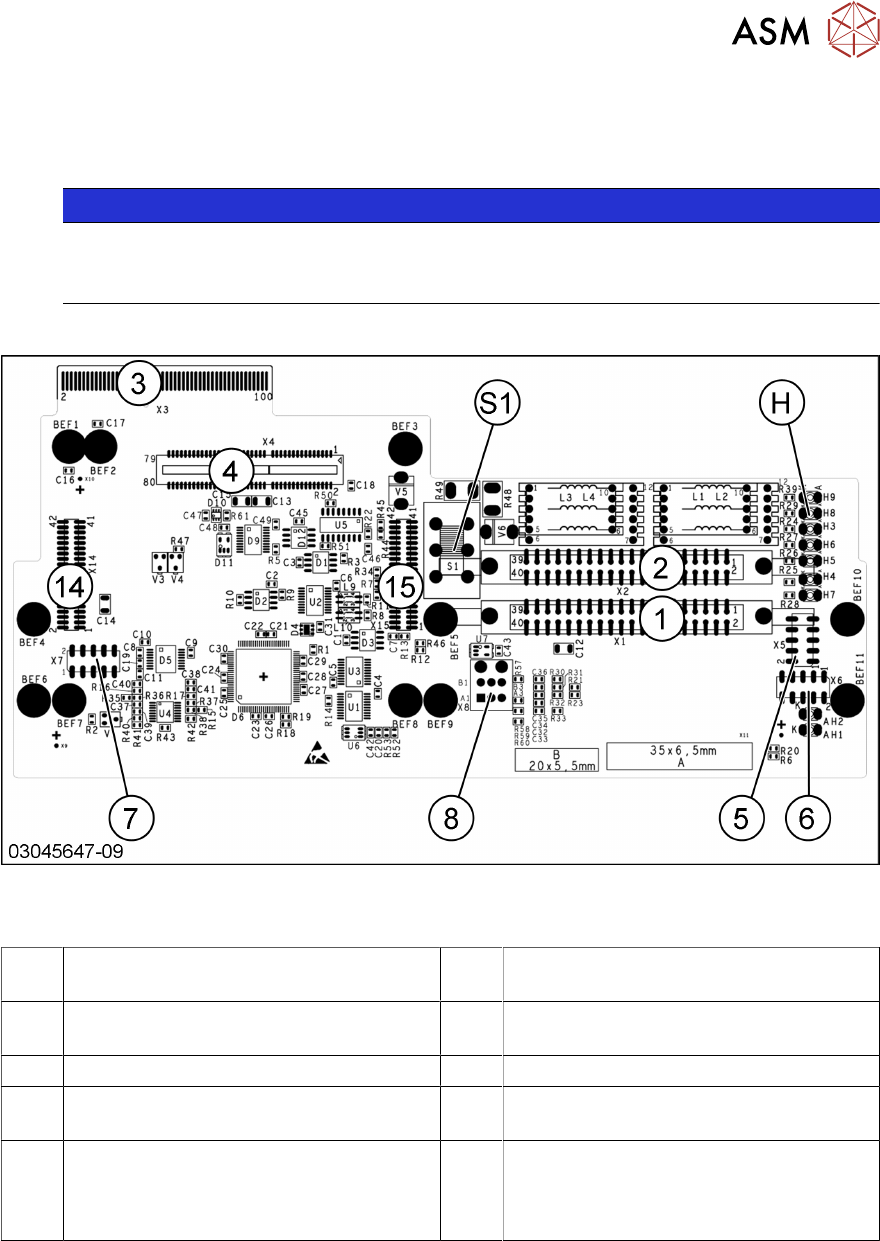
6.4.2.1 X Base Adapter C&P [03045647-xx]
This board is used for C&P20x and CPP heads on SIPLACE X-Series S, SX4/DX4 and TX-Series
machines.
NOTICE
C&P20P
The X base adapter needs at least function level 08 for the C&P20 P head. In this case,
you may need longer flat ribbon cables.
Version 09
Fig.145: X base adapter C&P
Connections [03045647-09]
1, 2 X1-X2 flat ribbon connection for CPP or
C&P20
3 X3 Connection to the head interface
board C700
4, 14,
15
X4, X14, X15 – connector for (M)HCU 5 X5 Test connector for FPGA
6 X6 Programming connector for FPGA 7 X7 Test connector (M)HCU
8 X8 connectors for inlet vacuum sensor
(cable X1a)
H LED H3- H9
S1 Switch S1 intermediate circuit voltage
Z axis
40V C&P20 (switch top)
150V CPP(switch bottom)
6 Gantries
6.4 MHCU, Boards and Camera
116 Service Manual SIPLACE TX Series 06/2017
6.4.2.2 X Base Adapter Twin [03054879-xx]
This board is used for Twin heads on SIPLACE X series S, SX4/DX4 and TX series machines.
From version -03:
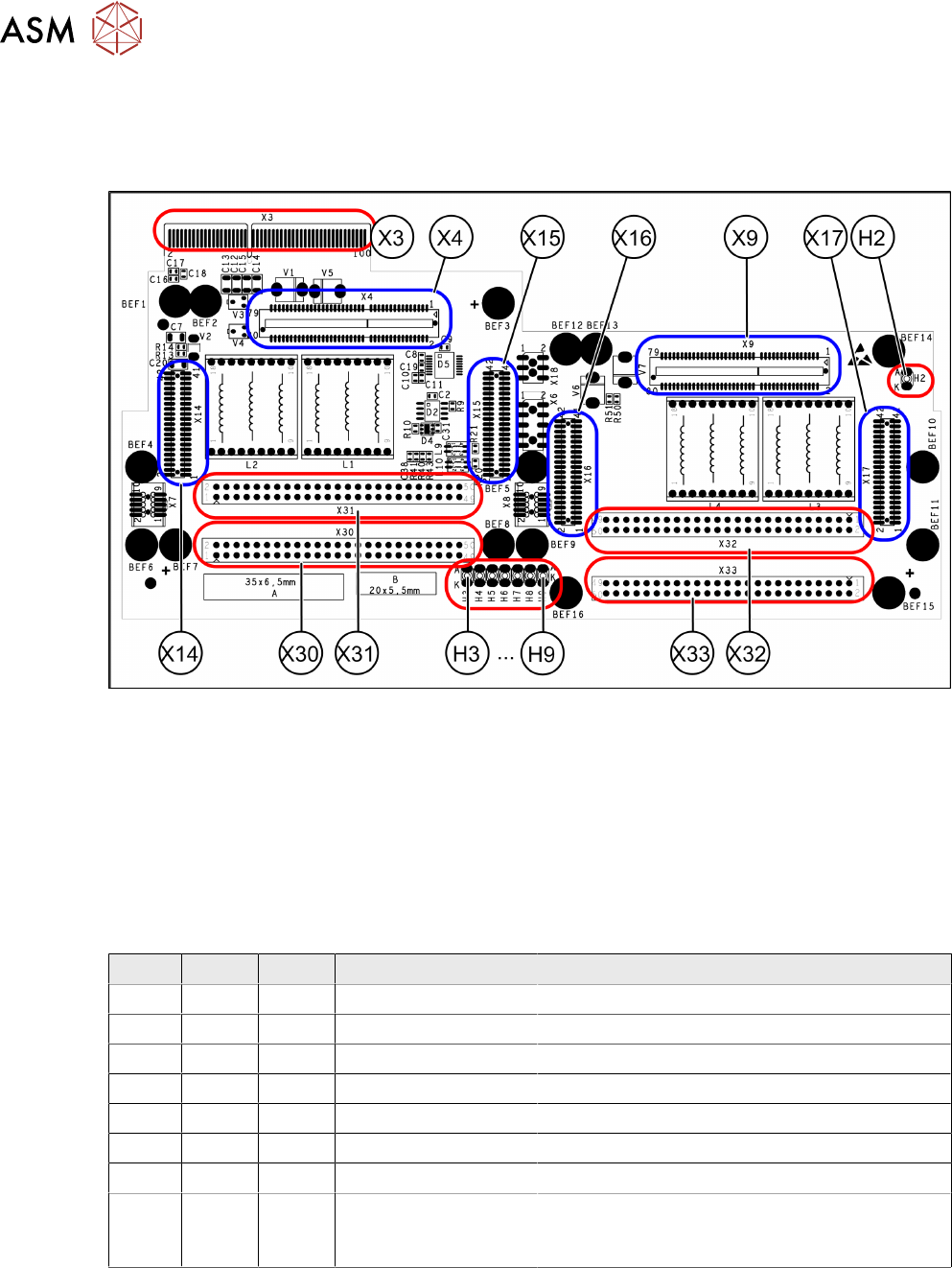
Fig.146: X Base Adapter Twin [03054879-03/-04]
X4
X14
X15
Connections for (M)HCU (TwinHead
module2)
X9
X16
X17
Connections for (M)HCU (TwinHead
module1)
X30
X31
Connections for TwinHead module 2 X32
X33
Connections for TwinHead module 1
X3 Connection on the head interface Hx LEDs (see below)
LED [03054879-03]
LED Color Status Signal name Description
H2 GN ON - (M)HCU2 programming connector connected
H3 RD ON FPGA_TEST_6 1.5VDC PowerFail
H4 RD ON FPGA_TEST_2 3.3VDC PowerFail
H5 RD ON FPGA_TEST_4 5VDC PowerFail
H6 RD ON FPGA_TEST_1 15VDC PowerFail
H7 RD ON FPGA_TEST_3 DP PowerFail, not used
H8 RD ON FPGA_TEST_5 24VDC PowerFail
H9 RD ON POWERFAIL_LOCAL PowerFail board:
ON, when 1.5VDC, 3.3VDC, 5VDC and 15VDC
are outside the permissible tolerance
The voltage monitors trigger as soon as the nominal voltage is undershot by 5%.
6 Gantries
6.4 MHCU, Boards and Camera
Service Manual SIPLACE TX Series 06/2017 117
6.4.3 Replacing the Vision Head Interface (VHI) [03115454-xx]
Parts, equipment and tools
●
Vision Head Interface (VHI) [03115454-xx]
Overview
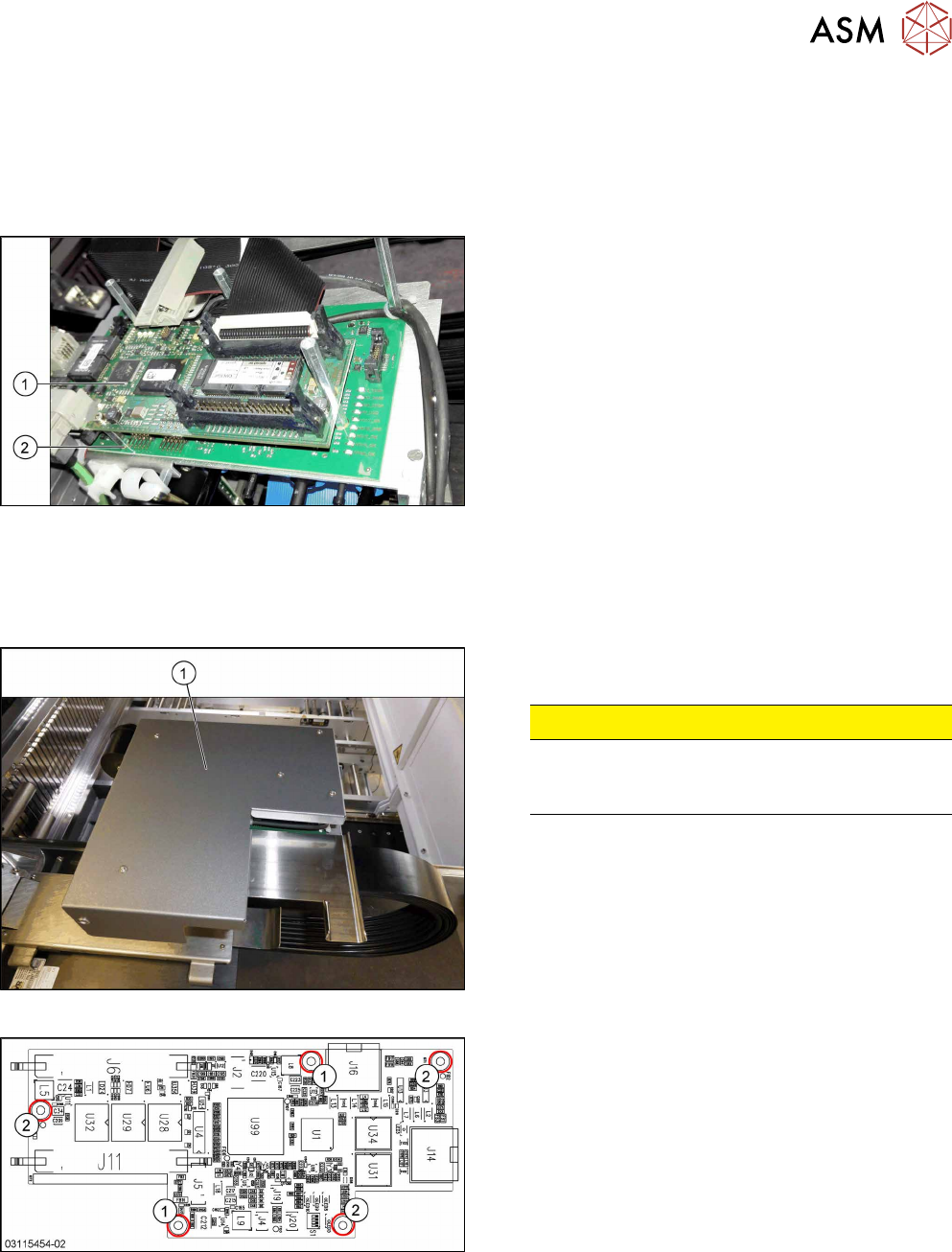
Fig.147: Boards on the gantry
1. Vision Head Interface (VHI)
2. Head interface
Removal
► Switch off the machine, disconnect it from the power supply and secure it to prevent
unauthorized reactivation. Observe the instructions in section 1.2 "Preparatory Work..." [}15].
Fig.148: Board cover
► Remove the five fastening screws and lift the
board cover(1) off.
CAUTION!
Switch off the machine
To avoid short circuits, only dismantle the cover
when the machine is switched off!
.
Fig.149: Vision head interface
1. Screws M3x6 [03007733‑xx]
2. Spacer bolts M3x30 [00315647‑xx] (for cover)
► Unplug all electrical connections to the VHI. You
may want to mark the positions of these connec-
tions to make clear assignment easier later on.
► Remove the five screws and spacer bolts fasten-
ing the VHI and remove the board.