00198150-02_SM_TX_en.pdf - 第87页
6 Gantries 6.2 X and Y Axis Service Manual SIPLACE TX Series 06/2017 87 6.2.3 Replacing the Y Axis Incremental Encoder/Mounting Bracket [03094996‑xx] Parts, equipment and tools ● Select the correct incremental encoder: S…
6 Gantries
6.2 X and Y Axis
86 Service Manual SIPLACE TX Series 06/2017
Installation
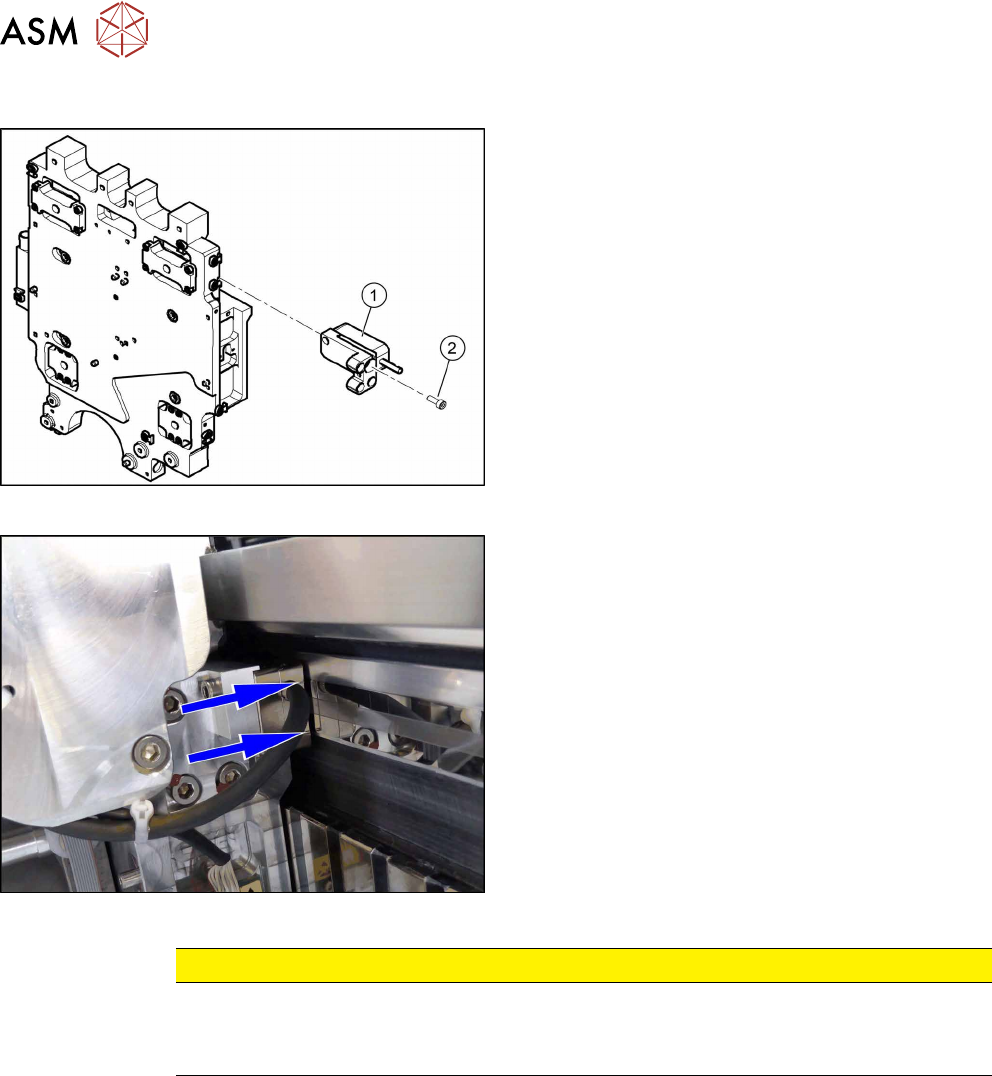
Fig.96: Fastening the incremental encoder
► Clean the reading surface of the incremental en-
coder with a lint free cloth or a Q tip moistened
with ethanol.
► Fasten the incremental encoder(1) with two
screws to the holder. Secure the screws with
Loctite241.
► Loosely fasten the holder with three fastening
screws (2). Secure the screws with Loctite 241.
The incremental encoder must be aligned with a
gap of 0.75mm to the scale. Use the plastic
feeler gauge for this.
Fig.97: Casting marks on the incremental encoder
► You must set the exact height to the scale.
► Align the incremental encoder, using the two
casting marks (arrows), which mark the read
area.
► Tighten the fastening screws.
► Reconnect to the electricity supply (connector
X20L on head interface).
CAUTION
Check how the cables are run!
► Make sure that the axes can be moved without damaging the cables.
► Fasten the cables with cable ties.
► Move the gantry as far as the end stopper and check that the buffer does not come into con-
tact with the cable.
► Check the track signals with the testing device (see 6.2.5 "Track Signals and Zero
Pulse" [}89]).
6 Gantries
6.2 X and Y Axis
Service Manual SIPLACE TX Series 06/2017 87
6.2.3 Replacing the Y Axis Incremental Encoder/Mounting Bracket [03094996‑xx]
Parts, equipment and tools
●
Select the correct incremental encoder:
SIPLACE TX1/TX2/TX2i SIPLACE TX2 micron / TX2i micron
Read head MS22.84, Y axis [03094996‑xx] Read head [03146506‑xx]
●
If necessary: select the right holder for the incremental encoder:
SIPLACE TX1/TX2/TX2i SIPLACE TX2 micron / TX2i micron
Mounting bracket for Y axis sensor [03086842-
xx]
Gantry 1: Read head holder 1 Y axis for MS30
20um Robax fix [03131408‑xx]
Gantry 2: Read head holder 2 Y axis for MS30
20um Robax fix [03130523‑xx]
●
Test device PG1-I (MS22/MS30) assembly [03102699-xx]
●
Loctite 241 [02101037‑xx]
●
Ethanol
Isopropanol – IPA can be used as an alternative.
●
Feeler gauge 0.75mm plastic [03090774-xx]
Overview
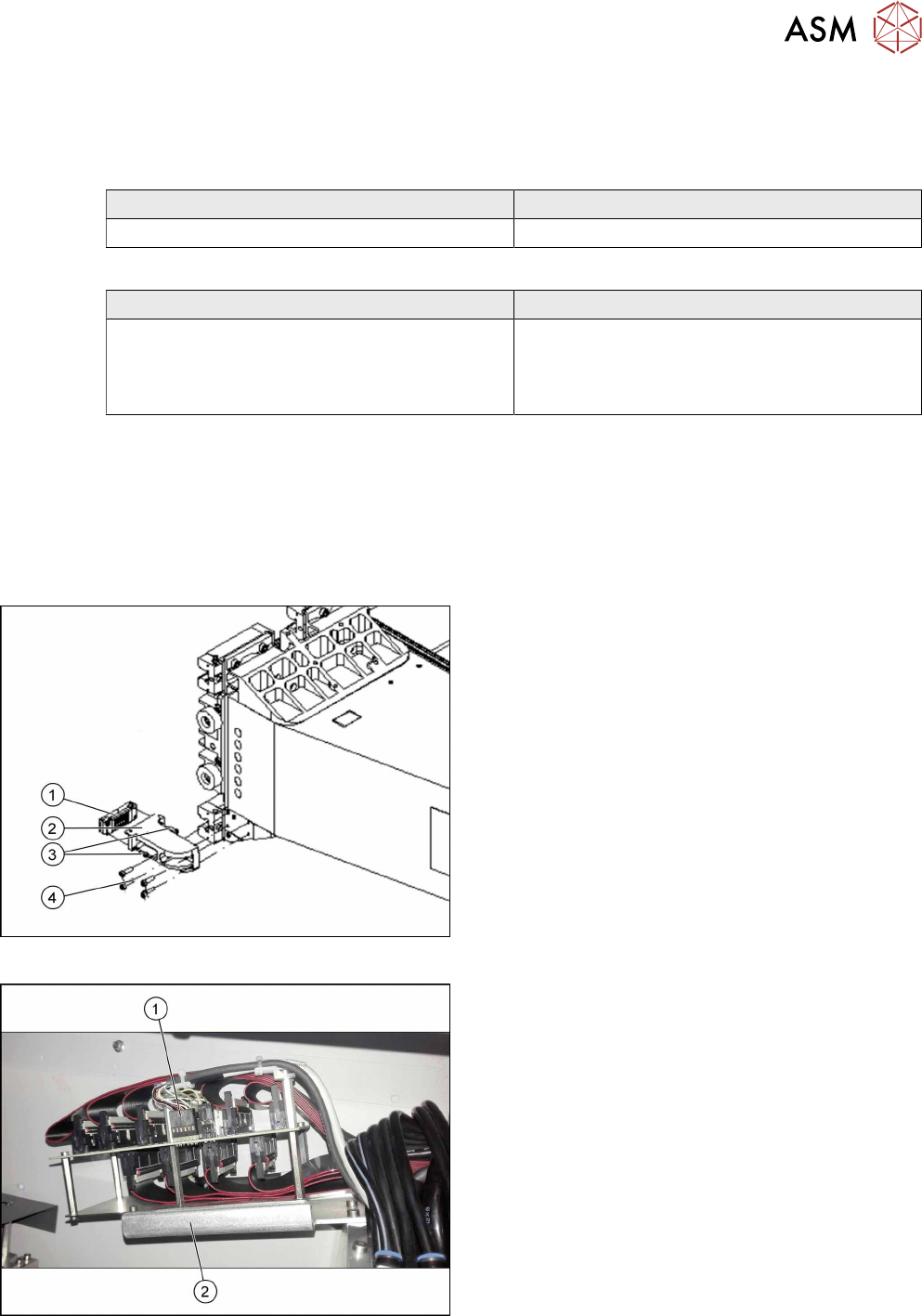
Fig.98: Incremental encoder
1. Incremental encoder (mounted on the holder)
2. Holder
3. Two fastening screws for incremental encoder
4. Four fastening screws for holder
Fig.99: Electrical connection
1. Electrical connection for encoder
2. Trailing cable holder on gantry

6 Gantries
6.2 X and Y Axis
88 Service Manual SIPLACE TX Series 06/2017
Removal
► Switch off the machine, disconnect it from the power supply and secure it to prevent
unauthorized reactivation. Observe the instructions in section 1.2 "Preparatory Work..." [}15].
► Unplug the incremental encoder press-fit connection from the gantry interface. In this case
make a note of the position to make clear assignment easier later on.
► Unthread the connection cable as far as the incremental encoder.
► Remove the four screws fastening the incremental encoder holder and carefully remove this
together with the incremental encoder.
► If necessary, remove the two screws fastening the incremental encoder and remove the en-
coder carefully.
Installation
► Clean the reading surface of the incremental encoder with a lint free cloth or a Q tip
moistened with ethanol.
► Fit the incremental encoder on the holder with two fastening screws.
► Fit the holder with four fastening screws at the gantry. Secure the screws with Loctite 241.
Place a 0.75mm feeler gauge between the incremental encoder and the scale, to ensure the
correct distance.
► Reconnect to the electricity supply.
CAUTION
Check how the cables are run!
► Make sure that the axes can be moved without damaging the cables.
► Fasten the cables with cable ties.
► Check the track signals with the testing device (see 6.2.5 "Track Signals and Zero
Pulse" [}89]).