00198150-02_SM_TX_en.pdf - 第196页
7 Conveyor 7.12 Vacuum Tooling 196 Service Manual SIPLACE TX Series 06/2017 7.12 Vacuum Tooling Spare parts The following parts can be replaced for vacuum tooling: ● Basic pack vacuum tooling TX [00588121‑xx] ● Vacuum su…
7 Conveyor
7.11 Replacing the Fiducial Rail
Service Manual SIPLACE TX Series 06/2017 195
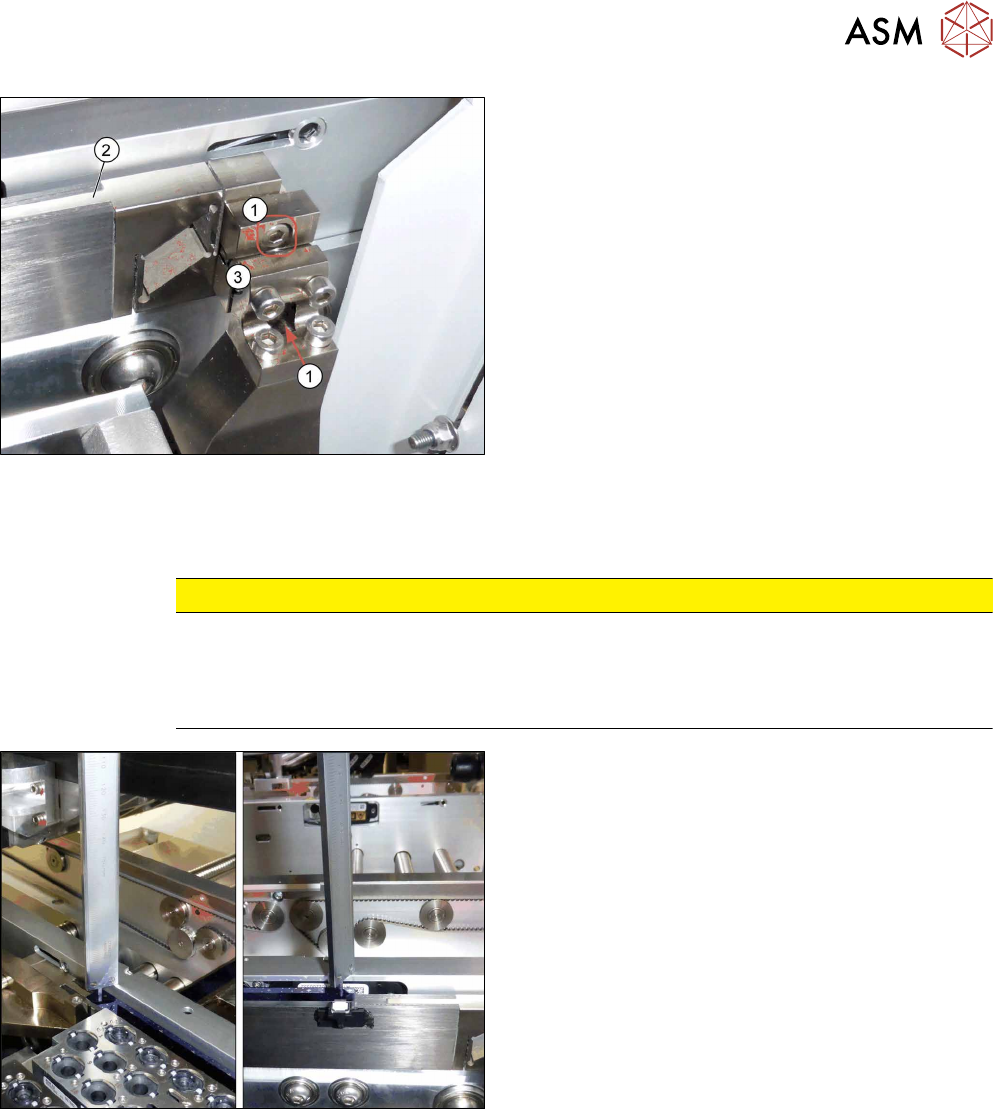
1. Two screws fastening the fiducial rail - right side
2. Holder and fiducial rail
3. Right holder for fiducial rail
► Remove the two right screws fastening the fidu-
cial rail.
Hold the fiducial rail firmly while doing this.
► Carefully take the fiducial rail up and out.
Installation
► Follow the removal instructions in reverse order for installation. Also observe the following in-
structions:
CAUTION
Installation instructions
► Make sure that you do not scratch the fiducial rail.
► Check the distance from the fiducial rail to the upper edge of the conveyor side wall
(see below).
► Check the distance from the blue fiducial rail to
the upper edge of the conveyor side wall. The
distance must be 5+/‑0.1mm.

7 Conveyor
7.12 Vacuum Tooling
196 Service Manual SIPLACE TX Series 06/2017
7.12 Vacuum Tooling
Spare parts
The following parts can be replaced for vacuum tooling:
●
Basic pack vacuum tooling TX [00588121‑xx]
●
Vacuum suction nozzle, nominal width 2 mm [03136878‑xx]
●
Maintenance unit vacuum tooling TX [03136432‑xx]
●
Valve unit assembly [03138689‑xx]
●
Cable: vacuum tooling [03139108‑xx]
●
Cable: vacuum tooling sensor [03139109‑xx]
●
Vacuum switch VSI V D M8-4 [03118829‑xx]
●
Cable: PCB sensor vacuum tooling 1 [03149630‑xx]
●
Cable: PCB sensor vacuum tooling 2 [03149631‑xx]
Equipment and tools
●
Assembly instructions "Basic pack vacuum tooling SIPLACE TX‑Series" [DE
+EN:00198328‑xx]
Removal / Installation
► For more information about replacing spare parts, please read the assembly instructions.
8 Placement Heads and Stationary Cameras
8.1 Fast Head Exchange
Service Manual SIPLACE TX Series 06/2017 197
8 Placement Heads and Stationary Cameras
DANGER
Observe User Manual
► Please observe the safety instructions in the user manual for all work!
8.1 Fast Head Exchange
By means of the Fast Head Exchange (FHE) it is possible to replace a placement head within 15
minutes.
NOTICE
CPP/M and C&P20P/M/M2 only
FHE is only possible with CPP and C&P20P/M/M2 heads only. TwinHeads must be calib-
rated manually.
See also
2 Replacing the SIPLACE C&P20 P/M2 Head [}202]
2 Replacing the SIPLACE CPP/M Head [}206]
8.1.1 Preparing the FHE in the Software
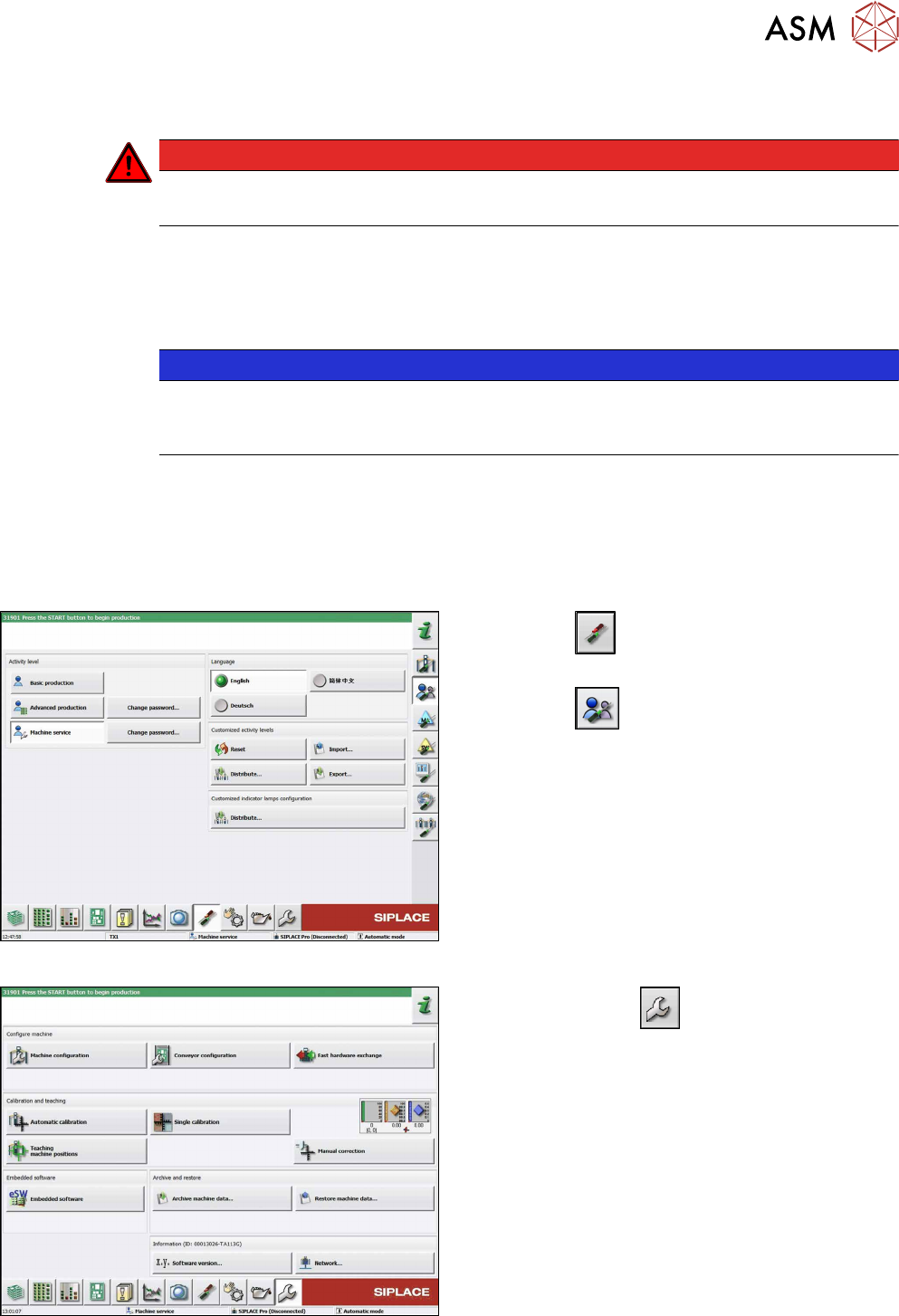
Fig.264: Select operator level
► Click the
button to enter the Settings
menu.
► Click the
button to open the Check and set
user settings menu.
► Switch to operator level Machine service or bet-
ter.
Fig.265: Service menu
► Click on Service
button.
► Click the Fast hardware exchange button.