00198150-02_SM_TX_en.pdf - 第56页
3 SMPS 3.9 Replacing the Distribution and Fusing Assembly 56 Service Manual SIPLACE TX Series 06/2017 3.9.1 Distribution and Fusing Assembly [03121508-xx] Fig.55: Distribution and Fusing Assembly [03121508‑xx] Fuses ● F…
3 SMPS
3.9 Replacing the Distribution and Fusing Assembly
Service Manual SIPLACE TX Series 06/2017 55
3.9 Replacing the Distribution and Fusing Assembly
Parts, equipment and tools
●
Distribution and fusing board assembly TX [03121508‑xx]
Overview
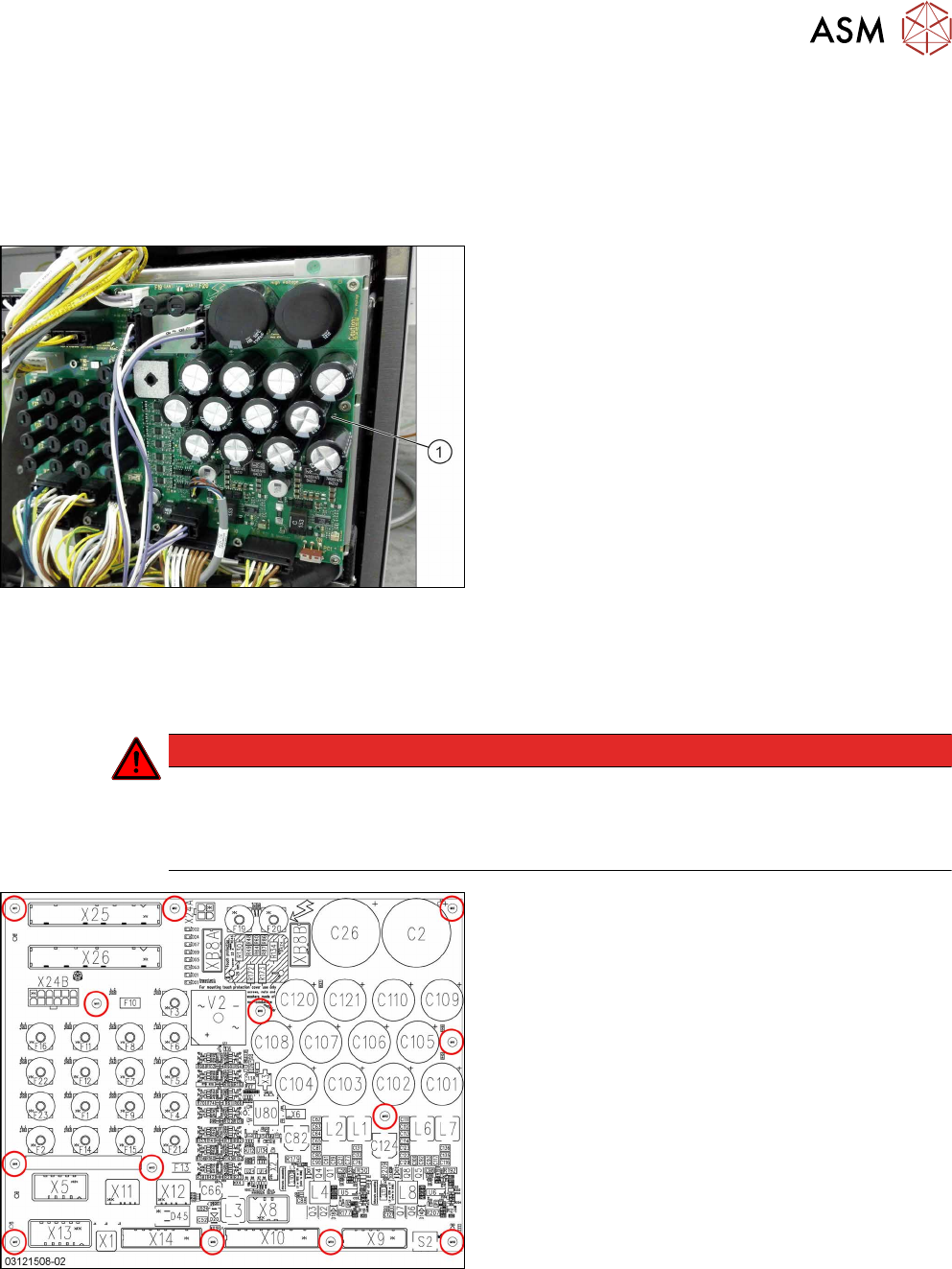
Fig.53: Distribution and fusing board assembly
1. Distribution and fusing board assembly TX
See also the board description: 3.9.1 "Distribution and
Fusing Assembly [03121508-xx]" [}56]
Removal
► Switch off the machine, disconnect it from the power supply and secure it to prevent
unauthorized reactivation. Observe the instructions in section 1.2 "Preparatory Work..." [}15].
DANGER
Checking for absence of voltage!
► Before you start working check the power supply for absence of voltage and observe
the waiting times! For more information about this read section 3.4 "Checking For Ab-
sence of Voltage" [}37].
Fig.54: Fastening screws
► Unplug all electrical connections to the board.
You might like to mark their positions to make
clear assignment easier later on.
► Remove the fastening screws on the board and
the earth conductor.
► Remove the board.
Installation
► Follow the removal instructions in reverse order for installation.
3 SMPS
3.9 Replacing the Distribution and Fusing Assembly
56 Service Manual SIPLACE TX Series 06/2017
3.9.1 Distribution and Fusing Assembly [03121508-xx]
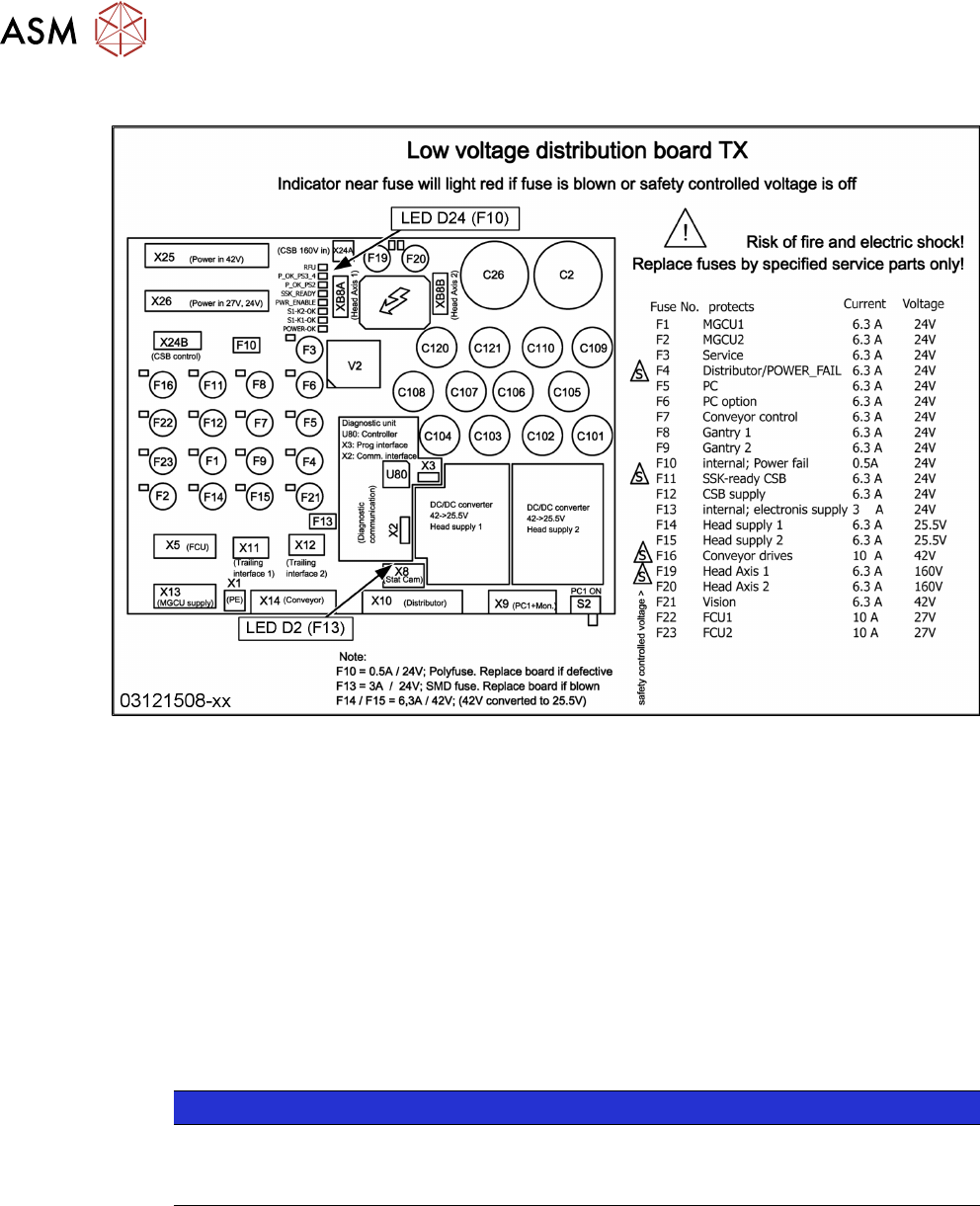
Fig.55: Distribution and Fusing Assembly [03121508‑xx]
Fuses
●
Fuse 5x20mm T6,3A 400VDC [03133256‑xx]
●
Micro fuse 5x20 / T 10A / ceramic [03010627‑xx]
●
Fuse F10 "power fail signal":
Check functionality with LED D24 (on the right side of XB8A).
While the machine is running the LED D24 is on and the power fail functions of the subsys-
tems are active.
The fuse voltage can be checked at connector X26, pin 2 (24V).
If fuse F10 is blown replace the board "distribution and fusing assembly" [03121508‑xx].
●
Fuse F13 "internal electronic and diagnostics":
Check functionality with LED D2 (above X8).
If fuse F13 is blown replace the board "distribution and fusing assembly" [03121508‑xx].
NOTICE
F13
The fuse may be removed from the fuse holder, but in most cases the holder is broken after
this.
3 SMPS
3.10 Replacing the Distributor Assembly [03121427‑xx]
Service Manual SIPLACE TX Series 06/2017 57
3.10 Replacing the Distributor Assembly [03121427‑xx]
Parts, equipment and tools
●
Distributor assembly TX [03121427-xx]
Overview
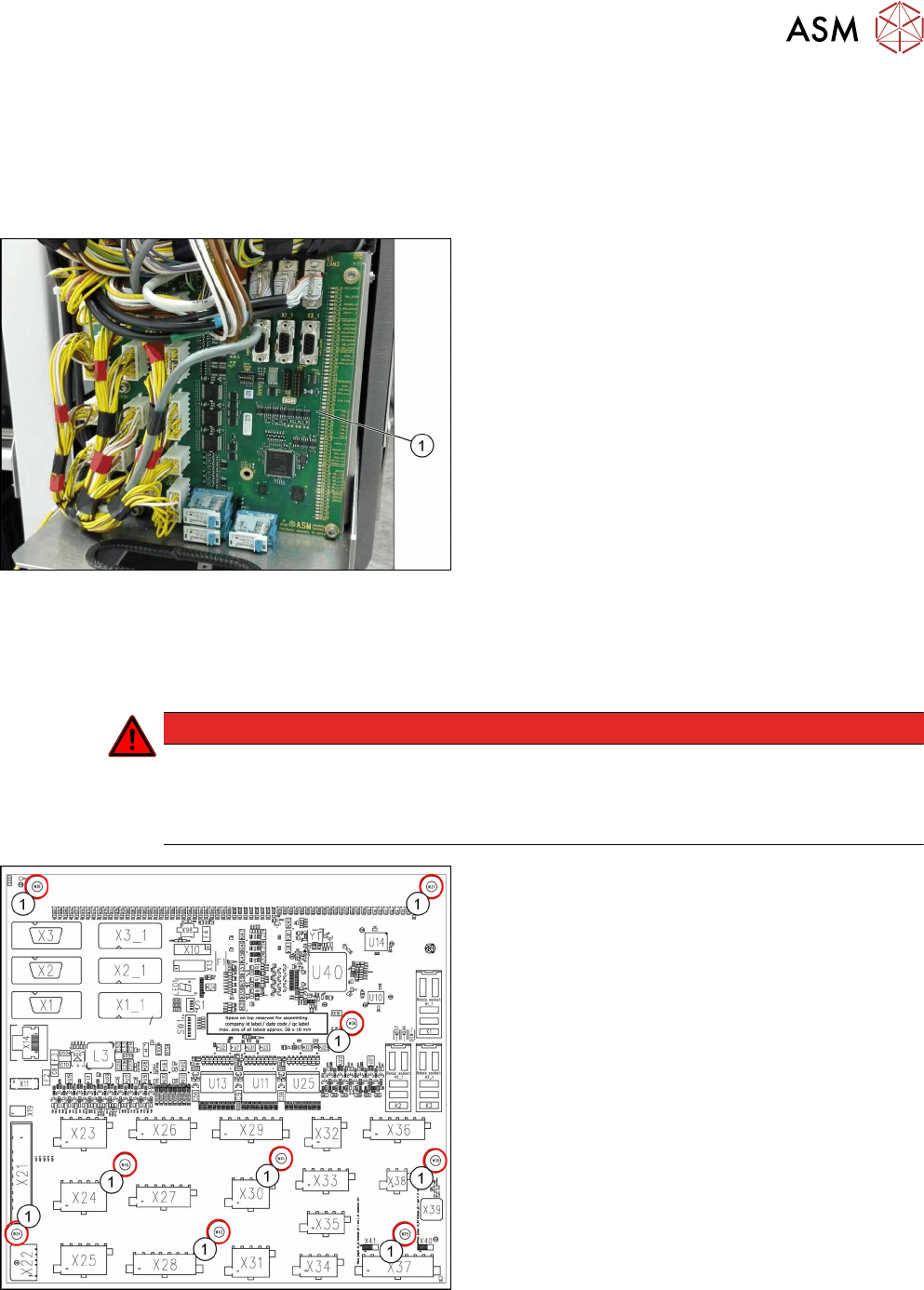
Fig.56: PCB distributor assembly TX
1. Distributor assembly TX
See also 3.10.1 "Distributor Assembly [03121427-
xx]" [}58]
Removal
► Switch off the machine, disconnect it from the power supply and secure it to prevent
unauthorized reactivation. Observe the instructions in section 1.2 "Preparatory Work..." [}15].
DANGER
Checking for absence of voltage!
► Before you start working check the power supply for absence of voltage and observe
the waiting times! For more information about this read section 3.4 "Checking For Ab-
sence of Voltage" [}37].
Fig.57: Fastening screws
► Unplug all electrical connections to the board.
You may want to mark the positions of these con-
nections to make clear assignment easier later
on.
► Remove the fastening screws(1).
► Remove the board.
Installation
► Follow the removal instructions in reverse order for installation.