00198150-02_SM_TX_en.pdf - 第152页
7 Conveyor 7.3 Conveyor Drive 152 Service Manual SIPLACE TX Series 06/2017 CAUTION Protective tape, do not bend the fiber optic cable There is also a protective tape in the trailing cable. This separates the cables from …
7 Conveyor
7.3 Conveyor Drive
Service Manual SIPLACE TX Series 06/2017 151
7.3.3 Replacing the Cables (Conveyor Drive)
Parts, equipment and tools
●
Select the relevant cable:
– Cable PCB sensor LB12.A1 [03113837‑xx]
– Cable PCB sensor LB14.A1 [03113840‑xx]
– Sensor cable belt motor output lane 1 [03113852-xx]
– Motor cable width adjustment lane 1 [03113854‑xx]
– Motor cable belt motor output lane 1 [03113870‑xx]
– Motor cable width adjustment lane 1 [03113871‑xx]
– Cable can-bus internal conveyor controller SX2 [03088836‑xx]
– Cable PCB centering laser LLBt2 panel-C [03113847‑xx]
– Cable PCB centering laser LLBr2 panel-D [03113848‑xx]
●
Loctite 241 [02101037‑xx]
Removal
CAUTION
Do not loosen the wrong screws
Make sure that you do not loosen any other screws except those ones explicitly mentioned.
Loosening other screws could lead to irreparable misalignment or damage to the conveyor.
► Use the software or manually move the conveyor rail into a position which allows you best ac-
cess.
– To move the conveyor rail manually, pull the toothed belt of the width adjustment unit.
► Switch off the machine, disconnect it from the power supply and secure it to prevent
unauthorized reactivation. Observe the instructions in section 1.2 "Preparatory Work..." [}15].
► Move all gantries out of the transport area as far as possible at one side of the machine.
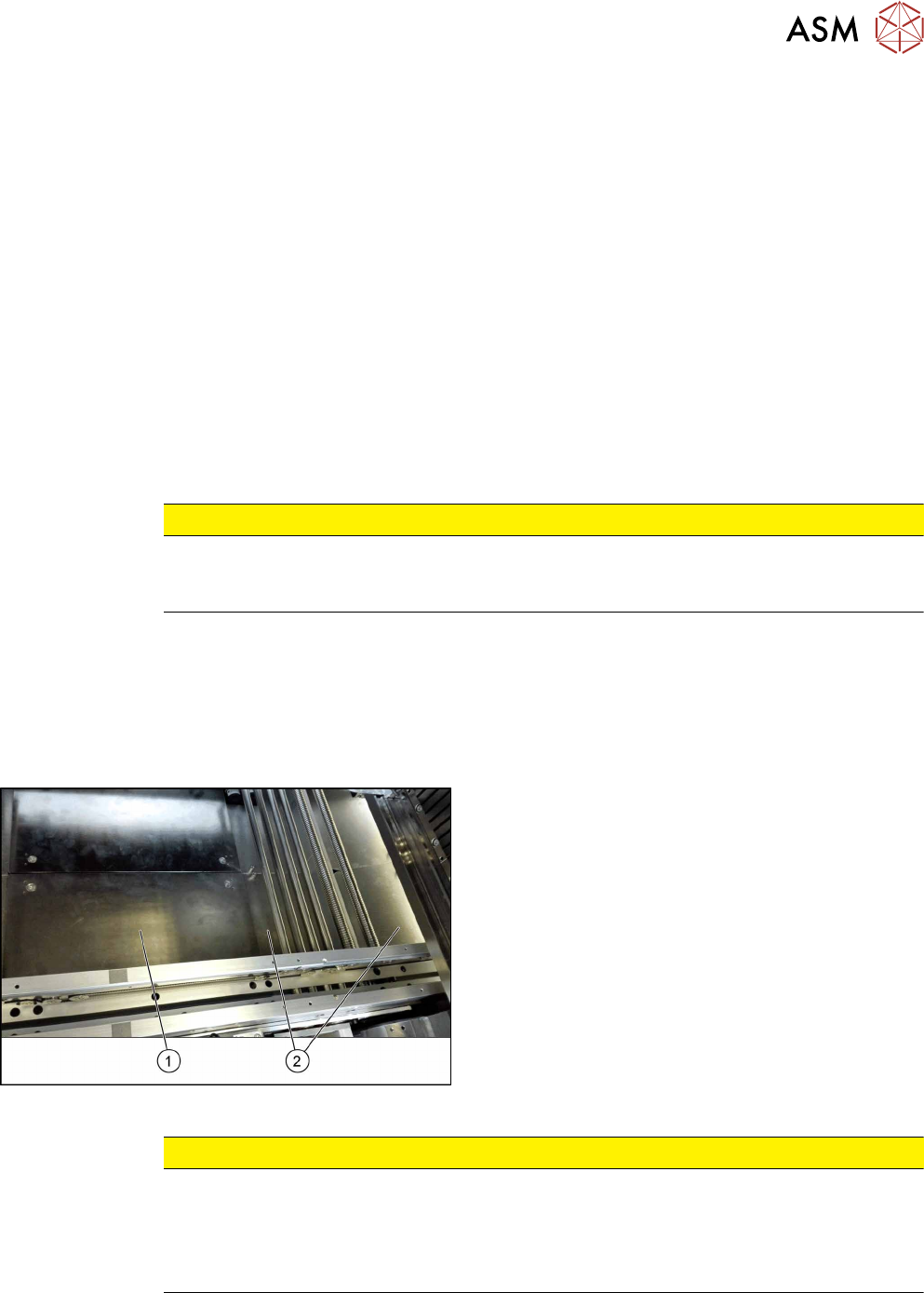
Fig.204: Table plate and covers
► Remove the four screws fastening the lifting table
plate(1) (see also 7.2.1 "Replacing the Lifting
Table Plate [03114873-xx]" [}136]).
► Remove the spacer bolts fastening the covers(2)
(two screws each cover) and remove the covers.
CAUTION
Make a note of the order in which the cables are run!
The room in the conveyor side walls is limited. The cables may therefore not be crossed
over.
Make a note of the order in which the cables are run in the conveyor side wall, so that you
can run them neatly and correctly again later on.
7 Conveyor
7.3 Conveyor Drive
152 Service Manual SIPLACE TX Series 06/2017
CAUTION
Protective tape, do not bend the fiber optic cable
There is also a protective tape in the trailing cable. This separates the cables from the fiber
optic cable.
► Make sure you do not bend the fiber optic cable. This will otherwise become dull and
no longer transmit the signal properly.
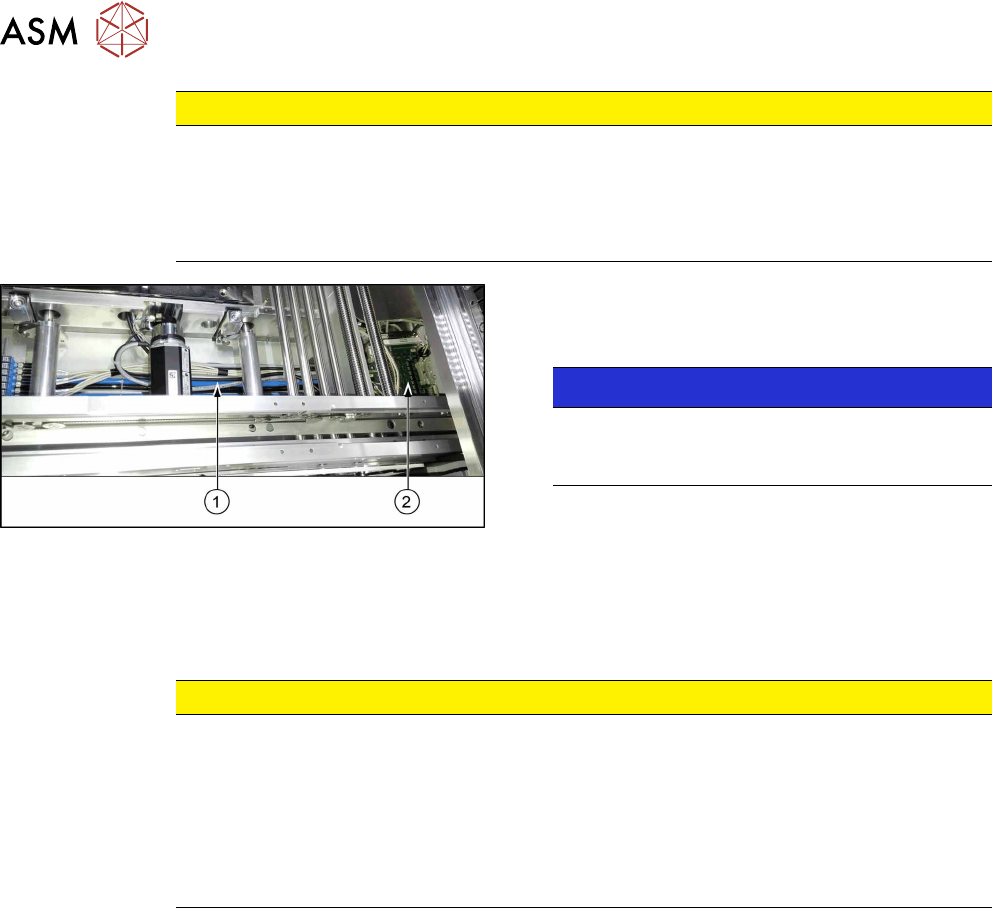
Fig.205: Cables
The cables run through the conveyor side walls, the
black and blue hoses on the base(1) of the conveyor
to the TSP(2).
NOTICE!
Hoses
One hose (black or blue) always contains all the
cables for one conveyor side.
.
► Carefully unthread the cables.
Remove any cable ties.
Installation
► Follow the removal instructions in reverse order for installation. Also observe the following in-
structions:
CAUTION
Installation instructions
► Check the setting for the transmitter / receiver and correct it if necessary (see 7.6.5.1
"Setting the Fiber Optic Cable Sensor" [}176]).
► Replace any open cable ties.
Make sure that the cable ties and the heads of the cable ties do not rub against any
parts when you do this.
► Observe the installation instructions for the conveyor drive where necessary.
7 Conveyor
7.4 Width Adjustment
Service Manual SIPLACE TX Series 06/2017 153
7.4 Width Adjustment
7.4.1 Replacing the Toothed Belt (Width Adjustment) [03087325-xx]
Parts, equipment and tools
●
Lane 1 (shorter): Toothed belt Brecoflex 5+-0.1 AT3/1509 [03121586‑xx]
●
Lane 2 (longer): Toothed belt Brecoflex 5+-0.1 AT3/1701 [03121584‑xx]
●
Belt tension measuring device [00326015‑xx]
Overview
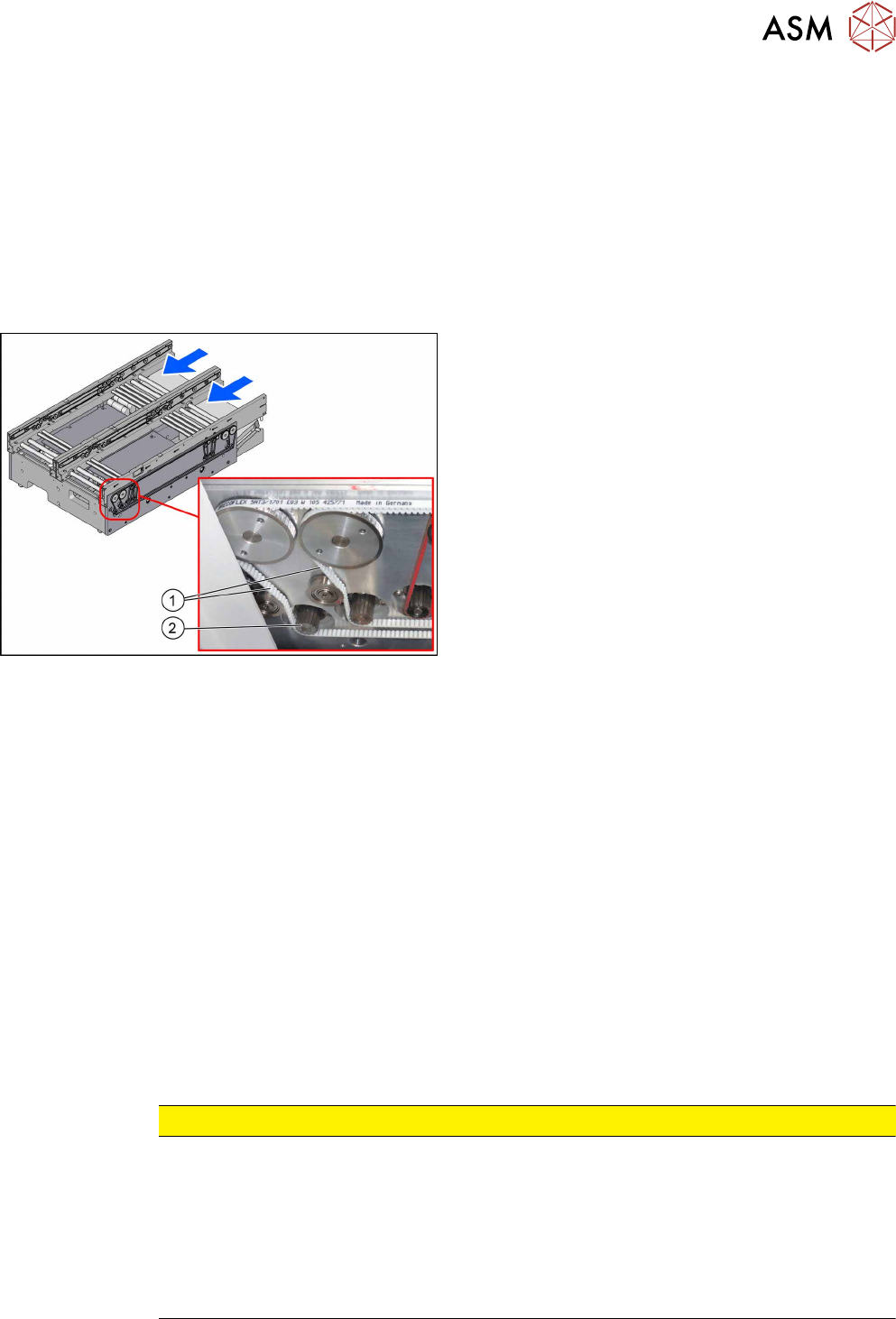
Fig.206: Toothed belts
1. Toothed belts for width adjustment
2. Width adjustment motor
Removal
► Use the software or manually move the conveyor rail into a position which allows you best ac-
cess.
– To move the conveyor rail manually, pull the toothed belt of the width adjustment unit.
► Switch off the machine, disconnect it from the power supply and secure it to prevent
unauthorized reactivation. Observe the instructions in section 1.2 "Preparatory Work..." [}15].
► Move all gantries out of the transport area as far as possible at one side of the machine.
► You may have to move out the COTi to get access to the toothed belt. In this case follow the
instructions to move out the COTi.
Replacing the COTi Central Unit and Lifting Mechanics [}235]
► Unthread the toothed belt. If necessary loosen the three screws fastening the width adjust-
ment motor.
Installation
► Follow the removal instructions in reverse order for installation. Also observe the following in-
structions:
CAUTION
Installation instructions
► Make sure that the toothed belt is not folded or otherwise damaged.
► Carefully thread in the toothed belt. To do this, carefully lift the toothed belt a little (e.g.
with the shorter end of an Allen key).
► Make sure that the relevant conveyor side is not moved, to keep parallelism of the
conveyor sides.
► Set the correct belt tension (see below).