SmartSM手册.pdf
SM 400 Us e r 's M anual 画 面 导 言 画 面 导 言 [ ANC] 系统 A NC 管理 ANC 菢 卛 扭 衒 评 宠 朏 兹 宏 裋 圮 ANC(Au to No zz l e Ch a n g e r) 皊 吾 嘺 皊 枊 或 ﹦ 匋 拲 吾 嘺 皊 吾 睆 ﹦ 贺 裋 劥 脃 皊 ANC 皊 劥 脃 ザ 卛 刁 歪 挏 钴 旼 晄 祀 妈 丑 皊 寿 诣 桌 ザ 菜 单 项 菜 单 项 &l…
SM400 User's Manual
画面导言画面导言
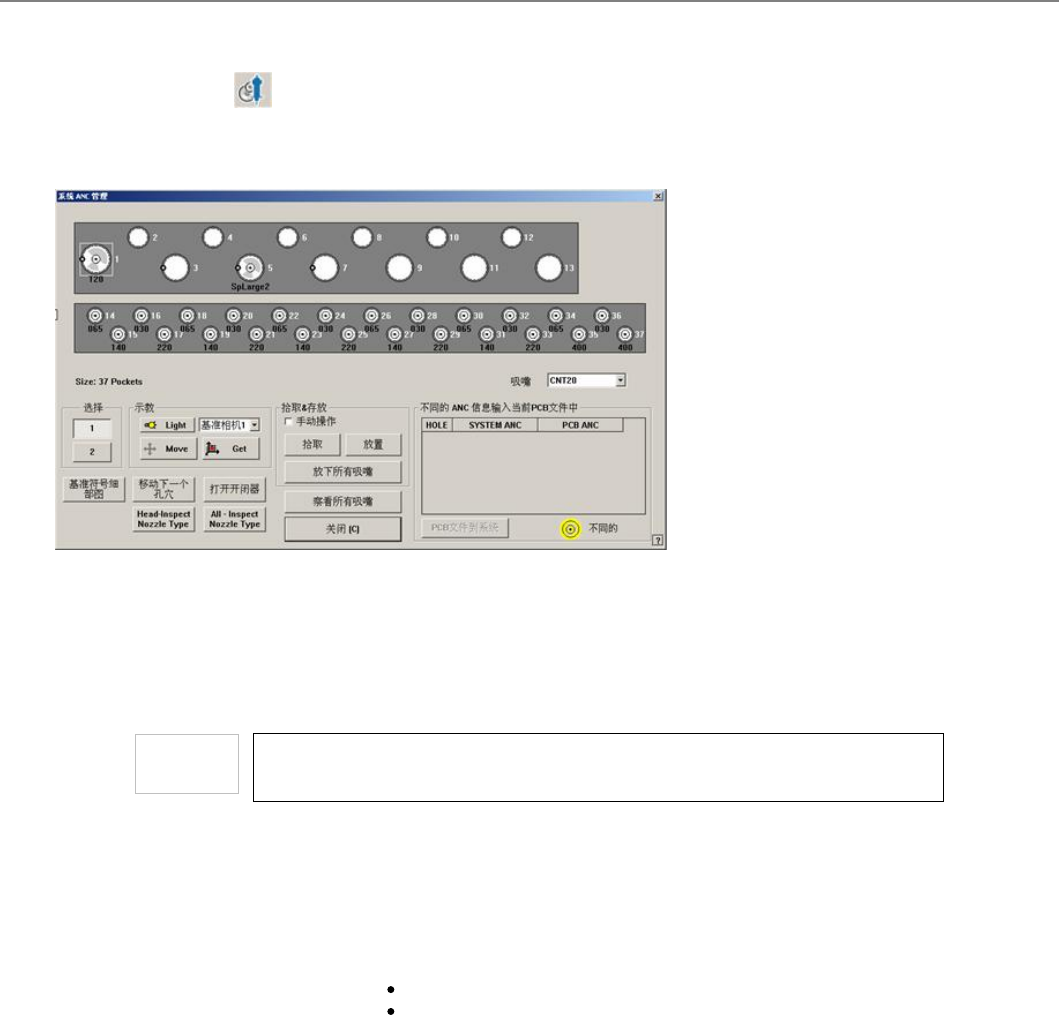
[ANC] 系统 ANC 管理
ANC菢卛扭衒评宠朏兹宏裋圮ANC(Auto Nozzle Changer)皊吾嘺皊枊或﹦匋拲吾嘺皊吾睆﹦贺裋劥脃皊ANC皊劥脃ザ卛刁歪挏
钴旼晄祀妈丑皊寿诣桌ザ
菜单项菜单项
<吸嘴>
选择要配置在选定装料口的吸嘴。
<选择>
透拯尌覇评宠皊ANC皊缜叽ザ
如果需要手动配置吸嘴,使用<打开开闭器>按钮打开ANC开关,在按下前面或后面操作板
的<EMG>按钮后就可以手动配置吸嘴。最后释放<EMG>开关并按<复位>按钮,如果不进
行此项步骤,可能会发生人员受伤。
<示教示教>
甮五囤轲XY轺驷劮画劮杀抐透宠寿豧稁劮制挍宠皊坖栍体罴戜甮五莽叜透宠寿
豧皊彙剓坖栍偂ザ
<Light>
评罴ANC Fiducial Mark 祀敟旼侅甮皊堀凌盾杀煭昔ザ
组合框
甮五旑轲XY轺驷劮画劮杀透拯惹覇稁劮制挍宠体罴皊寿豧﹦ 戜耋甮五透拯惹
覇莽叜彙剓坖栍皊寿豧ザ 叵透拯皊寿豧妈丑;
堀凌盾杀1: 透拯堀凌盾杀ザ
夺1 ~ 夺6: 透拯1叽 ~ 6叽夺ザ
<Move>
绊后桌丳透拯皊寿豧稁劮制挍宠皊坖栍体罴ザ歪旼﹦炿刁 <Move> 挏钴乑剓忋
颁甮鼦栍炿刁扆覇体罴盾庚皊孚ザ
<Get>
绊后桌丳透拯皊寿豧乀堀凌莽叜X, Y坖栍ザ歪旼﹦炿刁<Get> 挏钴乑剓忋颁甮鼦
栍炿刁扆覇体罴盾庚皊孚ザ
<基准符号细部图>
评宠堀凌炿栍讶﹢堀凌炿栍讶﹣皊敶捴ザ (Fiducial Mark)
<移动下一个孔穴>
<祀敟> 颌埥皊绊后桌丳透拯皊Device稁劮制 ANC丳彙剓透拯孚皊丑丆丰孚体
罴ザ
<开关阀开/关>
卛刁歪挏钴旼弆/兹ANC皊弆兹ザ
<Head-Inspect Nozzle Type>
选择此功能则检查当前选定的head喷嘴槽中插入的喷嘴类型。要激活本功能需要另
外的设定,如要使用本功能请与本公司CS联系。
可检查喷嘴类型的喷嘴如下。
CN030, CN040, CN065, CN140, CN220.
<All-Inspect Nozzle Type>
点击此按钮则检查全体head的喷嘴槽中插入的喷嘴类型。 要激活本功能需要另外的
设定,如要使用本功能请与本公司CS联系。
可检查喷嘴类型的喷嘴如下。

CN030, CN040, CN065, CN140, CN220
<取料取料&放置放置>
<手动操作>
卛刁歪挏钴旼﹦叜斟, 敄罴劥脃台迡衒沧朏室陋劮佢皊敶捴擓佢ザ
<拾取>
卛刁歪挏钴旼﹦吾叜圮ANC彙剓透拯皊Hole丐皊吾嘺ザ尌覇吾叜皊夺圮 “装
置”选择。
<放置>
单击此按钮时,把在” 装置”透拯皊夺丐皊吾嘺贺裋﹢敄﹣圮ANCザ
<放下所有的吸嘴>
卛刁歪挏钴旼﹦抐扆朏夺丐皊吾嘺贺裋﹢敄﹣圮ANCザ
<察看所有吸嘴/移动头安全>
甮肏睂硴讪Head丐昵听孞圮吾嘺旼﹦丑陓透拯乀丆宠髞庬皊Gantry扆
朏Head皊z轺旼侅甮ザ硴讪吔﹦釓斶炿刁刟扆朏Head皊Z轺传丐卍制厥杫皊体
罴ザ
<不同的 ANC 信息输入当前PCB文
件中>
晄祀直剓PCB丑较斍仼皊ANC评罴咒直剓佢丠丳皊评复紁绥皊ANC评罴皊巴
弈﹦覇尌紁绥评罴政叞制PCB斍仼评罴﹦炿刁叹辿皊<PCB斍仼制紁绥>挏钴幼
捨掏孚釒皊且PCB斍仼评罴专吒皊吾嘺ザ
<PCB文件到系统>
甮PCB斍仼扙夵皊评宠叞曺紁绥评宠ザ
进行手动ANC动作时,编程的吸嘴与实际设备吸嘴如果不一致,头的吸嘴有可能跟设备的
其它部分发生碰撞。一定要使设备的实际吸嘴与编程吸嘴一致。
<关闭>
点击此按钮则保存变更的设定关闭当前对话框。
连接项目连接项目
ANC
SM400 User's Manual
画面导言画面导言
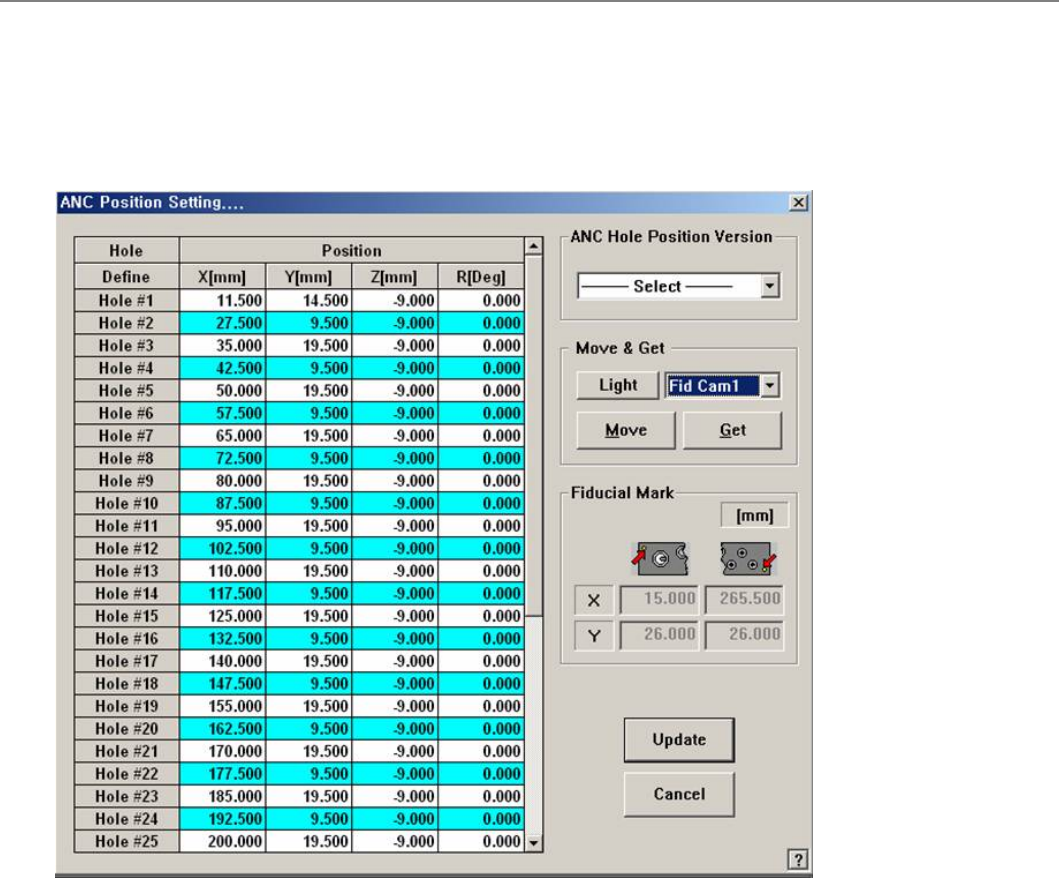
[ANC] ANC 位置设定.... (ANC Hole Position)
设置的立场,每个洞的非国大。
菜单项菜单项
<Grid>
Displays the position of each hole.
<Hole – Define> column: Displays the hole number.
<Position - X> column: Displays the X position of the hole.
<Position - Y> column: Displays the Y position of the hole.
<Position - Z> column: Displays the Z position of the hole.
<Position - R> column: Displays the R position of the hole.
<ANC 孔位置版本>
Enables the automatic setup of ANC hole position by selecting the ANC type. Select the
ANC type mounted.
ANC-37Hole
<移动 & 得到>
<亮度>
Setup the illumination of fiducial camera to be used for teaching the ‘ANC hole’.
Combo box
Used for selecting the object to move to the designated coordinates by rotating the XY
axis driving motor or to select the object for which the present coordinates is searching.
<移动>
Move the object selected in the combo box to the position of the assigned coordinates. At
this time, before executing <Move> button, the hole corresponding to the desired position
must be clicked on with a mouse.