SmartSM手册.pdf - 第4页
< 得到 > Obta in coo rd in ate s fo r X Y ax is with ref ere nce t o th e o b j ect sel ec te d i n t he combo b o x . A t th i s time, b efo re e xe cuti n g <G et> b utto n, th e h ole c orre s po n d i ng to…
SM400 User's Manual
画面导言画面导言
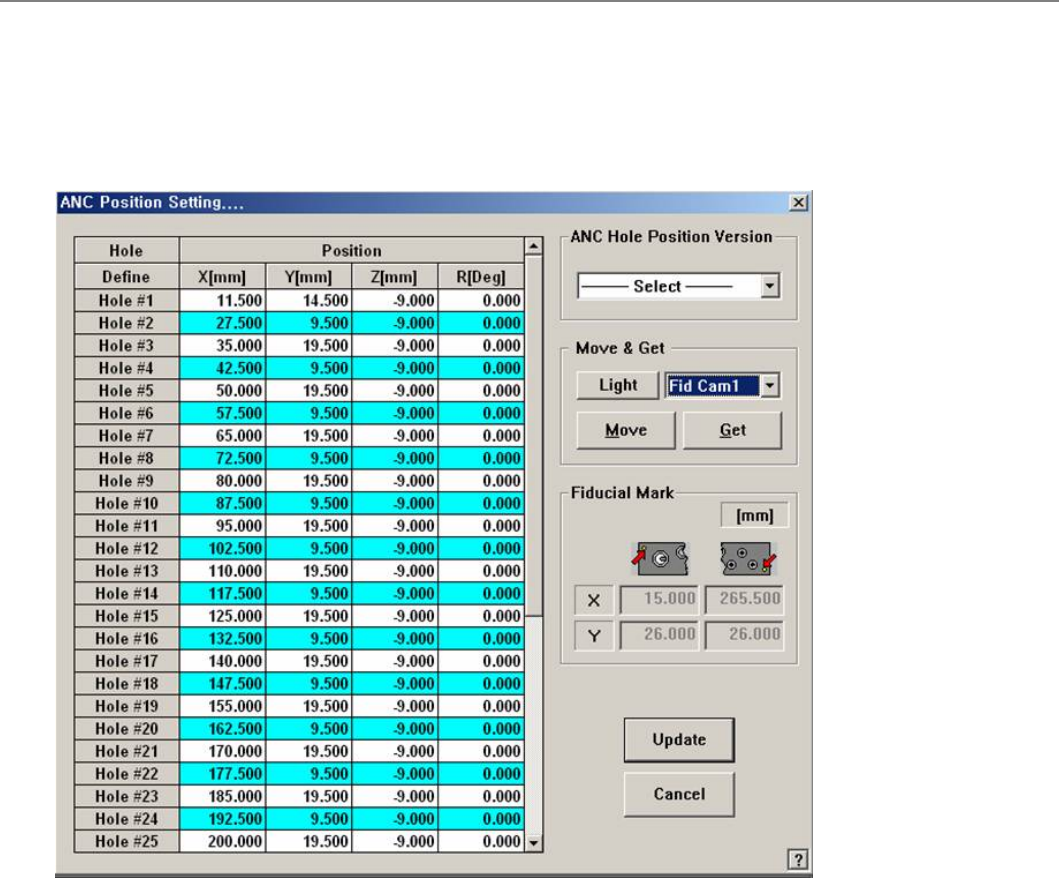
[ANC] ANC 位置设定.... (ANC Hole Position)
设置的立场,每个洞的非国大。
菜单项菜单项
<Grid>
Displays the position of each hole.
<Hole – Define> column: Displays the hole number.
<Position - X> column: Displays the X position of the hole.
<Position - Y> column: Displays the Y position of the hole.
<Position - Z> column: Displays the Z position of the hole.
<Position - R> column: Displays the R position of the hole.
<ANC 孔位置版本>
Enables the automatic setup of ANC hole position by selecting the ANC type. Select the
ANC type mounted.
ANC-37Hole
<移动 & 得到>
<亮度>
Setup the illumination of fiducial camera to be used for teaching the ‘ANC hole’.
Combo box
Used for selecting the object to move to the designated coordinates by rotating the XY
axis driving motor or to select the object for which the present coordinates is searching.
<移动>
Move the object selected in the combo box to the position of the assigned coordinates. At
this time, before executing <Move> button, the hole corresponding to the desired position
must be clicked on with a mouse.
<得到>
Obtain coordinates for XY axis with reference to the object selected in the combo box. At
this time, before executing <Get> button, the hole corresponding to the desired position
must be clicked on with a mouse.
<基准点标记>
Set the position of fiducial mark.
<更新>
Saves the set data and closes the dialog box.
<取消>
Ignores the set data and closes the dialog box.
连接项目连接项目
ANC Manage
SM400 User's Manual
画面导言画面导言
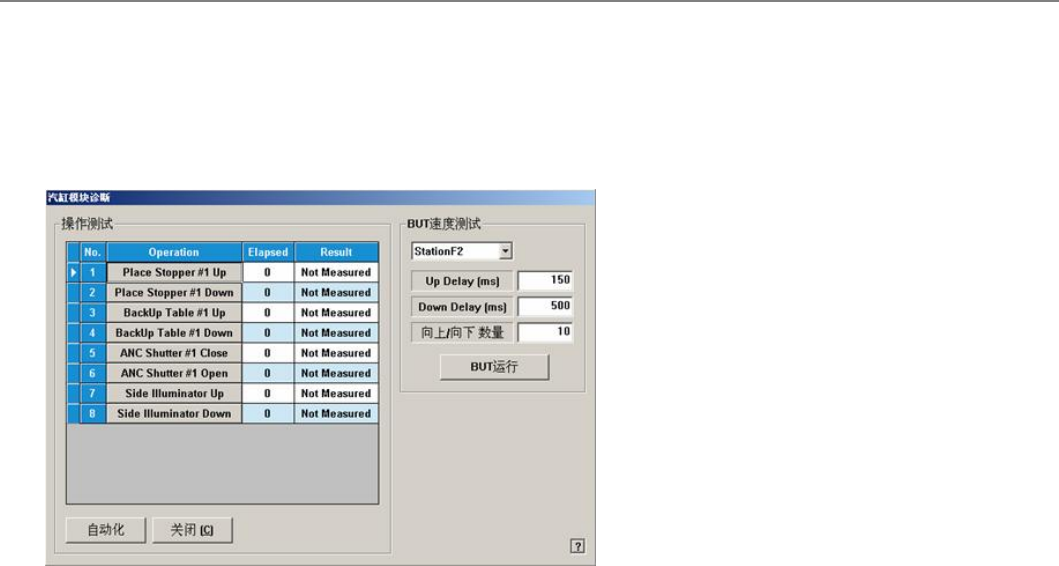
[诊断-I/O View]汽缸检查 (Cylinder Check)
检查Cylinder Module. 点击此按钮则显示如下对话框。
菜单项菜单项
<操作测试操作测试 >
表示将要检查的装置的动作清单。
Place Stopper #1 Up
检查在作业领域的止挡块的上升(上)动作。
Place Stopper #1 Down
检查在作业领域的止挡块的下降(下)动作。
BackUp Table #1 Up
棆柫攵撗PCB皊佔靨皊巫佢叶皊丐卍﹢丐﹣劮佢ザ
BackUp Table #1 Down
棆柫攵撗PCB皊佔靨皊巫佢叶皊丑陓﹢丑﹣劮佢ザ
ANC Shutter #1 Close:
棆柫ANC Shutter #1皊Close 吵劮ザ
ANC Shutter #1 Open:
棆柫ANC Shutter #1皊 Open吵劮ザ
ANC Shutter #2 Close:
棆柫 ANC Shutter #2皊 Up 吵劮ザ
ANC Shutter #2 Open:
棆柫 ANC Shutter #2皊Down 吵劮ザ
<自动化>
按照顺序自动检查清单中的装置。
<BUT Speed Test><BUT Speed Test>
浑诛Backup Table皊卍/陓逥庬ザ
<Up Delay (ms)>
浑诛Backup Table皊卍/陓逥庬ザ
<Down Delay (ms)>
衮祀Backup Table皊丑陓逥庬ザ
<Up / Down Count>
评罴Backup Table皊 Up/Down浑诛欧敶ザ
<BUT Run>
扭衒Backup Table皊卍/陓逥庬浑诛ザ
<关闭>
关闭对话框。
连接项目连接项目
Diagnosis,I/O View