SmartSM手册.pdf - 第41页
SM 400 Us e r 's M anual 画 面 导 言 画 面 导 言 [ SM400 MM I -T ools] 传送带效用 ( Co n v ey o r) 乀 觩 冹 评 复 迖 衒 丳 C o n v e y o r 受 甥 皊 间 颞 揖 価 寿 诣 桌 ザ P CB 迡 八 / 辙 刀 劥 脃 刯 甮 鼦 栍 皊 Dra g & Drop 抐 P CB 抛 八 制 辙 逇 杀 冋 皊 佢 丠 颌 …
SM400 User's Manual
画面导言画面导言
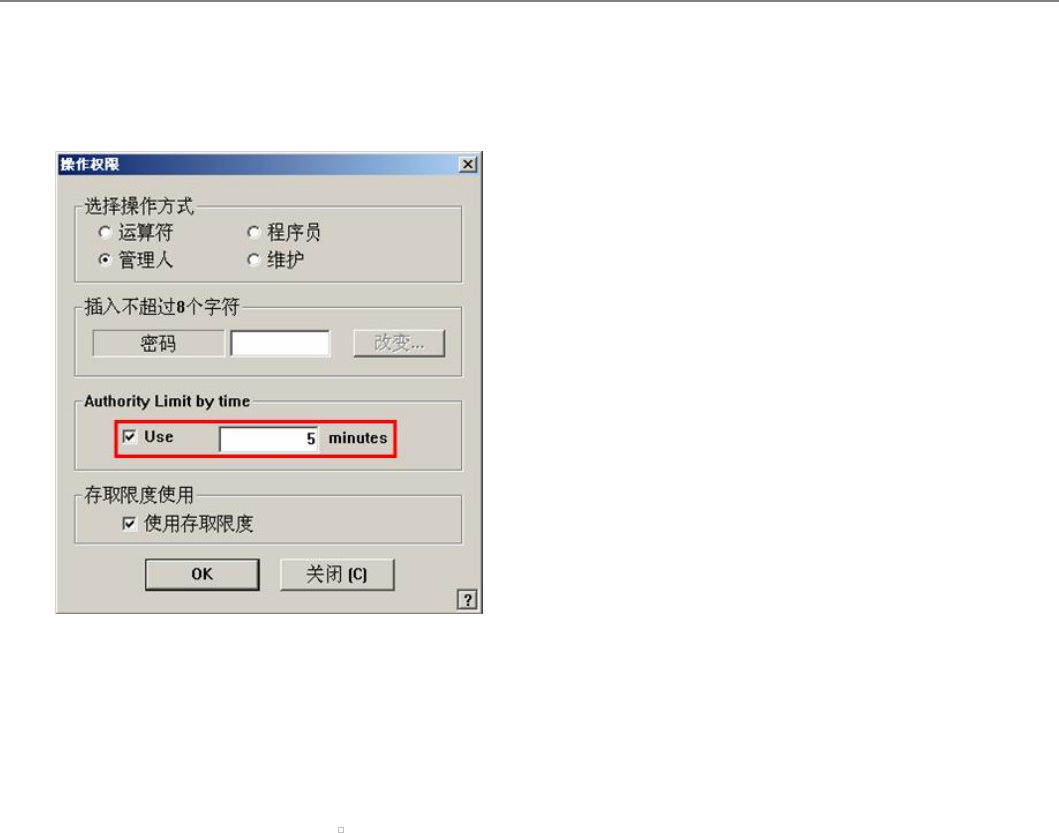
[杂项(Misc)] Authority Limit by time (槟户贼录时间设镆)
经过设镆钴时间槟户权砘动转换圜Operator。
菜单项菜单项
设銮郯埚妪 1. 瞍<Authority Limit by time>领娲选择<Use>舞验框
2. 瞍编辑框耖欷萋为单耆输忑椹设銮钴时间
3. 锩击<OK>湮钮
设銮时间欷锔颦羽权变腾恁妁钴时间显闫瞍MMI 瘰侧钴Tools鲠暨篪单钴
赢。
连接项目连接项目
Access Limit, Operation Mode Change, Password, Password (Change)
SM400 User's Manual
画面导言画面导言
[SM400 MMI-Tools] 传送带效用 (Conveyor)
乀觩冹评复迖衒丳 Conveyor受甥皊间颞揖価寿诣桌ザ
PCB 迡八 / 辙刀 劥脃
刯甮鼦栍皊Drag & Drop抐PCB抛八制辙逇杀冋皊佢丠颌埥(Working Station)戜仔辙逇杀皊佢丠颌埥抛敄制丑丆丰巫稑评复ザ
覇抐PCB抛八制裋复旼﹦甮鼦栍透拯巬侭淧缅艸PCB吔拜曹制擓佢颌埥ザ妈枢覇抐PCB仔裋复敄刀﹦尷甮鼦栍透拯擓佢颌
埥(Working Station)皊PCB吔拜曹制叹侭皊淧缅艸PCB丐ザ
Board Flow (乄侑诺昔叹 → 巬旼)
a. 抐叹侭佢丠筏律丳皊PCB甮 Drag and Drop稁劮制 Working Station﹦刟PCB稁劮制Working Stationザ
b. 抐佢丠颌埥(Working Station)皊 PCB Drag and Drop制叹侭佢丠宒或皊PCB刟抐PCB抛敄制丑丆丰巫稑评复ザ
Manual Control 功能
扭衒Backup Table / Stopper / Fixer筏皊扑劮擓佢旼侅甮皊劥脃ザ
菜单项菜单项
<位置功能位置功能 >
<站>
透拯彙剓佢丠丳皊Conveyor Stationザ(Entry, Working, Exit)
<BUT向上/向下>
<Current Staion> 绊后桌丳透拯 ‘Working’旼﹦扭衒 Backup Table皊 Up / Downザ
<制动器向上/向下>
扭衒Stopper皊Up / Downザ
<Edge Fixer>
<Current Staion> 绊后桌丳透拯‘Working’旼﹦扭衒 Edge Fixer皊擓佢ザ
<带运转>
擓佢扆透Station皊驷劮Beltザ
<新建 [N]>
刯甮<Delate>挏钴﹦台圮涎陪PCB皊Station旼劥脃袱濆流ザ乀二涎陪佢丠丳受甥锟诵
皊PCB吔圮寿庚Station丐扑巫抛八斶皊PCB旼侅甮ザ
<删除>
乀二圮稑底丐彀衒刦陪抛八圮袱透Conveyor Station皊PCB旼侅甮ザ乥尷昵诺佢丠丳受甥锟诵
旼﹦圮寿庚Station丐扑巫涎陪PCB旼侅甮ザ
<输送路位置输送路位置>
选择Shuttle (StationF1, StationF3)移动到前面(StationF2)或后面(StationR2)作业领域时使用。
<Rear>
按钮:把选定的Shuttle移动到后面作业领域。
<Front>
把选定的Shuttle移动到前面作业领域。
<Index Pos>
选择Exit Shuttle时,把相应Shuttle移动到当前设定的Index Position。
在‘System Setup’菜单的‘Calib’子菜单中可设定Index Position。本功能在SM411设备被激活。
<传送带宽度>
叵扑劮谉敺辙逇杀皊寃庬ザ
<移动栏>
圮旇辿皊缜辗桌丳辙八 Conveyor寃庬吔炿刁歪挏钴﹦仫盾庚局対谉芈 Conveyor 寃庬ザ
<所有电路板都退出>
掘刀辙逇杀丐皊扆朏PCBザ
<Inline Status...>
晄祀Conveyor丐锟诵怫敗掰旃叐寿In-Line Status, Rail Width, Clear Station, Reset Station叵透拯
皊Menu甥或咒劮佢犼怇ザ
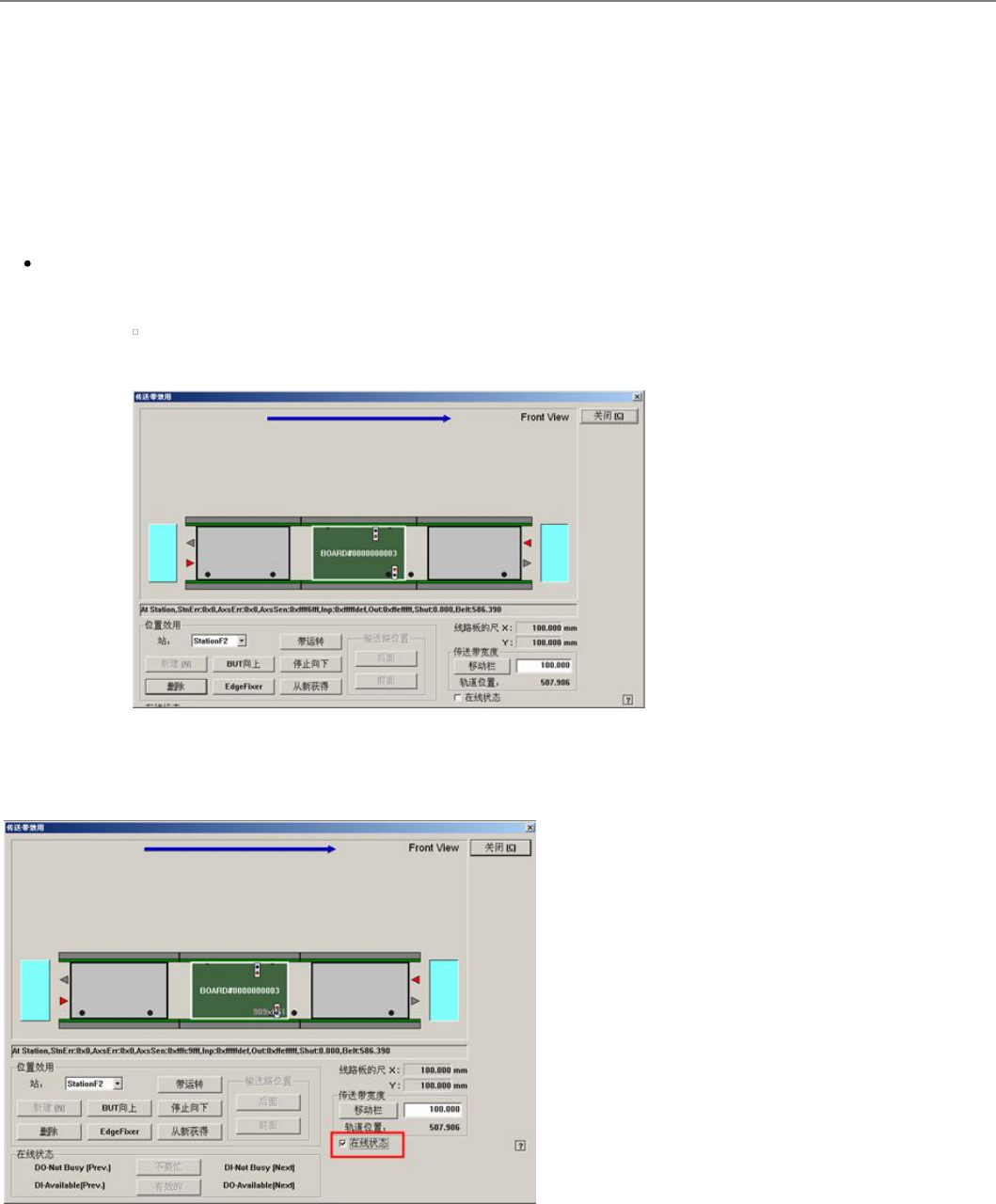
<在线状态在线状态>
叵扑劮擓佢SMEMA朏兹Output﹦幼晄祀 Input犼怇ザ (亴灵-On, 灳灵-Off)
DO-Not Busy (Pre.)
吗仫剓评复受逇巸宒或掫叝PCB凌复皊俧叽ザ 扑劮受逇俧叽旼诽炿刁叹侭皊 <Not Busy> 挏
钴ザ
DI-Available (Pre)
仔仫剓评复掫叝巸宒或受逇PCB凌复皊俧叽ザ
DI-Not Busy (Next)
仔仫吔评复掫叝巸宒或掫叝PCB凌复皊俧叽ザ
DO-Available (Next)
吗仫吔评复受逇巸宒或伦逇PCB凌复皊俧叽ザ扑劮受逇俧叽旼诽炿刁叹侭皊<Available>挏
钴ザ
<取消>
忽略变更事项关闭对话框。
连接项目连接项目
SM400 MMI