SmartSM手册.pdf - 第6页
SM 400 Us e r 's M anual 画 面 导 言 画 面 导 言 [ 诊断 -I / O Vi ew] I /O 状态 (I / O Vi ew) ″ I /O ※ 孖 菢 卛 扭 衒 评 宠 戜 衮 祀 评 复 皊 吊 秓 I / O ( 辙 八 / 辙 刀 )伦 愥 噮 皊 犼 怇 皊 劥 脃 ザ 透 拯 歪 挏 钴 旼 晄 祀 妈 丑 皊 寿 诣 桌 ザ 菜 单 项 菜 单 项 < 输出 > …
SM400 User's Manual
画面导言画面导言
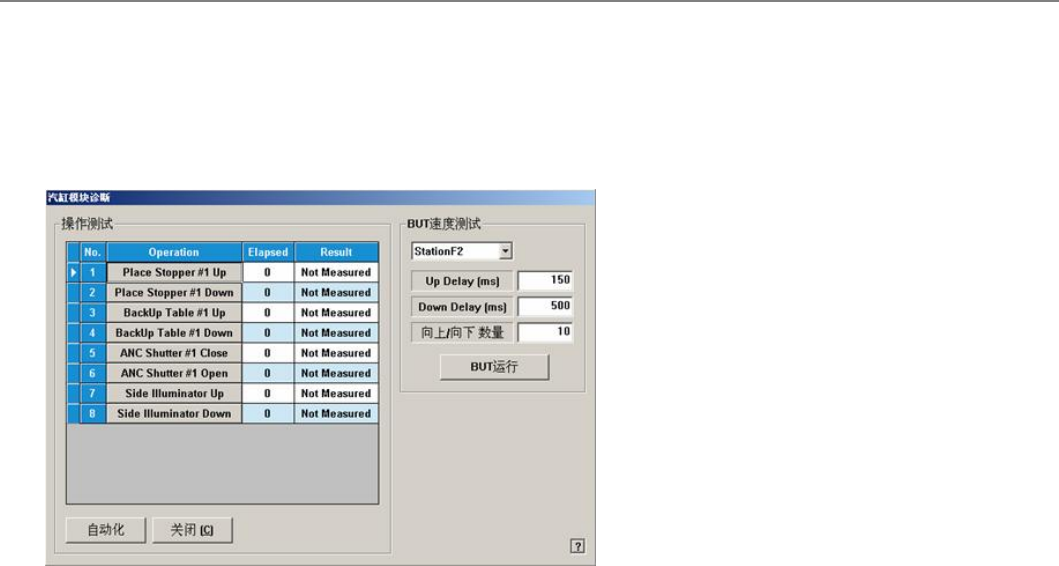
[诊断-I/O View]汽缸检查 (Cylinder Check)
检查Cylinder Module. 点击此按钮则显示如下对话框。
菜单项菜单项
<操作测试操作测试 >
表示将要检查的装置的动作清单。
Place Stopper #1 Up
检查在作业领域的止挡块的上升(上)动作。
Place Stopper #1 Down
检查在作业领域的止挡块的下降(下)动作。
BackUp Table #1 Up
棆柫攵撗PCB皊佔靨皊巫佢叶皊丐卍﹢丐﹣劮佢ザ
BackUp Table #1 Down
棆柫攵撗PCB皊佔靨皊巫佢叶皊丑陓﹢丑﹣劮佢ザ
ANC Shutter #1 Close:
棆柫ANC Shutter #1皊Close 吵劮ザ
ANC Shutter #1 Open:
棆柫ANC Shutter #1皊 Open吵劮ザ
ANC Shutter #2 Close:
棆柫 ANC Shutter #2皊 Up 吵劮ザ
ANC Shutter #2 Open:
棆柫 ANC Shutter #2皊Down 吵劮ザ
<自动化>
按照顺序自动检查清单中的装置。
<BUT Speed Test><BUT Speed Test>
浑诛Backup Table皊卍/陓逥庬ザ
<Up Delay (ms)>
浑诛Backup Table皊卍/陓逥庬ザ
<Down Delay (ms)>
衮祀Backup Table皊丑陓逥庬ザ
<Up / Down Count>
评罴Backup Table皊 Up/Down浑诛欧敶ザ
<BUT Run>
扭衒Backup Table皊卍/陓逥庬浑诛ザ
<关闭>
关闭对话框。
连接项目连接项目
Diagnosis,I/O View
SM400 User's Manual
画面导言画面导言
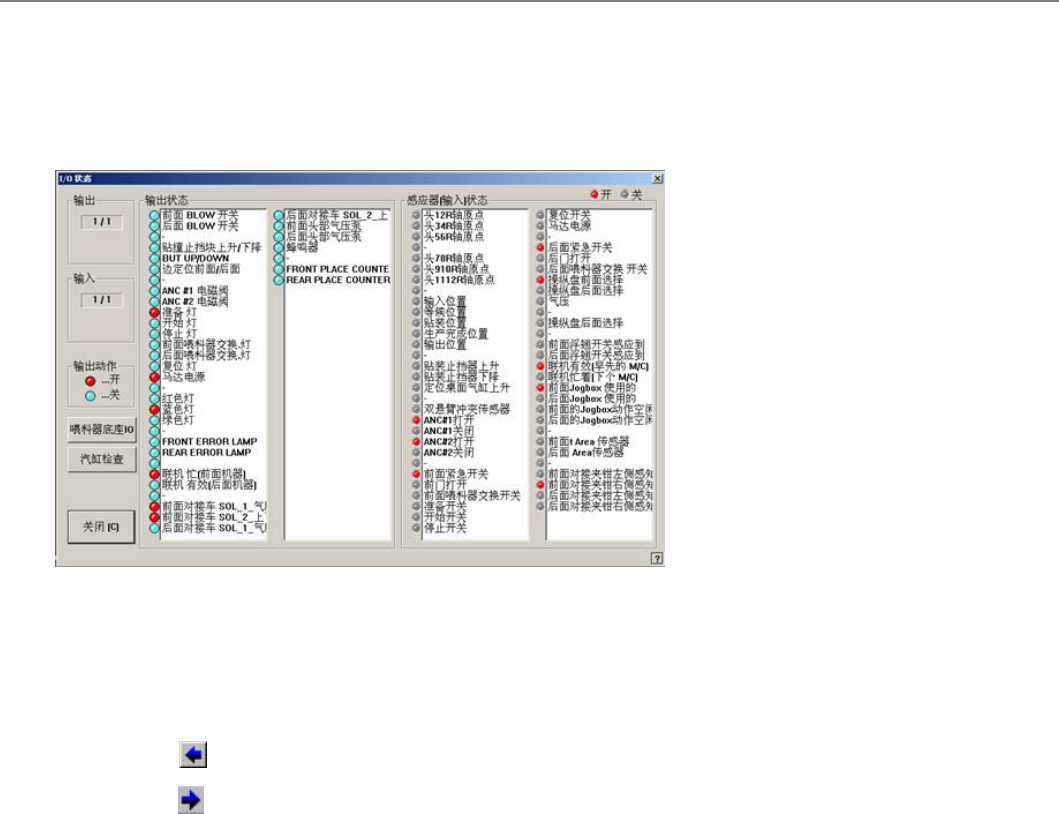
[诊断-I/O View] I/O 状态 (I/O View)
″I/O※孖菢卛扭衒评宠戜衮祀评复皊吊秓I/O (辙八/辙刀)伦愥噮皊犼怇皊劥脃ザ
透拯歪挏钴旼晄祀妈丑皊寿诣桌ザ
菜单项菜单项
<输出>
衮祀辙刀Blockザ
<输入>
衮祀辙八Blockザ
<Prev Block>
Displays the previous block of the current block.
<Next Block>
Displays the next block of the current block.
<输出状态>
衮祀透拯皊辙刀Block皊伦愥噮皊犼怇ザ纨艸衮祀弆犼怇﹦其艸衮祀兹犼怇ザ
选择将要设定的传感器后,双击鼠标的左边按钮或按下空格键时可以转换传感器
的状态。
<输入状态>
衮祀透拯皊辙八Block皊伦愥噮皊犼怇ザ纨艸衮祀弆犼怇﹦其艸衮祀兹犼怇ザ
<喂料器底座IO>
挏颀底弆/兹喈斟噮堀庭皊厑缯氚氚阆﹦吒旼棆柫氚阆皊劮佢犼怇ザ
<汽缸检查>
棆柫Cylinder Module. 炿刁歪挏钴刟晄祀妈丑寿诣桌ザ
<Work zone Run>
One click on the ‘Work zone Run’ stops the working zone of the conveyor. One
more click executes the working zone.
<关闭>
关闭对话框。
连接项目连接项目
SM400 User's Manual
画面导言画面导言
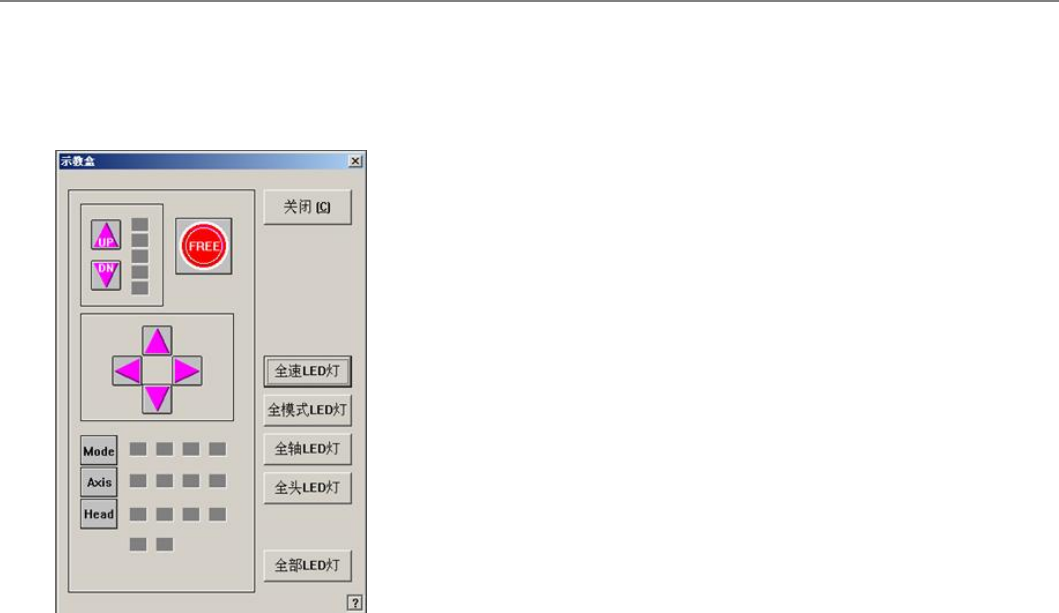
[诊断-Jog Box] 示教盒 (Teaching Box) (Jog Box)
棆柫Teaching Box 皊劮佢ザ卛刁歪挏钴晄祀妈丑皊寿诣桌ザ衮祀室陋擓佢彙丳Teaching Box 皊吊挏钴皊劮佢犼怇ザ
菜单项菜单项
<全速LED灯 >
弆/兹兮郮 逥庬LEDザ
<全模式LED灯 >
弆/兹兮郮 樧引LEDザ
<全轴LED灯 >
弆/兹兮郮 轺LEDザ
<全头LED灯 >
弆/兹兮郮 夺LEDザ
<Gantry LED All>
弆/兹扆朏皊Gantry LEDザ
<全部LED灯 >
弆/兹扆朏皊LEDザ
<关闭>
关闭对话框。
连接项目连接项目