00900194-01_SM_ASM ProcessLens_Dual-lane_EN.pdf - 第32页
3 Replacing spare parts 3.4 Scale bars 32 Service Manual ASM ProcessLens Dual-lane 09/2018 3.4 Scale bars 3.4.1 Replacing the Y scale bars Parts Fig.4: Y scale bar, 2 Scale 03139293-xx Y scale assembly 03139296-xx X sca…
3 Replacing spare parts
3.3 Encoder
Service Manual ASM ProcessLens Dual-lane 09/2018 31
3.3.4 Checking the alignment of the x, y and z encoder reader
Furthermore the alignment of the x, y and z readers need to be checked whenever the readers or
the scale bar has been changed.
Requirements
●
Machine is switched on.
Checking the alignment
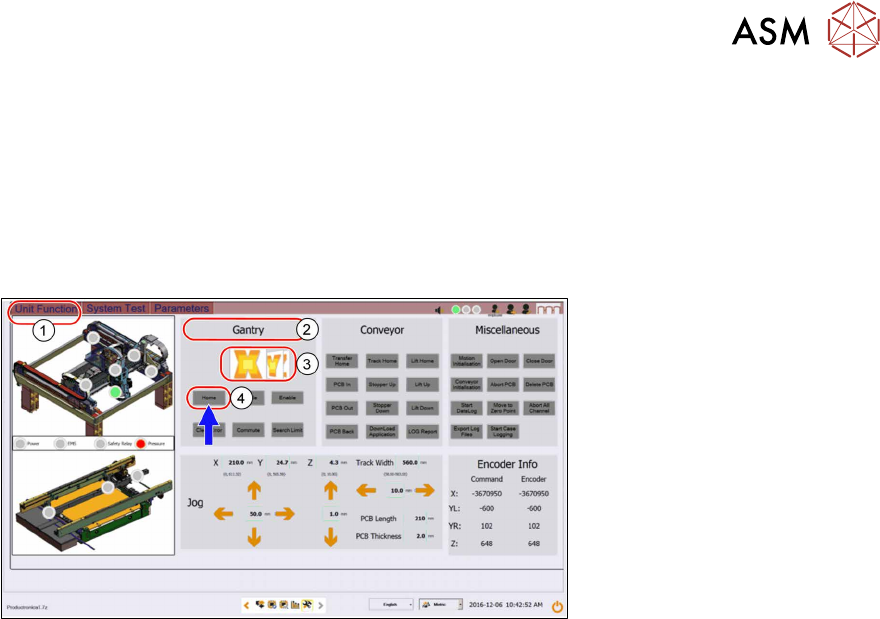
► Go to the Diagnostic page.
► Click on the Unit function(1) tab.
► Go to the Gantry section(2).
► Select the X button(3) and click on Home(4).
► Select the Y button(3) and click on Home(4).
► Select the Z button(3) and click on Home(4).
3 Replacing spare parts
3.4 Scale bars
32 Service Manual ASM ProcessLens Dual-lane 09/2018
3.4 Scale bars
3.4.1 Replacing the Y scale bars
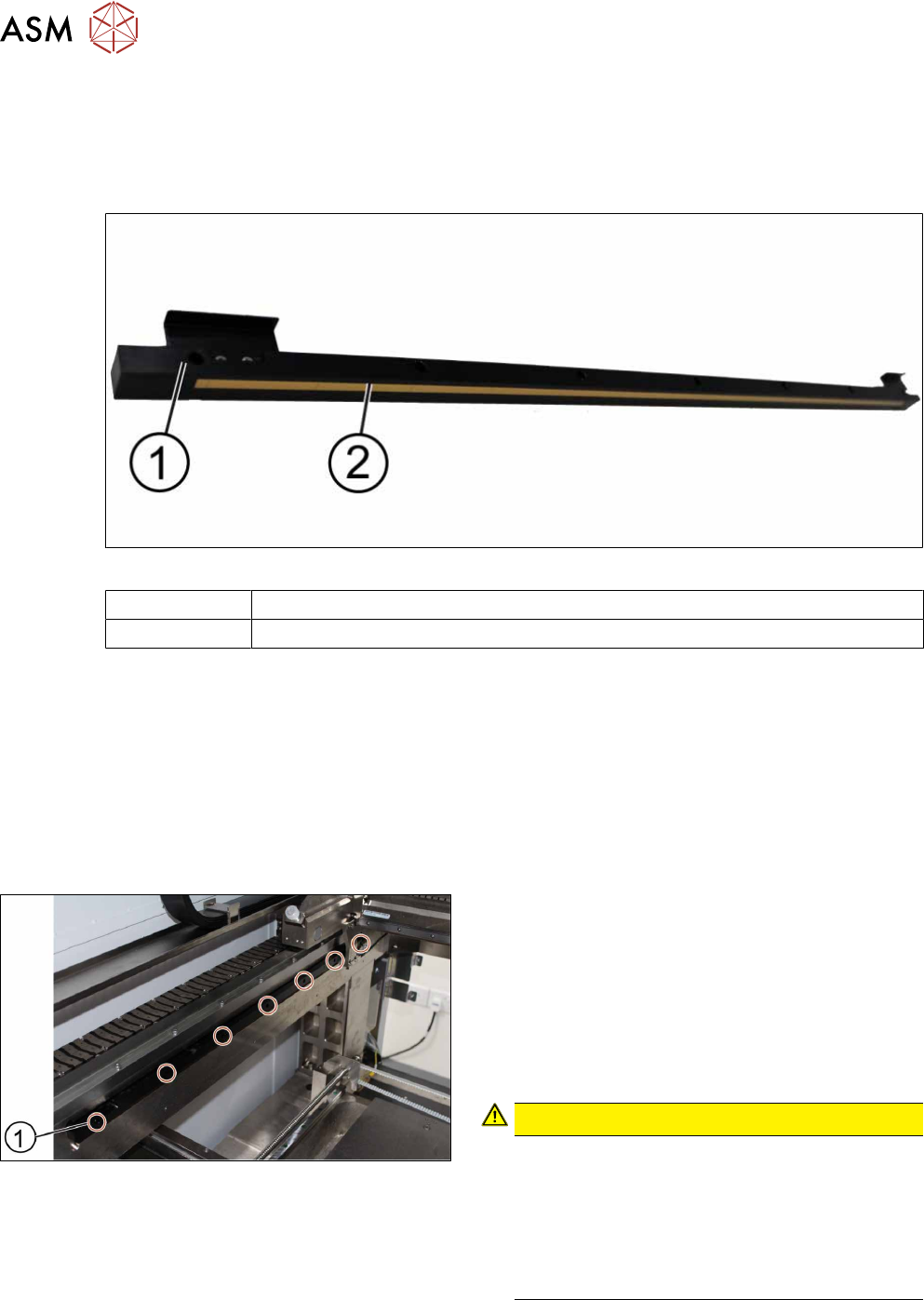
Parts
Fig.4: Y scale bar, 2 Scale
03139293-xx Y scale assembly
03139296-xx X scale assembly
Equipment and tools
●
Allen key size 2.5
●
Spacer 2.1mm
●
Piece of paper
Requirements
●
Machine is switched off.
Removal
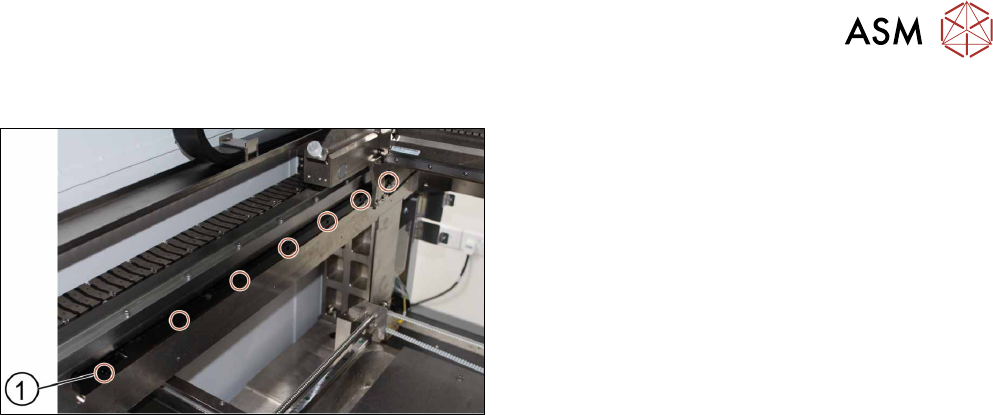
► Unscrew and remove the seven screws(1) off
the scale bar using a T shaped Allen key size
2.5.
► Carefully pull out the scale bar.
► Do not damage the encoder reader. The sensit-
ive reader may be protected by using a piece of
paper.
► Put in the new scale bar.
CAUTION!
The surface of the scale bars
Fingerprints or scratches damage the scale bars
which then need to be exchanged.
Do not touch or scratch the surface of the scale
bars.
Be careful when pulling out the reader and when
putting it back again.
.
3 Replacing spare parts
3.4 Scale bars
Service Manual ASM ProcessLens Dual-lane 09/2018 33
Installation
► Tighten the seven screws(1).
► Check the space between the reader and the
scale bar by using the 2.1 mm spacer provided.
► Check the lights of the encoder at the back of the
machine.
► Slowly move the gantry backwards and forwards.
See section 3.3.2 "Color code for the encoder
readers" [}29].
► Adjust the brackets when the lights indicate to do
so.
► The steps to change the other scale bar are identical.
► Check the alignment of the y scale bar. Go to section 3.3.3 "Checking the alignment of the en-
coder reader of the Y gantry" [}30] and section 3.3.3 "Checking the alignment of the encoder
reader of the Y gantry" [}30].
► Tighten the seven screws(1).
► Check the space between the reader and the scale bar by using the 2.1 mm spacer provided.
► Check the lights of the encoder at the back of the machine.
► Slowly move the gantry backwards and forwards. See section 3.3.2 "Color code for the en-
coder readers" [}29].
► Adjust the brackets when the lights indicate to do so.
► The steps to change the other scale bar are identical.
► Check the alignment of the y scale bar. Go to section 3.3.3 "Checking the alignment of the en-
coder reader of the Y gantry" [}30] and section 3.3.3 "Checking the alignment of the encoder
reader of the Y gantry" [}30].