00900194-01_SM_ASM ProcessLens_Dual-lane_EN.pdf - 第77页
4 Replacing spare parts at the conveyor 4.6 Fiber optic cables and laser light barriers Service Manual ASM ProcessLens Dual-lane 09/2018 77 4.6.2 Correcting the laser light barrier setting DANGER Laser Class 2 The laser …
4 Replacing spare parts at the conveyor
4.6 Fiber optic cables and laser light barriers
76 Service Manual ASM ProcessLens Dual-lane 09/2018
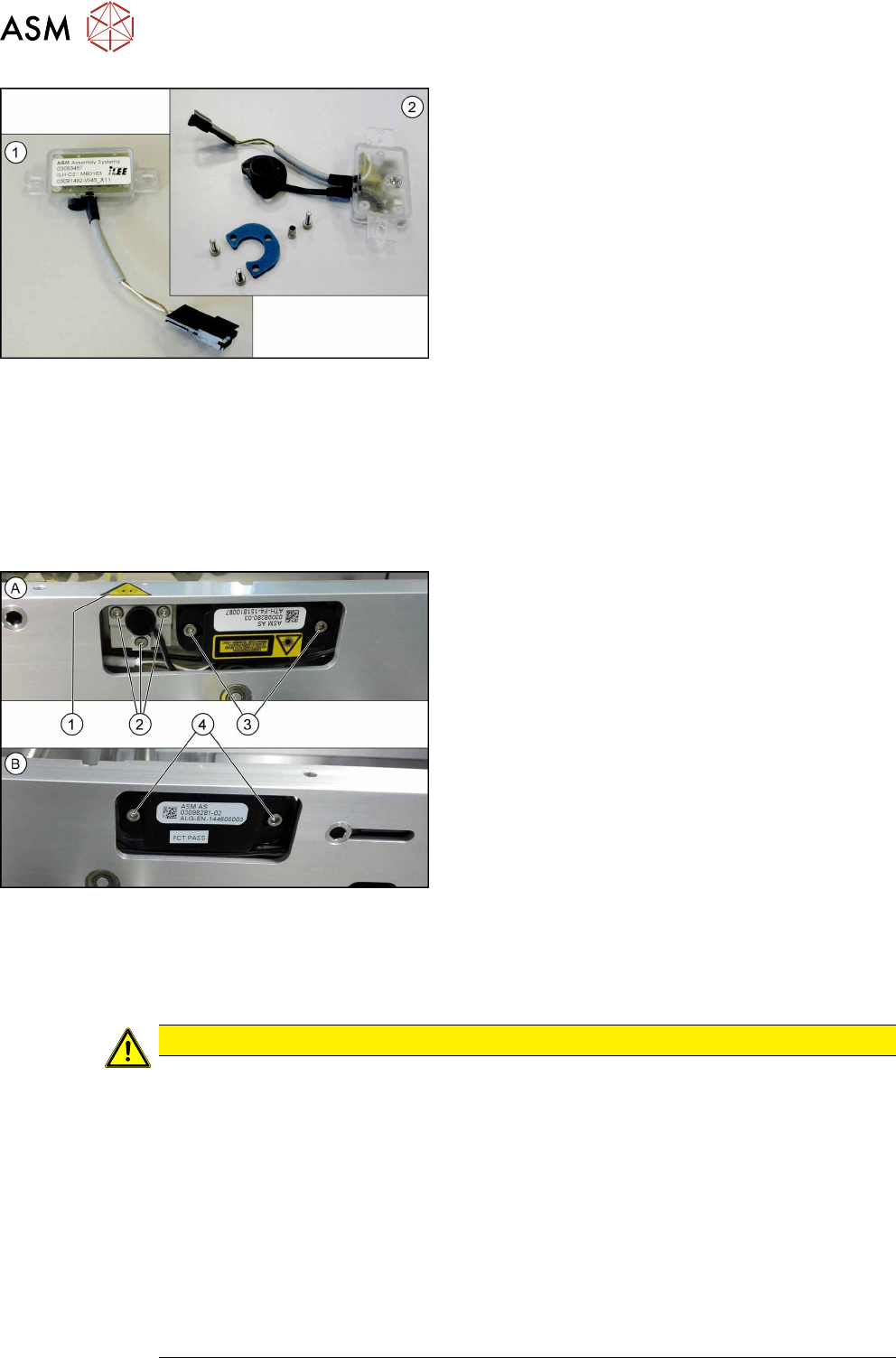
Fig.58: Transmitter and receiver
1. Receiver
2. Transmitter (incl. assembly material)
Removal
► Use the software or manually move the conveyor rail into a position which allows you best
access.
– To move the conveyor rail manually, pull the toothed belt of the width adjustment unit.
► Switch off the machine, disconnect it from the power supply and secure it to prevent
unauthorized reactivation.
Fig.59: Removing transmitter and receiver
The transmitters are always near the laser warning
labels(1). The receivers are always on the opposite
rails.
► (A) Transmitter:
Remove the five fastening screws(2) and(3).
Make sure that no parts fall into the conveyor rail.
► (B) Receiver:
Remove the two fastening screws(4). Make sure
that no parts fall into the conveyor rail.
► Unplug the electrical connection.
Installation
► Follow the removal instructions in reverse order for installation. Also observe the following
instructions:
CAUTION
Installation instructions
► Reconnect the transmitter/receiver before installation.
► Make sure that all the other cables in the conveyor rail are run under the transmitter/
receiver. There is a particular lack of space at the transmitters.
► Use the bushing for the bottom screw. This screw is used to fix the sensor.
The two upper screws are used to adjust the laser beam.
► The transmitters are fixed hand-tight with the lower screw and adjusted with the top
two screws.
► Check the setting for the transmitter / receiver and correct it if necessary (see 4.6.4.1
"Setting the fiber optic sensor" [}85]).
► Teach the PCB sensors using the station software (see Teaching the PCB sensors
(SW70x)).
4 Replacing spare parts at the conveyor
4.6 Fiber optic cables and laser light barriers
Service Manual ASM ProcessLens Dual-lane 09/2018 77
4.6.2 Correcting the laser light barrier setting
DANGER
Laser Class 2
The laser light barrier transmitter emits class 2 laser beams. You therefore do not require
additional protective measures!
► However, you should never look into the laser beam.
► Adjust the laser beam only from the rear side of the laser!
Equipment and tools
Fig.60: Setting gauge
00369205-xx Setting gauge for conveyor laser light barrier (optional)
00353832-xx Allen key set
Semi-transparent paper or plastic (recommendation for better recognition of the
laser beam)
Overview
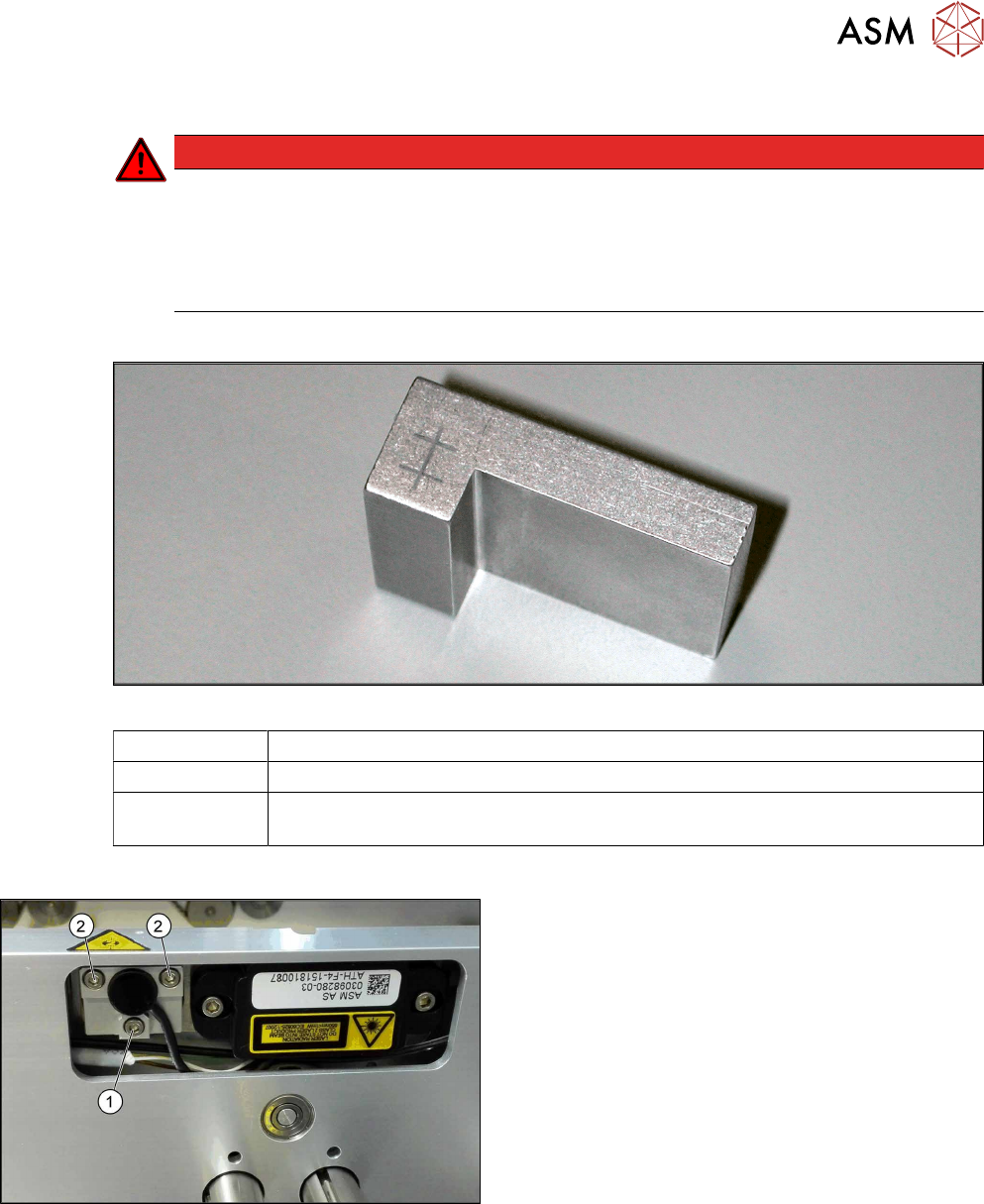
Fig.61: Laser light barrier
1. Fastening screw
2. Setting screws
4 Replacing spare parts at the conveyor
4.6 Fiber optic cables and laser light barriers
78 Service Manual ASM ProcessLens Dual-lane 09/2018
Procedure with setting gauge
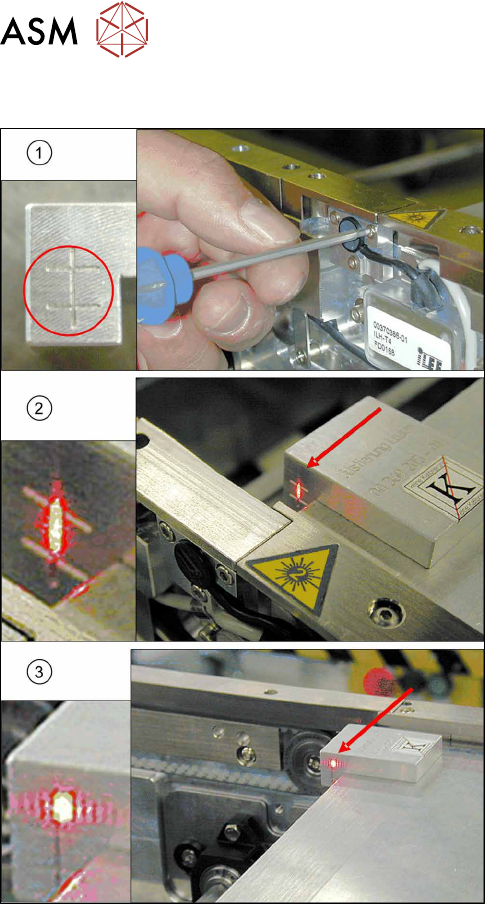
Fig.62: Focusing the laser beam (using example of X-Series)
1. Setting the laser light barrier
2. Minimum width
3. Maximum width
► Set the maximum conveyor width.
► Select Enable safety mode in software.
► Activate the relevant laser diode using the input/
output functions in the station software.
► Check the path of the laser beam with the help of
the gauge.
► With the help of the three setting screws, adjust
the laser beam to the center of the gauge cross
(1).
► Now position the conveyor to minimum width(2)
and check the setting.
► Check the PCB reference corner and reteach, if
necessary.