00900194-01_SM_ASM ProcessLens_Dual-lane_EN.pdf - 第62页
4 Replacing spare parts at the conveyor 4.4 Width adjustment 62 Service Manual ASM ProcessLens Dual-lane 09/2018 4.4.4 Calibrating the Track Zero Point After completing all work to the width adjustment (adjustment unit, …
4 Replacing spare parts at the conveyor
4.4 Width adjustment
Service Manual ASM ProcessLens Dual-lane 09/2018 61
Removal
CAUTION
Small parts
► Take care not to lose any small parts.
► Take particular care not to let the screws fall into the conveyor rail when removing the
screws or clamping plate.
► Use the software or manually move the conveyor rail into a position which allows you best
access.
– To move the conveyor rail manually, pull the toothed belt of the width adjustment unit.
► Switch off the machine, disconnect it from the power supply and secure it to prevent
unauthorized reactivation.
► Remove the lifting table plate to make room for removing the actuator later (see chapter 4.2.1
"Replacing the lifting table plate" [}38]).
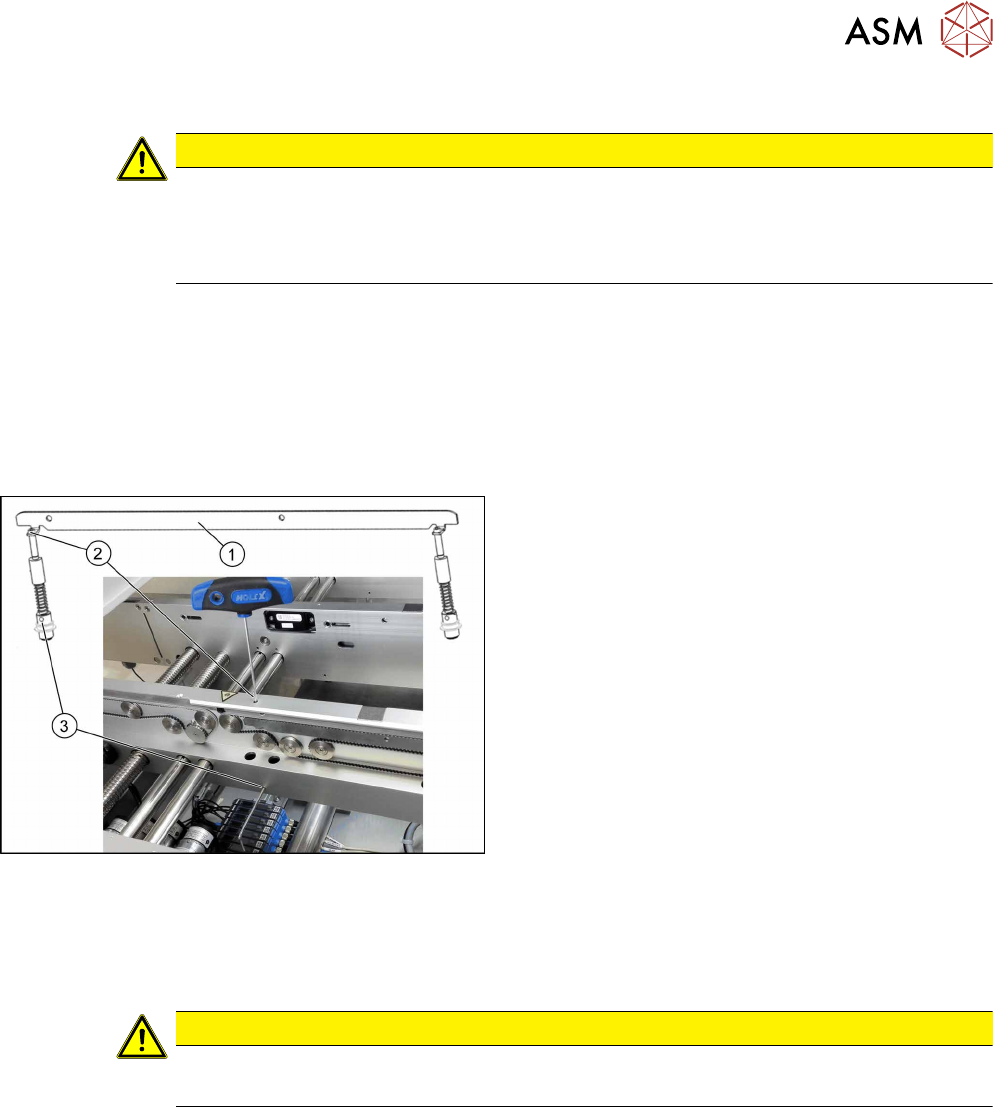
Fig.37: Removing clamping plate
► Insert the small pin or Allen key(3) to fix the
actuator.
► Remove the two screws(2) fastening clamping
plate(1).
First loosen one screw slightly, and then loosen
the other screw slightly. After that, remove both
screws completely.
► Remove inserted Allen key and remove the
actuator from bottom side.
► Remove the clamping plate(1) with two fastening
screws carefully.
Installation
► Follow the removal instructions in reverse order for installation. Also observe the following
instructions:
CAUTION
Installation instructions
► Secure the two screws fastening the clamping unit with Loctite 241.
4 Replacing spare parts at the conveyor
4.4 Width adjustment
62 Service Manual ASM ProcessLens Dual-lane 09/2018
4.4.4 Calibrating the Track Zero Point
After completing all work to the width adjustment (adjustment unit, motor or belt of width adjust-
ment), you need to configure the adjustment unit before you configure the conveyor sides.
Procedure
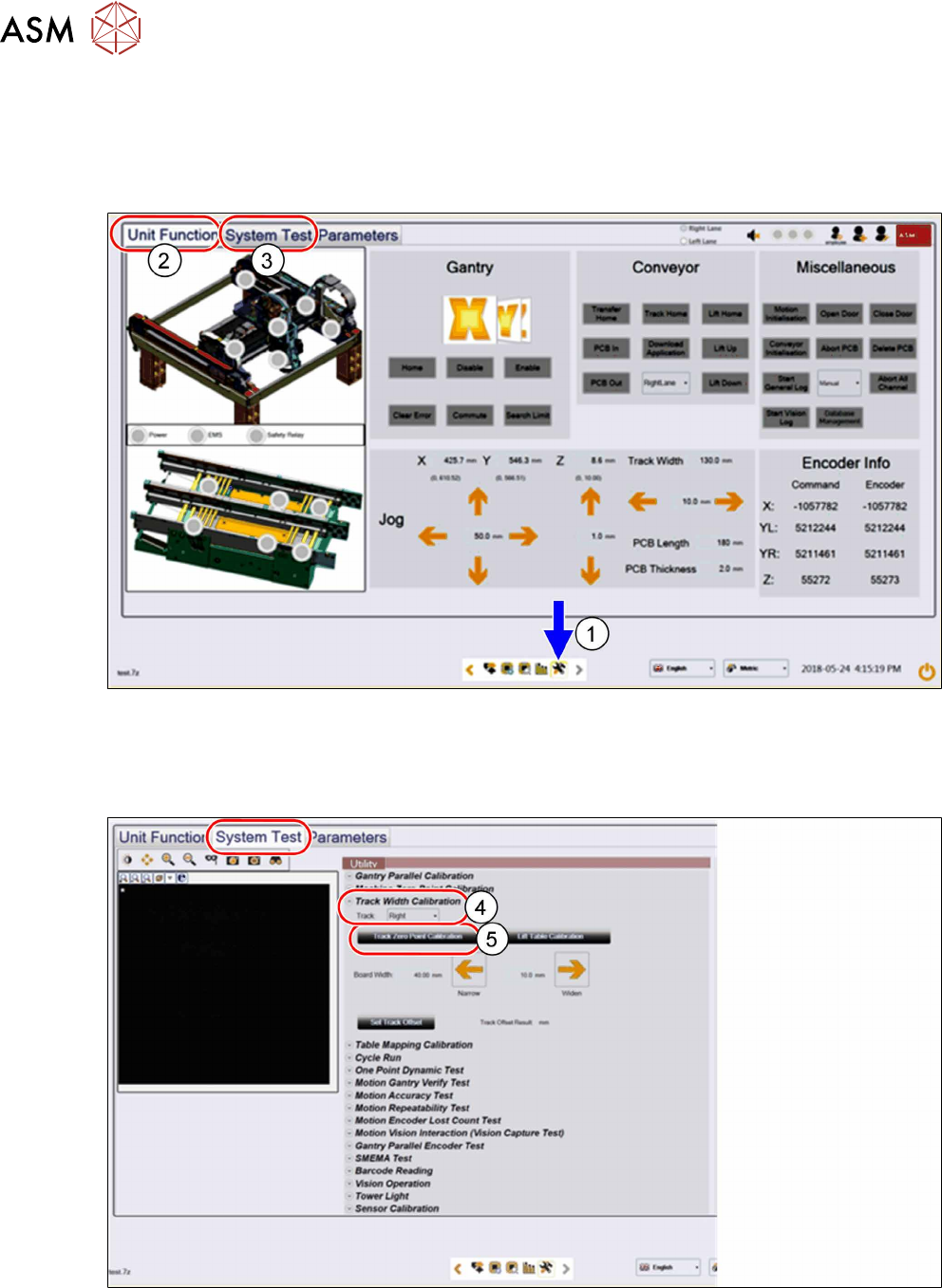
► Click on this icon(1) to enter the settings menu.
► Click on Unit Function(2) to enter the settings user menu.
► Switch to operator level Machine service.
► Click on System Test(3) to enter the calibration menu.
► In the Track Width Calibration area(4) select the right track.
► Click on the Track Zero Point Calibration button(5) to calibrate the track zero point of the
right track.
► Repeat the calibration the same way for the left track.
4 Replacing spare parts at the conveyor
4.5 Conveyor belt, belt drive and hexagonal shaft
Service Manual ASM ProcessLens Dual-lane 09/2018 63
4.5 Conveyor belt, belt drive and hexagonal shaft
4.5.1 Replacing the toothed belt (conveyor belt)
Parts
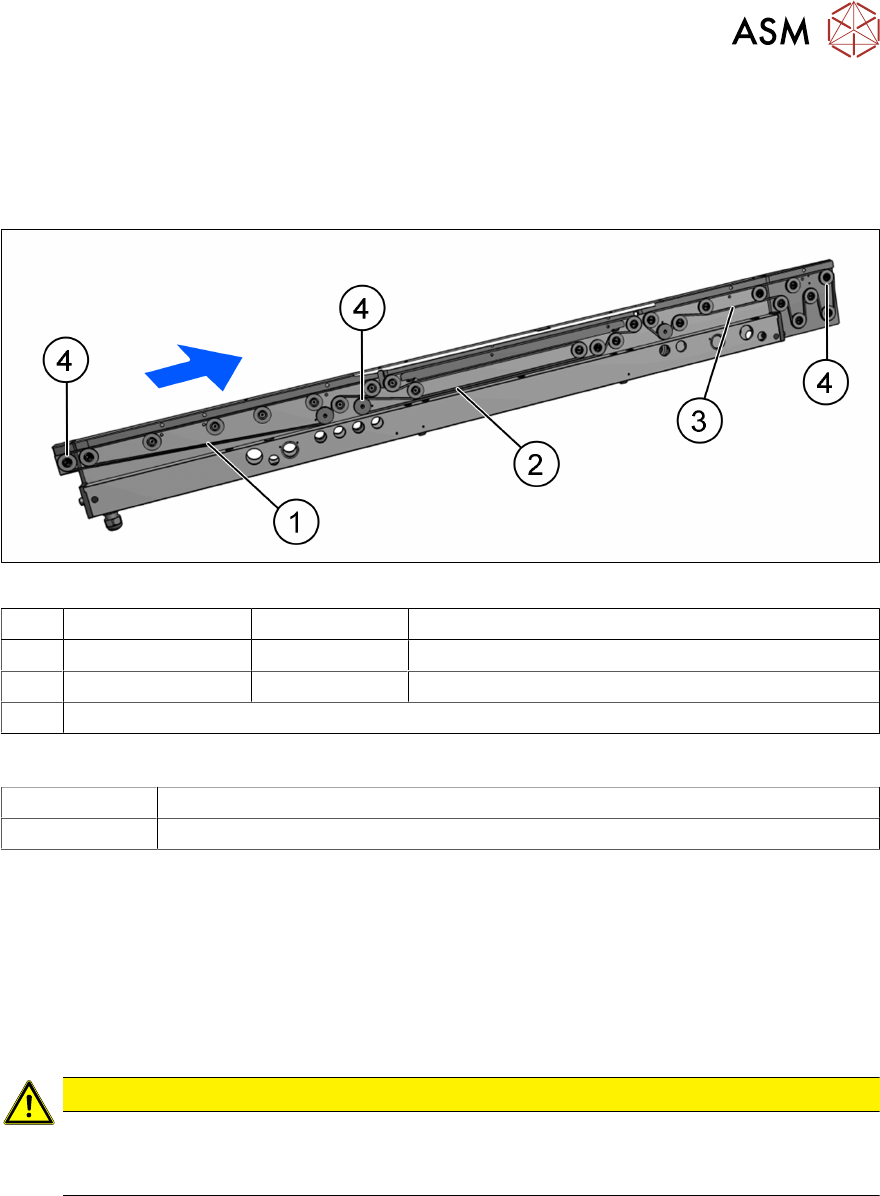
Fig.38: Toothed belt (conveyor belt) and movable idler pulleys
1 Input area 03172246-xx Belt L=897mm
2 Placement area 03121441-xx Synchronous belt L=843mm
3 Output area 03121441xx Belt L=843mm
4 Movable idler pulleys (see Replacing the idler pulley (conveyor belt))
Equipment and tools
00326015‑xx Belt tension measuring device
00353832-xx Allen key set
Removal
► Use the software or manually move the conveyor rail into a position which allows you best
access.
– To move the conveyor rail manually, pull the toothed belt of the width adjustment unit.
► Switch off the machine, disconnect it from the power supply and secure it to prevent
unauthorized reactivation.
► Loosen the movable idler pulley.
CAUTION
Loosen the movable idler pulley only as far as necessary!
► Do not remove the movable idler pulley. Otherwise the T slot nut on the inner side will
fall into the conveyor rail.
► Carefully unthread the belt drive.
Installation
► Check the new toothed belt before fitting it. Hold it up high. It should hang loose and should
not twist.
► Follow the removal instructions in reverse order for further installation. Also observe the fol-
lowing instructions:
– Do not bend or damage the toothed belt.
– Make sure that the toothed belt is positioned accurately in the guidance on the motor
shaft / belt drive.
– When you tighten the idler pulley, set the tension of the toothed belt (see below).