00900194-01_SM_ASM ProcessLens_Dual-lane_EN.pdf - 第56页
4 Replacing spare parts at the conveyor 4.4 Width adjustment 56 Service Manual ASM ProcessLens Dual-lane 09/2018 4.4 Width adjustment 4.4.1 Replacing the toothed belt (width adjustment) Parts Fig.30: Toothed belt (width…
4 Replacing spare parts at the conveyor
4.3 Conveyor drive
Service Manual ASM ProcessLens Dual-lane 09/2018 55
Removal
CAUTION
Do not loosen the wrong screws
Make sure that you do not loosen any other screws except those ones explicitly mentioned.
Loosening other screws could lead to irreparable misalignment or damage to the conveyor.
► Use the software or manually move the conveyor rail into a position which allows you best
access.
– To move the conveyor rail manually, pull the toothed belt of the width adjustment unit.
► Switch off the machine, disconnect it from the power supply and secure it to prevent
unauthorized reactivation.
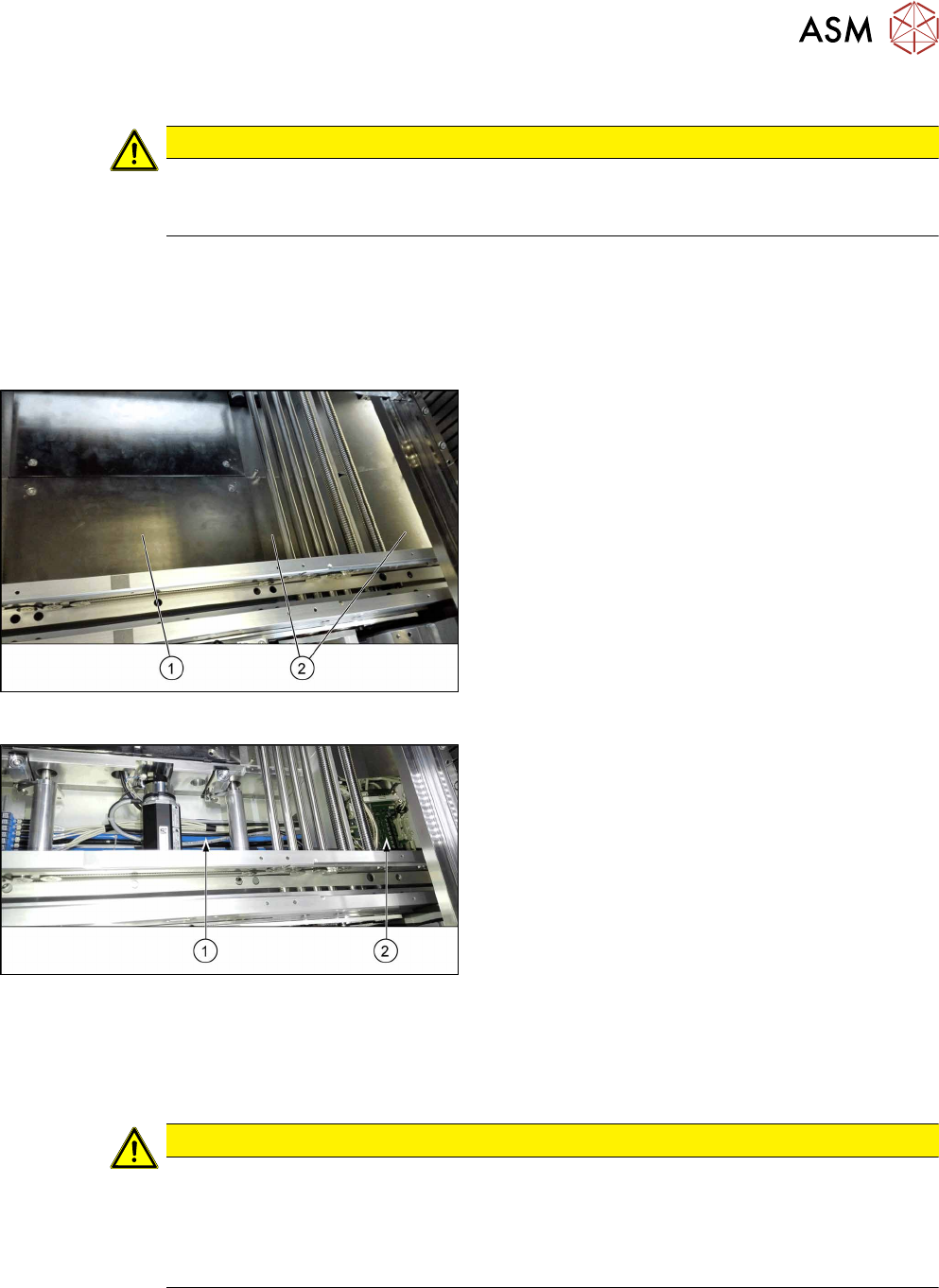
Fig.28: Table plate and covers
► Remove the four screws fastening the lifting table
plate(1) (see also 4.2.1 "Replacing the lifting
table plate" [}38]).
► Remove the fixing spacer bolts of the covers(2)
above the conveyor control (two screws each
cover) and remove the covers.
Fig.29: Cables
The cables(1) run from the respective motor over the
floor of the conveyor to the conveyor control(2).
► Carefully unthread the cables
Remove any cable ties.
Installation
► Follow the removal instructions in reverse order for installation. Also observe the following
instructions:
CAUTION
Installation instructions
► Observe the installation instructions for the conveyor drive where necessary.
► Replace any open cable ties.
Make sure that the cable ties and the heads of the cable ties do not rub against any
parts when you do this.
4 Replacing spare parts at the conveyor
4.4 Width adjustment
56 Service Manual ASM ProcessLens Dual-lane 09/2018
4.4 Width adjustment
4.4.1 Replacing the toothed belt (width adjustment)
Parts
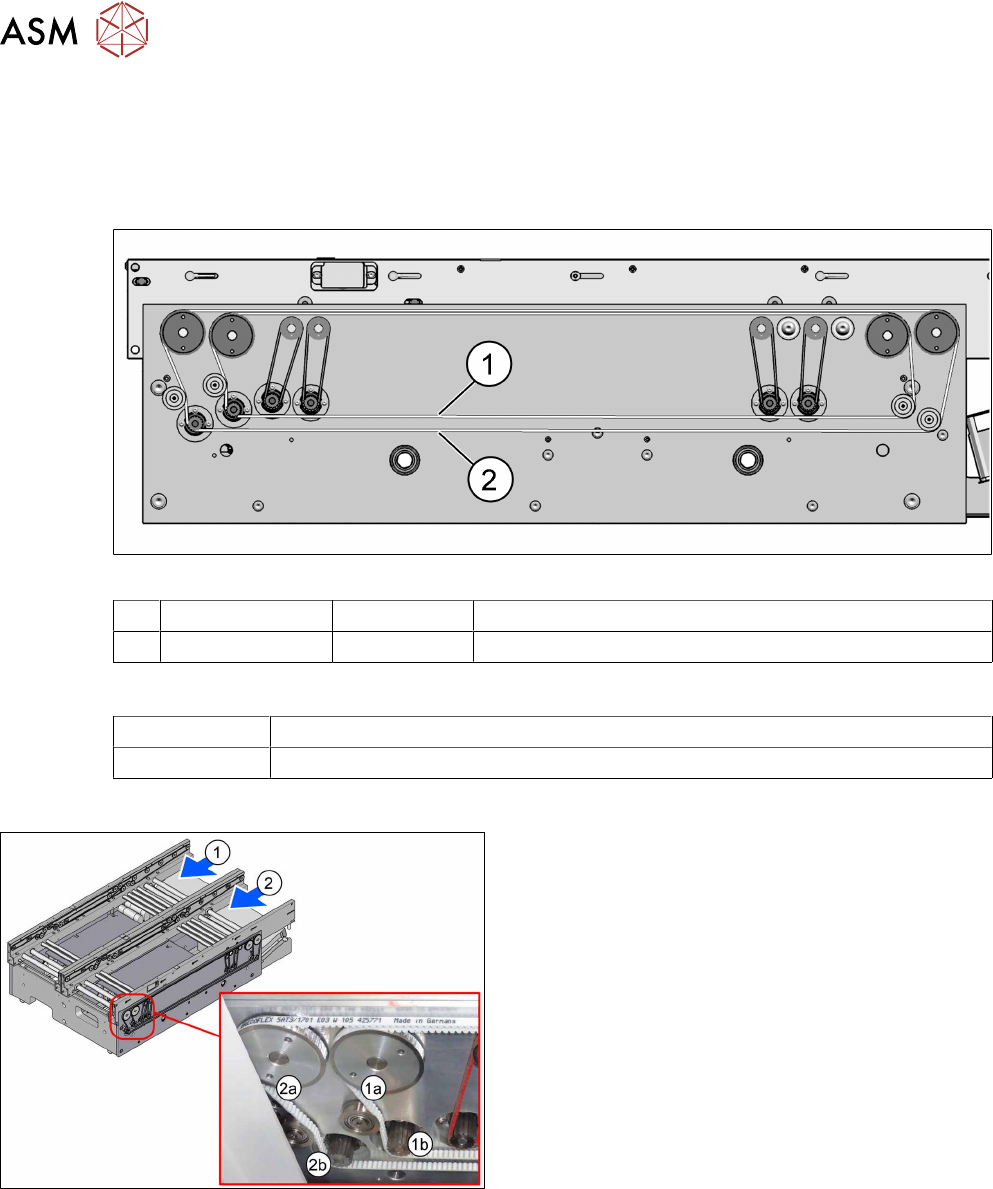
Fig.30: Toothed belt (width adjustment)
1 Track 1 (shorter) 03121586‑xx Toothed belt BRECOFLEX 5+-0.1 AT3/1509
2 Track 2 (longer) 03121584‑xx Toothed belt BRECOFLEX 5+-0.1 AT3/1701
Equipment and tools
00326015‑xx Belt tension measuring device
00353832-xx Allen key set
Overview
Fig.31: Toothed belt (width adjustment)
1) Conveyor track 1
1a) Toothed belt for width adjustment
1b) Width adjustment motor
2) Conveyor track 2
2a) Toothed belt for width adjustment
2b) Width adjustment motor
4 Replacing spare parts at the conveyor
4.4 Width adjustment
Service Manual ASM ProcessLens Dual-lane 09/2018 57
Removal
► Use the software or manually move the conveyor rail into a position which allows you best
access.
– To move the conveyor rail manually, pull the toothed belt of the width adjustment unit.
► Switch off the machine, disconnect it from the power supply and secure it to prevent
unauthorized reactivation.
► Unthread the toothed belt. If necessary loosen the three screws fastening the width adjust-
ment motor.
Installation
► Follow the removal instructions in reverse order for installation. Also observe the following
instructions:
CAUTION
Installation instructions
► Make sure that the toothed belt is not folded or otherwise damaged.
► Carefully thread in the toothed belt. To do this, carefully lift the toothed belt a little (e.g.
with the shorter end of an Allen key).
► Make sure that the relevant conveyor rail is not moved, to keep parallelism of the con-
veyor rails.
► Set the correct belt tension (see below).
Toothed belt (width adjustment) Belt tension
03121586‑xx Track 1 (shorter): Toothed belt Brecoflex 5+-0.1 AT3/1509 25 +/- 2 Hz
03121584‑xx Track 2 (longer): Toothed belt Brecoflex 5+-0.1 AT3/1701 21 +/- 2 Hz