MAN00000772_SI-G200BB_SVCPDFA.pdf - 第322页
Adjustment HLGB-10413-01 Nozzle Escape Detect Sens or Position Adjus tment SHEET 2/5 3. T ighten the split fastening screw . 4. Rotate the nozzle by o ne turn, and check that laser from lig ht emitting section is emitted…
Adjustment
HLGB-10413-01
Nozzle Escape Detect Sensor
Position Adjustment
SHEET
1/5
Nozzle Escape Detect Sensor Position Adjustment
Perform this working on both heads on the front side and rear side.
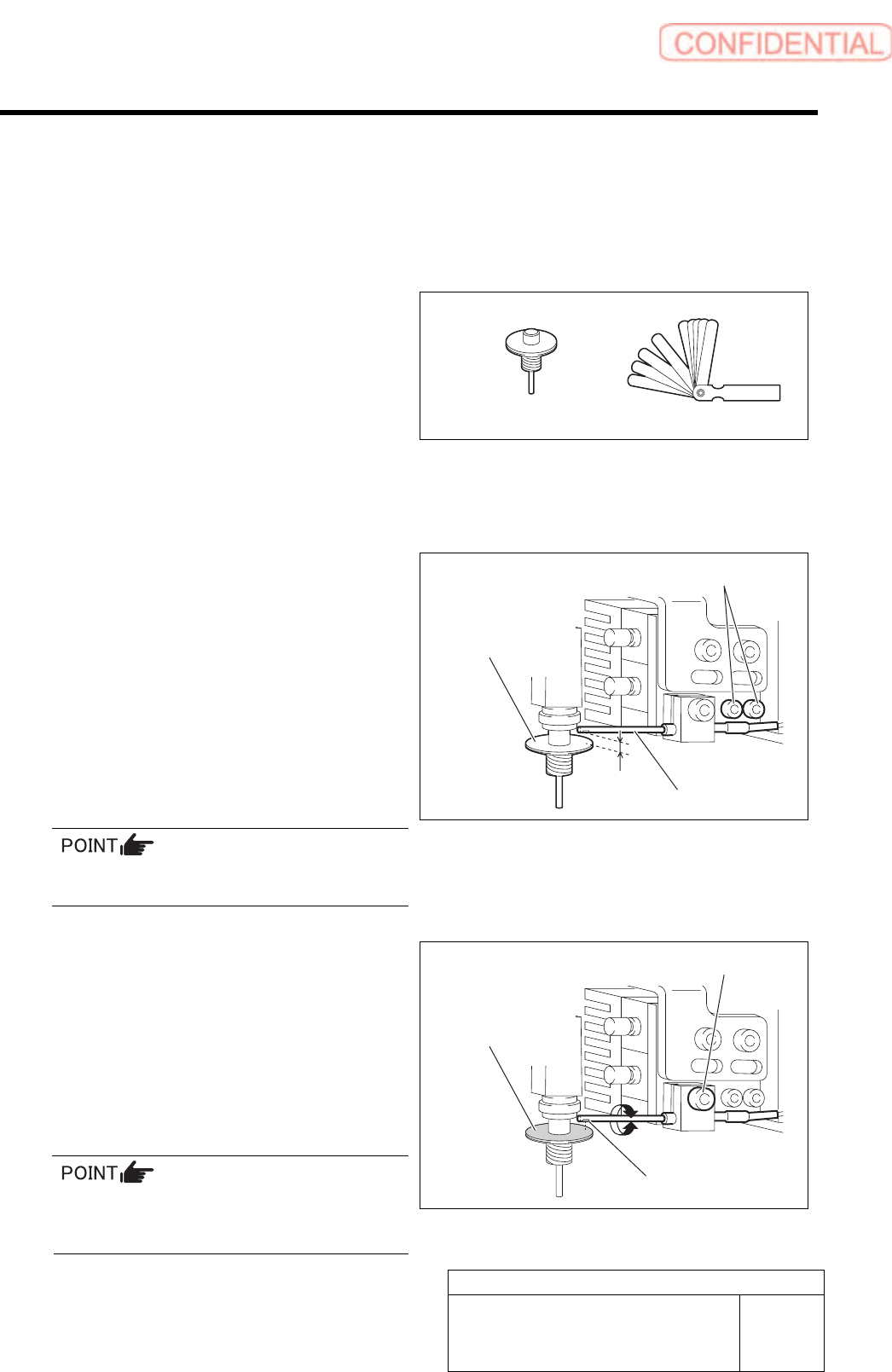
[Necessary jigs]
• Nozzle (used in production)
• Thickness gauge
[Procedure]
1 Install a nozzle for production to the turret No.1.
2 Adjust the clearance between the nozzle
omission detection sensor and the upper
face of the nozzle reflector to 1.0 mm.
1. Loosen the cap screw for the nozzle
omission detection sensor.
2.
Adjust with thickness gauge so that
clearance between the end of the nozzle
omission detection sensor and the
upper face of the reflector is 1.0 mm.
3. Tighten the cap screw.
Fiber sensor is used in the nozzle omission
detection sensor.
3 Adjust the optical axis of the nozzle
omission detection sensor.
1. Loosen the split fastening screw fixing
the nozzle omission detection sensor.
2. Turn the nozzle omission detection
sensor to adjust so that the sensor
luminescence part is directed to
reflector plane of the nozzle.
Optical axis can be easily adjusted by slightly
widening the split fastening part of the bracket
using flat end screwdriver.
Nozzle
(used in production)
Cap screw
Nozzle omission
detection sensor
1.0 mm
Nozzle
Reflector plane part
Split fastening screw
Sensor luminescence part
Thickness gauge
Adjustment
HLGB-10413-01
Nozzle Escape Detect Sensor
Position Adjustment
SHEET
2/5
3. Tighten the split fastening screw.
4. Rotate the nozzle by one turn, and
check that laser from light emitting
section is emitted to the reflector plane
at every angle.
5. Check that there’s some clearance
between the end of the nozzle omission
detection sensor and the nozzle O-ring
spring.
Check clearance at the ceramic ball section.
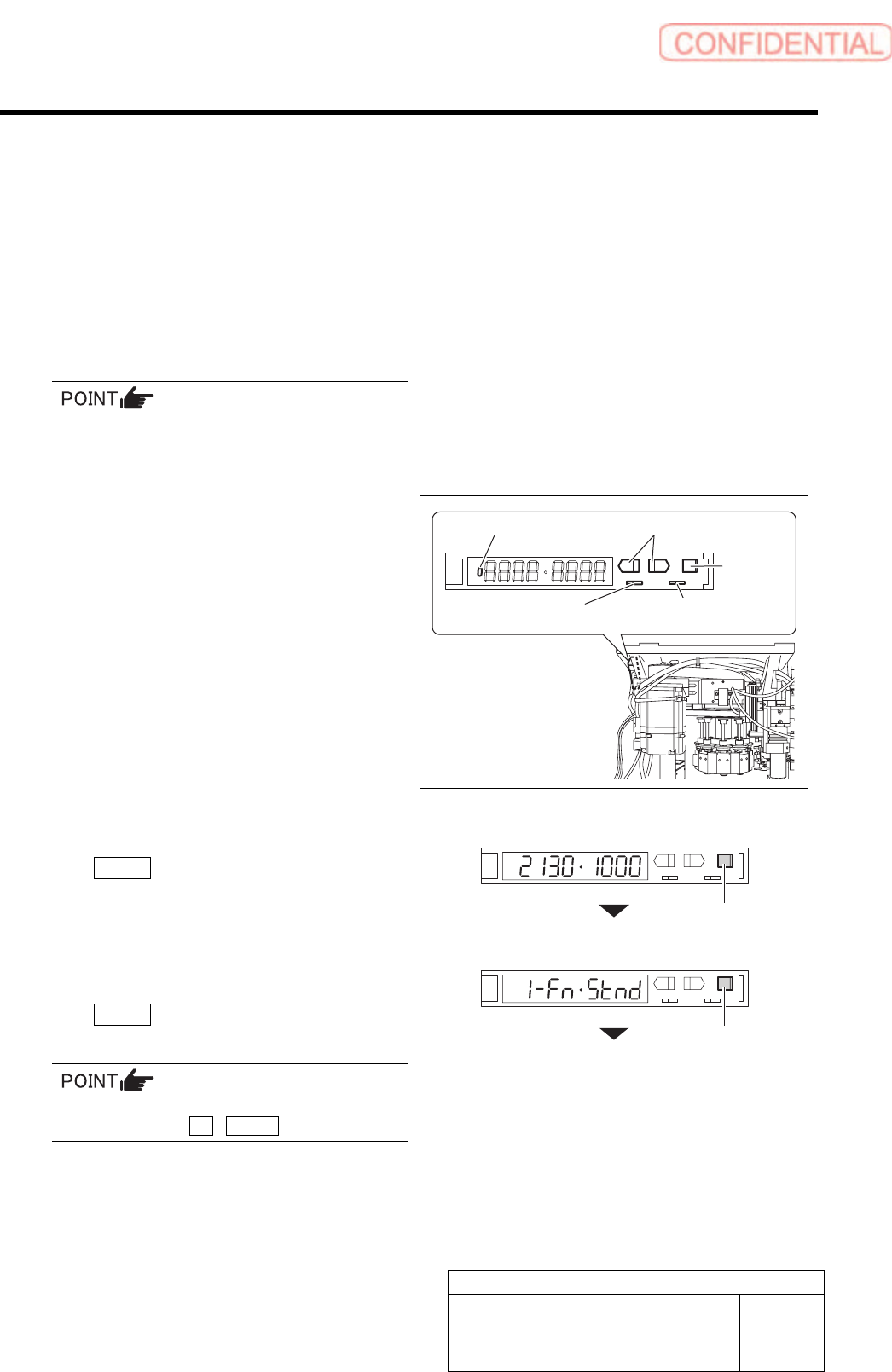
4 Set the nozzle omission detection sensor
amplifier mounted on the side of the head.
1. Open the cover of the sensor amplifier.
2. Turn the SET/RUN selector switch to
the “SET” side.
“Teaching” window appears, and present light
receiving value/threshold value are displayed.
3. On “Teaching” display, press the
MODE button to change the display
without doing anything.
Changes to the “1. Detecting function”.
4. Set the “1. Detecting function” to the
“Std (standard setting)” and press the
MODE button.
Changes to the “2. Timer function” display.
To change the selecting items on each set
display, press the UP / DOWN button.
UP/DOWN button
MODE
button
SET/RUN selector switch
Operation mode
selector switch
MODE button
MODE button
ON/OFF display part
Adjustment
HLGB-10413-01
Nozzle Escape Detect Sensor
Position Adjustment
SHEET
3/5
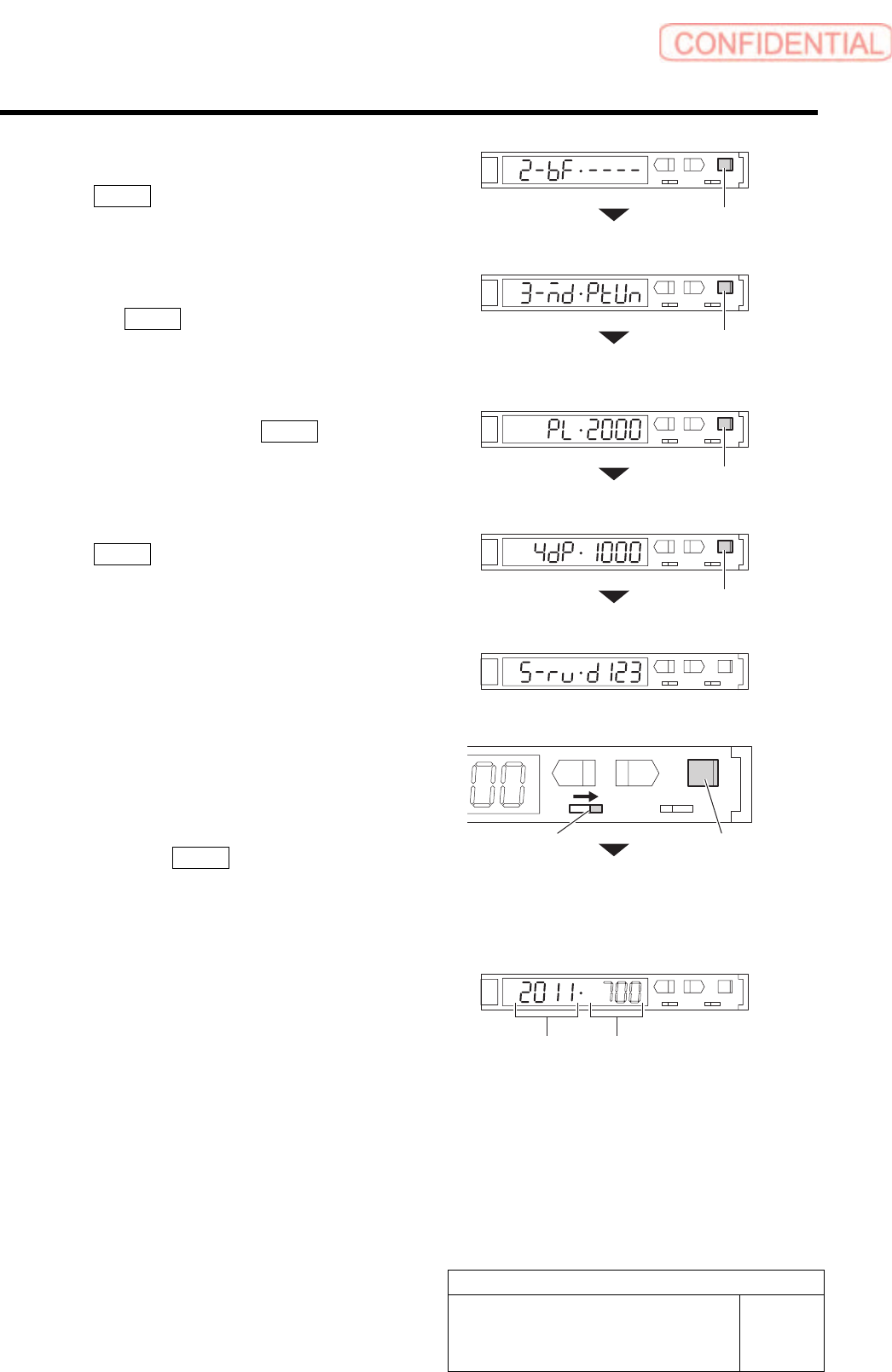
5. Set the “2. Timer function” to “------
(timer ineffective)” and press the
MODE button.
Changes to the “3. MODE key setting” display.
6. Set the “3. MODE key setting” to
“(Power tuning execution)” and press
the MODE button.
Changes to the “Power tuning target value”
display.
7. Set the “Power tuning target value” to
“2000” and press the MODE button.
Changes to the “4. Display change” display.
8. On the “4. Display change”, press the
MODE button without doing
anything.
Changes to the “5. Display direction” display.
9. Set the “5. Display direction” to “D123
(normal setting)”.
5 Set sensitivity of the nozzle omission
detection sensor.
1. Turn the SET/RUN selector switch to
the “RUN” side.
2. Press the MODE button for longer
than 3 seconds.
Light receiving value/threshold is automatically
adjusted.
L
SET RUN
UP DOWN MODE
D
3. Check the light receiving value.
If the light receiving value is within a range of
“2000±100”, setting is completed.
If the light receiving value is out of a range of
“2000±100”, re-perform the positional
adjustment of the nozzle omission detection
sensor performed in the procedures 2 and 3.
MODE button
MODE button
MODE button
SET/RUN selector switch
MODE button
Light receiving value Threshold
MODE button