80S-15贴片机.pdf - 第392页
9 Revolver Head SIPLACE 80S/F/G Service Manual Edition 04/97 9 - 108 Fig. 9.14. 1 Plug-in connections on the PCB camera Key to Fig . 9.14.1 1 P CB camer a amp lifier 5 Connector X1 on ca ble Y0 577 2 C onnect or X1 on PC…
SIPLACE 80S/F/G Service Manual 9 Revolver Head
Edition 04/97
9 - 107
9.14 Dismantling the housing cover
9.14.1 Tools, equipment and consumables
9.14.2 Dismantling the PCB camera
DANGER
OOO
Switch the placement machine off at the main switch and disconnect from the power supply.
●
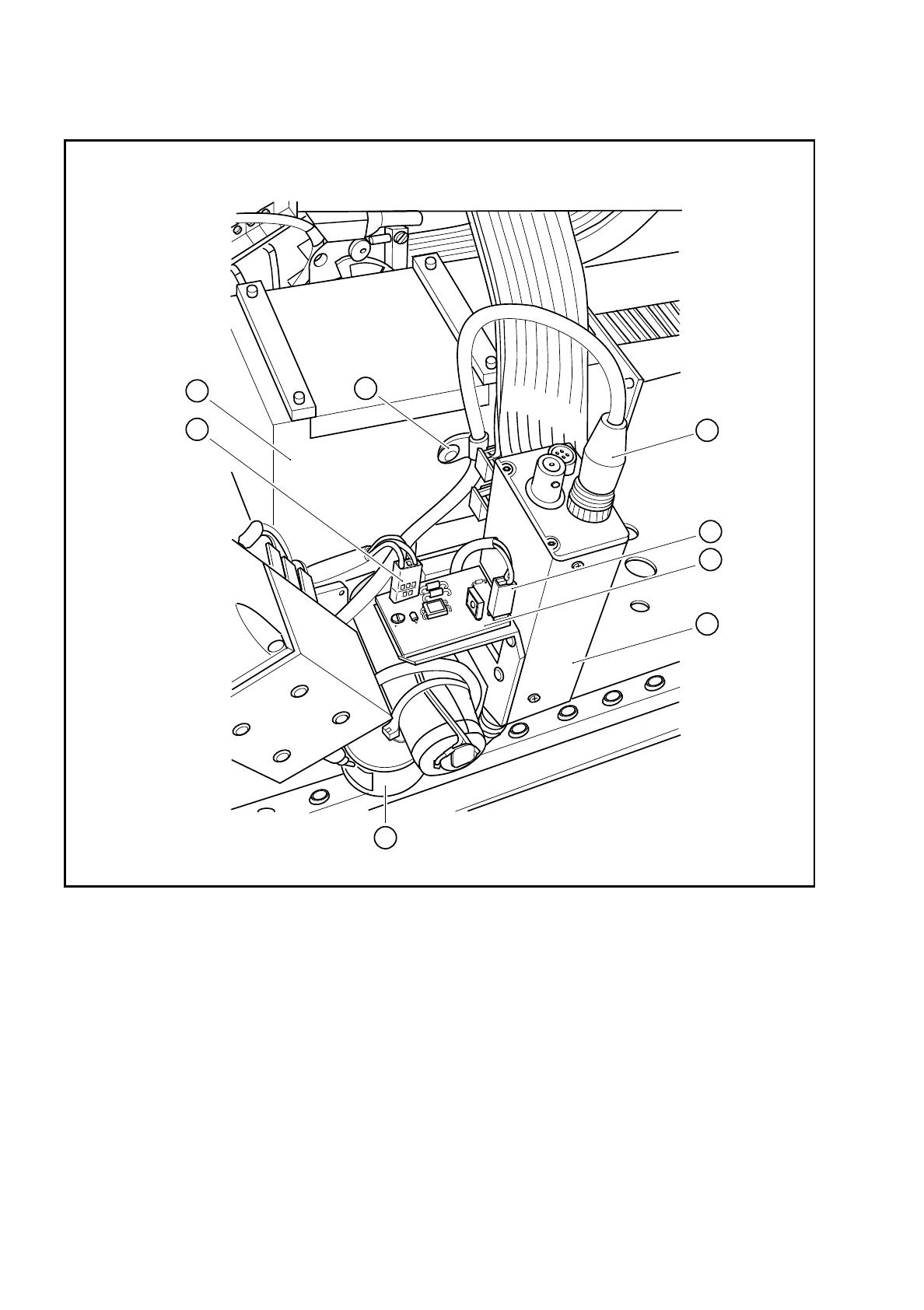
Remove connector X1 of cable Y0577 (point 5 in Fig. 9.14.1) from terminal X1 on board Y0029.
●
Remove connector X3 (point 6 in Fig. 9.14.1) of the lens system lighting cable from terminal X2 on board
Y0029.
●
Remove connector X1 of the PCB camera cable Y0597 (see item 2 in Fig. 9.14.1) from the PCB camera
amplifier.
●
Loosen the cable clip (see item 3 in Fig. 9.14.1).
●
Dismantle the red retaining bracket.
●
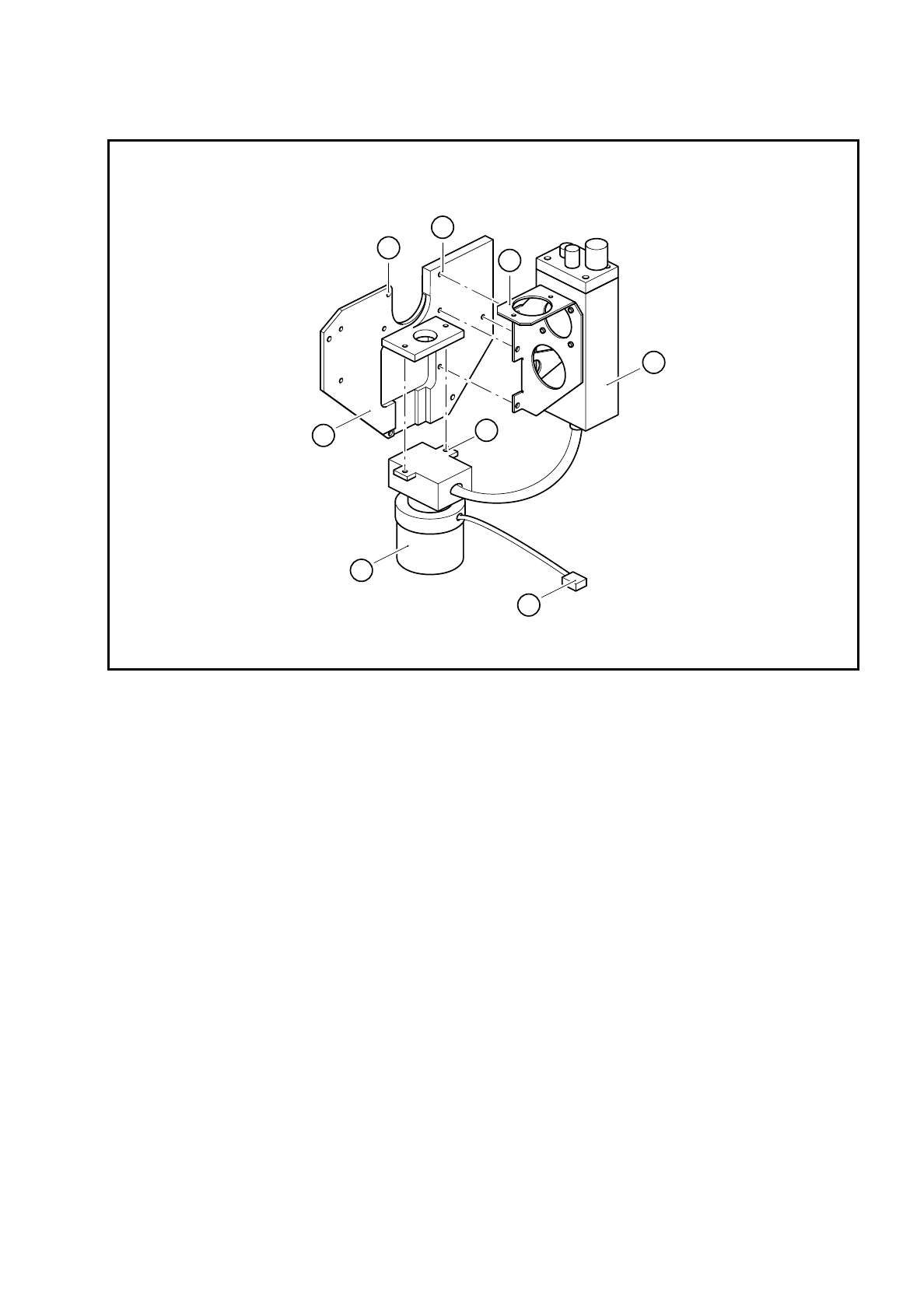
Loosen the 4 M3 hexagon socket-head screws (see item 6 in Fig. 9.14.2) for fixing the PCB camera holder
(see item 5 in Fig. 9.14.2).
From item number
Set of hexagon socket-head screwdrivers
Diagonal cutter
Cable ties
SITEST program
9 Revolver Head SIPLACE 80S/F/G Service Manual
Edition 04/97
9 - 108
Fig. 9.14.1 Plug-in connections on the PCB camera
Key to Fig. 9.14.1
1 PCB camera amplifier 5 Connector X1 on cable Y0577
2 Connector X1 on PCB camera cable Y0597 6 Connector X2 on the cable for the lens system light-
ing
3 Cable clip for the PCB camera cable 7 Illumination control for PCB camera Y0029
4 Cover 8 PCB optical system and PCB illumination
8
2
5
4
3
6
1
7
SIPLACE 80S/F/G Service Manual 9 Revolver Head
Edition 04/97
9 - 109
Fig. 9.14.2 Fixing screws on the PCB camera and housing cover
Key to Fig. 9.14.2
●
Loosen the two M3 fixing screws (see item 8 in Fig. 9.14.2) for the PCB optical system and remove the
PCB camera system.
9.14.3 Dismantling the housing cover
●
Loosen the 4 M3 hexagon socket-head screws (see item 7 in Fig. 9.14.2) for fixing the housing cover and
then remove the housing cover.
9.14.4 Reassembling the housing cover and PCB camera
●
Reverse the above sequence to reassemble.
●
Use the SITEST program to carry out all the calibration steps required, such as calibrating the PCB cam-
era, measuring the PCB /component offset, etc.
1 Housing cover 5 PCB camera holder
2 PCB optical system and PCB illumination 6 4 x M3 hexagon socket-head screws
3 Connector X2 on the PCB lens system cable 7 4 x M3 hexagon socket-head screws
4 PCB camera amplifier 8 2 x M3 hexagon socket-head screws
4
5
1
2
3
8
6
7