80S-15贴片机.pdf - 第453页
10 Si plac e G au tom atic g lue ap plic ator SIPLA CE 80 S/80 F/G Servi ce Ma nua l Ed itio n 06 /98 10 - 8 10.2.2.1 T ools required Y ou will need the equipment listed in th i s secti on in order to carry out se rvicin…

10 Siplace G automatic glue applicator SIPLACE 80S/80F/G Service Manual
Edition 06/98
10 - 4
● Error message no. 850: Process data cannot be stored
- Possible cause:
- Cannot write back to gluing head process switch (C:\TMP\VL_PDAT.K1/2/3).
To eliminate:
- Check the hard disk.
● Error message no. 897: DP: Glue identification lines not available
Possible cause:
- The wrong glue name was entered in the AKTUELL.MA file.
To eliminate:
- Correct the data in AKTUELL.MA.
● Error message no. 898: DP: VKL data not available
Possible cause:
- A glue name in the AKTUELL.MA file is not available as a *.VKL file.
To eliminate:
- Correct the data in AKTUELL.MA and the *.VKL file.
● Error message no. 899: DP: INI data not available
Possible cause:
- A glue name in the AKTUELL.MA file is not available as a *.INI file.
To eliminate:
- Correct the data in AKTUELL.MA and the *.INI file.
● Error message no. 905: Glueing size not possible with glue available
Possible cause:
- The dispensing stage requested by the line computer in this cluster is not possible with the current
glue set-up.
To eliminate:
- Set up the glue again and check the placement program.
● Error message no. 909: DP: Glue type list KLL incorrectly loaded
Possible cause:
- Incorrect data (*.VKL, SILPLACE.KLL) on the hard disk.
To eliminate:
- Correct the data in AKTUELL.MA.
● Error message no. 911: OPT: Spacer in contact with glueing point
Possible cause:
- The glue points are too close to one another or aligned too closely to the spacer.
To eliminate:
- Realign the spacer and reoptimize the cluster.
PLEASE NOTE
The alignment of the spacers must be specified in the "Modify system data" menu option.
SIPLACE 80S/80F/G Service Manual 10 Siplace G automatic glue applicator
Edition 06/98
10 - 5
● Error messages no. 1005/6/7: Z-axis, GU1/GU2/G3: Bero at top does not react
Possible causes:
- The Z axis of the glue application head concerned is not far enough up; z axis jamming; distance from
BERO too large; BERO defective; cam disc loose; incorrect zero point correction for Z axis; counting
error; direct-drive motor, controller, servo amplifier defective.
To eliminate:
- Check the possible sources of error listed above and replace any defective components.
● Error messages no. 1010/11/12: Z-axis, GU1/GU2/GU3: cannot be moved upwards anymore
Possible cause:
- The z axis of the glue application head concerned is below the minimum position when you press the
Start button.
To eliminate:
- Check the servo amplifier; push the z axis up manually.
● Error messages no. 1018/19: xk/yk-axis: Target position not reached
Possible causes:
- Incorrect machine data; axis jamming; wrong zero point correction; incorrect axis adjustment; direct-
drive motor, controller, servo amplifier defective.
To eliminate:
- Check the possible sources of error listed above and replace any defective components.
● Error messages no. 1020/21/22: Z-axis, GU1/GU2/GU3: Target position not reached
Possible causes:
- Incorrect machine data; axis jamming; wrong zero point correction; cam disc in turned position at zero
pulse; incorrect axis adjustment; direct-drive motor, controller, servo amplifier defective.
To eliminate:
- Check the possible sources of error listed above and replace any defective components.
● Error message no. 1163: GU: Glueing order (command) to head
Possible cause:
- An error occurred when the dispensing command was sent to the dispensing unit.
To eliminate:
- The error will be described in greater detail in another message. Note this message when trouble-
shooting.
● Error message no. 1164: 1164 GU: wait until glueing is finished
Possible cause:
- An error occurred when waiting for the end signal from the dispensing unit.
To eliminate:
- The error will be described in greater detail in another message. Note this message when trouble-
shooting.
10 Siplace G automatic glue applicator SIPLACE 80S/80F/G Service Manual
Edition 06/98
10 - 6
● Error message no. 1165: GU: Error while setting desired temperature
Possible cause:
- An error occurred when sending the desired temperature to the dispensing unit.
To eliminate:
- The error will be described in greater detail in another message. Note this message when trouble-
shooting.
● Error message no. 1166: GU: Error while setting glueing point volume
Possible cause:
- An error occurred when sending the change in glue point volume to the dispensing unit.
To eliminate:
- The error will be described in greater detail in another message. Note this message when trouble-
shooting.
● Error message no. 1167: GU: Error while setting new cartridge
Possible cause:
- An error occurred when sending a command to the dispensing unit to indicate that a new cartridge
had been inserted.
To eliminate:
- The error will be described in greater detail in another message. Note this message when trouble-
shooting.
SIPLACE 80S/80F/G Service Manual 10 Siplace G automatic glue applicator
Edition 06/98
10 - 7
10.2 Replacement work on the glue application head G
10.2.1 Safety instructions
This chapter describes the servicing work on the glue application heads of the SIPLACE G.
Please observe the following safety instructions when carrying out any of the servicing work described in this
chapter.
DANGER
Automatic placement machines from the SIPLACE family are powered with mains voltage at 3x400V ± 10%,
50/60 Hz. Parts of these systems carry hazardous voltages - even when switched off at the main switch.
Incorrect handling of these automatic placement machines can therefore result in death or severe injury and
considerable damage.
Please follow the applicable accident prevention and VDE regulations (particularly VDE 0113).
Measurements and maintenance work on the glue application heads and axes must only be carried out by
adequately qualified personnel.
Switch off at the main switch and remove the mains plug before starting the maintenance work. Secure the
system to prevent it being switched on again.
If these instructions are not followed, death or severe injury may result if live parts are touched.
10.2.2 Overview
- The SIPLACE G automatic placement machine has three autonomous glue application heads (also called
"dispensing units" in the software).
- The glue application heads are numbered clockwise. This means that glue application head 1 = on the
small Y axis (Y2); glue application head 2 = on the small X axis (X2), glue application head 3 = on the large
X gantry axis.
PLEASE NOTE
The positions of glue application heads 1 and 2 are measured relative to glue application head 3. Conse-
quently, the head offset of glue application heads 1 and 2 must be re-recorded whenever position-related
changes are made to glue application head 3.
- Glue application head 2 differs from glue application head 1 and 3 (1 and 3 are identical). It must therefore
be changed separately. Please note this fact when ordering spare parts.
10 Siplace G automatic glue applicator SIPLACE 80S/80F/G Service Manual
Edition 06/98
10 - 8
10.2.2.1 Tools required
You will need the equipment listed in this section in order to carry out servicing work on the glue applicator
heads.
- 1 set of screwdrivers
- 1 set of hexagon socket screw keys
- 1 x diagonal cutter, small
- 1 x flat-nose pliers
- 1 x caliper
- Screw locking glue (Loctite 462)
- 1 set of drift punches
- 1 x 250 g hammer
- Spare parts catalog
10.2.2.2 Preparatory tasks
Carry out the following preparatory tasks before any maintenance work on the glue application heads. This
will make the work easier and prevent subsequent errors.
● Before starting maintenance, switch off at the main switch and remove the mains plug. Secure the system
to prevent it being switched on again. See also the DANGER instructions at the start of this chapter.
● Remove the glue cartridges together with the spacers from the glue application heads.
10.2.3 Replacing the glue application head
WARNING
Whenever the gantry is moved manually, the Z axes of the glue applications heads have to be in their top
starting position (Z-Null = min. position). In the bottom position (max. Z position) the Z axis can collide with the
comb of the center conveyor causing irreparable damage to the glue application head. Also follow the safety
instructions in Section 10.2.1
SIPLACE 80S/80F/G Service Manual 10 Siplace G automatic glue applicator
Edition 06/98
10 - 9
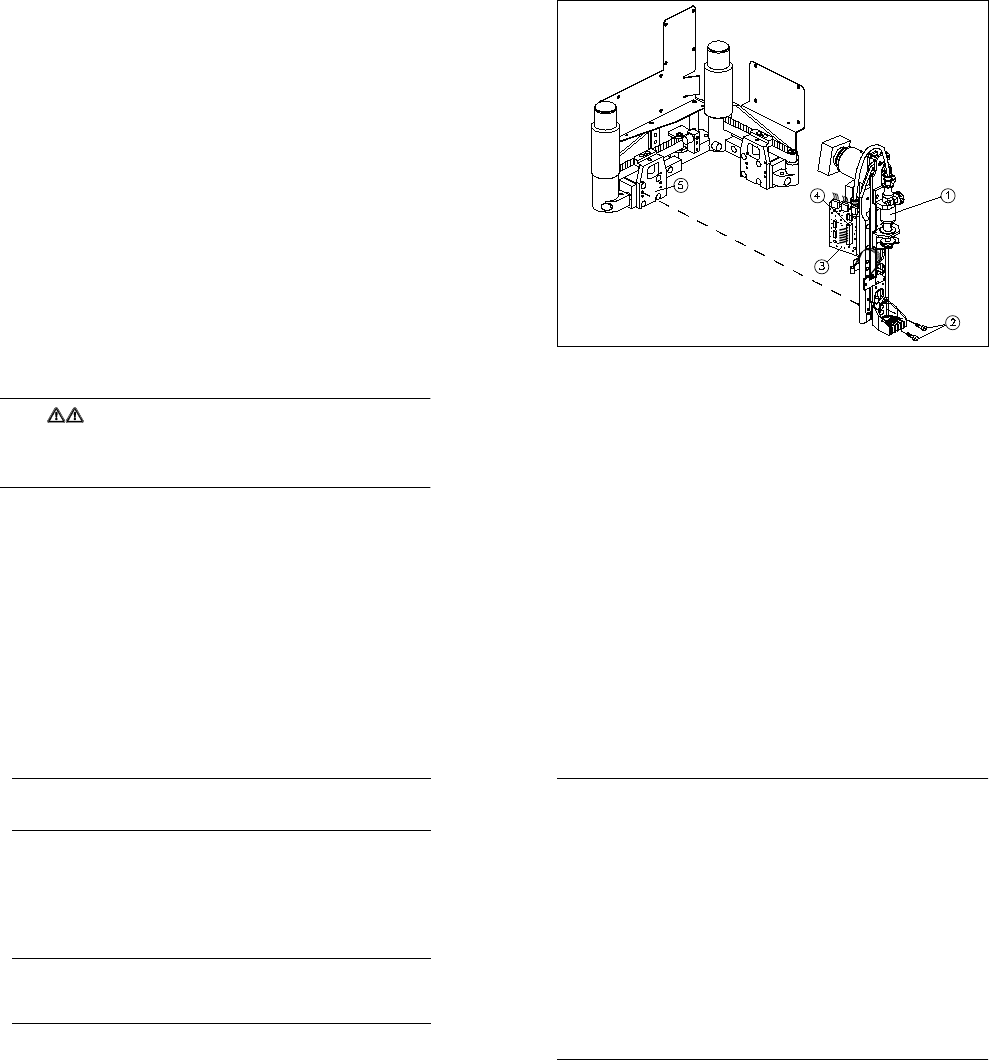
Fig. 10.2.1 Installing / Removing the glue application head
Key to Fig. 10.2.1
1 Glue application head 2
2 Fixing screws for the glue application head (4 x M3 hexagon socket-head screws)
3 Conversion board for gluing head Y0052 (gluing head board)
4 Ribbon cable
5 Angle bracket (supporting plate for dispensing unit) (on glue application heads 1 and 2 only)
10.2.3.1 Removal
● Remove the protective side covers. Manually move the gantry until the glue application head to be
removed is easily accessible. Note the warning given above.
● Detach the ribbon cable from the gluing head board on the glue application head concerned. To do this,
press down on the plug retainers.
● Loosen the four hexagon socket-head screws used to screw the glue application head to the angle bracket
(supporting plate for the dispensing unit) (see Fig. 10.2.1). Carefully remove the glue application head.
● Remove the black air line that leads from the gantry to the dispensing valve of the glue application head.
Do not remove the air line that leads from the dispensing pressure unit to the glue cartridge.
10 Siplace G automatic glue applicator SIPLACE 80S/80F/G Service Manual
Edition 06/98
10 - 10
PLEASE NOTE
The glue application head is pinned to the angle bracket (dispensing unit supporting plate). If the glue
application head cannot be removed immediately, loosen it carefully without using tools.
10.2.3.2 Installation
● Reconnect the black air line to the dispensing valve.
● Place the new glue application head on the angle bracket on the supporting plate.
● Tighten the four hexagon socket-head screws on the glue application head. Secure the hexagon socket-
head screws first with Loctite adhesive. Follow the instructions given below.
PLEASE NOTE
The glue application head 2 differs from glue application heads 1 and 3 (1 and 3 are identical). The glue
application heads have an identification label. When installing, make sure that the glue application heads
are assigned correctly.
● Introduce the black air line through the fixing lugs on the glue application head.
● Connect the ribbon cable to the gluing head board of the glue application head concerned. The plug retain-
ers must fold up fully. Make sure that the cable is inserted correctly.
● Replace the protective side covers in the machine.
● Correct the position as necessary (see instructions below). All other settings associated with the glue
application heads are described in detail in Section 10.3.
● Check the settings of the pressure sensor and temperature sensor on the new glue application head(s).
Readjust the pressure sensor and temperature sensor if necessary (see Section 10.3).
● Check the dynamic behavior of the z axis of the new glue application head(s). Readjust the dynamic
behavior, if necessary (see Section 10.3).
● Once all the settings are complete, carry out a short functional test on the new glue application head(s).
SIPLACE 80S/80F/G Service Manual 10 Siplace G automatic glue applicator
Edition 06/98
10 - 11
PLEASE NOTE
You will then have to carry out various position corrections, in the specified order, regardless of which glue
application head was replaced:
Situation 1: Only glue application head 3 was replaced, glue application heads 1 and 2 were not
changed.
- Record the zero point correction for axis Z3.
- Record the offset between the PCB camera and glue application head 3.
- Record the offset between glue application heads 1 and 2 and glue application head 3.
- Record the machine zero point.
- The following position corrections must be carried out in relation to the new machine zero point:
The automatic width adjustment must be calibrated.
Max/min positions of the X1 and Y1 axes
Situation 2: Only glue application head 1 and/or glue application head 2 was replaced, glue applica-
tion head 3 was not changed.
- Record the zero point correction for axis Z1 and/or Z2.
- Record the offset between glue application head 1 and 2 and glue application head 3.
- The Y2 and/or X2 axis must be mapped.
Situation 3: Glue application head 3, glue application head 1 and/or glue application head 2 was
replaced.
- All the position corrections described for situations 1 and 2 must be carried out.
10 Siplace G automatic glue applicator SIPLACE 80S/80F/G Service Manual
Edition 06/98
10 - 12
10.2.4 Replacing the Z axis motor
PLEASE NOTE:
Do not remove the proximity switch (BERO) at the top of the motor flange when you replace the Z axis motor.
Do NOT change the initial tension of the cam disc bearing when replacing the Z axis motor.
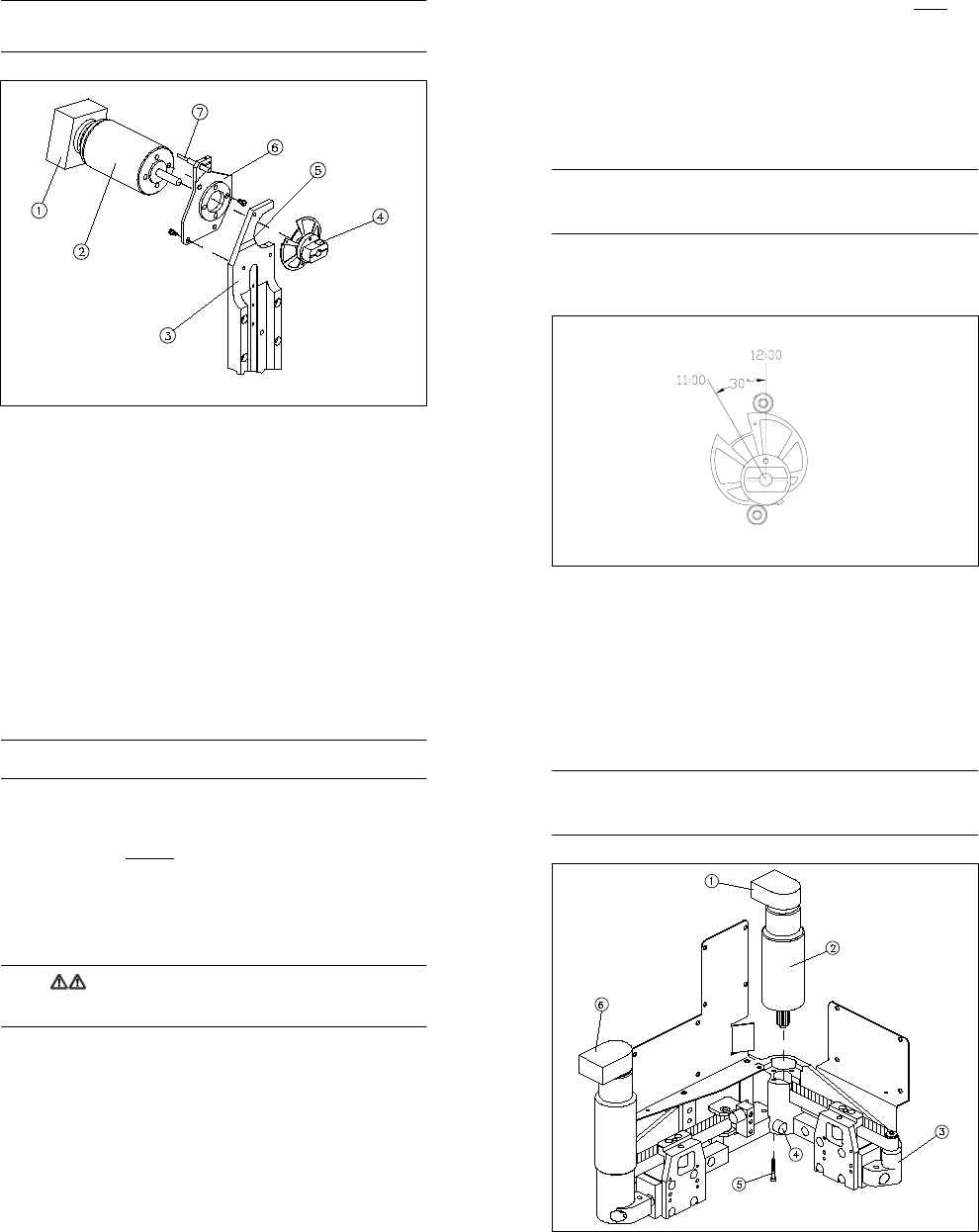
Fig. 10.2.2 Overview: Replacing the Z axis motor for the glue application head
Key to Fig. 10.2.2
1 Incremental encoder
2 Z axis motor
3 Motor support
4 Clamping screw for the hub of the cam disc
5 Round countersunk holes in the motor supports
6 Motor flange
7 Proximity switch (do not remove)
SIPLACE 80S/80F/G Service Manual 10 Siplace G automatic glue applicator
Edition 06/98
10 - 13
10.2.4.1 Removal
● To replace the z axis motor, remove the glue application head as described in Section 10.2.3.
● Loosen the clamping screw for the hub of the cam disc (M3 hexagon socket-head screw). DO NOT loosen
the screw for setting the initial tension of the cam disc bearing.
● Dismantle the motor flange from the motor support by loosening the three fixing screws
(M3 hexagon socket-head screws). These screws are accessible from the motor side.
● Pull the motor and the motor flange out from the back of the glue application head. At the same time, care-
fully remove the cam disc from the motor shaft. It is not necessary to change the initial tension of the cam
disc bearing to do this.
● Loosen the four fixing screws to dismantle the motor flange from the motor.
10.2.4.2 Installation
PLEASE NOTE:
Before assembling the motor flange, turn the motor so that the incremental encoder points downwards (plug
connection pointing to "6 o‘clock"). If the incremental encoder is pointing in another direction, there is a risk of
collision.
● Fit the motor flange to the motor by tightening the four fixing screws (M3 hexagon socket-head screws).
Please note that the incremental encoder must point downwards when the motor is installed.
● Insert the motor from the back into the motor support. At the same time, push the cam disc onto the motor
shaft. The recess in the cam disc should point to "11 o’clock" (see Fig. 10.2.3).
Fig. 10.2.3 Installation position for the cam disc of the z axis
10 Siplace G automatic glue applicator SIPLACE 80S/80F/G Service Manual
Edition 06/98
10 - 14
PLEASE NOTE:
During assembly, push the sides of the motor flange into the round countersunk hole in the motor support.
● Screw the motor flange to the motor support by tightening the three fixing screws. Please note the instruc-
tions above.
● Push the cam disc to the middle of the two cam disc bearings. The recess in the cam disc must be to the
left of the cam disc bearings, at the "11o‘clock" position (see Fig. 10.2.3). Lightly clamp the cam disc.
● Check that the cam disc lies against both cam disc bearings over the entire travel distance and that the
mechanism is running smoothly (you must always be able to turn the cam disc bearings). If this is not the
case, correct the installation position of the motor flange in the motor support.
● Leave the cam disc clamped lightly. Do not tighten it until you have set the zero point correction for the z
axis.
● Reconnect the three plugs (power supply, incremental encoder and inductive switch) to the gluing head
board. Fix the cable around the motor with a cable tie.
● Carry out a zero point correction for the z axis (see Section 10.3).
WARNING
The machine must not be started normally until the zero point correction has been carried out. You may only
load the SIKLEBER test program in order to determine the zero point correction for the z axis.
● Check the dynamic behavior settings for the z axis. If necessary, adjust the dynamic behavior as described
in Section 10.3.
● Calibrate the machine as described for situations 1 - 3 in Section 10.2.3.
SIPLACE 80S/80F/G Service Manual 10 Siplace G automatic glue applicator
Edition 06/98
10 - 15
10.2.5 Replacing the X2/Y2 axis direct-drive motor
PLEASE NOTE
The procedures for replacing the X2 and Y2-axis motors are almost identical. Conesequently, only replace-
ment of the Y2-axis motor will be described here. The wiring of the X2 and Y2-axis motors differs (reversed
direction of rotation at positive travel), so please note this when ordering spare parts.
Fig. 10.2.4 Overview: Replacing the Y2 axis direct-drive motor
Key to Fig. 10.2.4
1 / 6 Incremental encoder for the Y2/X2 axis motor (1 must be aligned at the back and 6 on the left)
2 Y2 axis direct-drive motor
3 Mini-gantry
4 Elastomeric spring (only has to be removed from the Y2 axis motor of the glue application head)
5 Fixing screws for the direct-drive motor (3 x, loosen fully)