1_H24维修手册.pdf - 第82页
CONFIDENTIAL Downloaded at 2015/06/18 12:05:48 (JST) by 5LUF0998 (C) FUJI Machine Mfg. Co., Ltd. All Rights Reserved. 2015/06/18 doc3elPkSB8
C
C
h
h
a
a
p
p
t
t
e
e
r
r
7
7
S
S
t
t
e
e
p
p
p
p
i
i
n
n
g
g
M
M
o
o
t
t
o
o
r
r
CONFIDENTIAL
Downloaded at 2015/06/18 12:05:48 (JST) by 5LUF0998
(C) FUJI Machine Mfg. Co., Ltd. All Rights Reserved. 2015/06/18 doc3elPkSB8

CONFIDENTIAL
Downloaded at 2015/06/18 12:05:48 (JST) by 5LUF0998
(C) FUJI Machine Mfg. Co., Ltd. All Rights Reserved. 2015/06/18 doc3elPkSB8
Edition 5.0 H24 Head Repair Training Text for Service Engineers
Replacing and Adjusting the Stepping Motor
Chapter 7 - Replacing and Adjusting the Stepping Motor
7.1 Setting Up the Head I/O Check Jig
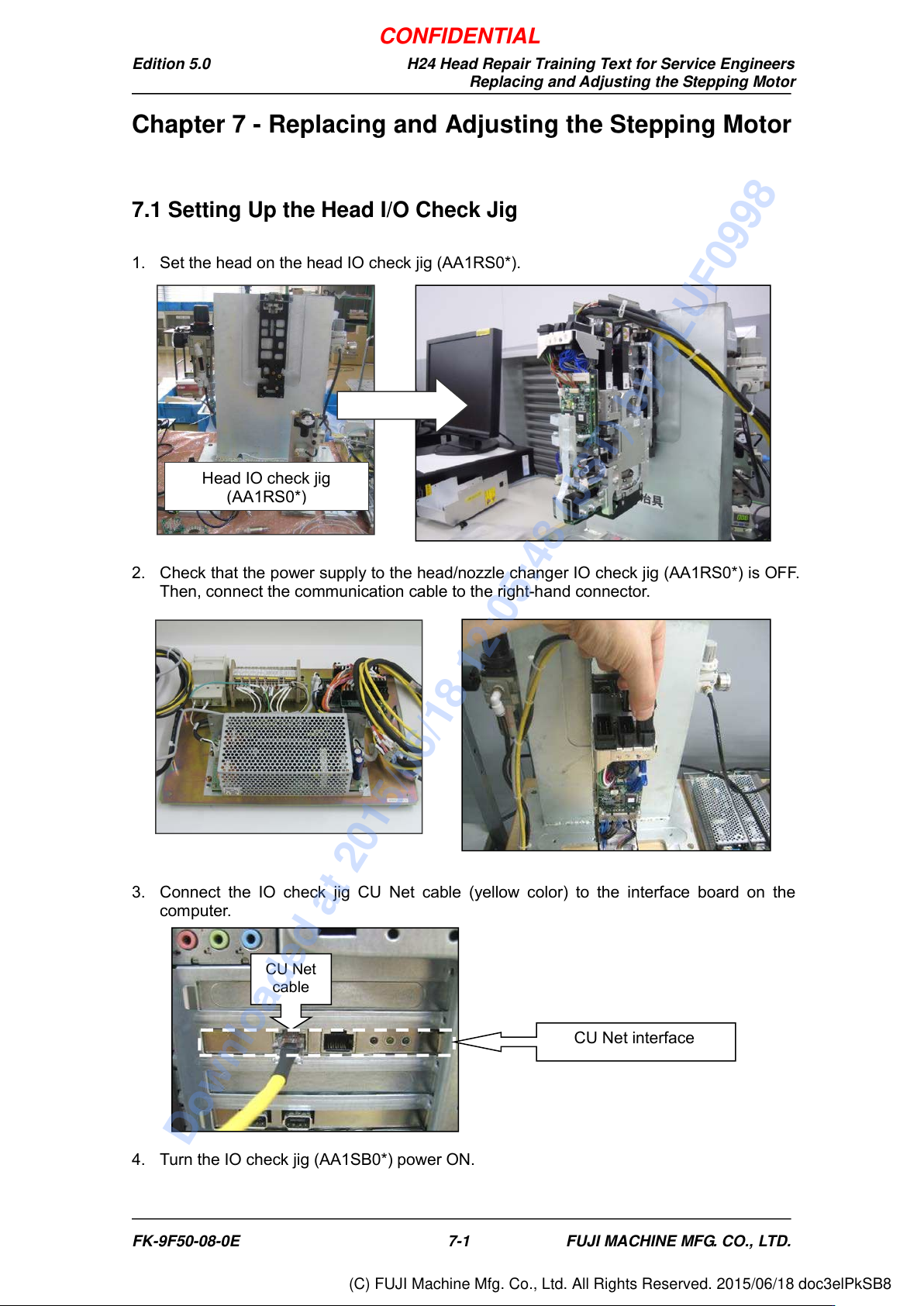
1. Set the head on the head IO check jig (AA1RS0*).
2. Check that the power supply to the head/nozzle changer IO check jig (AA1RS0*) i s OF F.
Then, connect the communication cable to the right-hand connector.
3. Connect the IO check jig CU Net cable (yellow color) to the interface board on the
computer.
4. Turn the IO check jig (AA1SB0*) power ON.
CU Net
cable
CU Net interface
Head IO check jig
(AA1RS0*)
FK-9F50-08-0E 7-1 FUJI MACHINE MFG. CO., LTD.
CONFIDENTIAL
Downloaded at 2015/06/18 12:05:48 (JST) by 5LUF0998
(C) FUJI Machine Mfg. Co., Ltd. All Rights Reserved. 2015/06/18 doc3elPkSB8