WinMCS_Manual(ENG) rev1.0.pdf - 第4页
4 WinMCS_Manua l(ENG) rev 1.0 Koh Y oung T echnology Inc. 1. Introduction 1.1. V ersion Vision: Higher than V er .1094 1.2. Purpose The purpose of this user manual is to guide the users to under stand the functional itie…

3
Service Manual
Koh Young Technology Inc.
4.8.1. ZOOM LANE 1 .................................................................................................................................... 57
5. TOWER LAMP SETTING ........................................................................................................................................... 58
5.1. TOWER LAMP SETTING ............................................................................................................................ 58
6. MACHINE CALIBRATION (Kohyoung Level).................................................................................................... 60
6.1. MACHINE CALIBRATION WIZARD ....................................................................................................... 60
7. DIAGNOSIS .................................................................................................................................................................... 61
7.1. STATUS VIEW (Kohyoung Level) ........................................................................................................... 61
7.1.1. Diagnosis for Conveyor (Kohyoung Level) ............................................................................ 62
7.1.2. Diagnosis for Motion & Conveyor (Kohyoung Level) ...................................................... 63
7.1.3. MACHIEN AGING MODE (Kohyoung Level) ......................................................................... 64
8. MACHINE STATUS DIAGRAM ................................................................................................................................ 65
8.1. SYSTEM STATUS DIAGRAM (Kohyoung Level) .............................................................................. 65
8.2. MACHINE MODE STATUS DIAGRAM(Kohyoung Level) ............................................................. 66
8.3. CONVEYOR STATUS DIAGRAM (Kohyoung Level) ....................................................................... 67
4
WinMCS_Manual(ENG) rev1.0
Koh Young Technology Inc.
1. Introduction
1.1. Version
Vision: Higher than Ver.1094
1.2. Purpose
The purpose of this user manual is to guide the users to understand the functionalities of
WinMCS application program, Windows O/S based Real-Time Motion Control System
developed by Koh Young Technology, and it describes all the menu items of WinMCS
application program to control machine in the best condition.
.
1.3. A Range of Application
It applies to SPI, AOI, PRIME inspection machines.
1.4. Main View
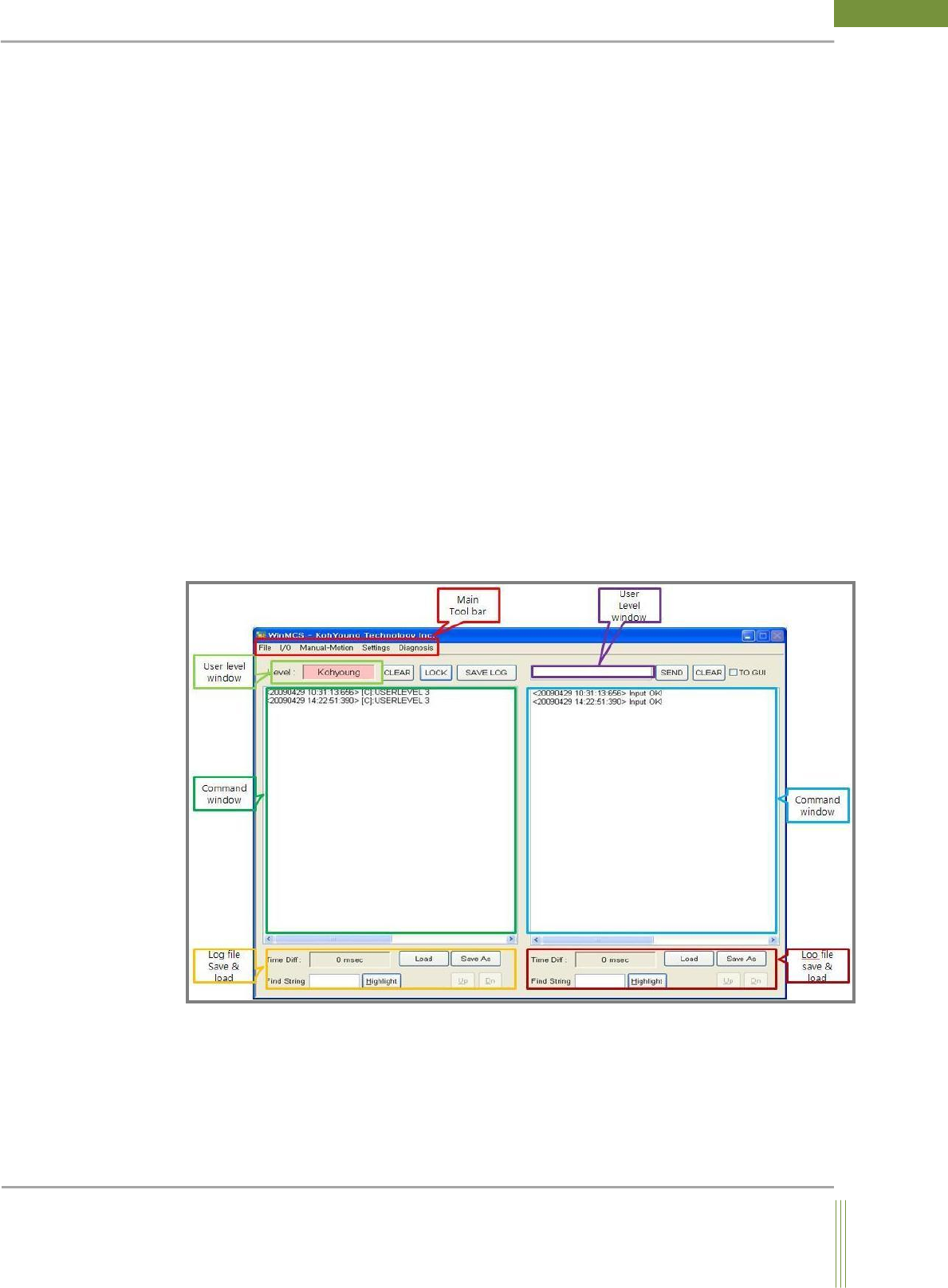
The Main view of WinMCS (Machine Interface) is as follows.

5
Service Manual
Koh Young Technology Inc.
MAIN View
Main view is displayed if you double-click on the minimized icon. You can use each menu
as per the user level.
Main Tool bar
It is consisted of five menu items such as File, I/O, Manual-Motion, Setting and Comhistory.
More details will be explained in next chapter.
Command Edit Window
It is to input a control command in WinMCS.
Log file save & load
It is to save the records of Command window, or to load and check the log files.
GUI Communication Window
It is to check the communication status between WinMCS and GUI.
Command Input check Window
It is to check the time when each operation is performed in MCS and the commands inputted to
machine.
Manual Command
If you input the user level 0~4 to Command Edit Window, it is changed to each mode.
Log file Save & Load
It is to save the commands as text files, and to view log files after loading.