00197394-03_AI_Smart-Pin-Support_X-S_DE_EN.pdf - 第110页
3 Installation 3.4 Installing the W5 magazine (SIPLACE X4i S) 110 Assembly Instructions / Montageanleitung SIPLACE X-Series S Smart Pin Support 05/2019 3.4.4.1 DIP Switch S1 - Jumper Assignment S1.1 S1.2 Magazine connect…
3 Installation
3.4 Installing the W5 magazine (SIPLACE X4i S)
Assembly Instructions / Montageanleitung SIPLACE X-Series S Smart Pin Support 05/2019 109
3.4.4 Connecting the "Magazine Recognition" Board (If Present)
NOTICE
From SW 706.1 SP2
► Configuration of the magazines is performed automatically in machines before SW
706.1 SP2, using the "magazine recognition" board.
► If older machines with SPS are upgraded to a version equal to or higher than SW
706.1 SP2, the existing magazine configuration is kept in the software. If additional
magazines without board are fitted into these upgraded machines, these must be
manually configured via the software (Autoconfig).
► From SW 706.1 SP2, magazines can be fitted without the "magazine recognition"
function. In this case, the machine can only be configured manually via the software
(Autoconfig).
Proceed with chapter 3.3.4 "Assembling the W5 magazine" [}106] if this applies.
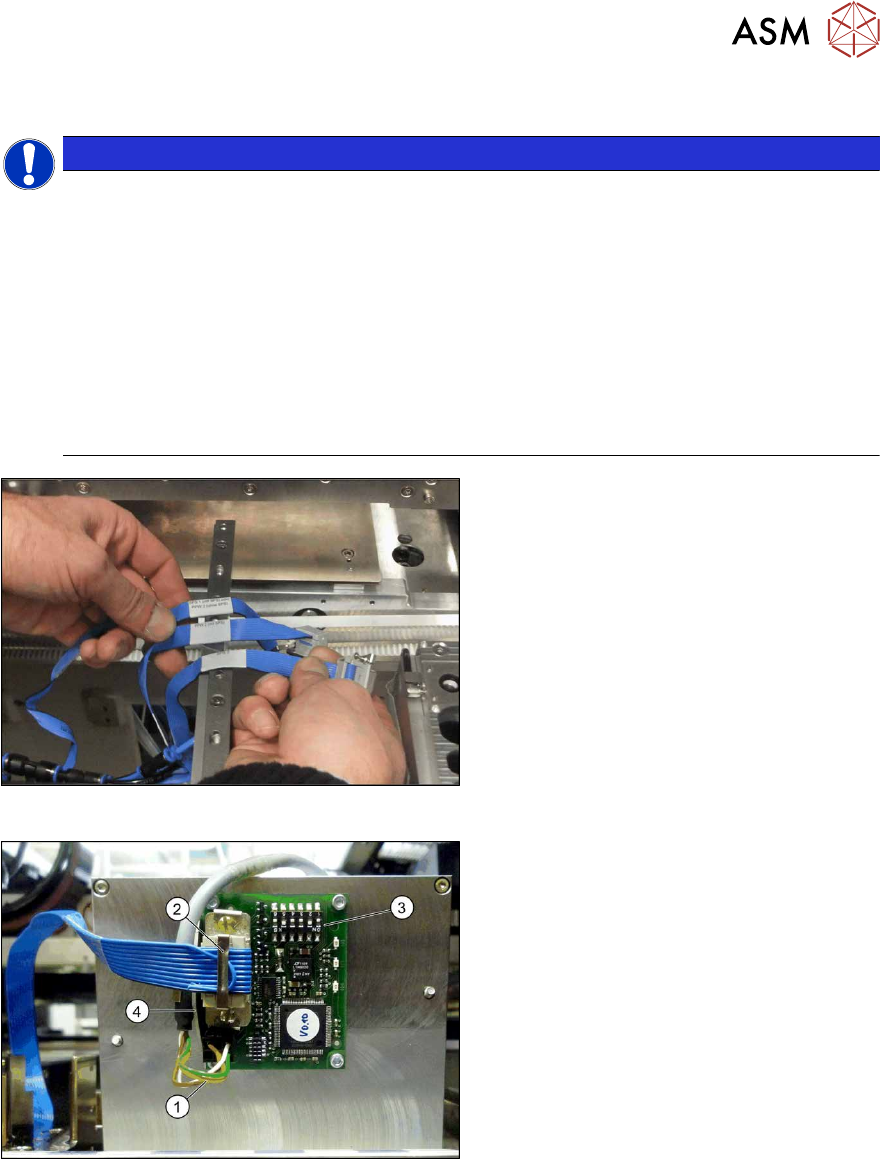
Fig.37: Data cable for NC 2 and SPS
► Locate the required cables.
Four labeled data cables have been pre-
pared in the machine for the various config-
urations of NCs with and without Smart Pin
Support (SPS).
●
X1*a (NC 1)
●
x1*b (SPS (1) or NC 2 (without SPS))
●
X1*c (NC 2 with SPS)
●
X1*d (SPS2)
Fig.38: Board connection (using example of Q10)
► If not fitted, screw the board to the un-
derside of the magazine with four
M2.5x4 screws. The connection for the
flat ribbon cable should point towards
the angular metal bracket(4).
► Connect the power supply cable (1) to
connector X8 on the magazine board.
► Fit the strain relief for the voltage sup-
ply cable to the metal bracket and then
fix the cable into place.
► Connect the "NC SPS ribbon cable" (2)
to connector X6 on the board and
screw into place.
► Set the jumper (3) on the DIP
switchS1. (see below )
3 Installation
3.4 Installing the W5 magazine (SIPLACE X4i S)
110 Assembly Instructions / Montageanleitung SIPLACE X-Series S Smart Pin Support 05/2019
3.4.4.1 DIP Switch S1 - Jumper Assignment
S1.1 S1.2 Magazine connected at
ON OFF NC connection 2
OFF ON NC connection 4
S1.4 S1.5 S1.6 Meaning
OFF OFF OFF Garage is switched off
ON OFF OFF Garage type W5
X X ON Reserved
NOTICE
Jumper S1.3
Jumper S1.3 is not used.
3.4.5 Assembling the W5 magazine
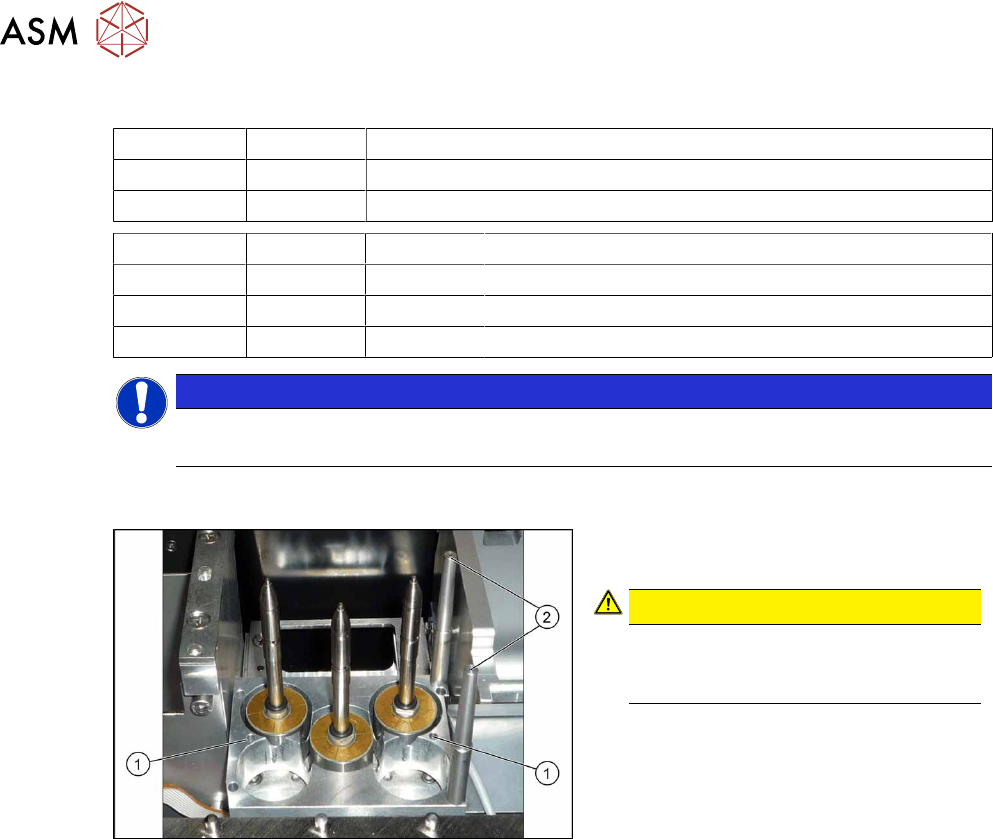
Fig.39: W5 magazine (using example of X4 S)
► Fix the magazine into place with the
four fastening screws(1).
CAUTION!
Observe the installation position.
The calibration fiducials (2) need to be
on the right-hand side.
.
3 Installation
3.5 Installing the Q10 Magazine
Assembly Instructions / Montageanleitung SIPLACE X-Series S Smart Pin Support 05/2019 111
3.5 Installing the Q10 Magazine
The Q10 magazine is fitted in place of a FC camera or a coplanarity module..
See also
2 2.4 "Possible Configurations/Required Equipment" [}82]
3.5.1 Installing the Q10 Magazine Holder
WARNING
Incorrectly labeled spacers for stationary cameras
During retrofitting or conversion of stationary cameras or ("Smart Pin Support) Q10"
magazines, pay attention to correct fitting of the spacers.
► Also read the technical information [DE:TI2014‑02D04] [EN:TI2014-02E04].
► Incorrect installation creates a risk of a crash occurring!
The holder is fixed on two spacer plates, which have already been screwed to the screw fixing
points on the machine base.
The procedure for fitting these spacer plates and for fixing the mount is in principle the same at all
locations. Any differences are indicated in the following section.
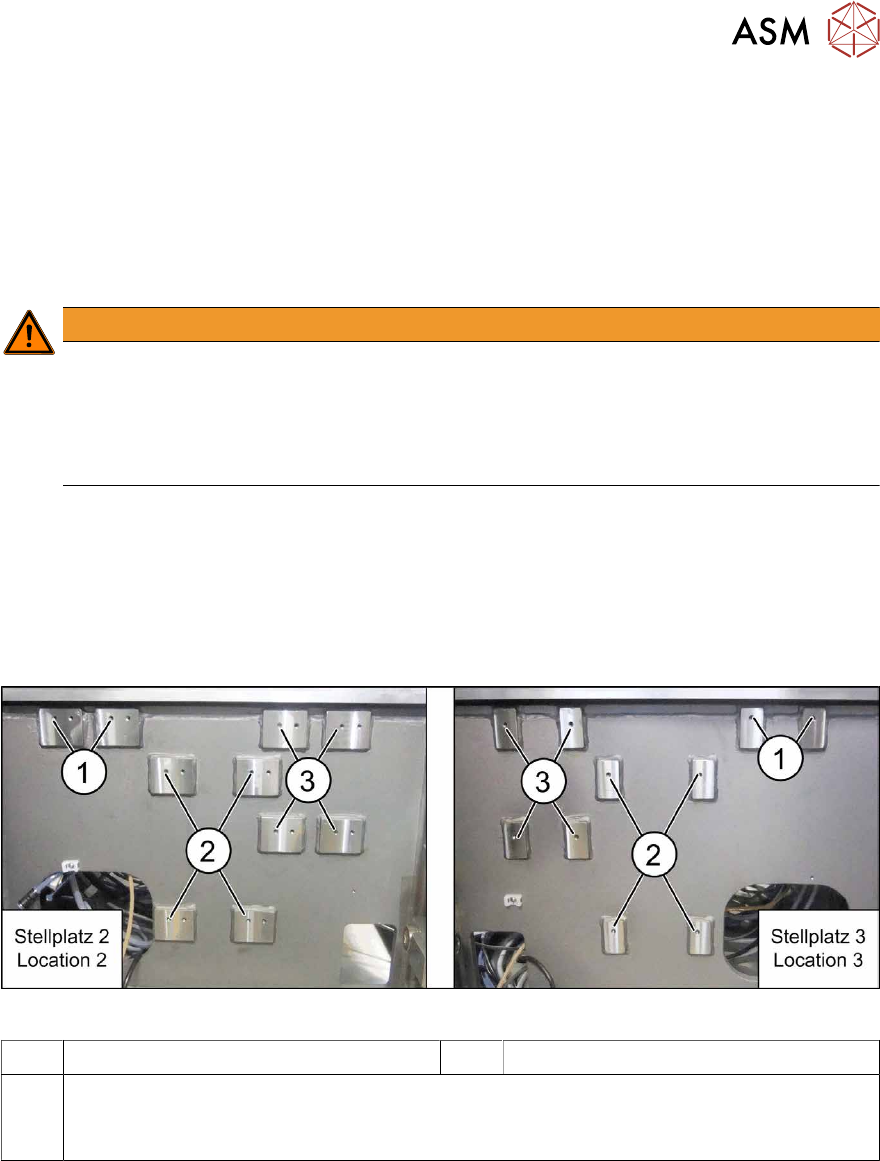
Screw fixing points at location 2 and 3
The spacer plates are fixed to the relevant screw fixing points in the machine base.
Fig.40: Screw points at location 2 (left) and 3 (right)
1 Screw fixing points for the reject bin 2 Screw points for the IC camera type 33
3 Screw points for the Q10 magazine mount (otherwise: FC camera type 25)
The screw points at location 2 and 3 are mirrored.
Use the left holes at location 2.