4OM-1431-006_w.pdf - 第154页
2-23 0802-002 4. "ERROR" Windows When the machine detects an error , the following "ERROR" window opens. [9] [8] [10] [7] [6] [1] [3] [5] [4] [2] Fig. 4B4 Example of "ERROR" Window [1] Error…
2-220802-002
3.2 List of Machine Information
Machine
Information Codes
Display Field A (Scope of Machine Information)
Display Field B (Details of Machine Information)
809801 Feeder alternate condition is disable.
Original and alternated feeders have had pickup errors and they are under
disabledstatus.Afterndingthecauseofpickup
errors,gotothemainmenu,
then [OPERATION], [Altn Mode], select feeder lane number, enable feeder(s)
to clear disabled status, go back to the main menu and press the start button to
resume.
2-230802-002
4. "ERROR" Windows
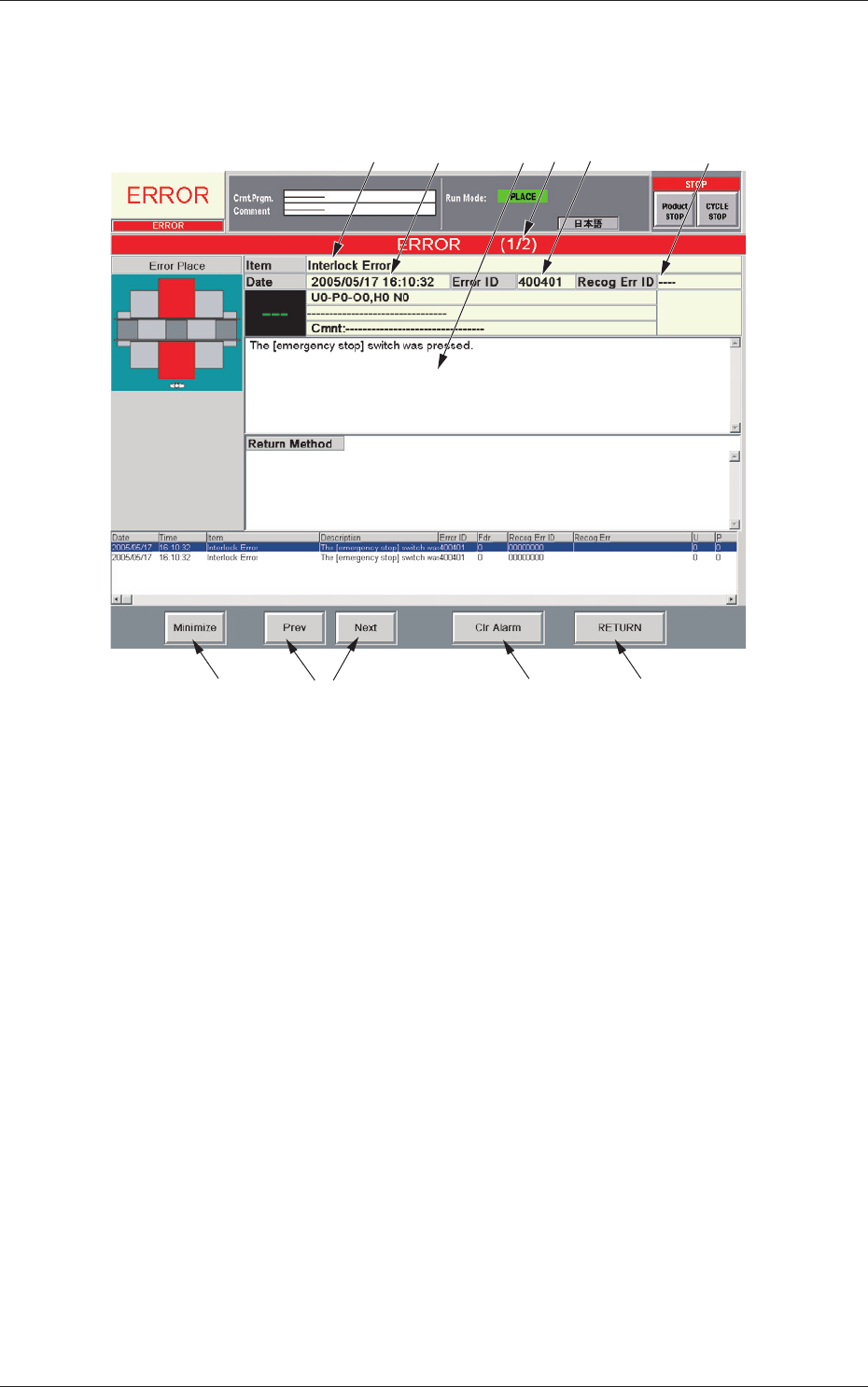
When the machine detects an error, the following "ERROR" window opens.
[9]
[8]
[10] [7]
[6]
[1]
[3] [5]
[4]
[2]
Fig. 4B4 Example of "ERROR" Window
[1] Error ID
Displayed is a string of alphanumeric characters (6 characters) that
identi es an error.
When an error has occurred, use the error ID as an index and refer to
"Chapter 3 Troubleshooting from Error IDs" (Vol. 4) for details.
[2] Recog Err ID
Displayed is a string of alphanumeric characters (8 characters) that
identies an error.
When an error has occurred, use the error ID as an index and refer to
"Chapter 4 Troubleshooting from Recognition Error IDs" (Vol. 4) for
details.
[3] Item
Displayed is a name of the classied element that caused an error.
[4] Description
Displayed are the contents of the error and Return Method (Remedial
Procedure).
4. "ERROR" Windows

2-240802-002
[5] Date and Time
Displayed are the date and time of error occurrence.
[6] Number of Pages
Displayed are the total number of pages and the number of the curren
page.
Example:
(3/
5
)
T
otal Number of Pages : 5
Number of Current Page : 3
[7] [Prev] and [Next] Buttons
[Prev] Button : When pressed, this button opens the previous page.
[Next] Button : When pressed, this button opens the next page.
[8] [Clr Alarm] Button
When pressed, this button cancels an alarm sound only
.
[9] [RETURN] Button
When pressed, this button cancels an alarm sound and closes the
"ERROR" window. The original window resumes.
[10] [Minimize] Button
When pressed, this button minimizes the "ERROR" window and moves
to the bottom left of the window.
Double-click the minimized window to return it to the size before it was
minimized.
•
Reset Procedure from "ERROR" Window
(1)
Take a note of "Error ID", "Item", and "Description" in the "ERROR"
window
.
Notice
When you have forgotten an error message, refer to the list of
errors in the "Machine Error Recall" window. (Operation Sequence:
[RECALLMSG.]Button(Submenu)→"MachineErrorRecall"
Window)
(2) Press the [RETURN] button to resume the original window.
(3) Use the error ID as an index and refer to "Chapter 3 Troubleshooting
from Error IDs" (Vol. 4) or "Chapter 4 Troubleshooting from
Recognition Error IDs" (Vol. 4) for details.
4. "ERROR" Windows