4OM-1431-006_w.pdf - 第246页
4-21 0802-002 Recognition Error ID Description of Recognition Error , Cause, and Remedy (3) Manipulate the image movement buttons on the window until the actual ducialmarkcomesovertotheducialmarktemplatelocate…
4-200709-001
3.5 PEC Recognition Errors
Z A B CC DDD
Detailed Classification: Detailed Classification
Small Classification: Small Classification
Middle Classification
0: PEC Recognition (Mark Missing)
1: PEC Recognition (Coarse Recognition Error)
2: PEC Recognition (Detailed Recognition Error)
3: PEC Recognition (Shape Error)
8: PEC Recognition (Inspection Error)
E: PEC Recognition (Other Errors)
Large Classification (6)
Classification Criteria
Notice
When an error ID other than the described ones is issued, contact
our service personnel for some advice.
Table 4D8
Recognition Error ID Description of Recognition Error, Cause, and Remedy
0 6 0 ** 001 Speciedmarknotfoundinrecognizablerange.
0 6 0 ** *** Others.
0 6 1 ** 001 Specied
marknotfoundinrecognizablerange.
0 6 1 ** *** Others.
0 6 2 ** 001 Specied
marknotfoundinrecognizablerange.
(Cause)
TheducialmarkandtheducialmarkcoordinatesXandYor
the mark data are not suitable.
(Remedy)
Follow the steps below to reset the machine to the normal
condition.
(1)
When the [RETURN] button is pressed, the "Manual Alignment Operation
Guide" window appears.
(2)
When the [Mnl Align] button is pressed, the following recognition window
appears.
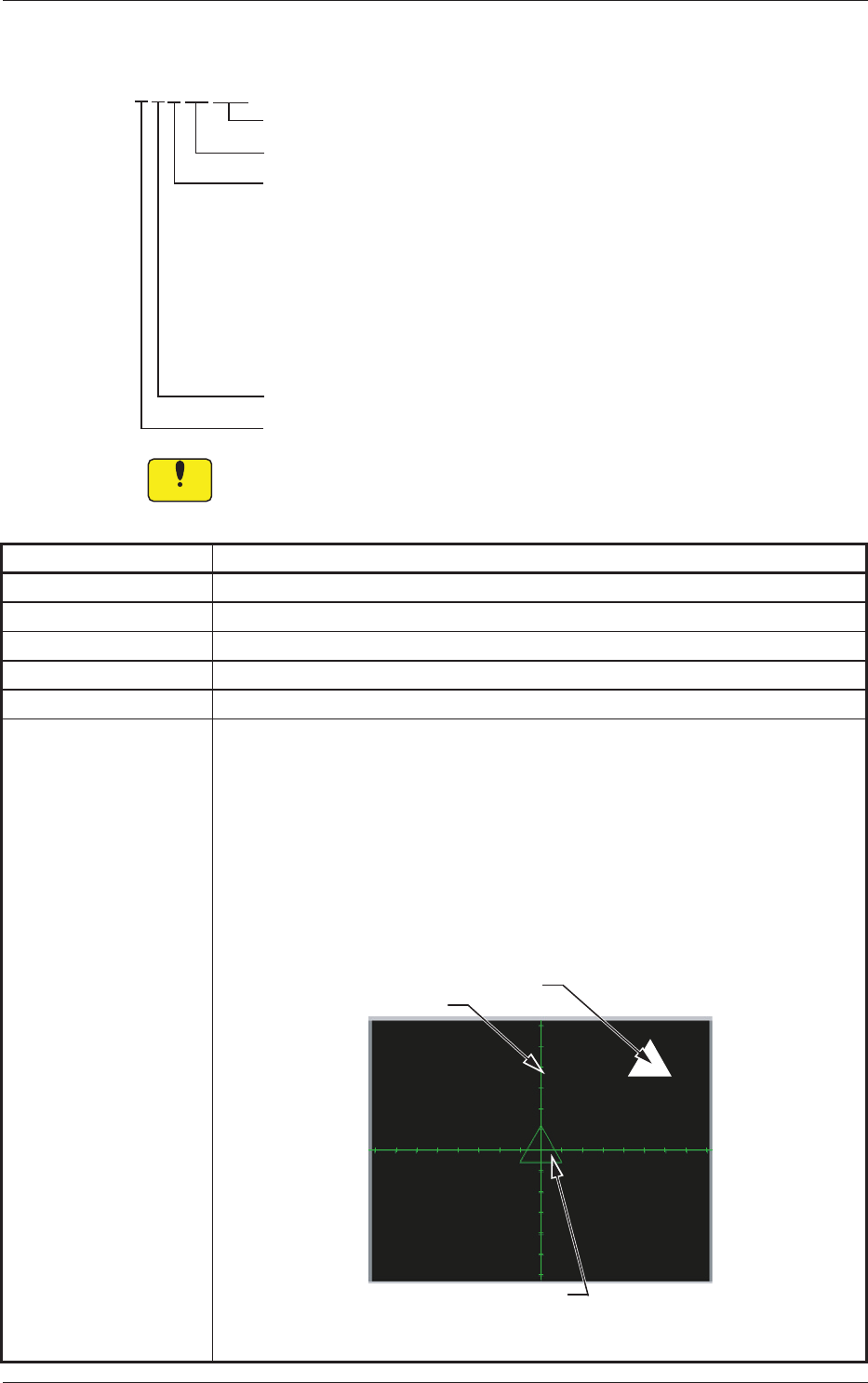
Actual Fiducial Mark
Crosshair
Template of Fiducial Mark
Fig. 4D2 Sample Display of Recognition Window
(Continued to the next page.)
3.5 PEC Recognition Errors
4-210802-002
Recognition Error ID Description of Recognition Error, Cause, and Remedy
(3) Manipulate the image movement buttons on the window until the actual
ducialmarkcomesovertotheducialmarktemplatelocatedatthe
center of the crosshair.
Enlarge the view for accurate alignment operation. Otherwise,
components may not placed accurately.
(4) Aftertheactualdu
cialmarkhascomeovertotheducialmarktemplate,
pressthepositiondenitionbutton.The"AUTOOPN."windowresumes.
(5) When the [START] button on the operation panel is pressed, the
automatic operation restarts.
Notice
When the [x] button is pressed to exit from the recognition window,
the "Manual Alignment Operation Guide" window resumes.
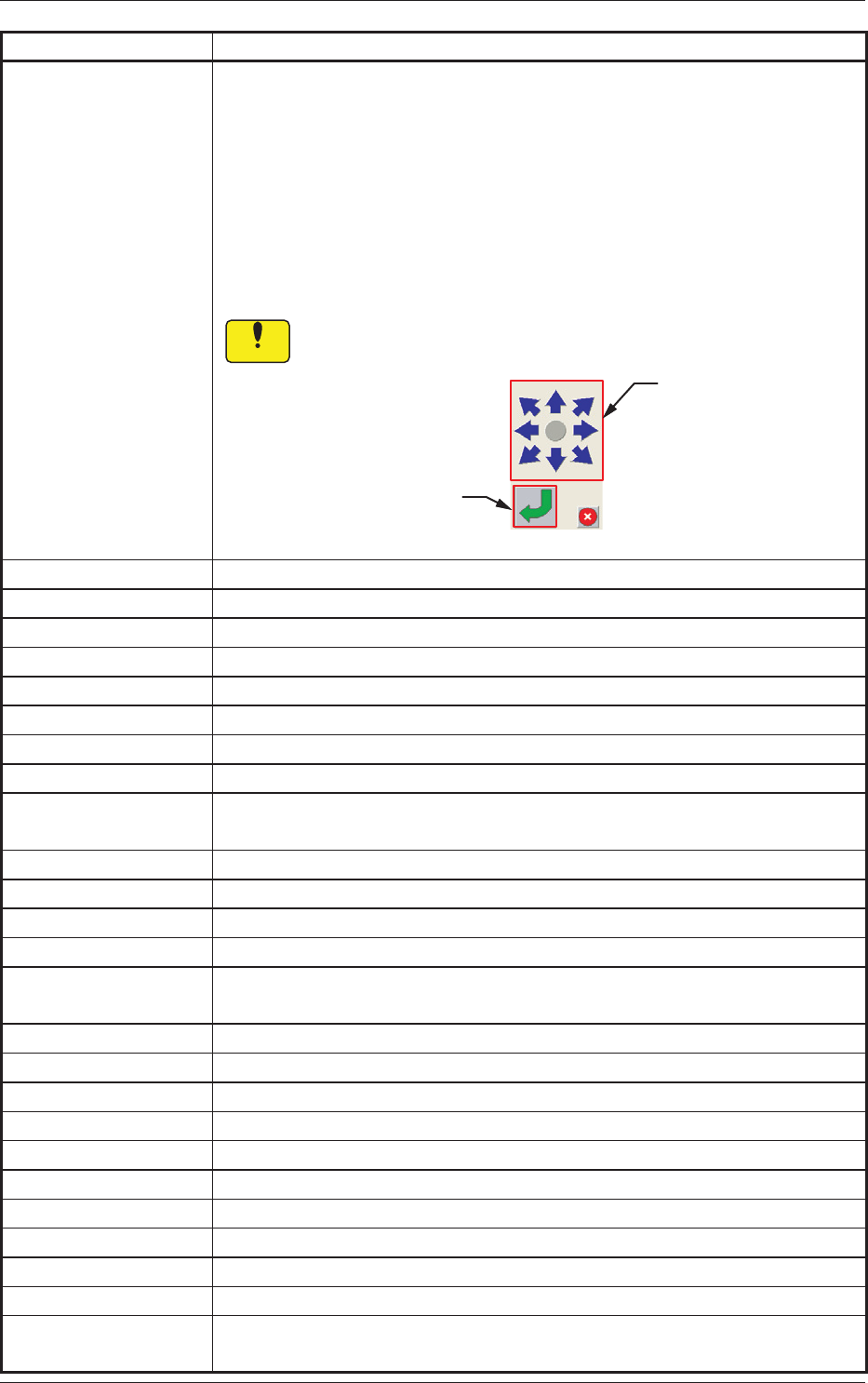
Image Movement
Buttons
Position Definition
Button
Fig. 4D3 Operation Buttons
0 6 2 ** 1** Edge not detected.
0 6 2 ** 201 Edge not detected.
0 6 2 ** 401
0 6 2 ** 402
0 6 2 ** 403
0 6 2 ** 404
0 6 2 ** 405
0 6 2 ** *** Others.
(Cause) PCB Recognition Error
(Remedy) Contact our service personnel for details.
0 6 3 ** 101 Specied
markisnotcircle.
0 6 3 ** 102 Speciedmarkisnot
square.
0 6 3 ** 201 Edge not detected.
0 6 3 ** *** Others.
(Cause) PCB Recognition Error
(Remedy) Contact our service personnel for details.
0 6 8 ** 101 Speciedmarknot
foundinrecognizablerange.
0 6 8 ** 102 Speciedmark
notfoundinrecognizablerange.
0 6 8 ** 201 Extensive error in similitude of mark size
0 6 8 ** 202 Extensive error in similitude of mark size
0 6 8 ** 301
Extensive error in similitude of mark shape
0 6 8 ** 302 Extensive error in similitude of mark shape
0 6 8 ** 401 Extensive error in similitude of mark shape
0 6 8 ** 402 Extensive error in similitude of mark shape
0 6 8 ** 501 Specied
mark
not
found
in
recognizable
range.
0 6 8 ** 502 Specied
mark
notfoundinrecognizablerange.
(Cause) PCB Recognition Error
(Remedy) Contact our service personnel for details.
3.5 PEC Recognition Errors

4-22
Recognition Error ID Description of Recognition Error, Cause, and Remedy
0 6 8 ** 601 Speciedmarknotfoundinrecognizablerange.
0 6 8 ** 602 Speciedmark
notfoundinrecognizablerange.
0 6 8 ** 603 Speciedmark
notfoundinrecognizablerange.
0 6 8 ** 604 Speciedmark
notfoundinrecognizablerange.
0 6 8 ** *** Others.
(Cause) PCB Recognition Error
(Remedy) Contact our service personnel for details.
0 6 e ** 001 Others.
0 6 e ** ***
Others.
(Cause) Self-Diagnostics Error Message
(Remedy) Contact our service personnel for details.
1 6 * ** *** Others.
(Cause) Self-Diagnostics Error Message
(Remedy) Contact our service personnel for details.
0802-002
3.5 PEC Recognition Errors