SM411F_Service Manual.pdf - 第108页
4096 values. <Inner> Colum n Enabled only when the fix camera was selected. The value within the range up to 4096 for each light level is inputted. <Mapping/T est> button Perform test or automatic mapping…
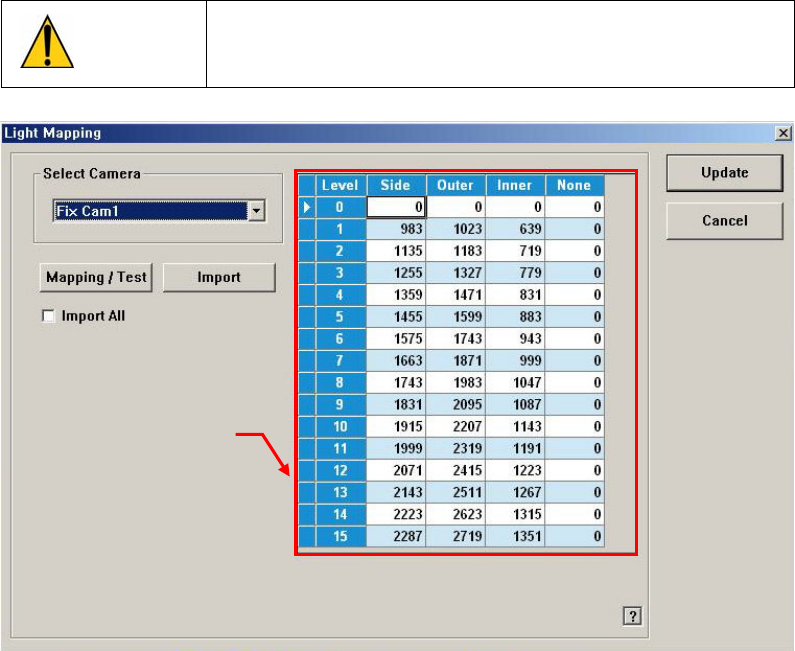
1.2.10.9. Light Mapping
Calibrate the brightness of the illumination for the fly camera and fix camera. In
order to perform this calibration, insert the LightFly or LightFix nozzle into the No.
1 nozzle of the ANC.
Caution
Since the nozzle for the SM32x model is not compatible to
the one for the light mapping used for the SM32x model,
do not use it for this machine.
<Select Camera> combo box
Since the fiducial camera does not apply light mapping, select the camera to be
calibrated.
Repeat the same action for all fly cameras and Fix Camera.
Light Level Group
Sets the brightness by light level.
<Level> Column
Dislays 16 steps of lighting.
<Side> Column
à For the fly camera, input the side illumination value within the range
of 256 values.
à For the fix camera, input the side illumination value within the range
of 4096 values.
<Outer> Column
à For the fly camera, input the side illumination value within the stage of
256 values.
à For the fix camera, input the side illumination value within the stage of
Light Level
group
4096 values.
<Inner> Column
Enabled only when the fix camera was selected. The value within the
range up to 4096 for each light level is inputted.
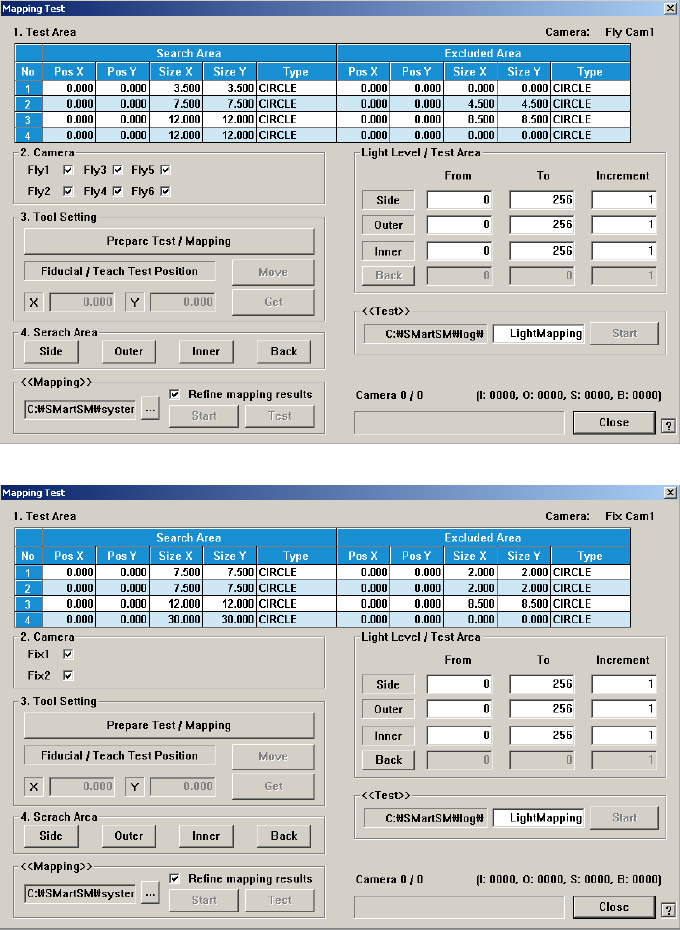
<Mapping/Test> button
Perform test or automatic mapping for the light level for the camera selected
from the <Select Camera> combo box.
[When the fly camera was selected]
[When the fix camera was selected]
<1. Test Area> group
Designates the area for which the nozzle for test checks the brightness of
the lighting. The are can be designated up to 4. the search area and
excluded area are designated together. That is, the area is designated in the
form of circle band.
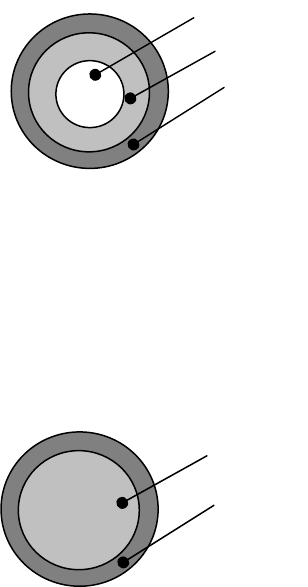
There are a total of 4 areas, among which Area 1 ~ Area 4 are
corresponding areas.
Do not change the value since it is set automatically.
[Bottom Shape of Calibration Nozzle for Fly-Camera]
Test Area1 = Search Area(A) – Excluded Area (B + C)
Test Area2 = Search Area(B) – Excluded Area (C)
Test Area3 = Search Area(C)
Test Area4 = Test Area1 + Test Area2 + Test Area13
There are a total of 3 areas, among which Area 1 ~ Area 3 are
corresponding areas.
[Bottom Shape of Calibration Nozzle for Fix-Camera]
Test Area1 = Search Area(A) – Excluded Area (B)
Test Area2 = Search Area(B)
Test Area3 = Test Area1 + Test Area2
à <No> Column
Displays the serial number of the test area.
à <Pos X> Column
Displays the X coordinate of the area center.
à <Pos Y> Column
Displays the Y coordinate of the area center.
à <Size X> Column
Displays the area size in the X direction.
à <Size Y> Column
Displays the area size in the Y direction.
à <Type> column
Designates the shape of the area.
CIRCLE: Refers to the round area.
RECT: Refers to the rectangular area.
NONE: Area not designated.
C
B
A
B
A