SM411F_Service Manual.pdf - 第72页
position. <Enable Gantry Mapping> check box Decides whether to carry out Gantry Mapping. W hen all the fiducials on the transport rail are taught for Calibration, it will be checked automatically . T o disable th…
1.2.8. Gantry Mapping
Calibrate the positions of the fiducial marks that become the reference for the
gantry mapping in order to compensate the relative coordinate system between the
front gantry and rear gantry.
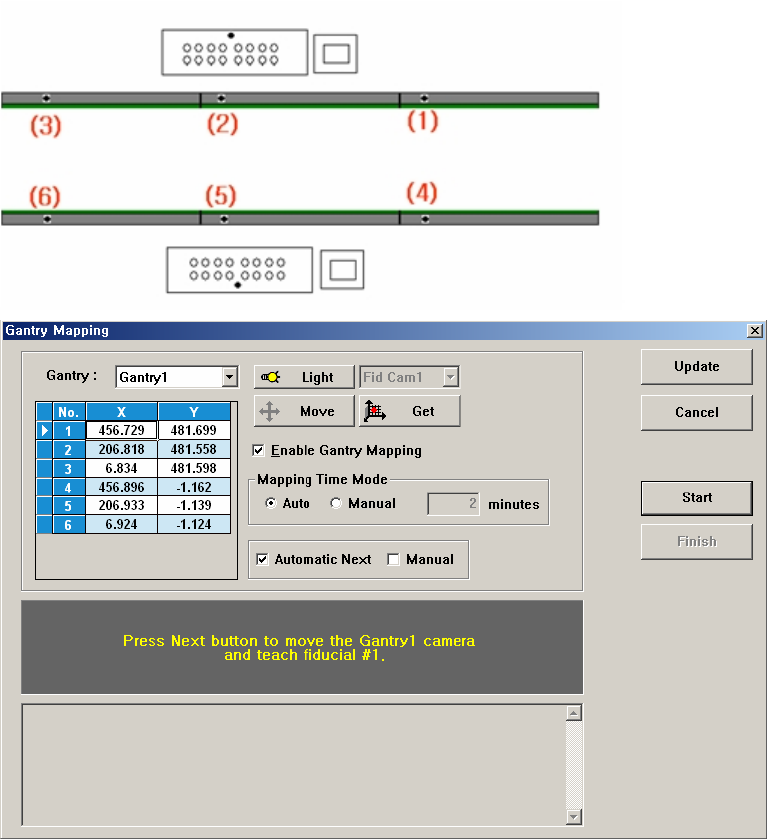
To carry out Calibration, 6 Fiducial Marks on the transport rail must be taught. The
order of teaching should be as follows; fiducial marks on the fixed rail must be
taught first and For teaching fiducial on the same rail, fiducial Mark must be taught
according to the order from the right to the left.
Figure 3-7. ”Calibration Wizard- Gantry Mapping” dialogbox
<Gantry> combo box
Select the Gantry for performing Gantry Mapping.
<Move> button
Move the fiducial camera of the corresponding gantry to the position of the
fiducial mark selected from the Grid group.
<Get> button
Apply the coordinate value of the current position as the selected fiducial mark
position.
<Enable Gantry Mapping> check box
Decides whether to carry out Gantry Mapping. When all the fiducials on the
transport rail are taught for Calibration, it will be checked automatically. To
disable the “Gantry Mapping”, remove the check from the check box.
<Mapping Time Mode> group
Set the cycle by which the mapping is performed.
Auto: Carries out automatic calibration for Gantry Mapping at preset
intervals.
Manual: Carries out calibration for Gantry Mapping at the intervals
entered in the edit box below.
<Automatic Next> checkbox
Automatically aligns the coordinates of gantries by using the designated
Fiducial Mark.
<Manual> checkbox
Move the gantry to the designated position by using the teaching box and
perform the gantry mapping manually.
1.2.8.1. Procedure
The gantry mapping method is as follows.
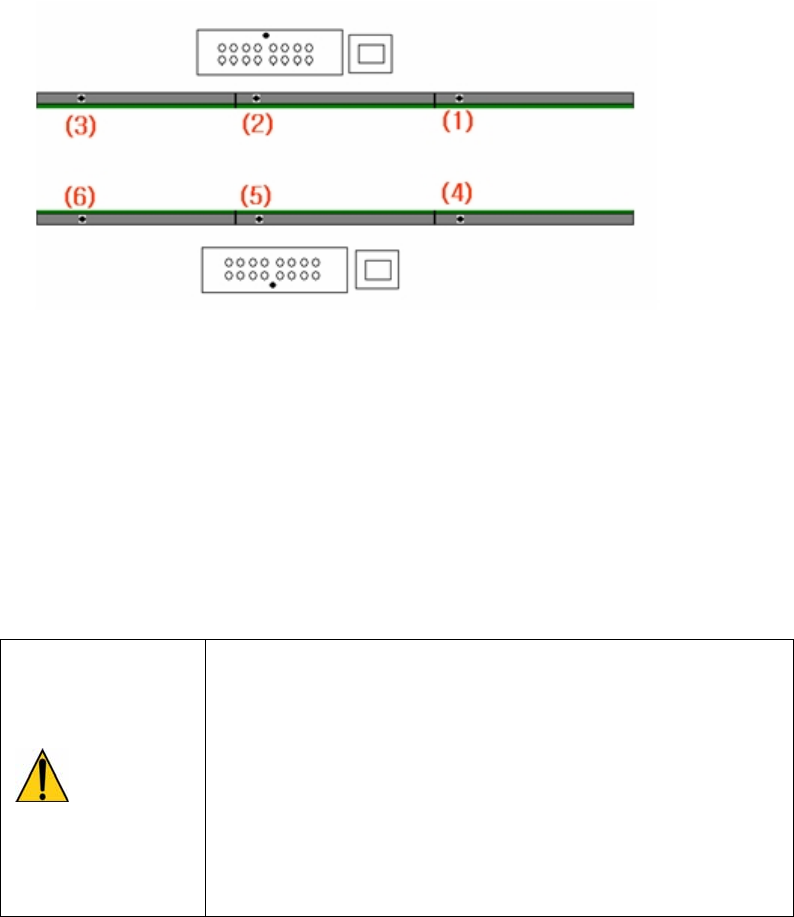
1. Referring to the following figure, perform teaching of the position of fiducial
mark 6 located on the upper surface of the conveyor.
2. < Click the <Move> button to move the fiducial camera to the designated
position.
3. Adjust the position of the fiducial camera by using the teaching box so that the
center of the cross hair displayed in the SMVision window matches with the
center of the fiducial mark that was already set on the conveyor.
4. Click the <Get> button to reflect the current coordinate.
5. Identically teach fiducial marks #2~#6 in the order as shown in the above
figure.
6. When the teaching of 6 fiducial marks for Gantry1F has been completed, the
teaching of 6 fiducial marks for Gantry1R is carried out. The method is the
same as Gantry1F.
Warning
Operation error caused by unauthorized or untrained
personnel or insufficient checking before calibration could
severely damage the machine or the set up data, or it
could cause personal injury of the operator or the worker
near the machine.
Before carrying out calibration, check the item to be
calibrated and check if there is any worker near the
machine.
And calibration must be carried out by an authorized and
trained user only.