SM411F_Service Manual.pdf - 第236页
Softwar e 5.2.3.2. T rouble st ate and measures 1. If the trouble related to servomotor occur , alarm code is indicated on LED of front panel. For more information about the Alarm Code, refer to “5.2.1 Servo Motor Alar m…
Software
As for alarms with which restoration is not possible, improve the alarm cause and turn on
the power supply once again making an interruption to reset the system operation
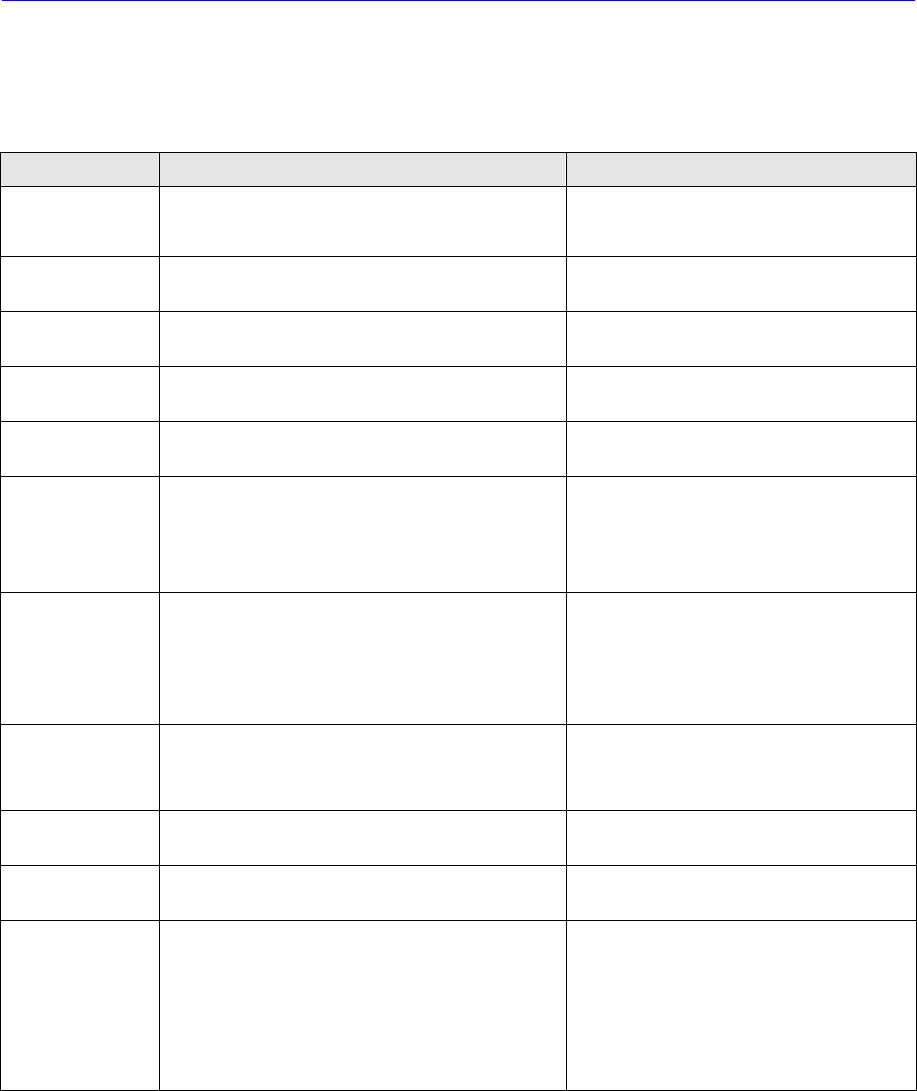
Table 5-3. Conveyor Suttle, Width and Rail -Axis Motor trouble
Alarm content Cause Corrective measure
CPUE
y Supply voltage has dropped
y CPU failure has occurred
y Check if the supply voltage is within the
specification
y Replace the amplifier
DE(Open circuitry
of the sensor)
Open circuitry or connection failure of the sensor has
been detected.
y Review the sensor wiring
y Replace the amplifier
OV(Overvoltage)
Supply voltage to the amplifier exceeds the
specification.
Correct the supply voltage to the amplifier
within the specification.
MPE(Supply
voltage drop)
Supply voltage to the amplifier is below the
specification.
Correct the supply voltage to the amplifier
within the specification.
RSTE(Resetting
failure)
Resetting operation cannot be finished normally. Review the load conditions
OVF(Excessive
deviation)
Excessive deviation setting is too small.
Excessive vibrations occurring by over Motor locking
Review the setting
Adjust the load conditions and parameters.
Check the brake releasing functions and
review the mechanisms
OL(Servo failure)
A state Where the motor makes abnormal 8S stop
not being possible to reach the targeted position has
been detected.
A state where an obstacle exists in the course of
movement has been detected.
y Check if obstacles, etc. do not exist.
y Check if the movement is not hitting the
mechanism end, etc.
y Check if the power cable is not open.
OS(Over-speed)
The revolution of the motor exceeded the permissible
speed limit.
Detecting Speed: Fixed to 5400 min
-1
Review the positional commands, load
conditions and parameter adjustment.
RGOL(Regenerati
on failure)
Regenerative coltage of the motor has exceeded the
allowance during servo ON driving is being made.
Review the load conditions and parameters.
ORG(Zero point
resetting failure)
Open circuit of the phase C of the sensor Check the sensor cable connections.
EEPER(Memory
failure)
Non-volatile memory failure
When the memory failure is detected, the parameters
will be initialized to the state before shipment from
the factory.
Write time for the initialization will be about 1s.
When the power supply is turned off 1
second or more of the issuance of the alarm
and when the power supply is turned on once
again, if the same alarm occurs once again, it
is necessary to replace the amplifier. If the
system has reset, it then becomes necessary
to re-write the user setting parameters.
5.2.3. Checking Points for Servo Motor Driver Trouble
5.2.3.1. At abnormality of drive, sequence
Occurrence of Abnormality -> Dynamic Braker /Motor Current /Servo Output /Alarm
Output -> Braker Release
When this sequence is activated, motor stops and generate alarm.
Software
5.2.3.2. Trouble state and measures
1. If the trouble related to servomotor occur, alarm code is indicated on LED of front
panel. For more information about the Alarm Code, refer to “5.2.1Servo Motor Alarm
Code”.
2. At this time, servo motor power is OFF. For the release of the alarm, it is required
that procedure 1 [EMG Alarm: EMG -> STOP -> RESET -> READY] or procedure 2
[General Alarm: STOP -> RESET -> READY] is performed.
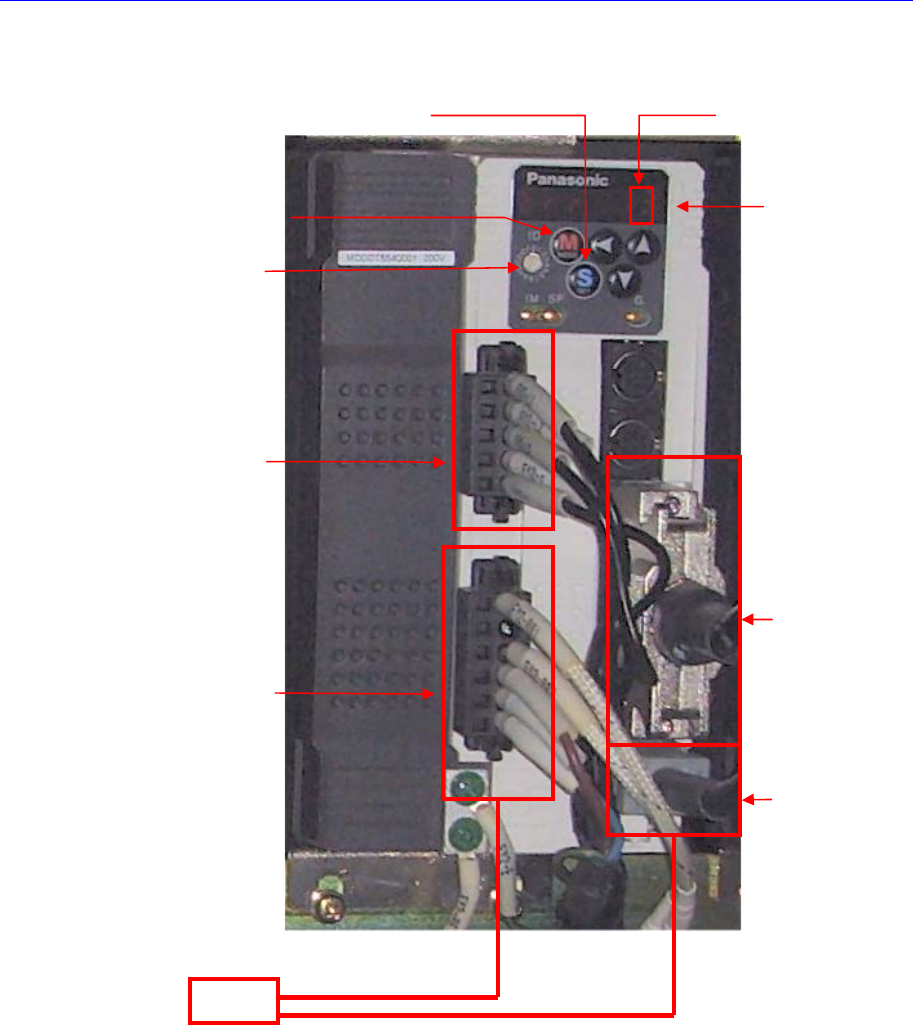
ID Switch
Input Powe
r
Ping Check!
Motor Power
Pin Check!
Earth Check!
Interface
Check!(From
Drive to Axis
Board)
Motor Encorder
Cable Connetciotn/
Pin Check!
Parameta
Setting
Check!
MODE Switch
SET Switch
Alam Code Check!
Motor
Motor Noise / Mechanical Trouble / EMG Switch Check!
Software
Caution
For alarms related to power, turn off power and turn on
power.
3. For alarm caused by OVERLOAD, normal clear is possible in 10 seconds or more.
So, press the ‘READY’ button to supply power to the servo motor in 10 seconds or
more after pressing the ‘RESET’ button.
4. If troubles are caused by cable connection for the terminal of servomotor and
improper wiring, ensure that checking wiring is performed after motor power is off.
5. If the servomotor without mechanical problem does not drive, check if the parameter
is normal. And then if the same trouble ouccur again, replace the mortor drive.
6. If the drive of motor is not stable and acceleration/deceleration is improper, the
following checks should be performed;
Check if servomotor has mechnical problem
Check if servomotor parameter setup is normal
Check if the primary input voltage is acceptable
Check if the state of cable shield is normal.
7. The unmatched origins may be caused by serious difference between Z phase and
Home sensor or the defective axis board. So check the connections of axis board
cables.
8. The causes of noise are mainly noise, parameter, and bad connection of cable, etc.
except mechanical causes.
5.2.4. Servo Motor Driver Replacement
5.2.4.1. Required tools
Spanner
“+” shape tipped screw driver, “-” shape tipped screw driver
T Wrench or Hex Wrench
Motor Driver Data Cable (P-Motor): for Servo Motor
5.2.4.2. Driver replacement procedure
1. Press the <EMG> switch on the front side of the machine to cut off the power supply
to the motor. At this time, the power supply to the entire machine must remain turned
on or the power must be supplied to the corresponding motor driver.
2. Remove the rear cover of the machine by using a screw driver.
3. Back up the parameters saved in the previous driver by referring to “5.2.5 Parameter
Download/Upload Procedure “.
Caution
The new driver contains the standard parameters the
setups of the manufacturer. However, they may be changed
in our factory for tuning.
4. If the parameters cannot be downloaded from the existing driver, download the
distributed standard parameters.