00193370-0202.pdf - 第56页
Handbuch für das Achsprüfgerät / Axis T ester Manual SIPLACE Axis T e ster 6 S tructure of the user interface Ausgabe 08/2003 Edition 56 6.4 “ System con trol” menu Fig. 6 - 4 “Syst em control” menu The “Sys tem control …
SIPLACE Axis Tester Handbuch für das Achsprüfgerät / Axis Tester Manual
Ausgabe 08/2003 Edition 6 Structure of the user interface
55
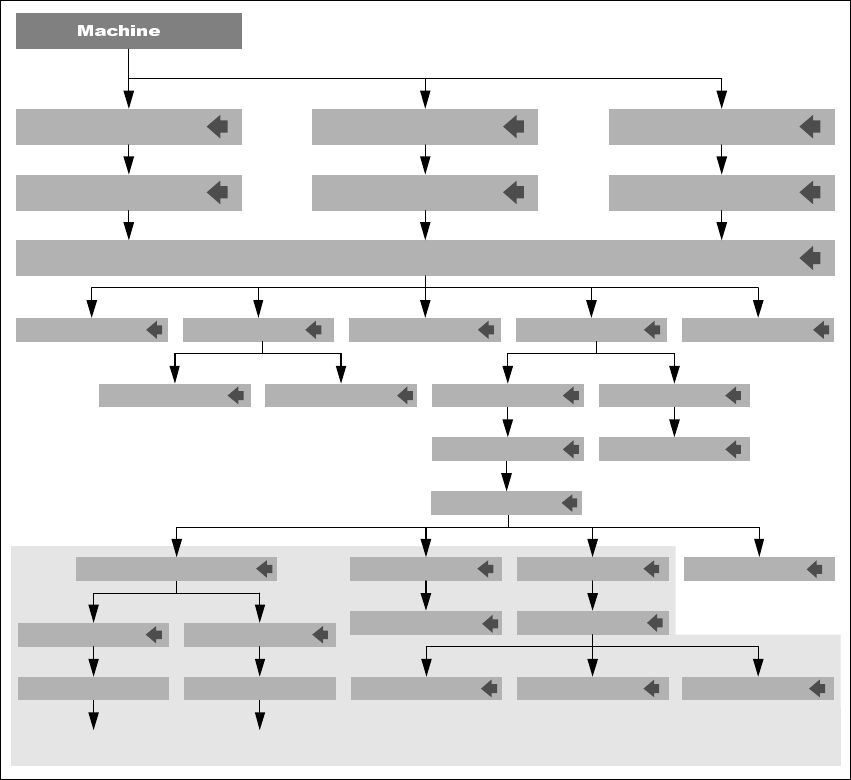
6.3 “Machine” menu
Fig. 6 - 3 “Machine” menu, flow chart
The “Machine” menu contains preconfigured test set-ups for each type of machine:
HS machines This menu contains the axis configuration for 4-gantry placement ma-
chines.
S machines This menu contains the axis configuration for 2-gantry placement machines
and the glue dispenser.
F machines This menu contains the axis configuration for 1-gantry placement machines
and the wafflepack changer (WPC).
BackCursor T1 Cursor T2
Proceding
Grafics w. cursor
QuitStart plotStart FFT
Waiting f. Trigger Start window
OverspeedPositioning timeLine errorReference error
Track signalsMachine info Adjust panelPos. qualitySerial connect.
Select axis / Properties
HS-50
F3, F4, F5,
F5 HM, WPC
F machine
S-15, S-20, S-23
S-25, G
HS machine
S machine
BNC 1/2/3/4
Dynamic
RETURN
Press any key
to go back
Press any key
to go back
BNC 1/2/3/4
Static
Select PWM mode
These menus can only be accessed
if the previous measurement was successful.
Back to Positioning
time menu
Handbuch für das Achsprüfgerät / Axis Tester Manual SIPLACE Axis Tester
6 Structure of the user interface Ausgabe 08/2003 Edition
56
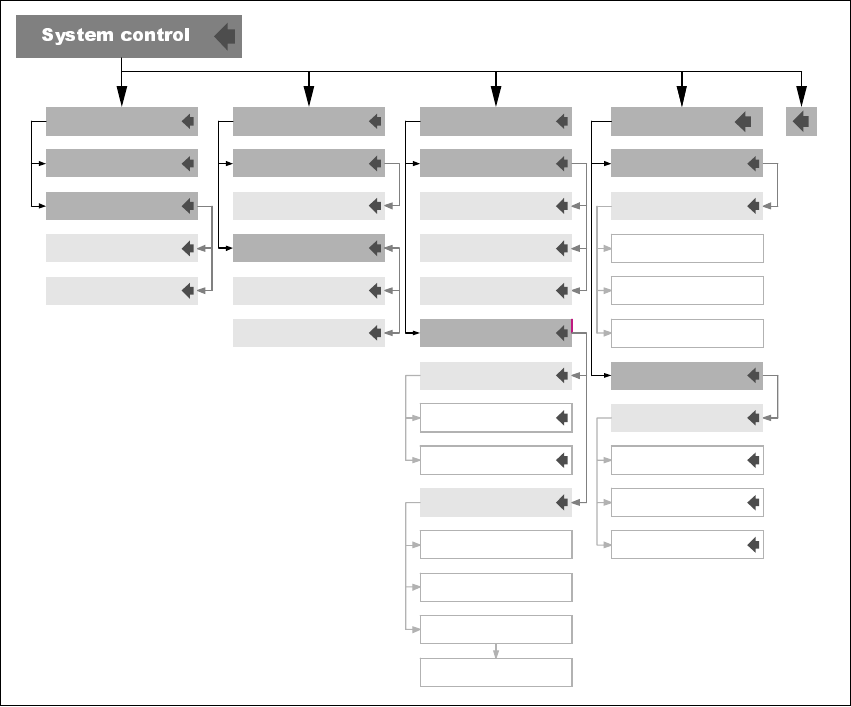
6.4 “System control” menu
Fig. 6 - 4 “System control” menu
The “System control” menu has four submenus:
Settings This menu is used to save your individual settings or load settings that you
have already stored.
User control Allows you to select the user interface language. There are two versions –
German and English.
Also used to select the user level. There are two options: “Beginner” and
“Expert”. “Beginner” is set by default.
Display This menu is used to set the appearance of the user interface and screen
saver.
Ports Used to define the parameters for the CAN bus and serial port.
EEPROM
DisplayUser controlSettings
Save ...
Load ...
Default
Beginner
Language
German
English
User level Set contrast
Darker
Brighter
Screen saver
Stars
Change type
Display off
Settings
Enable
Reset
Disable
Delay
Max. 2 h
CAN port
CAN IDS
Serial port
Change ASC port
Sending CT ID
Sending events ID
Receiving ID
SAT-A36X
SAT-PC
A36X-PC
Ports
SIPLACE Axis Tester Handbuch für das Achsprüfgerät / Axis Tester Manual
Ausgabe 08/2003 Edition 7 Commissioning the axis tester
57
7 Commissioning the axis tester
7.1 Connecting the axis tester
WARNING 7
Always press the emergency stop button before connecting the axis tester to or disconnecting it
from the axis controller. 7
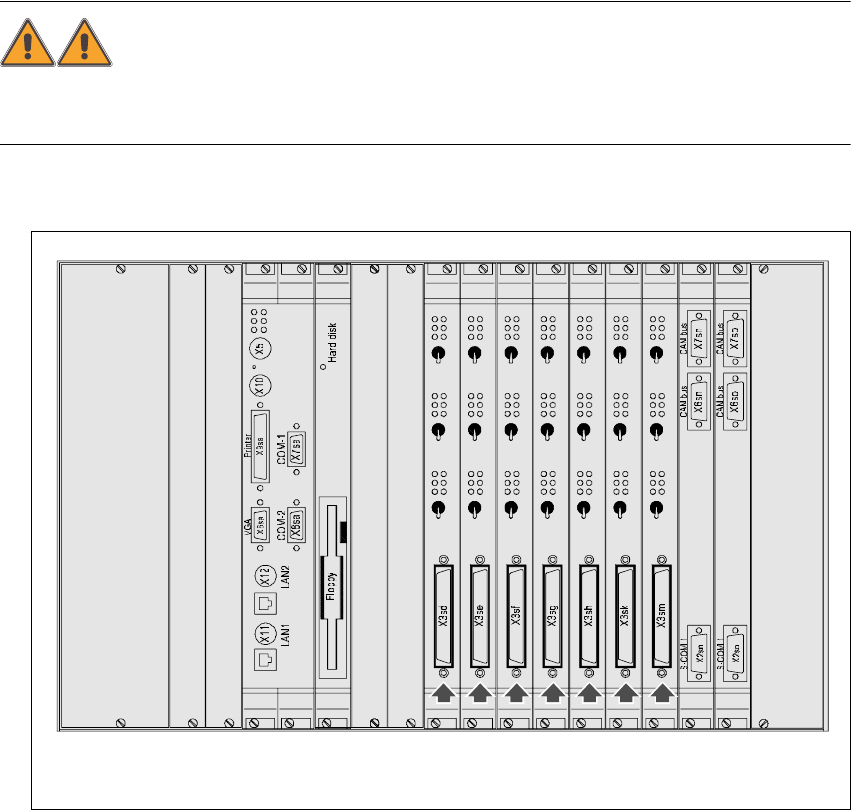
Æ Open the doors to the control unit.
Fig. 7 - 1 Section of the control unit in the HS-50 placement machine
7.1.1 Connecting the axis tester to HS /S2x F4/F5 machines
Æ Connect the 37-pin plug on the ribbon cable to the axis controller.
Æ Connect the 37-pin socket on the ribbon cable to the axis tester.
The axis tester boots up. If all the self tests are successful, the start-up screen appears.
Æ Carry out your diagnostics and settings as described in the setting instructions.
Servo
Servo
Servo
Servo
Servo
Servo
Servo
Servo
Servo
Servo
Servo
Servo
Servo
Servo
Servo
Servo
Servo
Servo
Servo
Servo
Servo
Keyboard
Mouse
Off
Off
Off Off
Off
Off
Off
Off
Off Off
Off
Off Off
Off
Off
Off
Off
Off Off
Off
Off
Axis controllers in the HS-50 control unit with 37-pin sockets