00193370-0202.pdf - 第65页
SIPLACE Axis T est er Handbuch für das Achsprüfgerät / Axis T est er Manual Ausgabe 08/2003 Edition 8 Using the menus 65 Fig. 8 - 12 “Configurat i on” menu, “Config unit ” The “Sel ect unit” menu appears. Fig. 8 - 13 “Se…
Handbuch für das Achsprüfgerät / Axis Tester Manual SIPLACE Axis Tester
8 Using the menus Ausgabe 08/2003 Edition
64
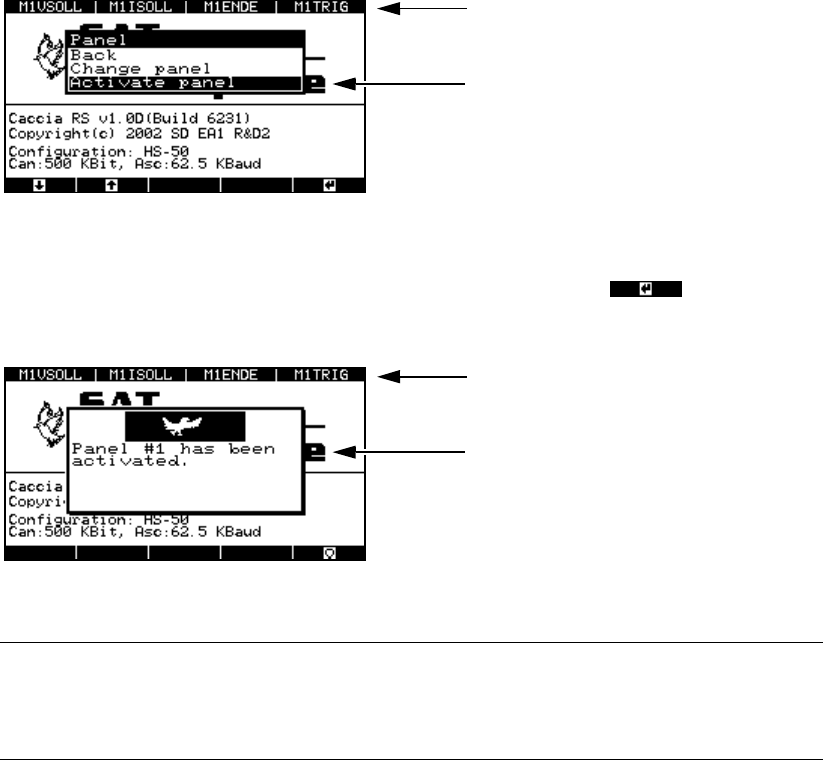
Fig. 8 - 10 “Panel” menu, “Activate panel” option
Æ Select the “Activate panel” menu option and press membrane button .
This activates the signaling line and updates the panel assignment display in the header.
Fig. 8 - 11 “Panel” menu, activation display
PLEASE NOTE: 8
Don’t forget to store your settings, otherwise they will be lost when you remove the ribbon
cable. 8
Æ From the main menu, select
- the “System control” menu
→ “Settings” → “Save” or
- the “Shutdown” menu
→ “Shutdown computer: Yes”.
8.3.2 “Config unit” menu
The “Config unit” menu is used to set the time base for sampling the signals for each of the three
axis controllers on an axis controller board. You can also set the minimum time between two pulse
edges during which a pulse train can still be triggered. In the event of overspeed, the individual
pulses can no longer be triggered and counted since the pulse train is too large. A signal and an
error message are output.
Æ Select the “Config unit” option from the “Configuration” menu.
Panel assignment display
Activates the selected assignment
Updated panel assignment display
This window indicates that the panel as-
signment has been activated.
SIPLACE Axis Tester Handbuch für das Achsprüfgerät / Axis Tester Manual
Ausgabe 08/2003 Edition 8 Using the menus
65
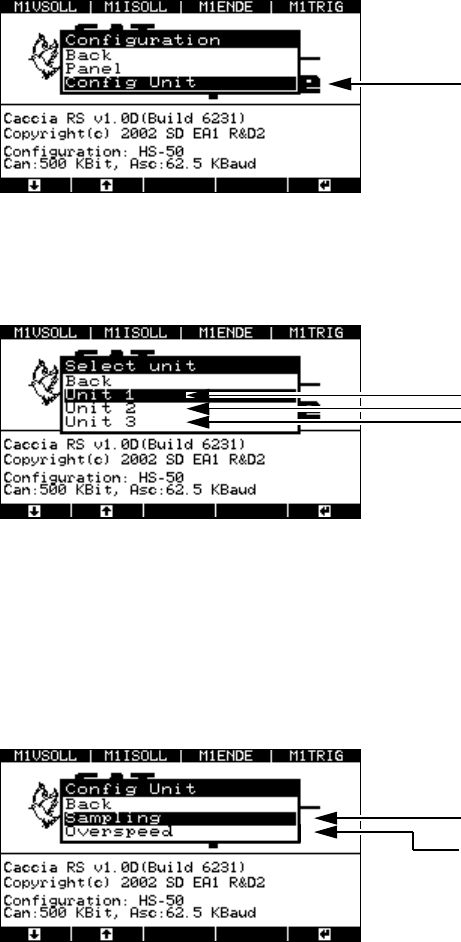
Fig. 8 - 12 “Configuration” menu, “Config unit”
The “Select unit” menu appears.
Fig. 8 - 13 “Select unit” menu
8.3.2.1 “Sampling” menu
Æ Select the required axis controller
The menu for setting the sampling frequency or maximum sampling frequency appears.
Fig. 8 - 14 “Config unit” menu, “Sampling”
Æ Select the “Sampling” menu.
The window for setting the sampling frequency appears.
“Config unit” menu
Sets the sampling values for axis controlle
r
1 (top),
2 (middle) or
3 (bottom)
Menu for setting the sampling frequency
Menu for setting the maximum sampling fr
e-
quency for the minimum time between the
corresponding edges of two successive
pulses.
Handbuch für das Achsprüfgerät / Axis Tester Manual SIPLACE Axis Tester
8 Using the menus Ausgabe 08/2003 Edition
66
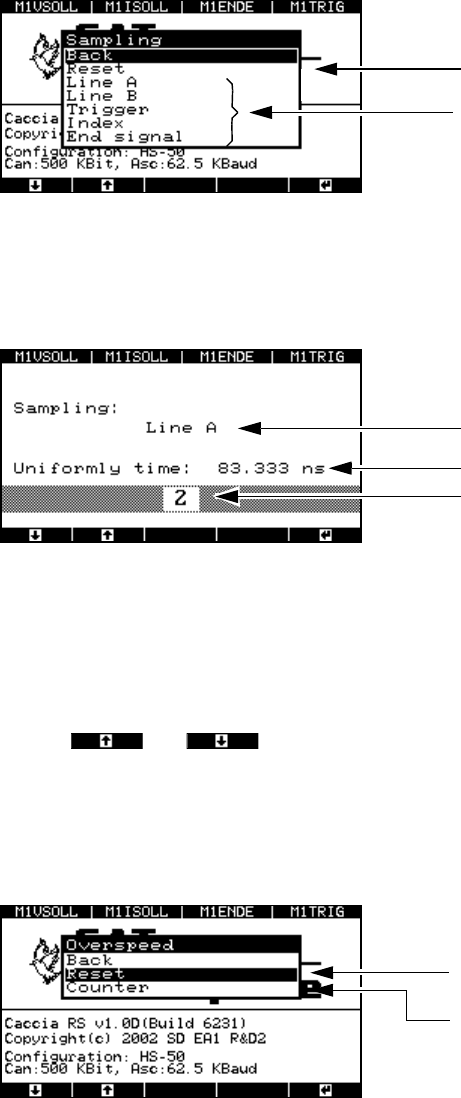
Fig. 8 - 15 “Sampling” menu
Æ Select “Reset” to set the sampling frequency to 12 MHz for all the signals. This corresponds to
a time base of 83.333 nsec.
Fig. 8 - 16 Sampling frequency
To calculate the time base:
Time base = Multiplier x 41.667 nsec.
This gives a range for the time base of 41.667 nsec to 10.625 µsec.
Use the and buttons to reduce or increase the time base. The smallest pos-
sible time base is 41.667 nsec, which corresponds to a sampling frequency of 24 MHz.
8.3.2.2 “Overspeed” menu
Æ Select the “Overspeed” option from the “Config unit” menu.
Fig. 8 - 17 “Overspeed” menu
Æ Select the “Counter” menu option in order to set the time base.
Sets the sampling frequency to the default
value of 12 MHz.
Sampling frequency for track signals
Selected line
Time base
Multiplier 1 ... 255
The minimum time between two pulse edges
is set to 83.333 nsec.
This menu allows the time to be set to a
multiple of 41.667 nsec.