00193370-0202.pdf - 第59页
SIPLACE Axis T est er Handbuch für das Achsprüfgerät / Axis T est er Manual Ausgabe 08/2003 Edition 8 Using the menus 59 8 Using the menu s 8.1 St arting the axi s test er and selec ting the use r level When you connect …

Handbuch für das Achsprüfgerät / Axis Tester Manual SIPLACE Axis Tester
7 Commissioning the axis tester Ausgabe 08/2003 Edition
58
7.1.2 Connecting the axis tester to S-15 /F3 /G placement machines and wafflepack
changers
Æ Connect the adapter to the 37-pin plug on the ribbon cable.
Æ Connect the 25-pin plug on the adapter to the socket on the axis controller.
Æ Connect the 37-pin socket on the ribbon cable to the axis tester.
The axis tester boots up. If all the self tests are successful, the start-up screen appears.
Æ Carry out your diagnostics and settings as described in the setting instructions.
7.2 Disconnecting the axis tester from the placement machine
Once you have completed your measurements on an axis controller, remember to save your
changes before you disconnect the ribbon cable. The procedure is as follows:
Æ Select the “Shutdown” option from the main menu.
Æ Select the “Shutdown computer: Yes” menu option.
When you click on “Yes”, all your settings are saved and the axis tester is shut down.
WARNING 7
Press the emergency stop button. 7
Æ You can now unplug the axis tester from the ribbon cable of the axis controller.
SIPLACE Axis Tester Handbuch für das Achsprüfgerät / Axis Tester Manual
Ausgabe 08/2003 Edition 8 Using the menus
59
8 Using the menus
8.1 Starting the axis tester and selecting the user level
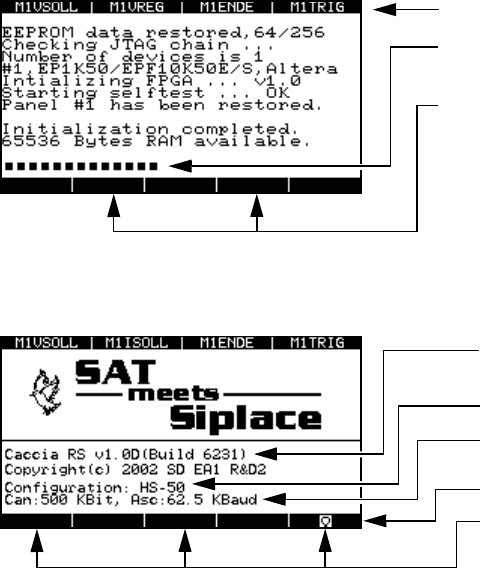
When you connect the axis tester to the axis controller in the control unit or after a reset, the CPU
restarts the axis tester. This loads the program and runs a number of self tests. The progress of
these tests is indicated by the dotted line at the bottom of the display.
Fig. 8 - 1 Display after booting
Once all the tests have been completed successfully, the start-up page appears on the display.
Fig. 8 - 2 Start-up window, rebooting the axis tester
Assignment of the BNC sockets
Self test progress indicator
Activate “Expert” mode:
To do this, press both keys simultaneously
during start-up. This displays a window to
confirm that “Expert mode” has been acti-
vated.
The current software version
Last saved configuration
Transmission speed for CAN bus or V24
port
Button for calling up the main menu
Press these three buttons simultaneously
to reset and reboot the axis tester.
Handbuch für das Achsprüfgerät / Axis Tester Manual SIPLACE Axis Tester
8 Using the menus Ausgabe 08/2003 Edition
60
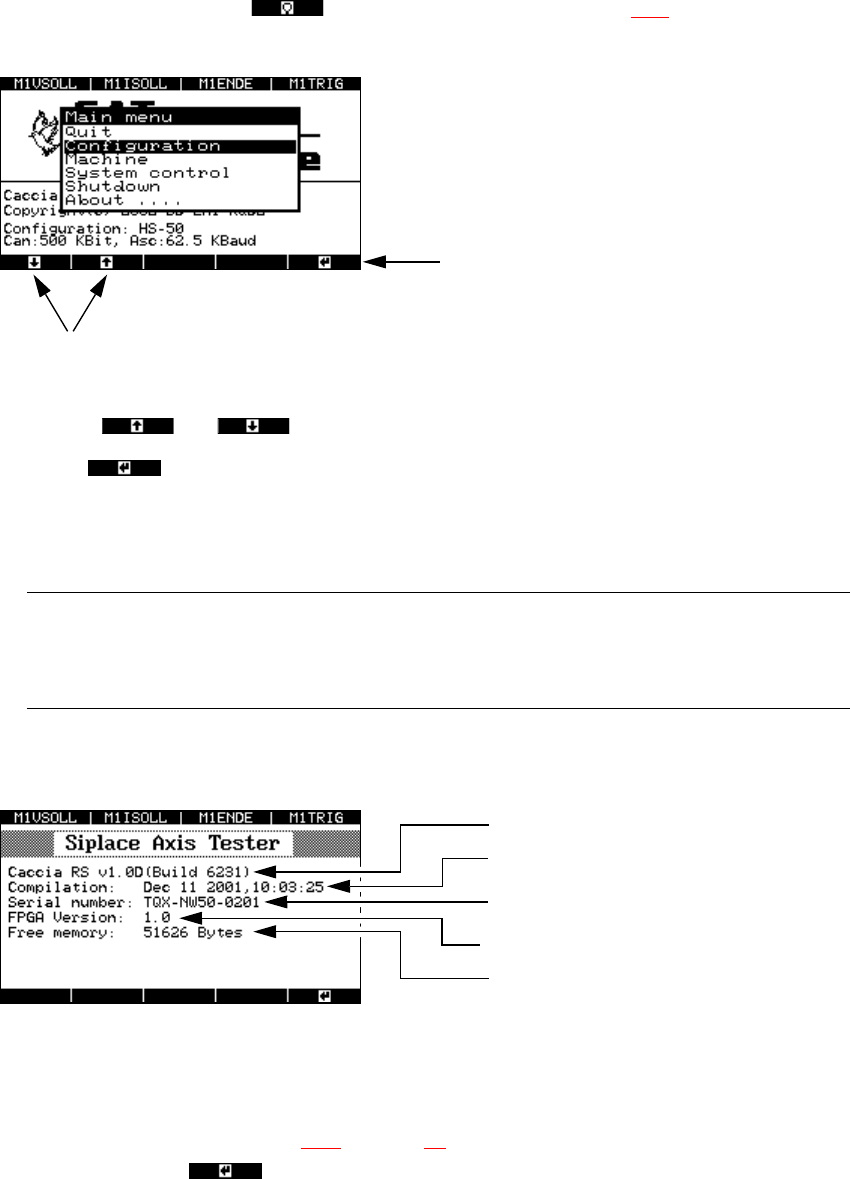
8.2 Main menu
Press this membrane button from the start-up window (see Fig. 8 - 2) to display the main
menu.
Fig. 8 - 3 Main menu of the user interface
Æ Use the and cursor keys to select individual menu options.
Æ Select to open a menu.
Æ Select “Quit” to close the main menu.
Æ Select “Shutdown” to save all your changes and shut down the axis tester.
PLEASE NOTE: 8
All your settings and values will be lost if you unplug the ribbon cable from the axis controller
before saving your settings. 8
Æ The “About…” menu option contains device-specific information, such as the software version,
serial number, etc.
Fig. 8 - 4 “About ...” menu option
8.3 “Configuration” menu
Æ From the main menu (see Fig. 8 - 3 on page 60) select the “Configuration” menu and press
membrane button .
The ‘Configuration’ menu appears.
Up and Down cursor keys
RETURN
Software version
Indicates when the software was compiled
Serial number of the axis tester
FPGA: Field Programmable Gate Array
Free memory