00193370-0202.pdf - 第75页
SIPLACE Axis T est er Handbuch für das Achsprüfgerät / Axis T est er Manual Ausgabe 08/2003 Edition 8 Using the menus 75 Fig. 8 - 37 “S el ect mode ” menu Æ Se lect “Show al l”. The window for tr aversing the ax is appea…
Handbuch für das Achsprüfgerät / Axis Tester Manual SIPLACE Axis Tester
8 Using the menus Ausgabe 08/2003 Edition
74
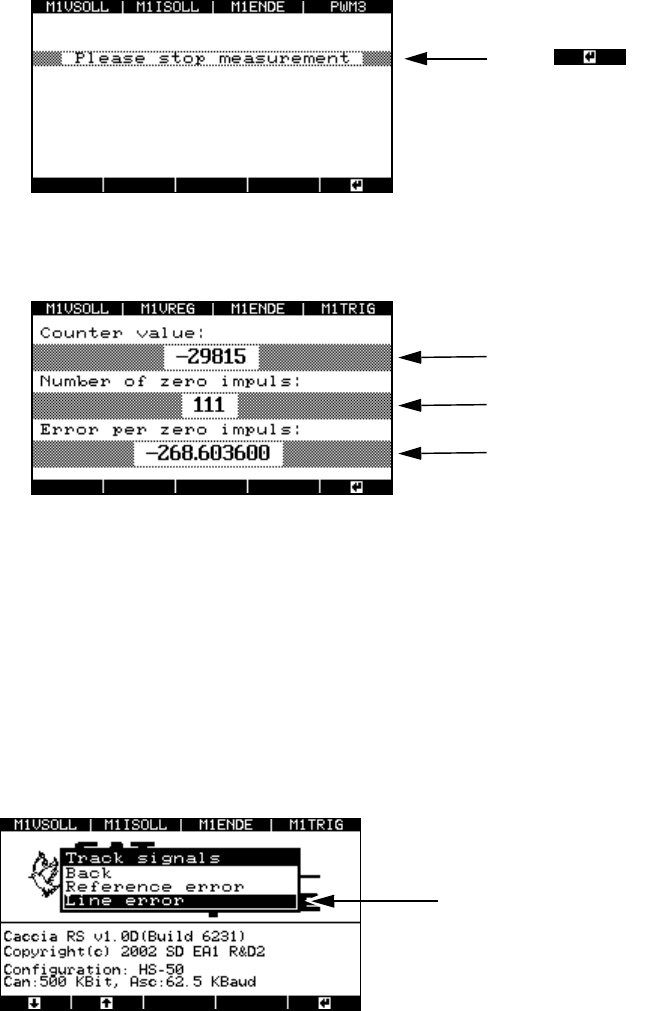
Fig. 8 - 34 Stopping the measurement to identify zero pulse errors
The result appears in the next window.
Fig. 8 - 35 Result of the zero pulse measurement
Ideally, the counter value should read 0 since the forward and backward movements were
identical. In this case, a 0 will also be output for the “Error per zero impulse” value.
If the counter value is other than 0, then counting errors have occurred. A minus sign before
the counter value means that more zero pulses were measured during the backward move-
ment than during the forward movement. In this case, a value other than 0 will again be output
for “Error per zero impulse”.
8.4.4.2 Checking track signals for errors
Fig. 8 - 36 “Track signals” menu, “Line error”
Æ Select the “Line error” option from the “Track signals” menu.
The window for selecting the display mode appears.
Press to stop the measuremen
t.
Counter value
Number of measured zero pulses
Counting error per zero pulse
Menu for testing the track signals
SIPLACE Axis Tester Handbuch für das Achsprüfgerät / Axis Tester Manual
Ausgabe 08/2003 Edition 8 Using the menus
75
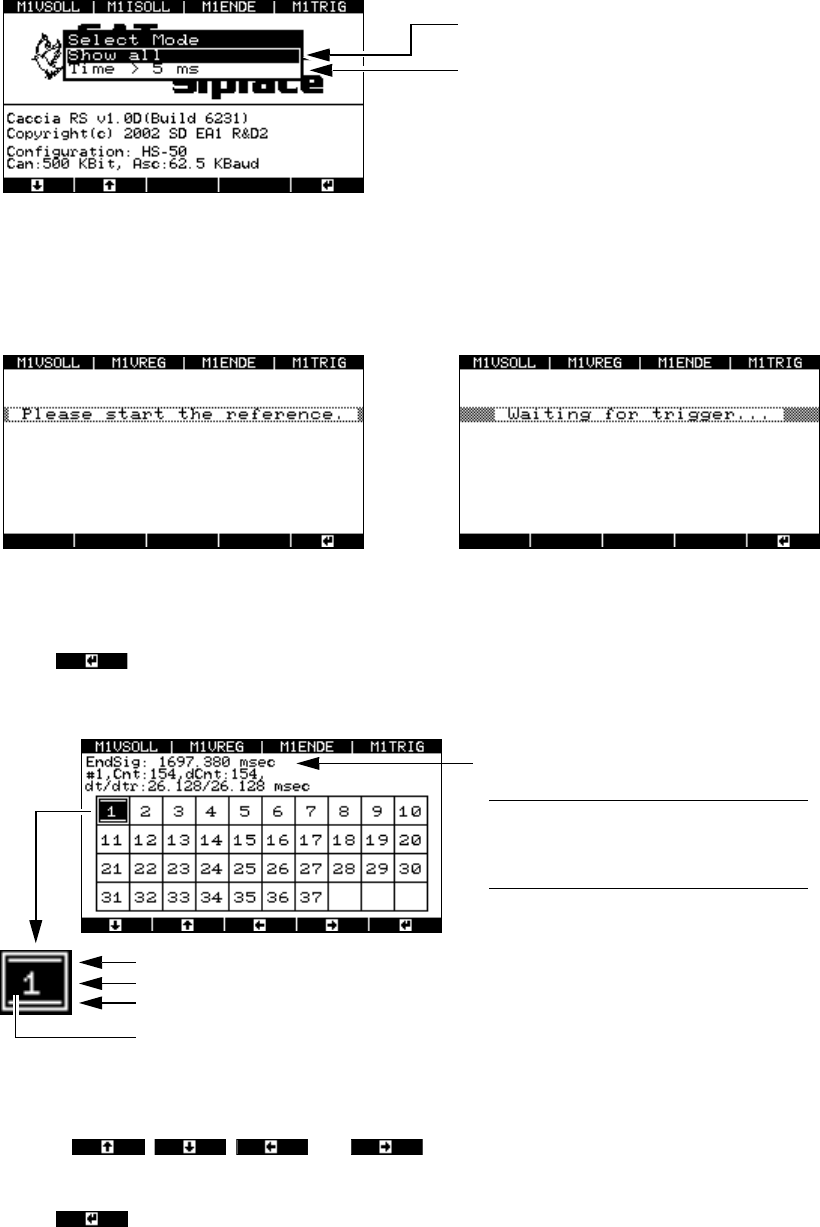
Fig. 8 - 37 “Select mode” menu
Æ Select “Show all”. The window for traversing the axis appears, followed by the window for stop-
ping the measurement.
Fig. 8 - 38 Prompts to traverse the axis and stop the measurement
Æ Press to stop the measurement.
The result window appears.
Fig. 8 - 39 Window for selecting the zero pulse
Æ Use the , , and cursor keys to select the required zero pulse
(the maximum number of zero pulses is 37).
Æ Press
All zero pulses are displayed.
Only zero pulses > 5 msec apart are
displayed.
This filter function should be used for
standard applications.
P
rompt to traverse the axis Prompt to stop the measurement
Duration of the end signal
PLEASE NOTE: The first measurement
is always invalid since there is no refer-
ence point for calculating the difference.8
Signals a counting error
Displays the recorded zero pulse
Signals a timing error
Black background:
The test results for this position are displayed in the next window.
Handbuch für das Achsprüfgerät / Axis Tester Manual SIPLACE Axis Tester
8 Using the menus Ausgabe 08/2003 Edition
76
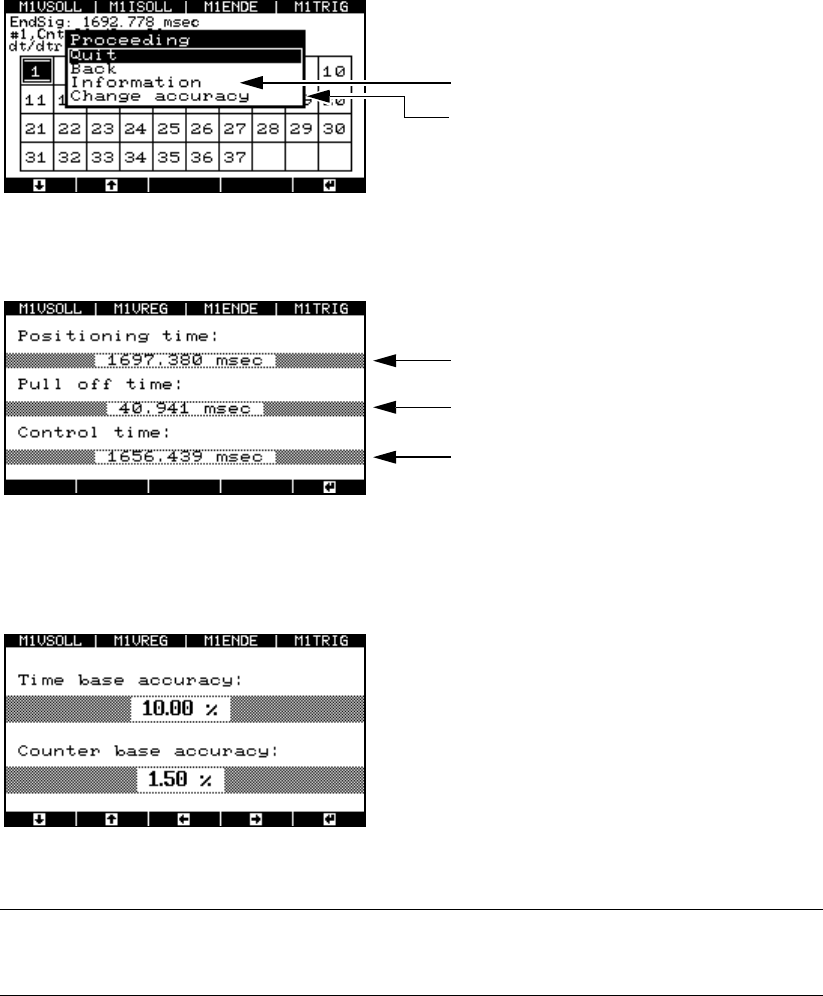
Fig. 8 - 40 Window for displaying the measuring accuracy
Æ Select the “Information” menu option. The test results are displayed.
Fig. 8 - 41 Test results for the distance measurement
Æ Select the “Change accuracy” menu option to change the permitted scatter of the time base or
counter.
Fig. 8 - 42 Setting the accuracy of the time base and counter
PLEASE NOTE: 8
Do not change the default values. 8
8.4.5 “Serial connect” menu
Æ Select the “Serial connect” option from the “Properties” menu.
Displays the test results
Selects the level of measuring accuracy
Duration of the end signal
Pull-off time
Trigger time