00193370-0202.pdf - 第79页
SIPLACE Axis T est er Handbuch für das Achsprüfgerät / Axis T est er Manual Ausgabe 08/2003 Edition 8 Using the menus 79 8.5 “System control” m enu Y ou can use this me nu to – save an d reload the se ttings for your axi…
Handbuch für das Achsprüfgerät / Axis Tester Manual SIPLACE Axis Tester
8 Using the menus Ausgabe 08/2003 Edition
78
8.4.6 “Adjust panel” menu
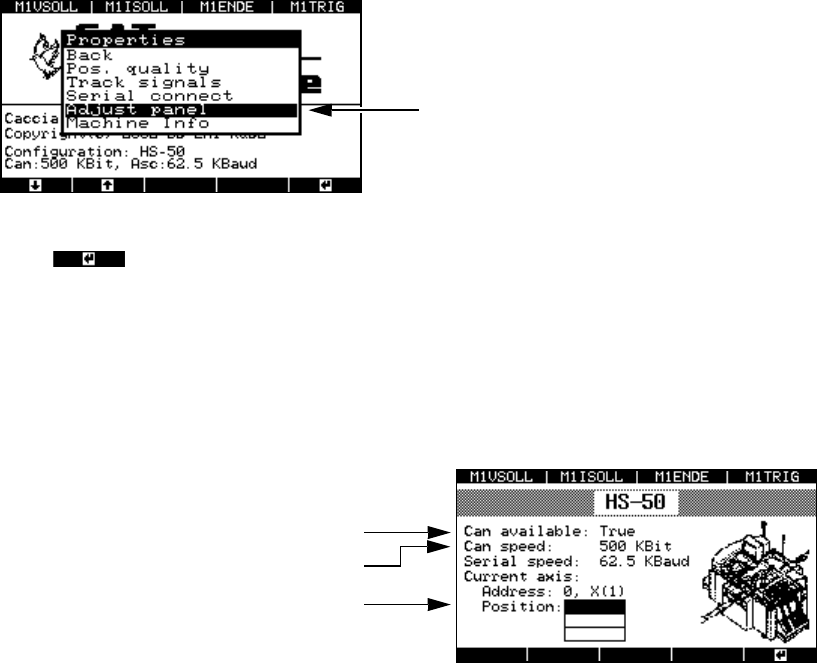
This menu is used to adopt the settings for the current axis for all the other axes.
Æ Select the “Adjust panel” option from the “Properties” menu.
Fig. 8 - 45 “Adjust panel” menu
Press to confirm your settings.
8.4.7 “Machine info” menu
This menu indicates the currently selected axis controller.
Æ Select the “Machine info” option from the “Properties” menu.
Fig. 8 - 46 “Machine info” display
The settings for the current axis are adopted.
The CAN interface is ready
Transmission speed
Top axis controller in the 1st axis controller
board with address bus no. 0
SIPLACE Axis Tester Handbuch für das Achsprüfgerät / Axis Tester Manual
Ausgabe 08/2003 Edition 8 Using the menus
79
8.5 “System control” menu
You can use this menu to
– save and reload the settings for your axis tester,
– change the display language,
– configure the display and
– define the parameters for the CAN bus and serial ports.
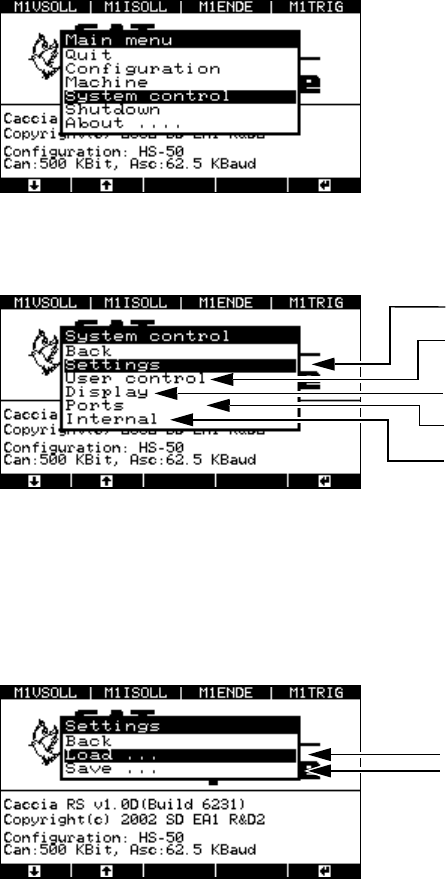
Æ To do this, select the “System control” option from the main menu.
Fig. 8 - 47 Main menu, selecting the “System control” menu
The ‘System control menu appears.
Fig. 8 - 48 “System control” menu
8.5.1 “Settings” menu
Æ Select the “Settings” menu. The window for loading and saving the axis tester configuration
appears.
Fig. 8 - 49 “Settings” menu, loading or saving settings
Æ Select the “Load …” menu option.
For saving and loading settings
User level and language
Display: contrast and screen saver
CAN bus and serial port
Reserved for servicing purposes
Menu option for loading settings
The settings are stored in the EEPROM of the
axis tester.
Handbuch für das Achsprüfgerät / Axis Tester Manual SIPLACE Axis Tester
8 Using the menus Ausgabe 08/2003 Edition
80
The menu for loading settings appears.
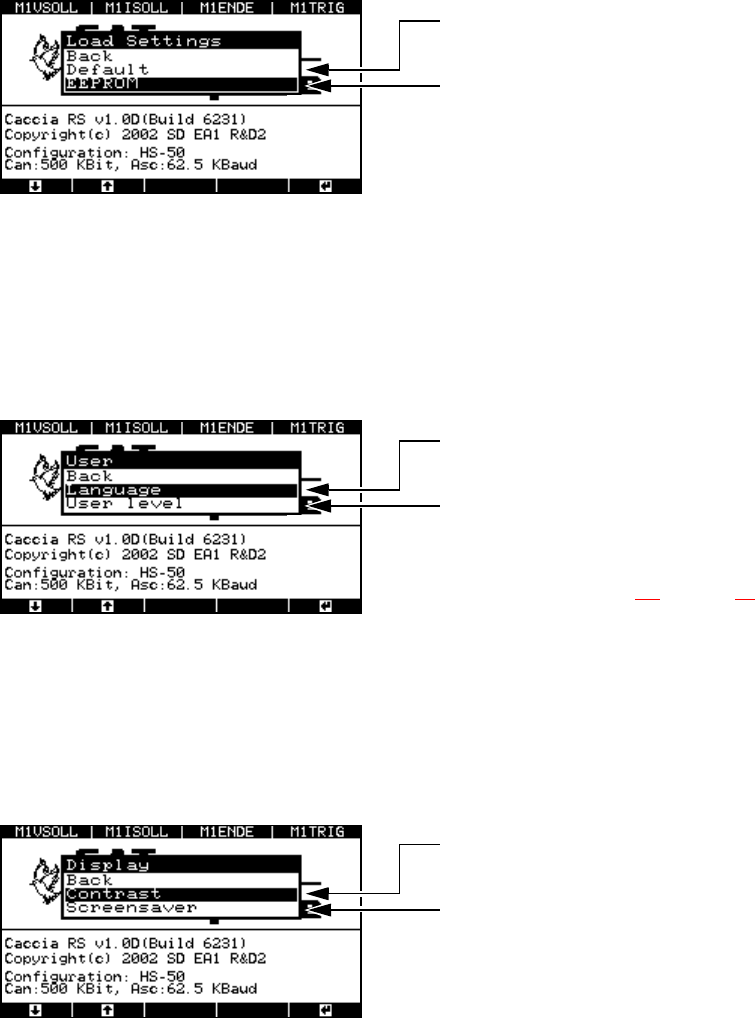
Fig. 8 - 50 “Load settings” menu
8.5.2 “User” menu
The “User” menu allows you to select the user interface language: German or English. You can
also set the user level. At the “Beginner” user level, you only have access to a limited choice of
menus from the user interface.
Fig. 8 - 51 “User” menu
8.5.3 “Display” menu
Æ Select the “Display” option from the “System control” menu.
The menu for configuring the CAN connection and serial port appears.
Fig. 8 - 52 “Display” menu
Factory defaults that cannot be modified
Here you can adopt the most recently saved
settings
“Yes” to accept
“Back” to cancel
Select German or English as the interface
language
Select “Expert” or “Beginner” as the user
level: if you choose “Beginner”, then the num-
ber of options in the “Machine” and “About”
menus is limited. Selection of the user level
is described in section 8.1
on page 59.
Display contrast settings:
Brighter ↔ Darker
Screen saver configuration:
- Duration
- Change type
- Set the delay