00193370-0202.pdf - 第83页
在线预览 00193370-0202.pdf PDF 文档。
Handbuch für das Achsprüfgerät / Axis Tester Manual SIPLACE Axis Tester
9 Maintenance Ausgabe 08/2003 Edition
82
8.5.4.2 “Asc port” menu
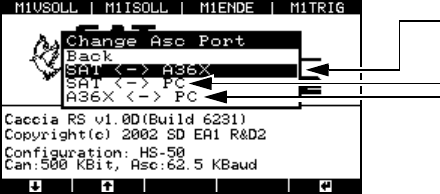
Æ Select the “Asc port” option from the “Ports” menu, and then select “Change Asc port”.
The “Change Asc port” menu appears.
Fig. 8 - 56 “Change Asc port” menu
SAT ↔ A36X
The axis tester - axis controller connection is always configured as the default. The signal is
transferred via the ribbon cable.
SAT
↔ PC
Choose this setting in order to update the axis tester software.
A36X
↔ PC
With this configuration, the axis tester acts as the mediator between the A36X axis controller
and the PC connected at the 9-pin sub-D socket. With suitable programs, you can transfer data
(such as counter values or status bytes) from the axis controller to an external PC.
9 Maintenance
The actual axis tester is maintenance-free. You should, however, check the connecting cables ev-
ery year, particularly the ribbon cable, for:
– damage to the insulation
– cable breaks and
– uninterrupted electrical connections between the ribbon cable and connectors.
To select the port:
Axis tester - axis controller (default)
Axis tester - PC
Axis controller – PC

Item no. / Artikel-Nr.: $SM Assembly Systems GmbH & Co. KG
Rupert-Mayer-Strasse 44
81379 München
Germany
www.siplace.com