00193370-0202.pdf - 第67页
SIPLACE Axis T est er Handbuch für das Achsprüfgerät / Axis T est er Manual Ausgabe 08/2003 Edition 8 Using the menus 67 Fig. 8 - 18 Sett i ng the time b ase for the overspeed PLEASE NOTE: 8 We recomme nd that you k eep …
Handbuch für das Achsprüfgerät / Axis Tester Manual SIPLACE Axis Tester
8 Using the menus Ausgabe 08/2003 Edition
66
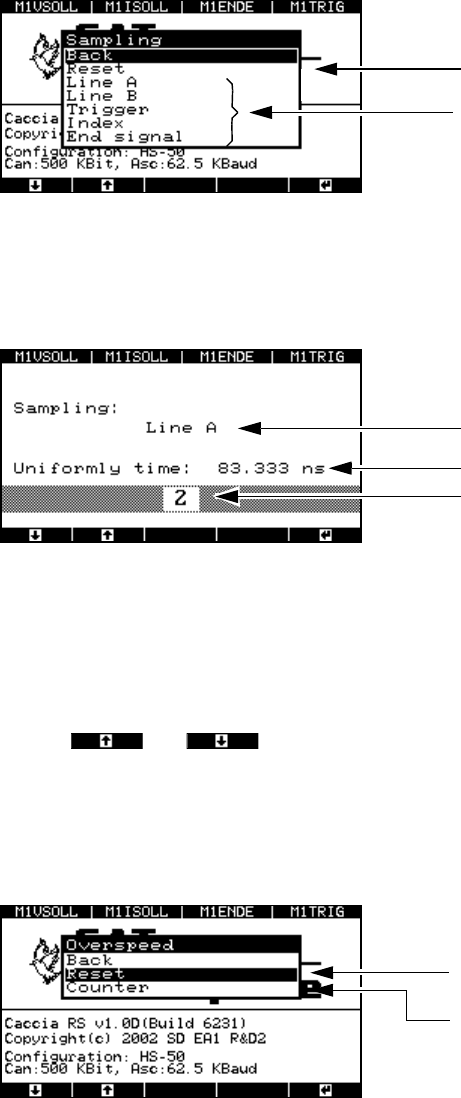
Fig. 8 - 15 “Sampling” menu
Æ Select “Reset” to set the sampling frequency to 12 MHz for all the signals. This corresponds to
a time base of 83.333 nsec.
Fig. 8 - 16 Sampling frequency
To calculate the time base:
Time base = Multiplier x 41.667 nsec.
This gives a range for the time base of 41.667 nsec to 10.625 µsec.
Use the and buttons to reduce or increase the time base. The smallest pos-
sible time base is 41.667 nsec, which corresponds to a sampling frequency of 24 MHz.
8.3.2.2 “Overspeed” menu
Æ Select the “Overspeed” option from the “Config unit” menu.
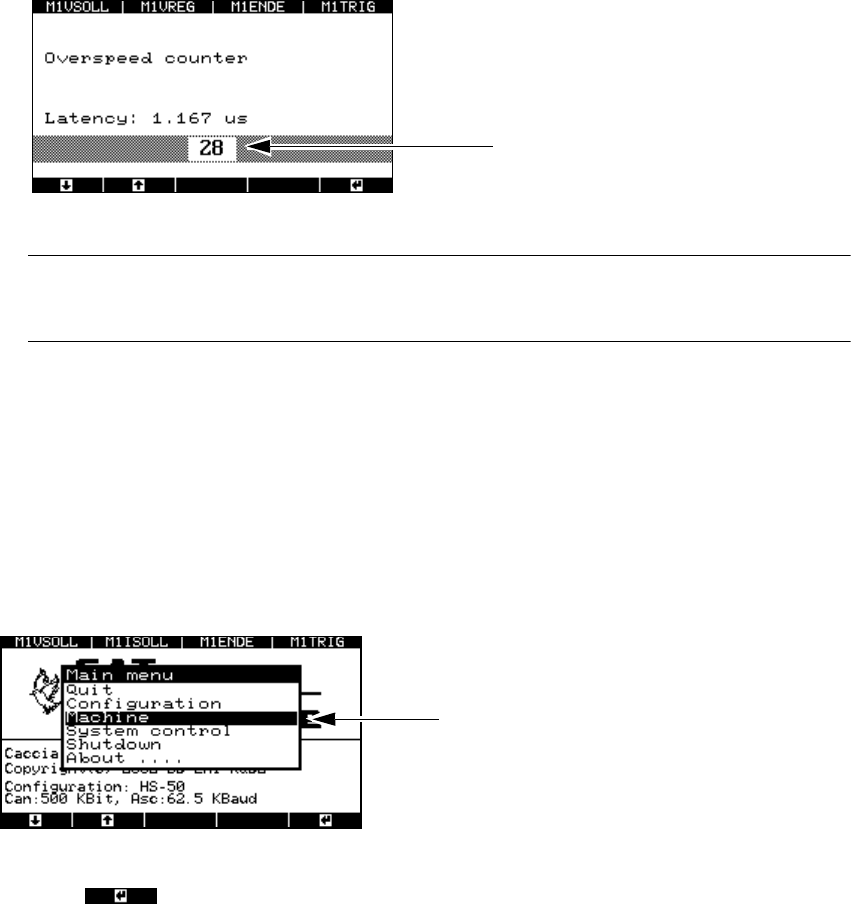
Fig. 8 - 17 “Overspeed” menu
Æ Select the “Counter” menu option in order to set the time base.
Sets the sampling frequency to the default
value of 12 MHz.
Sampling frequency for track signals
Selected line
Time base
Multiplier 1 ... 255
The minimum time between two pulse edges
is set to 83.333 nsec.
This menu allows the time to be set to a
multiple of 41.667 nsec.
SIPLACE Axis Tester Handbuch für das Achsprüfgerät / Axis Tester Manual
Ausgabe 08/2003 Edition 8 Using the menus
67
Fig. 8 - 18 Setting the time base for the overspeed
PLEASE NOTE: 8
We recommend that you keep the default value of 83.333. 8
If you have changed any values, then you must save them.
Æ Select from the main menu
- the “System control” menu
→ "Settings" → "Save" or
- the “Shutdown” menu
→ "Shutdown computer: Yes”.
8.4 “Machine” menu
The “Machine” menu is accessed from the main menu.
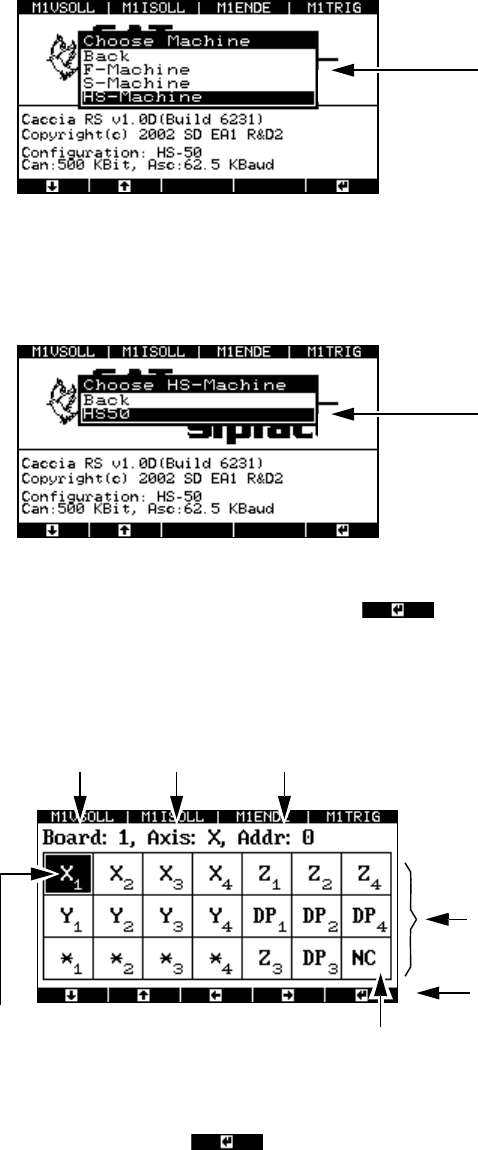
Fig. 8 - 19 Main menu, selecting the “Machine” menu
Æ Press to select the menu.
The menu for selecting the placement machine appears.
Multiplier
Example: 28 x 41.667 nsec = 1.167 µsec
“Machine” menu
Handbuch für das Achsprüfgerät / Axis Tester Manual SIPLACE Axis Tester
8 Using the menus Ausgabe 08/2003 Edition
68
8.4.1 Selecting a machine
Fig. 8 - 20 Selecting the “Machine” menu
The wafflepack changer can be found under F machine.
Æ Select a class of placement machine, e.g. HS machine.
Fig. 8 - 21 Selecting the “Machine type” menu
Æ Move the cursor onto HS-50 and press to confirm your choice. The window for con-
figuring the axis controllers in the control unit appears.
8.4.2 Selecting an axis
Fig. 8 - 22 Axis controller display, configuration
Æ Select the required axis by using the cursor keys to move the black marker onto the field con-
cerned. Then press to confirm your choice.
The window for displaying the axis properties appears.
There is a separate menu for each class of
machine, i.e. 1-gantry, 2-gantry or 4-gantry
machines.
Accesses the configuration menu for the
HS-50 placement machine
The selected axis has
a black background
Axis board no. 1 X axis Address 0
Not used
This display corresponds to the address
-
ing in the HS-50 control unit.
This display corresponds to the arrange-
ment in the HS-50 control unit.
Cursor keys for defining the axis selection