D-serie LEVEL II.pdf - 第144页
C&P6/12 Placement Head Vacuum Check Throughput Test for Vacuum-Holding Circuit S tuden t Guide Advanced Level 2 SIPLACE D Series C&P6/12 Placement Head EN 05/2007 8-18 8.5.3 Throughput T est for V acuum-Holding C…

C&P6/12 Placement Head
Vacuum Check for Pickup/Place Circuit Vacuum Check
Student Guide Advanced Level 2 SIPLACE D Series
EN 05/2007 C&P6/12 Placement Head
8-17
Benefits of Special Mode "Slow Start"
The component stays on the board even if the soldering paste has a low holding force.
8.5 Vacuum Check
8.5.1 Vacuum Check for Pickup/Place Circuit
Machine functions and component presence are checked in regular function tests during the pickup and
place processes. These relate to the vacuum values during the reference run as comparative values.
8.5.2 Vacuum Check for Holding Circuit
In order to detect any leaks in the segments which are not in the pickup/place position, a vacuum check
for the holding circuit is performed after placement.
The vacuum check for the holding circuit is only performed under the following conditions:
The placement sequence has been completed. (All components have been placed.)
There were no vacuum or Vision errors during the placement process.
The vacuum value must exceed a threshold of 750 mbar. This threshold also depends on the height of
the machine when installed.
NOTE:
However, this option makes the placement procedure around 20 ms longer than the standard
placement procedure.
1. Vacuum check before pickup
Vacuum check with Z-axis still in zero position
"Vacuum closed" value:
To valve check
For 604
only (new)
Vacuum check after start down
Only at pickup for components with function "early
vacuum"
"Vacuum open" value:
Check whether segment is empty
2. Vacuum check after pickup
Vacuum value for Z-axis at light barrier up position
First component presence check:
Starts gantry positioning
3. Vacuum check after pickup
Vacuum value for Z-axis at zero position
Second component presence check:
Check whether component is processed
further in star positions.
4. Vacuum check before placement
Vacuum value with Z-axis still in zero position
Presence check before placement
5. Vacuum check after placement
Vacuum check when Z-axis is again in zero position
"Vacuum closed" value:
To valve check
This is the reference value for vacuum check
before pickup.

C&P6/12 Placement Head
Vacuum Check Throughput Test for Vacuum-Holding Circuit
Student Guide Advanced Level 2 SIPLACE D Series
C&P6/12 Placement Head EN 05/2007
8-18
8.5.3 Throughput Test for Vacuum-Holding Circuit
Through the installation of the placement head, the silicon tube for supplying the holding circuit with
vacuum can become jammed, especially in HF/X/D3 machines.
The lower throughput reduces the holding force for the components during the placement process. This
means that components can be displaced on the nozzle, both before and after the component camera.
If this happens before the camera, the component may be moved out of the pickup tolerance. After the
camera, displacement can lead to random, uncorrectable placement offsets.
This fault can be recognized with the SITEST 'throughput test".
C&P12/6
Perform the following steps:
X Return all C&P head nozzles.
X Measure the holding circuit vacuum. Typical values are around 900 mbar (values over 900 are
shown as 900).
X Open a segment in the reject circuit and
X step the star one position.
X Measure the holding circuit vacuum. Values higher than 800 mbar are OK.
X Open another segment in the reject circuit and
X step the star one position.
X Measure the holding circuit vacuum. Values higher than 700 mbar are OK.
Values around 600 mbar are reached at around half the diameter of the silicon supply tube.
Vacuum values in the holding circuit which only reach 500 mbar are no longer sufficient to guarantee the
holding circuit function. (Values under 400 mbar are only shown as -1)
C&P6/12 Placement Head
Boards at C&P12 Settings
Student Guide Advanced Level 2 SIPLACE D Series
EN 05/2007 C&P6/12 Placement Head
8-19
8.6 Settings
8.6.1 Boards at C&P12
All the settings described in this chapter are head-specific and apply here for the C&P12.
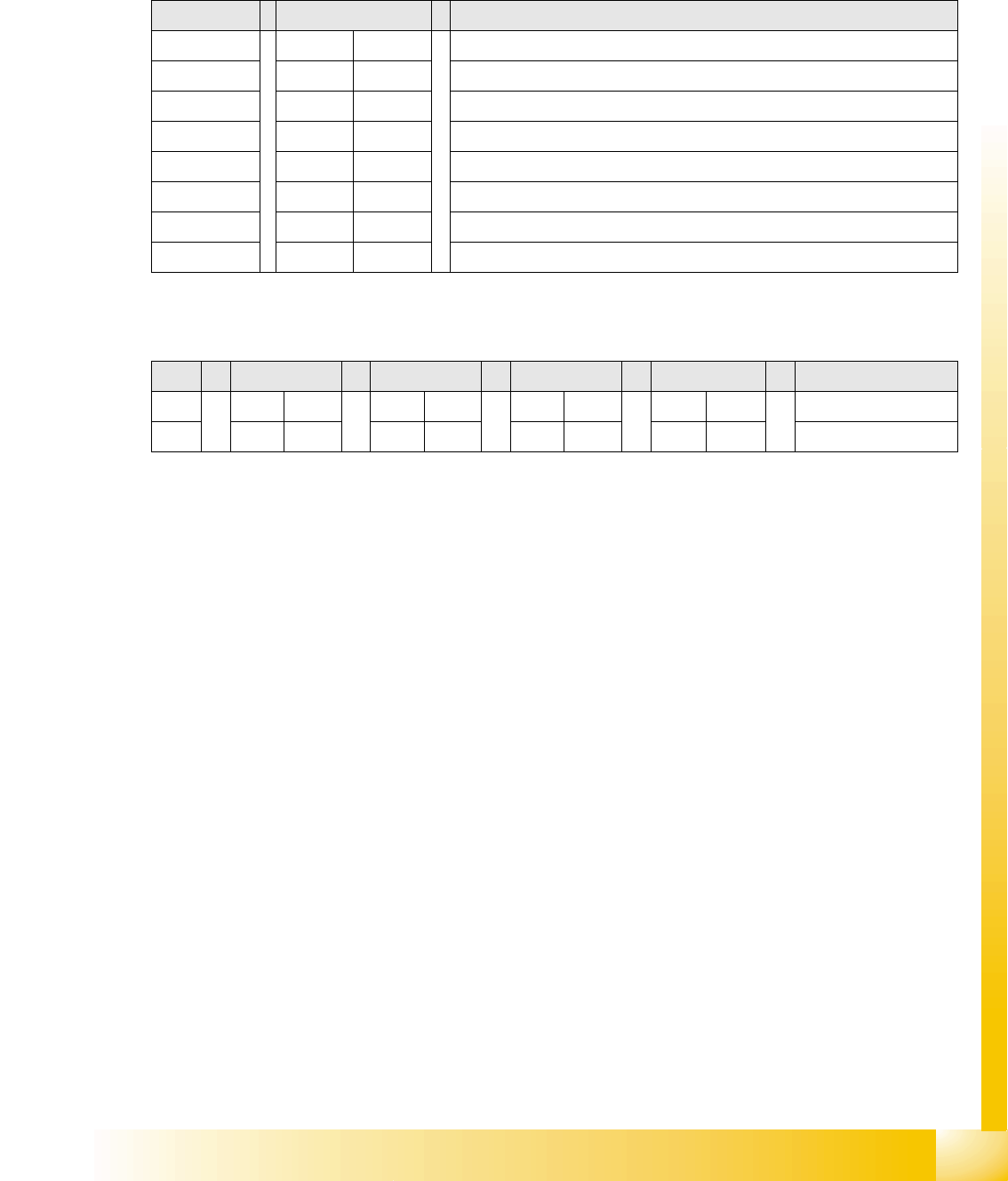
8.6.1.1 8-Fold DIP Switch of the Gantry Head Distributor (incl. Switch S1) – C&P6/12
Switches P0 and P1:
Switch S1:
ON – Test mode (without delay)
OFF – Default state (with delay of 3.6 ms+/- 300 us) means: Z-axis moves downwards, the top LB
is released and the LB down is enabled after a delay of 3.6 ms.
See also:
J Description of LEDs on the Gantry Head Distributor [J6-15]
J 6.3.3.1 Gantry Head Distributor [J6-13]
DIP switch Switch position Designation
1 OFF P0 (see below)
2 OFF P1 (see below)
3 OFF "S1" for test mode (see below)
4 OFF BL – activates boot loader for the serial port
5 OFF Res (Reset) – 16 bit CAN processor (TQ module)
6 OFF C0 – currently no function
7 OFF C1 – currently no function
8 OFF S2 – switch for DLM head (currently no function)
S Gantry 1 Gantry 2 Gantry 3 Gantry 4 Designation
1 OFF ON OFF ON P0
2 OFF OFF ON ON P1
Gantry selection via switches P0 and P1: