D-serie LEVEL II.pdf - 第213页
SITEST New Functions in SITEST Calibration Basics S tude nt Guide Advanced Level 2 SIPLACE D Series EN 05/2007 SITEST 12-13 2. Change transport mode : This function is used to configure the option Long Board . Next menu:…
SITEST
Calibration Basics Head Mapping (C&P Head)
Student Guide Advanced Level 2 SIPLACE D Series
SITEST EN 05/2007
12-12
The results will be saved in the file
MAPP_xy.MA
(x= gantry number, y= conveyor lane).
12.2.9 Head Mapping (C&P Head)
Head mapping measures the linearity of the C&P head X/Y guidance.
The C&P head places the calibration tool precisely on the default positions of the mapping plate. The
PCB-camera measure the placement accuracy of this placements for the whole placement area.
After the PCB mapping the placement head place at the theoretical positions of the PCB-mapping
the calibration tool.
The PCB camera measures the placement accuracy with the help of the 4 calibration tool fiducials
on the calibration tool upper side.
12.2.10 New Functions in SITEST
12.2.10.1 Transport Menu
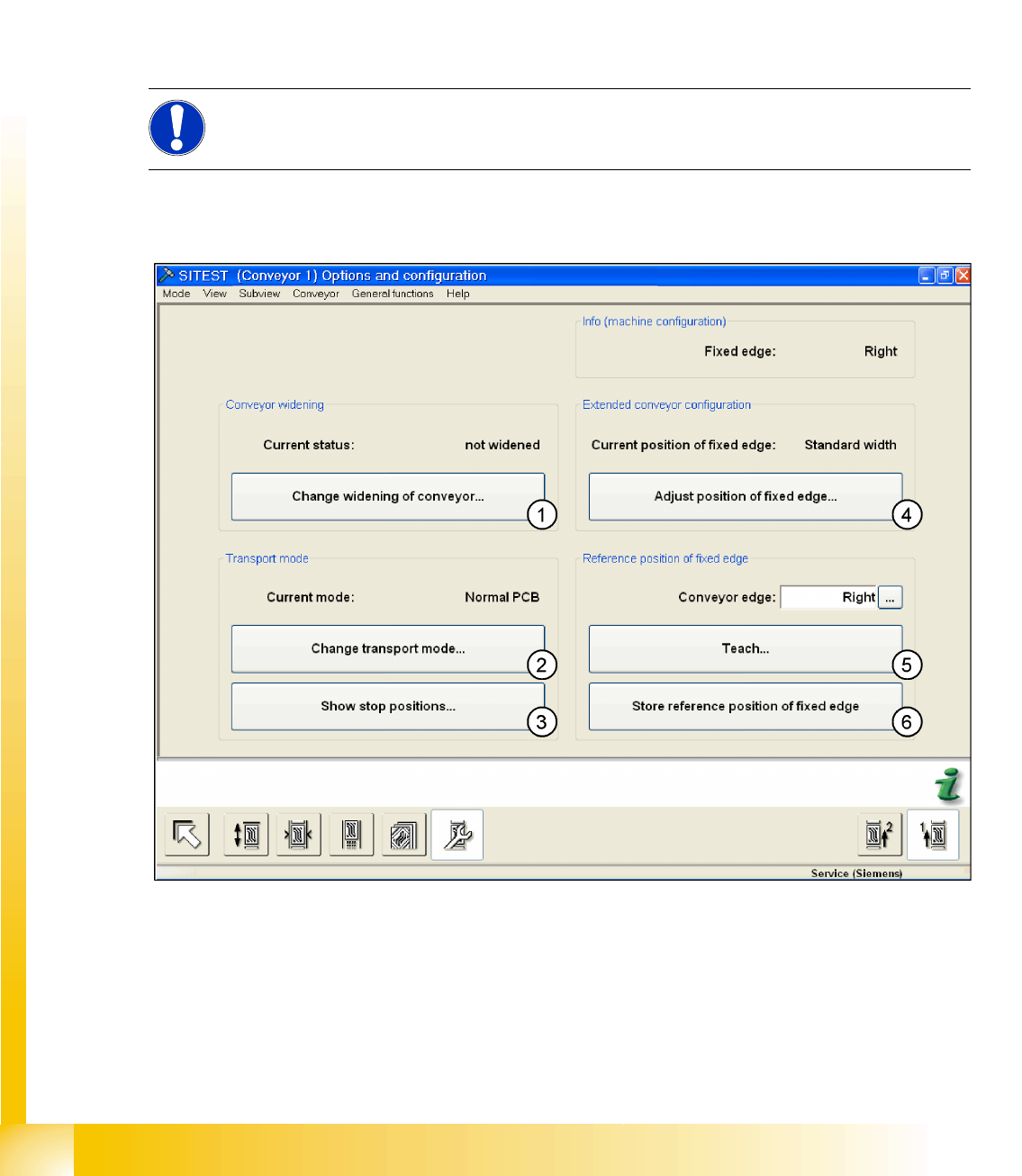
12-6: Transport - option and configuration
Legend
1.
Changing the conveyor width
(only for lane 1, if dual conveyor):
You will see a submenu, in which you can select
Widened
or
Not widened
(standard width).
Widened means that lane 2 is moved together (to the limit switch), while the fixed side for lane 1
remains in its position. (max. width of lane 1 = 380 mm)
If point 4 is selected first (extra wide) this gives a max. width for lane 1 of 430 mm.
NOTE:
All described automatically calibration steps above, can you do manually step by step under the
sub menus (see chapter 12.1).
SITEST
New Functions in SITEST Calibration Basics
Student Guide Advanced Level 2 SIPLACE D Series
EN 05/2007 SITEST
12-13
2.
Change transport mode
:
This function is used to configure the option
Long Board
.
Next menu:
normal PCB/ long PCB
3.
Show stop positions
:
shows the number of position in PA 1 and PA2, additional the offset depend on the standard position
(PCB Reference- corner). The offset for the option
Long Board
is set by SIPLACE Pro.
4. This enables you to move the fixed conveyor side in its standard position to accommodate standard
or extra wide boards (values from the conveyor control machine data).
Extra wide means that the fixed side is moved up to 26 mm. (dual conveyor lane 1 and lane 2 =
242 mm, flexible dual conveyor lane 1 = 430 mm, single conveyor = 508 mm)
5. Point 5 and 6 only with Siemens Service password active! The fixed conveyor side (
left, right
) can
be taught.
6. Save the teach data from point 5.
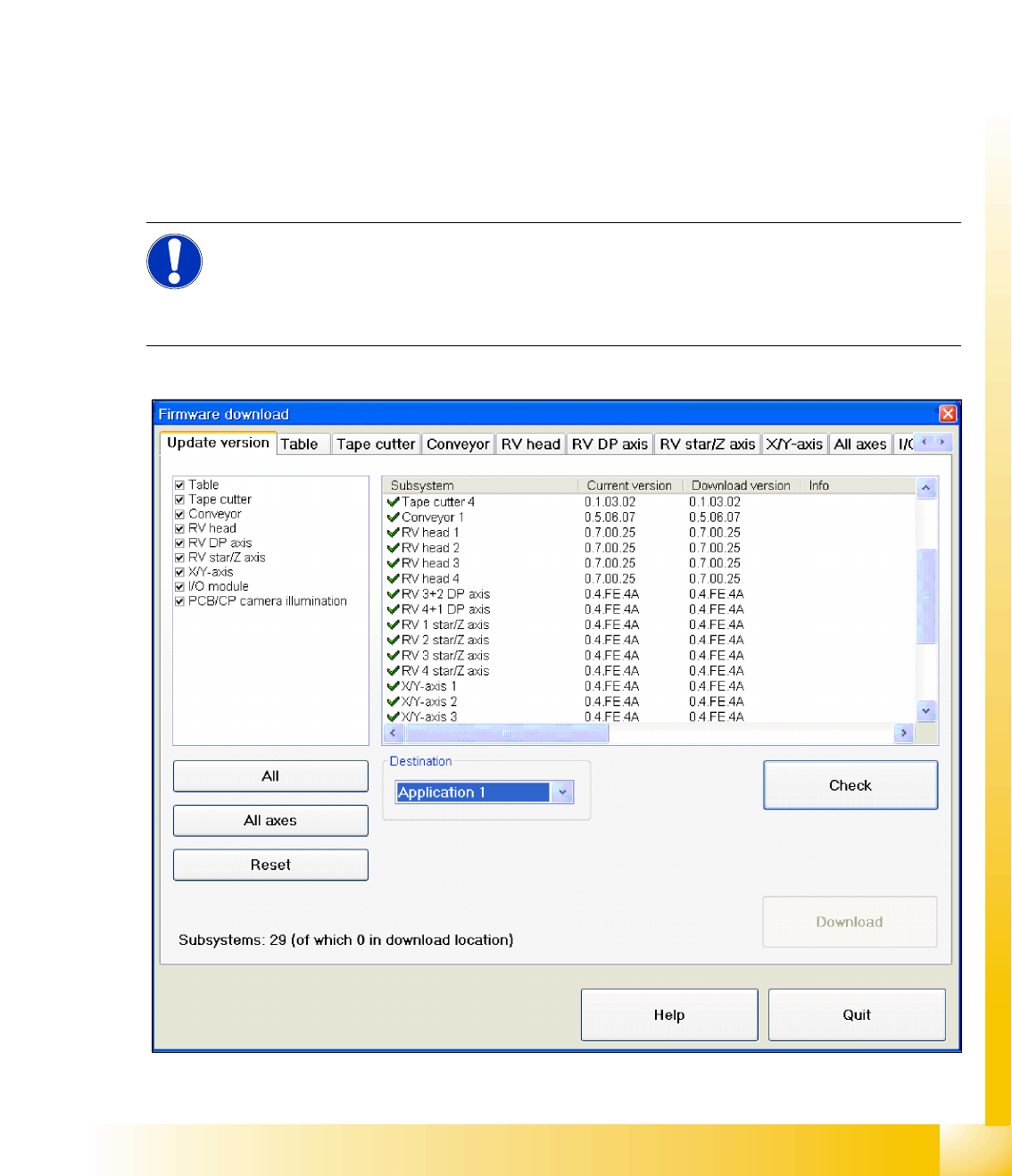
12.2.10.2 Function Firmware Download
X , select
Settings
from the SITEST menu and then
FirmwareDownload
.
12-7: Overview of firmware download
NOTE:
For versions up to SC/MC SW 603, this function is only available to SIEMENS service
personnel.
From SC/MC SW 604, the downloads performed with SITEST to all components can also be
executed by customer service technicians.
SITEST
Calibration Basics New Functions in SITEST
Student Guide Advanced Level 2 SIPLACE D Series
SITEST EN 05/2007
12-14
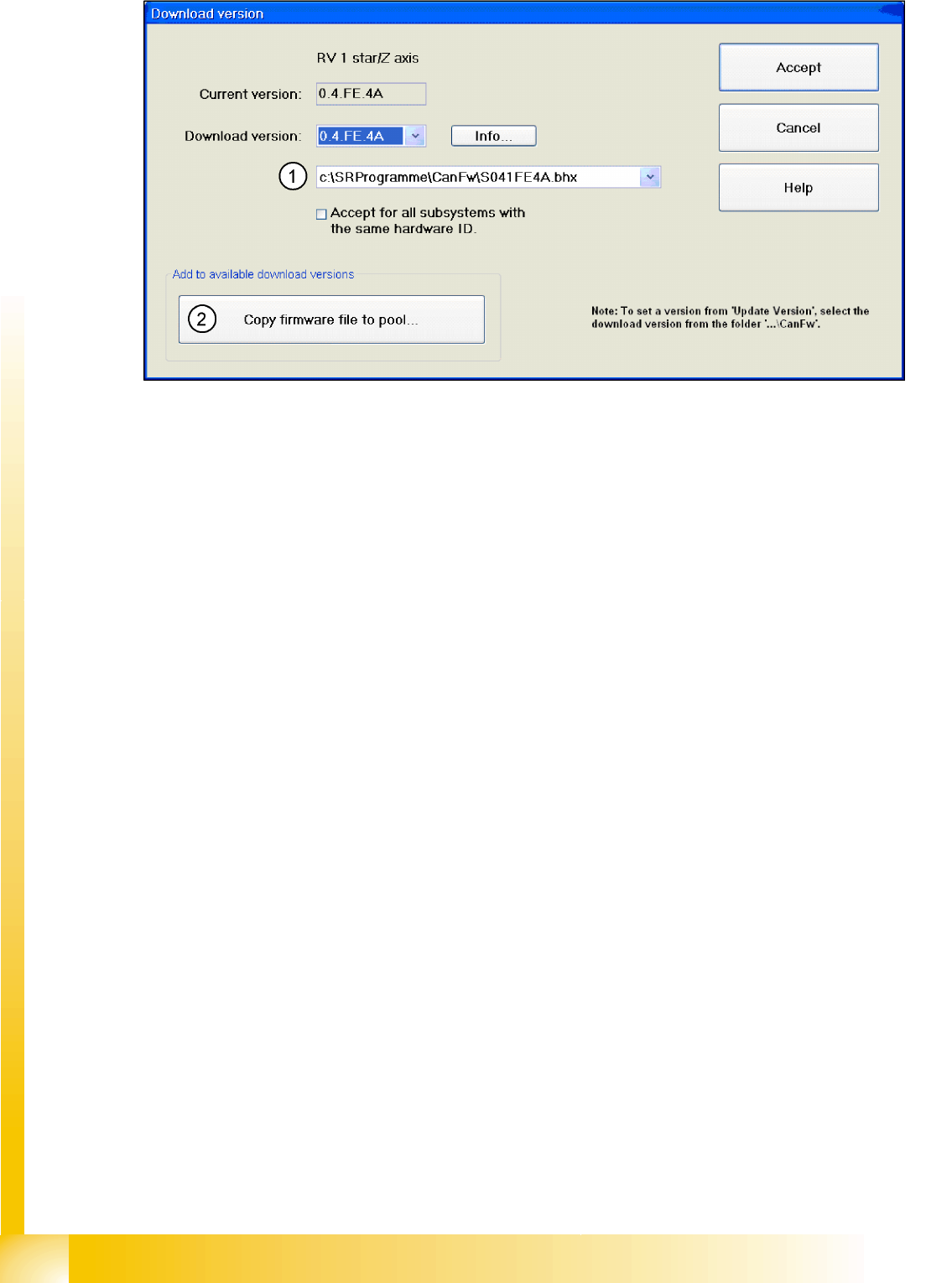
12-8: Firmware download
In the Can FW folder there are all current Firmware versions of all axes, tables etc.
Legend
1. The system checks this folder, to see whether there is a newer version of the firmware for the
respective axis, table etc.. If there exist a new firmware version, this new version will be offered and
could be downloaded for example to the star- axis.
2. You can also copy a new firmware version manually into the CAN FW folder. Click on the
Copy firm-
ware file to pool
. An Explorer menu will open, in which you can directly copy the new firmware
version from a USB stick etc. into the CAN FW folder. The firmware version you have selected is
now present in the selection menu (see (1)).
12.2.10.3 Head Modularity for SIPLACE D-Series
X , select
Settings
from the SITEST menu and then
Head exchange
.