D-serie LEVEL II.pdf - 第96页
Gantry Settings Travel Ranges and Speed Monito ring at the D4 (A364) S tuden t Guide Advanced Level 2 SIPLACE D Series Gantry EN 05/2007 6-10 6-6: Travel ranges for X and Y axes (D4 and X4 shown as example) The end of th…
Gantry
Fitting the Incremental Scale Settings
Student Guide Advanced Level 2 SIPLACE D Series
EN 05/2007 Gantry
6-9
*
Equipment in addition to standard manual tools
6.2.1 Fitting the Incremental Scale
6.3 Settings
For detailed information about the assemblies and their settings, refer to the service guide for the
respective machine.
6.3.1 Travel Ranges and Speed Monitoring at the D4 (A364)
The travel range of the X- and Y-axes is determined automatically with the SITEST program.
This means that, during travel range calibration, the axis concerned moves stepwise towards the
minimum or maximum position, until the set target value is no longer reached by the axis. It is then
assumed that the hardware limit switch (bumper) has been reached. After a time window of approx.
10 ms, the greatest actual value achieved is taken to calculate the travel range.
To guarantee an appropriate safety distance before the hardware end position is reached, a certain
distance is deducted from the set travel range and is defined as the software end position for the
axis.This enables the axis to brake in time, even when errors occur.
Head distributor ––– 'Gantry interface’ Currently --
-
Trailing cable
distributor
––– Trailing cable
interface
Currently --
-
Axis dynamics
X-motor
(primary part)
Axis dynamics D3 (5ms faster than
with 602)
Y-motor Axis dynamics D3 (5ms faster than
with 602)
Y drive magnets Axis dynamics? D3
Assembly Tools &
equipment *
Setting type Comments See also
Settings/checks
NOTE: X incremental scale
X The X incremental scale on the D4 is glued to a metal strip, which can be unscrewed.
X The X incremental scale on the D3 is to be glued onto an aluminum strip, along the stopper
edge. Before stripping off the scale, mark where it starts on the aluminum strip.
X The D1/2 scale is glued to the fixed base plate of the gantry.
Gantry
Settings Travel Ranges and Speed Monitoring at the D4 (A364)
Student Guide Advanced Level 2 SIPLACE D Series
Gantry EN 05/2007
6-10
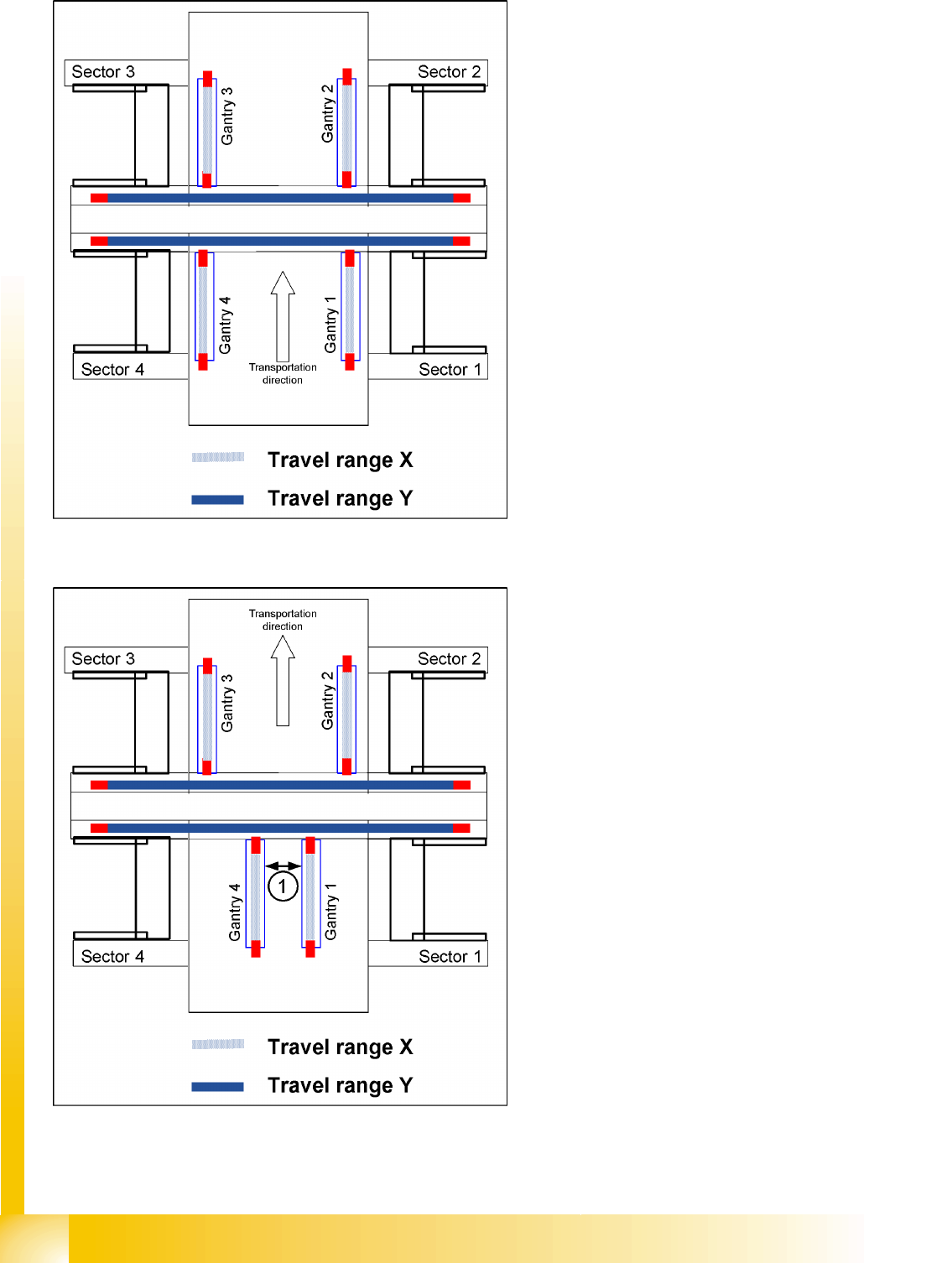
6-6: Travel ranges for X and Y axes (D4 and X4 shown as example)
The end of the X-axis travel range (software
end position) is 0.5 mm before the hardware end
position, which is 1.5 mm before the bumper. A
safety distance of 2.0 mm to the bumper is
adequate, if the X-axis moves into this area with
excessive speed.
The end of the Y-axis travel range (software
end position) is 1.5 mm before the hardware end
position. The Y-axis travel range for a particular
placement area is monitored in one direction by
the software end position and a bumper. In the
other direction, the travel range is calculated from
the position of the opposite gantry. A mutual
gantry-gantry position query is issued, which
regulates the start of the Y axes. The
communication exchange is via the SPI bus (Small
Processor Interface bus) between the Y axes and
reports their positions and speed (see description
of anti-crash function). The safety distance
between the gantry bumpers is 4 mm during
placement.
6-7: Travel ranges and safety distances for gantry axes (D4 and X4 shown
as example)
1. This means that, during travel range
calibration, the X-axis moves as far as
possible towards the minimum or maximum
position, until it touches the bumper.
The travel ranges are calculated, taking into
account the relevant safety distance.
2. In placement areas 1 and 2 of the D4, gantry
1/2 moves to the minimum position and gantry
4/3 to the maximum position, for calculation of
the Y-axis travel range.
3. The safety distance (1) between the sides of
the gantry facing each other is at least 4mm,
during placement.

Gantry
Anticrash Function for the A364 Axis Controller Board Settings
Student Guide Advanced Level 2 SIPLACE D Series
EN 05/2007 Gantry
6-11
6.3.2 Anticrash Function for the A364 Axis Controller Board
6.3.2.1 Anticrash Function for the A364
The anticrash function is no longer provided by the anticrash board but instead by the A364 software
(application 1). This means that the proximity switches used to monitor the travel range and the
sensor for monitoring the gantry spacing are no longer required.
Tasks:
– Monitoring the travel range of the X and Y axes
Evaluation of the actual axis position in the direction of the bumper, taking the speed into
account.
– Monitoring the distance for the two Y axes in one placement area
Evaluation of the actual positions of the own and partner gantries during gantry crash monitoring.
– Count error monitoring of gantry axis
Time-based monitoring of the counter pulses received (edge control).
6.3.2.2 Anticrash Monitoring for the A364
The anticrash function is activated after the X/Y axes have been referenced. When first referencing the
gantry axes, the anti-crash monitoring is not active. However, this is not critical, due to the low travel
speed.
After this, the bit is set for the anticrash monitoring function and the actual position for the relevant
partner gantry is continuously communicated via the SPI Bus.
The following information is exchanged between the Y axes:
Actual position and speed of the own gantry
Status information (reference state, anticrash monitoring state ).
Anticrash Monitoring Settings for the A364
6.3.2.3 Error "Gantry Crash"
A “gantry crash” error is established by calculating the position difference and speed difference for both
axes. A gantry crash error is signaled via the axis board and the CAN Bus. The servo is disabled for both
axes and needs to be referenced again.
6.3.2.4 Count Error:
If the axis board detects a "fatal count error", the axis concerned will be disabled and the anticrash
function disabled. The other axis is informed of this in the status information and will also disable the
anticrash function. The disabled axis now needs to be referenced again,
after which the anticrash function will be re-enabled for both axes.
NOTE: No settings
The anti-crash monitoring function is controlled by a rapid software regulator. This means that
there are no longer any settings required for the anti-crash monitoring.