SOM-1655-002.pdf - 第47页
46 Tg0742-PM-SO 12.1 Adjustment for Sensor Head Installation This window is used for the installation and adjustment of the sensor head. Normally , no operation is performed in this window . 12.1 Adjustment for Sensor He…
45 Tg0742-PM-SO
12. V. Bend Detection Unit Offset
The V. bend detection unit offset consists of [Insp Head Adj] (In-
stalled Head Adjustment) and [Offset Teaching] functions.
When the V. bend detection unit is installed, the adjustment for sen-
sor head attachment is first performed and the sensor head position
is arranged. Then, the offset teaching is started.
• Sheet Layout
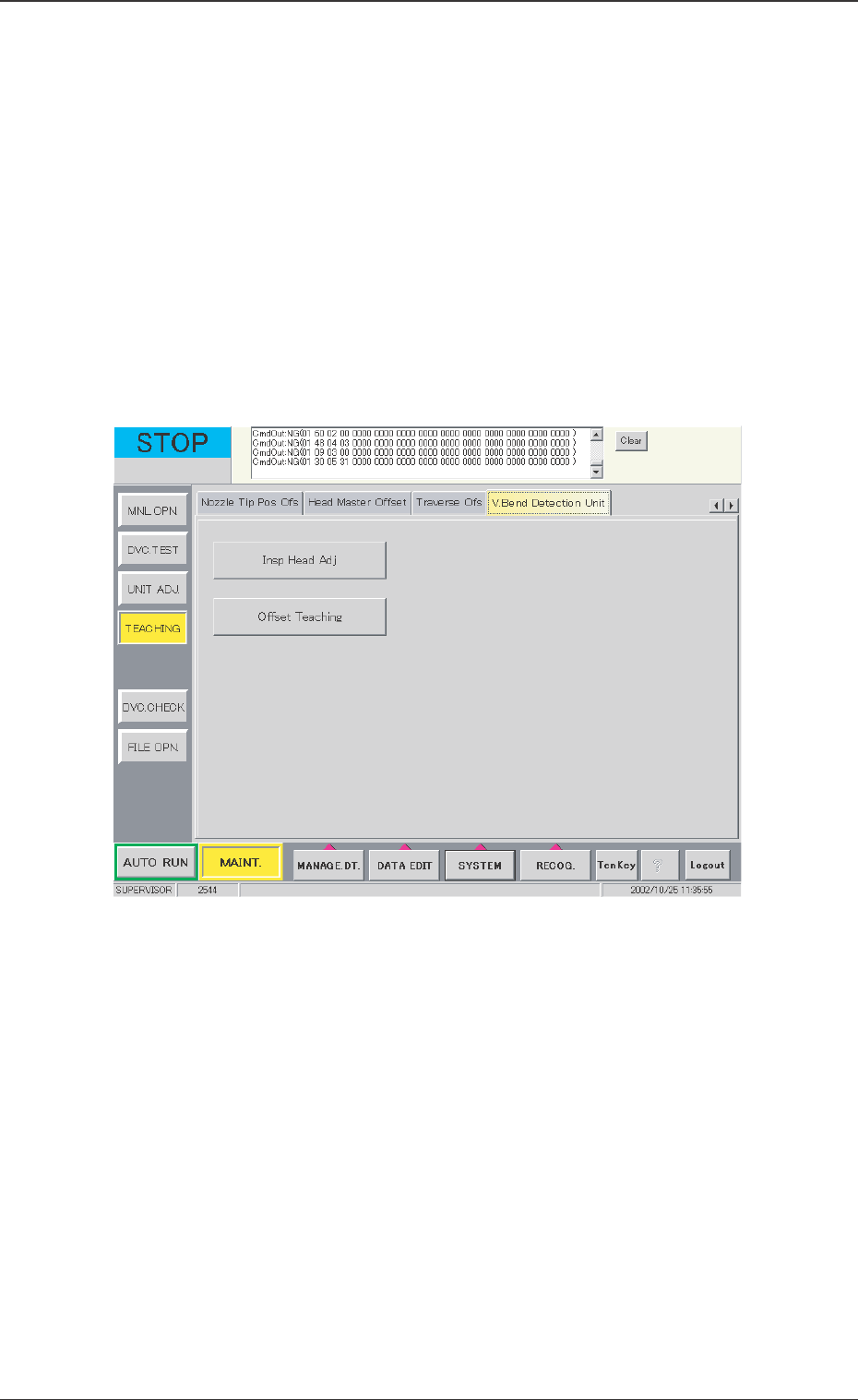
When the [V. Bend Detection Unit] tab in the "TEACHING"
submenu window is pressed, the following tab sheet appears.
12. V. Bend Detection Unit Offset
0301-001
Fig. 26 "V. Bend Detection Unit" Tab Sheet
• Sheet Composition
[Insp Head Adj] Button
When this button is pressed, the window in Fig. 27 appears.
[Offset Teaching] Button
When this button is pressed, the window in Fig. 34 appears.
46 Tg0742-PM-SO
12.1 Adjustment for Sensor Head Installation
This window is used for the installation and adjustment of the
sensor head.
Normally, no operation is performed in this window.
12.1 Adjustment for Sensor Head Installation
0301-001
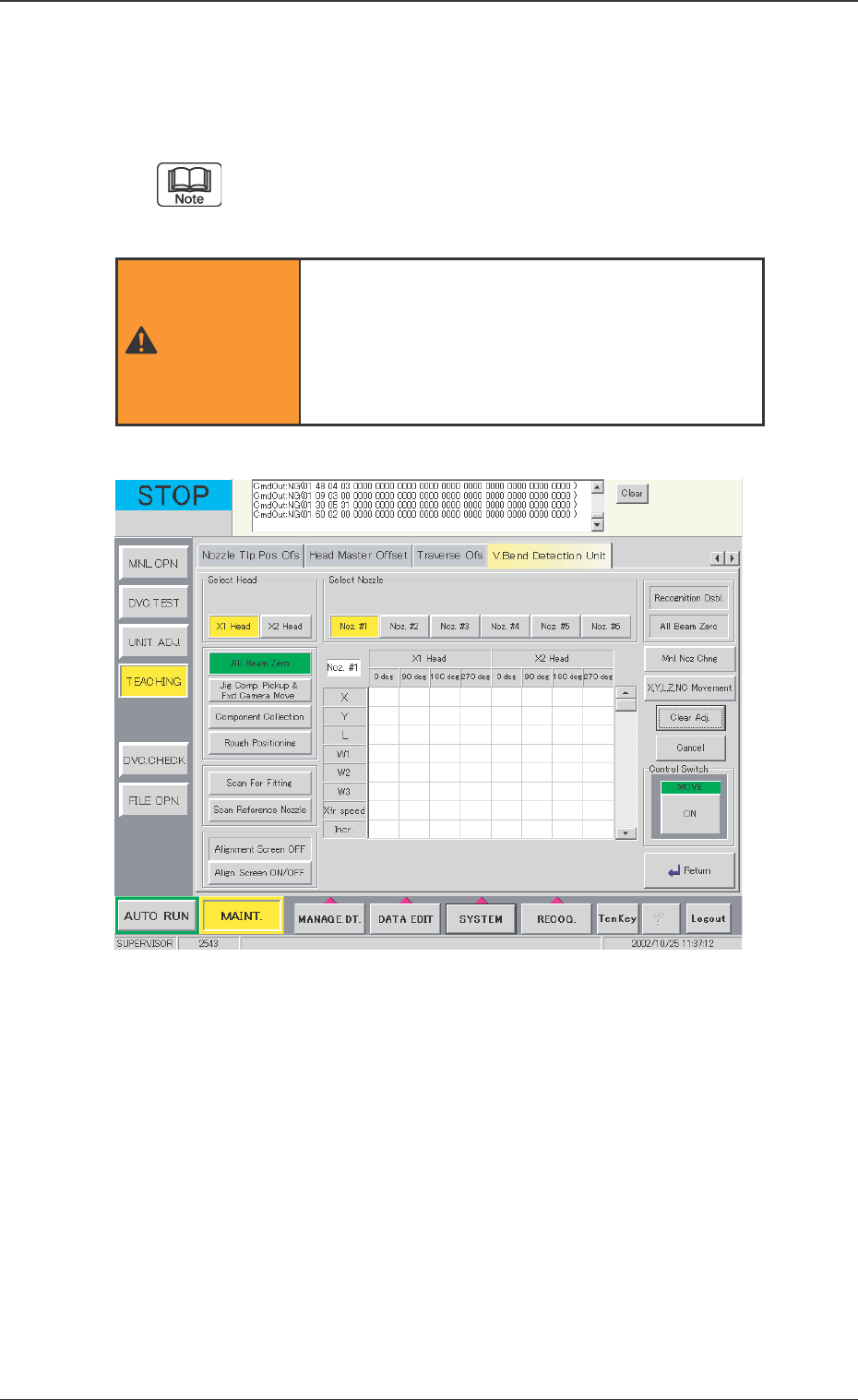
Fig. 27 "Insp Head Adj" Window
The operation of the adjustment for sensor head
installation function greatly affects the V. bend
detection accuracy. Therefore, only our service
personnel, or other persons accustomed to
teaching, should operate it.
WARNING

47 Tg0742-PM-SO
12.1 Adjustment for Sensor Head Installation
0301-001
Select Head
The head to be detected is selected.
Select [X1 Head] or [X2 Head].
Select Nozzle
The nozzle clamp to be detected is selected.
Select [Noz. #1], [Noz. #2], [Noz. #3], [Noz. #4], [Noz. #5] or
[Noz. #6].
V. Bend Detection Unit Detected Value Display
The detected values are shown in the center of the display, and
are the result of the detections of the installation correction jigs
for the head and nozzle at the angles of 0 deg, 90 deg, 180 deg
and 270 deg, respectively, using the V. bend detection unit. X, Y,
L, W1, W2, W3, Xfr speed (Transfer Speed), and Incr. (Increment
Amount) are displayed as the detection results. The sensor head
position is adjusted on the basis of these detection results.
X : Detected Value for Deviation X
Y : Detected Value for Deviation Y
L : Detected Value for Deviation L (Height)
W1 : Inclination of Sensor Head X-axis from Vertical Line
W2 : Inclination of Sensor Head Y-axis from Vertical Line
W3 : Inclination of Sensor Head Y-axis from Horizontal
Line
Xfr Speed : Transfer Speed of Jig in the Detection
Incr. : Detected Jig Size
[Recognition Dsbl.] Button
When the background is colored red, the recognition using the
camera is not available. When the detection is performed without
positioning the jig, the installation is not performed correctly.
Cancel the "Recognition Dsbl." setting.
[All Beam Zero] Button (The right of the window)
When the background is colored red, the beam cannot be zeroed,
so the detection is not available.
[Align. Screen ON/OFF] Button
Indicates that the alignment screen is displayed (or not displayed)
on the V. bend detection unit.
When the alignment screen is ON, the detection is not available
in the V. bend detection unit.