SOM-1655-002.pdf - 第59页
58 Tg0742-PM-SO Adjustment in ω ω ω ω ω 1 Direction Repeatedly adjust the inclination in ω 1 direction until ω 1 set condition becomes OK, using the [Scan Reference Nozzle] function. Adjustment in ω ω ω ω ω 3 Direction R…
57 Tg0742-PM-SO0301-001
12.2 Sensor Head Set and Adjustment Procedure
Scan for Fitting
(1) Return to the nozzle stocker all nozzles which are attached
to the head.
(2) Check that the "Recognition Dsbl." is not set.
(3) Press the [Scan For Fitting] button in the "Insp Head Adj"
window and set to [All Heads] and [All Nozzles] and set the
"Scan Times" to 6 times or more. Then start scanning.
There may be V. bend recognition error, particularly
when the deviation in the ω3 direction is great.
Refer to "8. Troubleshooting after Error window
(Error ID)" for details.
Sensor Head Position Fine Adjustment
(1) Set the EF01 nozzle on the selected nozzle position of the
selected head.
(2) After the correction jig is picked up by means of pressing the
[Jig Comp. Pickup & Fxd Camera Move] button, select [Scan
Reference Nozzle].
(3) Set "Scan Times" to "6" and "Direction" to "All Direc.", and
then start the reference nozzle scanning.
(4) Confirm the data obtained for all nozzles.
· Check the ω2 data at angles of 90 deg and 270 deg for all
nozzles and make sure that all values are within the
range of ± 0.400 from the set values.
If any value is outside the range of ± 0.400, the
placement head might not have been set correctly.
• Check the ω3 data at all angles for all nozzles and make
sure that the values are within the range of ± 1.00.
If any value is outside the range of ± 1.00, the sensor
head position in ω3 direction might be deviant.
Check the sensor head attachment condition.
• Check the L data at all specified angles for all specified
nozzles and see that all values are within the range of
± 0.50.
If any value is outside the range of ± 0.50, the height
offset value for the main head might be wrong.
Check the L offset value for the main head.
58 Tg0742-PM-SO
Adjustment in
ωω
ωω
ω1 Direction
Repeatedly adjust the inclination in ω1 direction until ω1 set
condition becomes OK, using the [Scan Reference Nozzle]
function.
Adjustment in
ωω
ωω
ω3 Direction
Repeatedly adjust the inclination in ω3 direction until the ω3 set
condition becomes OK, using the [Scan Reference Nozzle]
function.
There is no problem when the ω2 set is NG (no good).
0301-001
12.2 Sensor Head Set and Adjustment Procedure
59 Tg0742-PM-SO
12.3 Offset Teaching
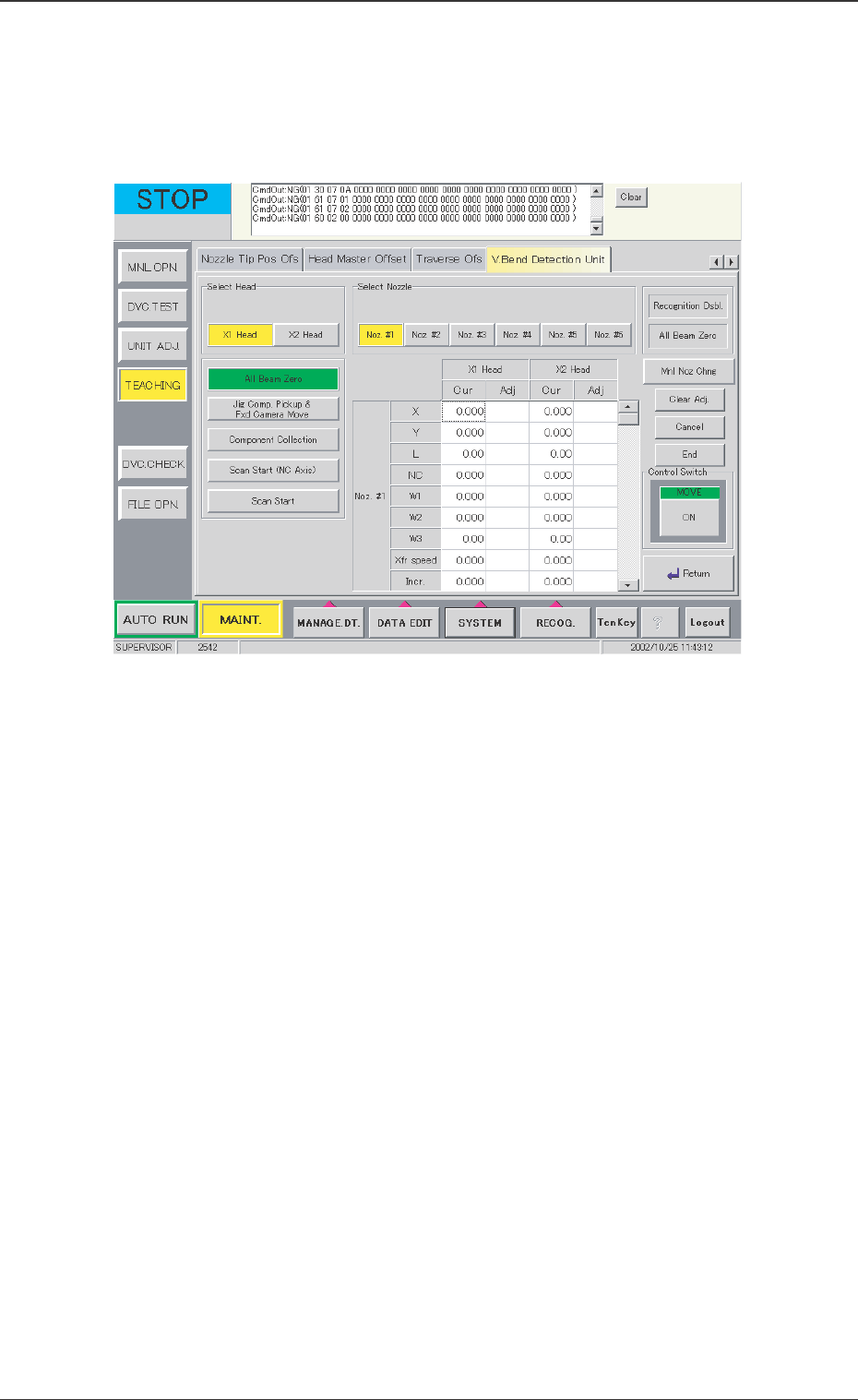
The offset teaching is required when the installation condition of V.
bend detection unit is changed or the placement head replaced.
V. Bend Detection Unit Adjusted Value Indication
The current values and adjusted values for offset of each head
and nozzle are shown in the center of the window of the V. bend
detection unit.
Select Head
Select the head to be detected.
Select [X1 Head] or [X2 Head].
Select Nozzle
The nozzle clamp to be detected is selected.
Select [Noz. #1], [Noz. #2], [Noz. #3], [Noz. #4], [Noz. #5] or [Noz.
#6].
[Recognition Dsbl.] Button
When the background is colored red, the recognition using the
camera is not available. When the detection is pertormed without
positioning the jig, the installation is not performed correctly.
Cancel the "Recognition Dsbl." setting.
12.3 Offset Teaching
0301-001
Fig. 34 "Offset Teaching" Window