192277 - Micron Technical Reference Volume 3.pdf - 第61页
CAMERA SYSTE M MODULE REPLACEMENT PROCEDURES Chapter Issue 9, Feb 18 Technical Reference Manual 23.19 1 1. Loosen the two camera mount screws and lift the dovetail fixings to free the camera, lift the camera out of the c…

CAMERA SYSTEM MODULE
REPLACEMENT PROCEDURES
23.18 Technical Reference Manual Chapter Issue 9, Feb 18
REPLACEMENT PROCEDURES
Camera
WARNING
BOARD CLAMPS. EXTREME CARE MUST BE EXERCISED WHEN WORKING IN
THE TOOLING AREA OF THE MACHINE TO AVOID INJURY. THE FOILS ON THE
FRONT AND REAR BOARD CLAMPS ARE VERY SHARP.
WARNING
STRONG MAGNET FIELD. A STRONG MAGNETIC FIELD EXISTS IN THE
VICINITY OF THIS LABEL. THIS MAY PRESENT A HAZARD TO PERSONNEL OR
EQUIPMENT.
))
((
PROHIBITION
ELECTROMAGNETIC FIELD. AN ELECTROMAGNETIC FIELD EXISTS WITHIN
THE MACHINE FROM THE LINEAR MOTORS. THESE MAY PRESENT A HAZARD
TO PEOPLE FITTED WITH AN IMPLANTED CARDIAC DEVICE. THE MOTOR
MANUFACTURER RECOMMENDS A SAFE DISTANCE OF AT LEAST 15MM.
PROHIBITION
ELECTROMAGNETIC FIELD. AN ELECTROMAGNETIC FIELD EXISTS WITHIN
THE MACHINE FROM THE LINEAR MOTORS. THESE MAY PRESENT A HAZARD
TO PEOPLE FITTED WITH AN IMPLANTED CARDIAC DEVICE. THE MOTOR
MANUFACTURER RECOMMENDS A SAFE DISTANCE OF AT LEAST 15MM.
PROHIBITION
STRONG MAGNETIC FIELD. A STRONG MAGNETIC FIELD EXISTS IN THE
VICINITY OF THE LINEAR MOTORS THAT REPRESENT A SERIOUS HAZARD TO
PEOPLE FITTED WITH METALLIC IMPLANTS.
PROHIBITION
STRONG MAGNETIC FIELD. A STRONG MAGNETIC FIELD EXISTS IN THE
VICINITY OF THE LINEAR MOTORS THAT MAY ACT UPON FERROUS OBJECTS
WHOSE MOVEMENTS COULD LEAD TO PERSONAL INJURY AND/OR DAMAGE
TO THE MACHINE.
The following procedure is valid for all cameras.
Removal 1. Select Open Cover Commands.
2. Select Carriage To Rear.
3. Select Back.
4. Select Shut Down.
5. Select Continue.
6. Switch the mains isolator to OFF.
7. Open the front printhead cover.
8. Remove the stencil.
9. To gain access to the camera for removal, move the camera forward and
central over the table by manually moving the camera carriage.
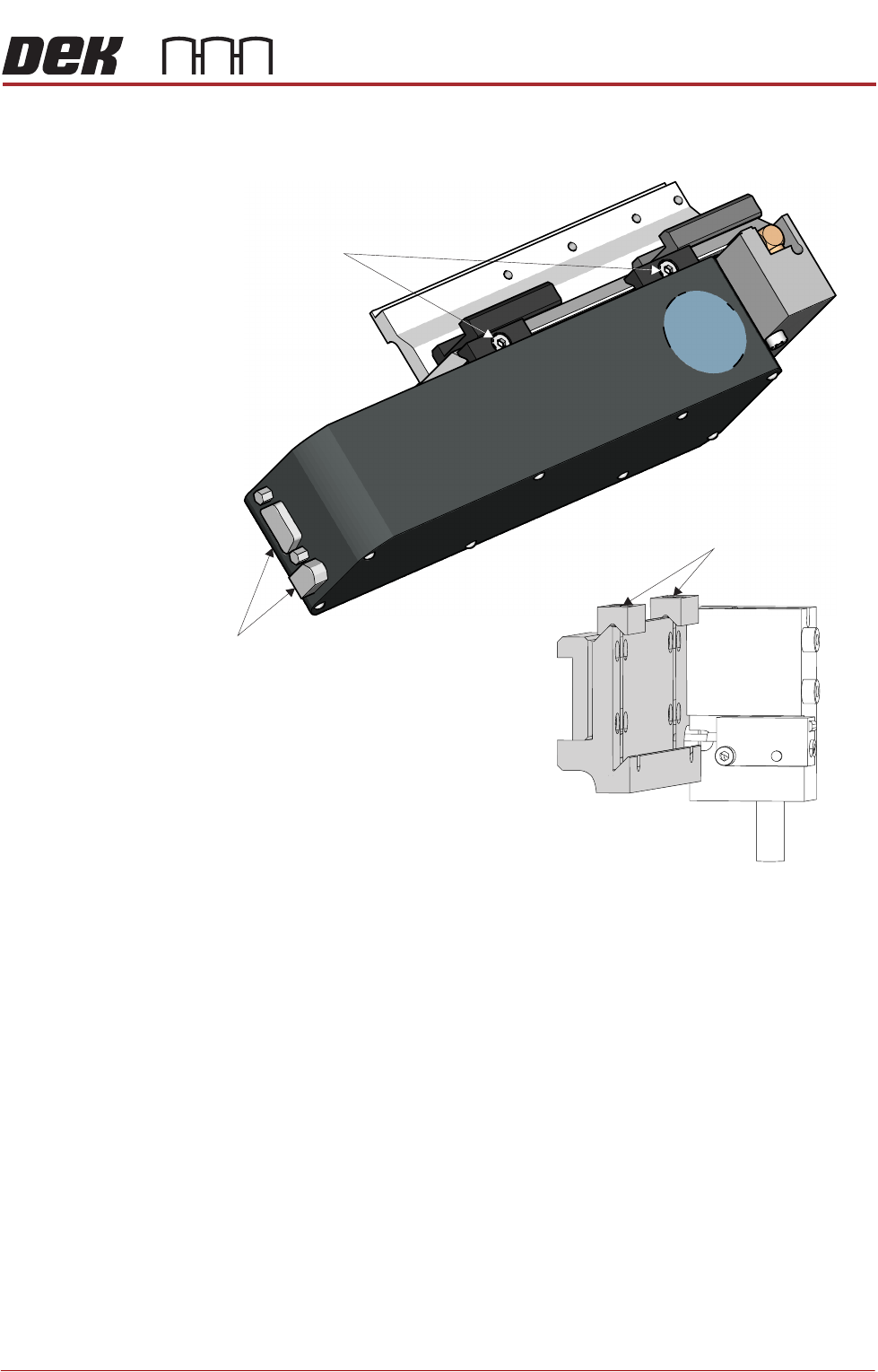
10. Remove the following connectors from the rear of the camera unit:
•10SK17
•10SK13
CAMERA SYSTEM MODULE
REPLACEMENT PROCEDURES
Chapter Issue 9, Feb 18 Technical Reference Manual 23.19
11. Loosen the two camera mount screws and lift the dovetail fixings to free the
camera, lift the camera out of the camera mount.
Fitment 12. Slide the camera into position in the dovetail ensuring that the end of the
camera mount butts against the right hand side of the dovetail and secure
camera mount screws (2).
13. Connect 10SK13 and 10SK17.
14. Ensure that the cable-ties are secure and the cables are positioned to
prevent any chaffing on the board clamps or transport rails.
15. Refit the stencil.
16. Close the front printhead cover.
17. Power up the machine.
18. The following adjustments/calibrations must be carried out:
• Camera Reference Position Adjustment
• Board Stop X Offset Check Calibration
• Vision Calibration
• Calibrate Offset Calibration
Camera Mount with Camera Removed
Dovetail Fixings Remain in Place
Camera
Securing Screws
Camera
Connectors
CAMERA SYSTEM MODULE
REPLACEMENT PROCEDURES
23.20 Technical Reference Manual Chapter Issue 9, Feb 18
Camera X Axis Timing Belt (Rotary Servo Motor Systems Only)
WARNING
BOARD CLAMPS. EXTREME CARE MUST BE EXERCISED WHEN WORKING IN
THE TOOLING AREA OF THE MACHINE TO AVOID INJURY. THE FOILS ON THE
FRONT AND REAR BOARD CLAMPS ARE VERY SHARP.
1. Select Maintenance.
2. Select Diagnostics.
3. Select Exit.
NOTE
Exiting diagnostics initialises the machine, homing the camera axes.
4. Select Back.
5. Select Shut Down.
6. Select Continue.
7. Switch the mains isolator to OFF.
8. Open the front printhead cover.
9. Remove the stencil from the machine.
10. Remove the left and right side panels.
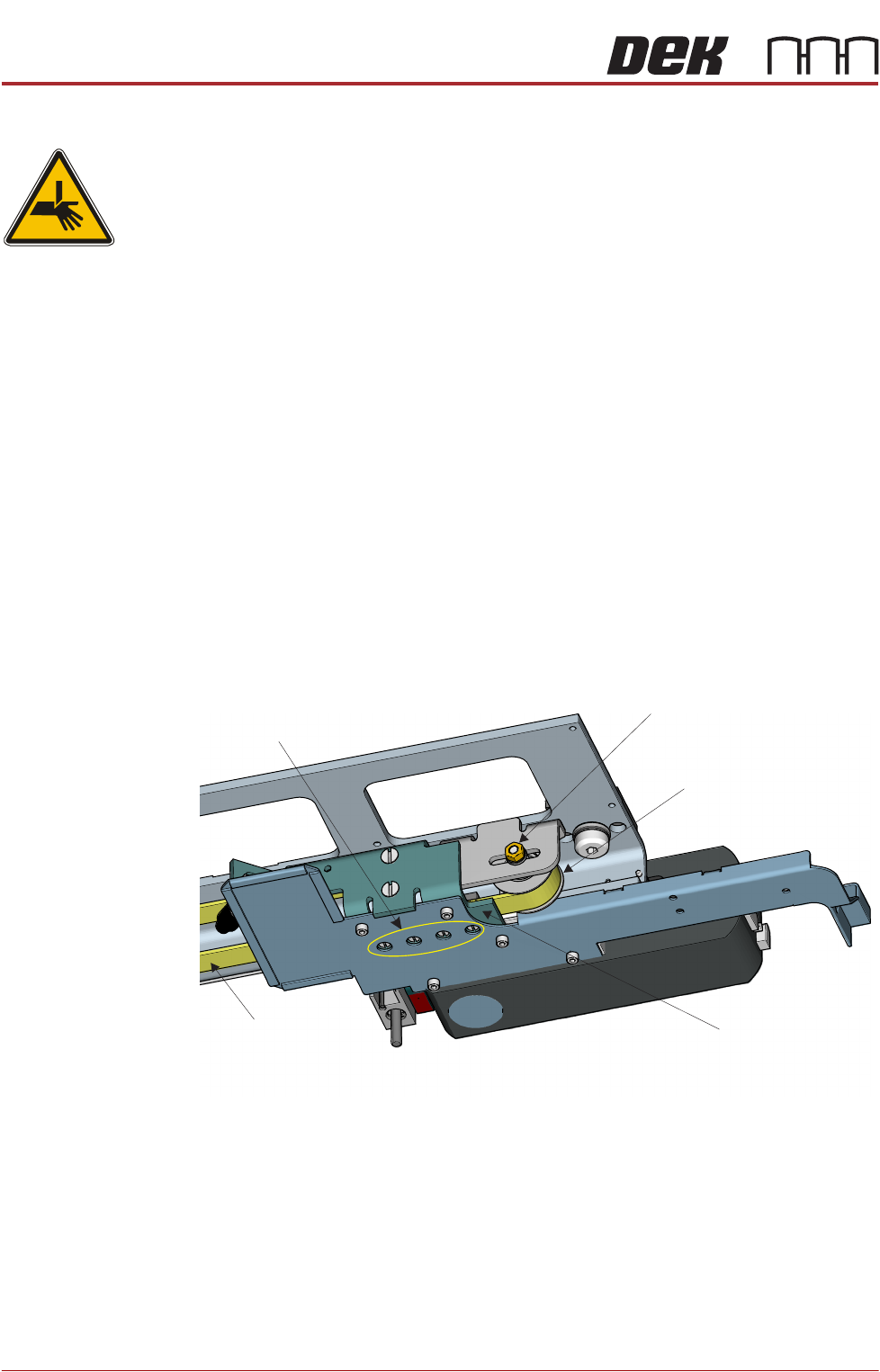
11. Slacken the idle pulley locknut at the left hand end of the camera carriage.
12. Slide the pulley inwards to release tension on the timing belt.
13. Slacken the four timing belt clamp securing screws sufficiently to remove the
timing belt from the clamp.
NOTE
Take note of the routing of the timing belt before removing it.
14. Remove the timing belt and discard.
15. Route the replacement timing belt around the camera X motor pulley and
the idle pulley.
View From Beneath Camera Carriage
Idle Pulley
Securing Screws
(in 4 positions)
Locknut
Timing Belt
Timing Belt Clamp