M8_ServiceManual_e.pdf - 第7页
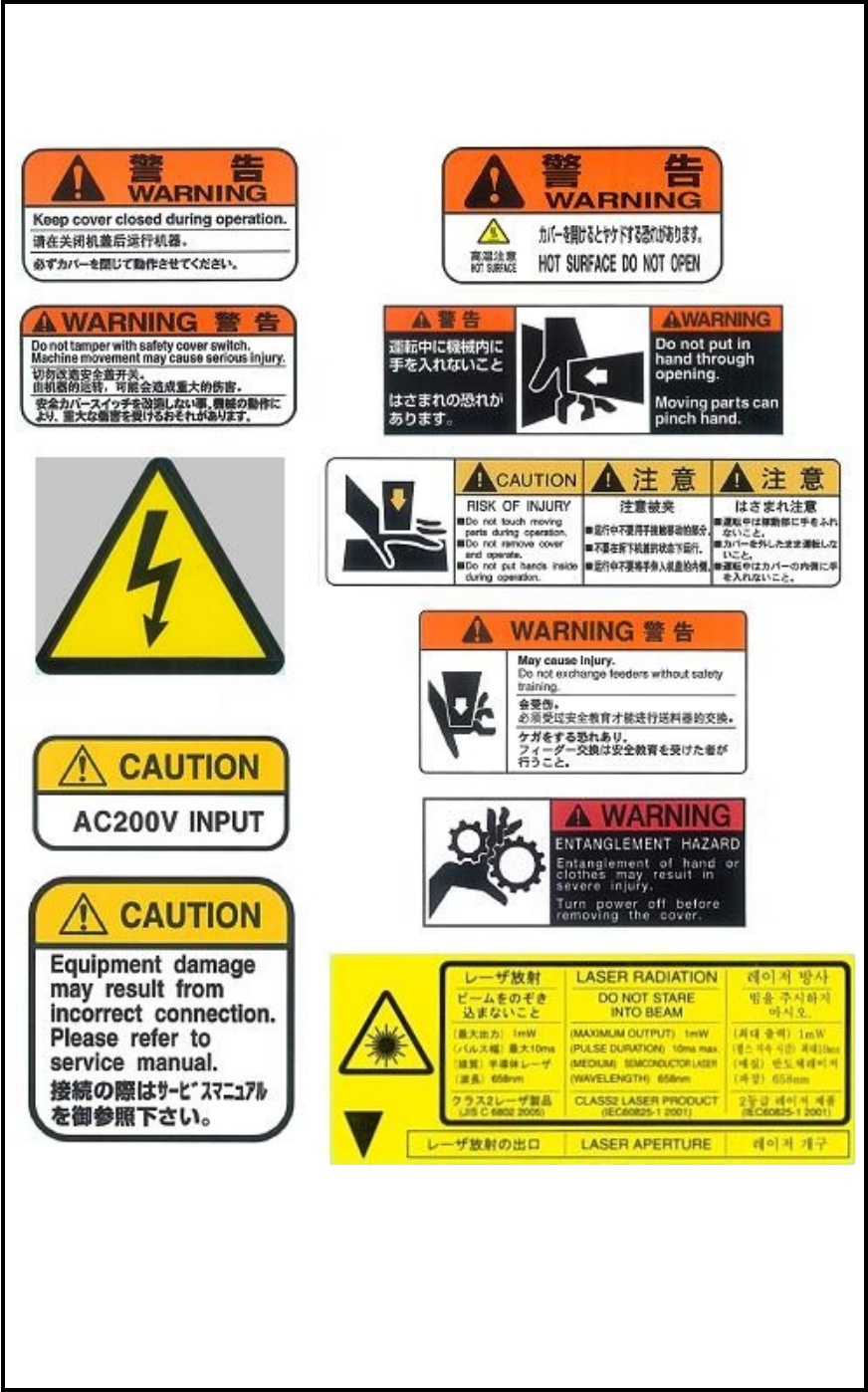
5 Warning labels Please be sure to observe instructions of the warni ng labels attached on the m ounter.
4
Details
Unloading the mounter
If movable parts of the mounter move and lose a balance while unloading the mounter by a forklift, the
lifted mounter may slide down. It may cause to injury or machine damage.
When using a forklift, be sure to fasten movable parts securely in advance.
Installation
Improper installation of the mounter creates mechanical and electrical risks.
Be sure to install the mounter and connect the power supply in the correct way.
Line connection
The mounter is designed to use in a production line. If you use the mounter stand alone, please attach covers
at both the PCB entrance and exit by yourself to avoid a risk of injury of your hands. The covers should be
made conform to the following standard, EN294/JISB9707.
In the same way, even if the mounter is installed in your production line and there is an opening section you
can enter hands inside, make the cover equivalent to the following standard, EN294/JISB9707.
[EN294/JISB9707] Safety of machinery;
Safety distances to prevent danger zones being reached by the upper limbs
e: Opening width Opening shape
Rectangle (square)
6 < e ≤ 8 ⇒ Safety distance ≥ 20(15)
8 < e ≤ 10 ⇒ Safety distance ≥ 80(25)
10 < e ≤ 12 ⇒ Safety distance ≥ 100(80)
12 < e ≤ 20 ⇒ Safety distance ≥ 120(120)
Feeder bank
Do not put you hands between feeders on the feeder bank. It may cause injury. Please purchase dummy
feeders to fill the vacant feeder stations to prevent from putting your hands in. Or make the cover equivalent
to the standard, EN294/JISB9707.
Electric shock
Even if you turn off the main switch of the mounter, there is residual voltage in the primary power supply
and the wirings between the terminal assembly (XB11) and the main switch (QS11).
Do not remove the covers or disassembling the mounter. It may cause electric shock.
UPS
Even if you turn off the main switch of the mounter, the optional UPS remains residual voltage. Do not
remove the covers or disassemble the mounter. It may cause electric shock.
Regenerative resistor
The regenerative resistor can be hot. Do not remove the covers or disassemble the mounter. Touching the
generation resistor or the heatsink may cause burn injury.
5
Warning labels
Please be sure to observe instructions of the warning labels attached on the mounter.

6
■ General
Keep the machine and its surrounding area safe and clean.
Do not get on the feeder bank or machine top.
Not to let any rats enter and stay inside of mounter or its surrounding area, always keep there clean, tidy and
locked up securely, taking care of prevention against machine damages by rats.
(Chapter 4 > Cautions about overall electrical items)
■ Operation
To prevent machine damage, before operation, make sure accessories such as parts feeders are set
completely and not to jump off.
To prevent machine damage, do not operate the mounter with foreign obstacles such as measurement tools
left on the conveyor or feeder bank.
After turning off the mounter, leave the machine 15 seconds or more before turning on again. Otherwise,
motor alarm can result.
■ Safety Interlock
The machine covers (front/rear) feature safety interlock mechanism. To safeguard the operator, this
mechanism is activated to stop the machine immediately by opening a machine cover or entering hand or
part of the body inside the operation area during operation.
Details
Installation
Operate the mounter in the following environments.
Environmental requirements
Ambient air temperature: Accuracy assurance 23 +/-2 degrees C
Operation assurance: +10 to +35 degrees C
(Average temperature over 24 hours should not exceed 30 degrees C.)
Relative humidity: 45 to 60%, no dew condensation
Altitude sea level: Below 1,000m
Atmosphere: Dust and corrosive gas free
The mounter is not designed to operate in residential and commercial area.
The maximum noise level is the mounter is 75.4 dB.
Caution