00191369-02.pdf - 第140页
4 Placement Functions User Manual HS-50 4.2 Error Display Software Version SR.501.xx 12 /99 Issue US 140 t I I t 4.2.2 "T rack Errors" V iew 4 Fig. 4.2 - 1 "T rack errors" view 4 4.2.2.1 Meaning of th…
User Manual HS-50 4 Placement Functions
Software Version SR.501.xx 12/99 Issue US 4.2 Error Display
139
t IIt
4.2.1 Functions
The following functions described below can be executed by selecting the corresponding buttons
in the views for the corresponding error type. 4
Delete all 4
All entries in the table for the error type currently displayed are deleted with this function. 4
Å Click on the Delete all button
The error table is emptied.
Error information 4
This starts a help system that displays information on the possible causes of error for the selected
error as well as corrective measures. 4
Å Select the entry in the table for the error for which you require additional information. The line
selected is highlighted in light blue in the table. The "Error information" button is now active
(see Fig. 4.2 - 1
, for example).
Å Click on the Error information button
The help system window is opened.
The further procedure is described in Chapter 8
"Error Information".
Diagnostics 4
This starts the diagnostics system. You use this system to attempt to recognize the cause of the
current error and to correct this error together with the operator. 4
Å Select the entry in the table for the error for which you want to start the error diagnostics.
Å Click on the Diagnostics button.
The user interface switches to the Main view of the diagnostics system.
NOTE
The diagnostics system is not available in the current software version. 4
4
4 Placement Functions User Manual HS-50
4.2 Error Display Software Version SR.501.xx 12/99 Issue US
140
t IIt
4.2.2 "Track Errors" View
4
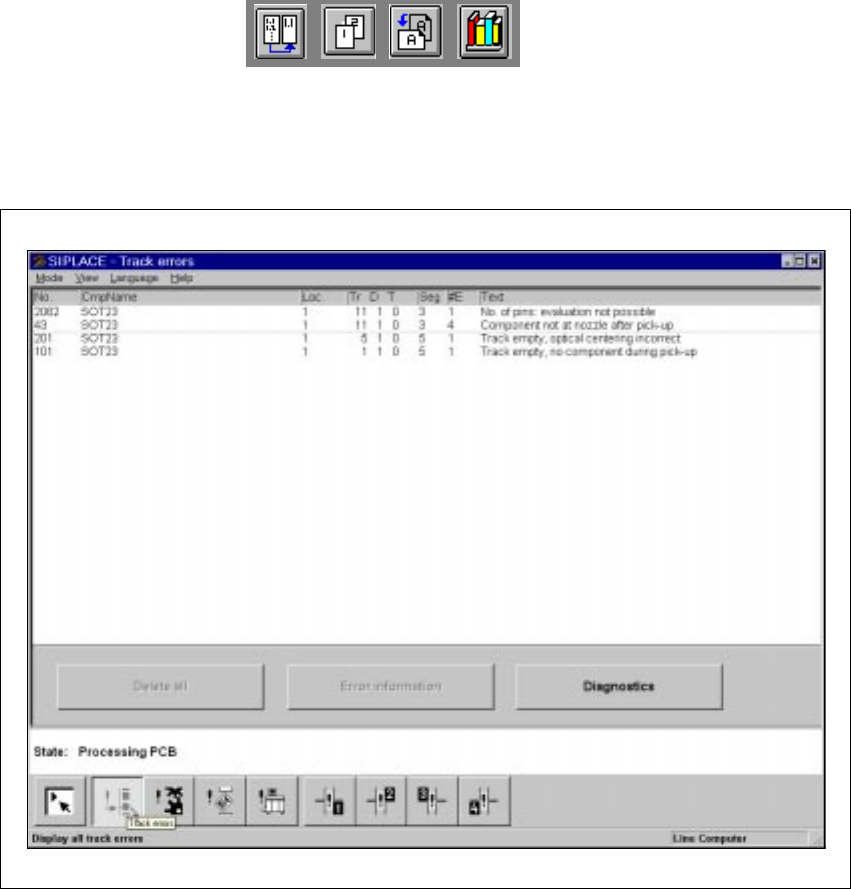
Fig. 4.2 - 1 "Track errors" view
4
4.2.2.1 Meaning of the Entries in the Table for "Track Errors"
– No
The error number of the corresponding error is entered in this column.
– CmpName
The name of the component for which the error has occurred is entered here.
– Loc.
The number of the location for which the corresponding component is set up is entered in this
column.
– Tr D T
The number of the track and of the feeder division for the corresponding component is entered
here.
User Manual HS-50 4 Placement Functions
Software Version SR.501.xx 12/99 Issue US 4.2 Error Display
141
t IIt
The entry for "T" is irrelevant for model SIPLACE HS-50 machines.
(Only valid for automatic machines with wafflepack changers)
– Seg
The number of the segment that was used to insert the component is entered here.
– #E
This column displays how often the corresponding error has occurred until now.
– Text
The error that has occurred is described in this column.
4.2.3 "Track errors location X" view
4
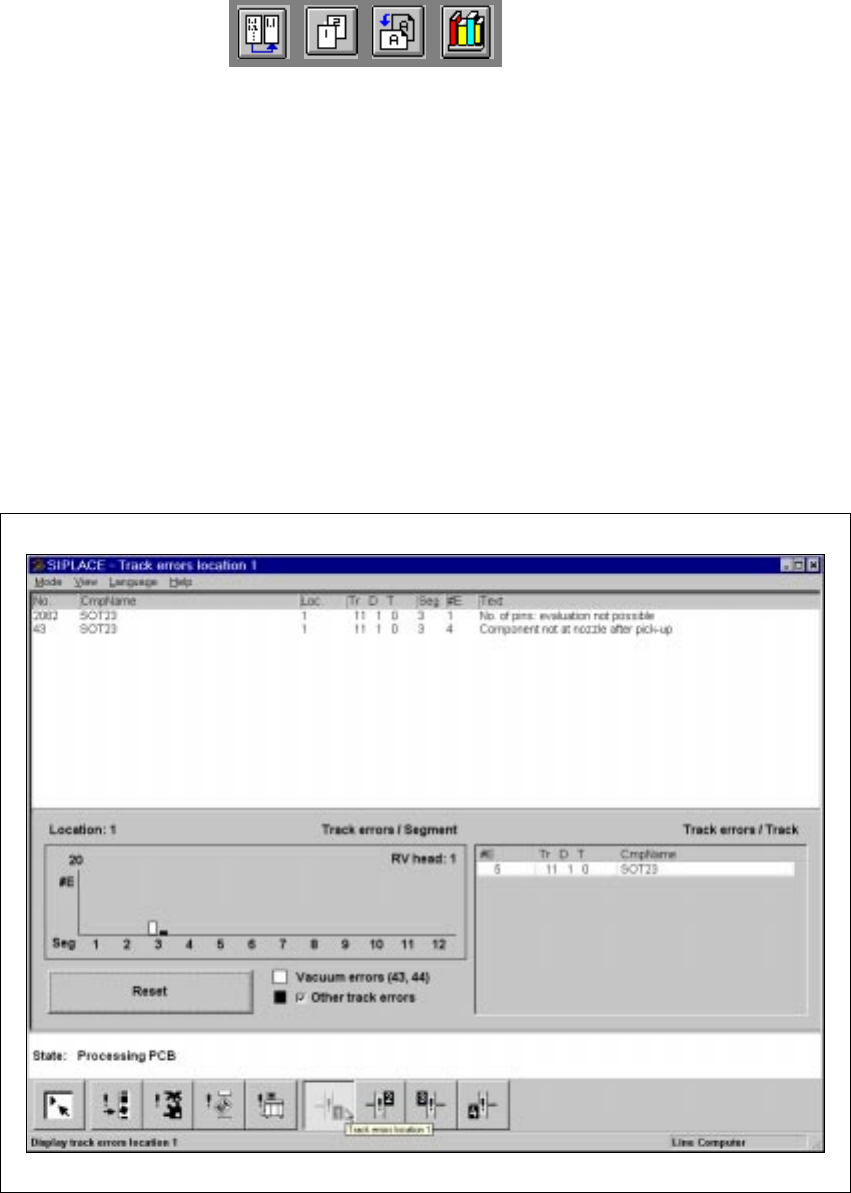
Fig. 4.2 - 2 “Track errors location X” view
The “Track errors view” menu contains a general overview of all the track errors. The “Track errors
location X” menu also displays the errors separately for locations 1 – 4. This list contains all track
errors, apart from ‘Track empty’. The errors are also totaled and then displayed in the “Track errors
/ Segment’ bar chart, sorted by segment number. 4