00191369-02.pdf - 第401页
User Manual HS-50 13 Software Installat ion Software Version S R.501.xx 12/99 Issue US 13.1 General definitions 401 t I I t 13 Software Inst allation 13.1 General definiti ons 13.1.1 Initial i nst allation This is the t …
12 Station Extensions - Software User Manual HS-50
12.1 Remote Support Software Version SR.501.xx 12/99 Issue US
400
t IIt
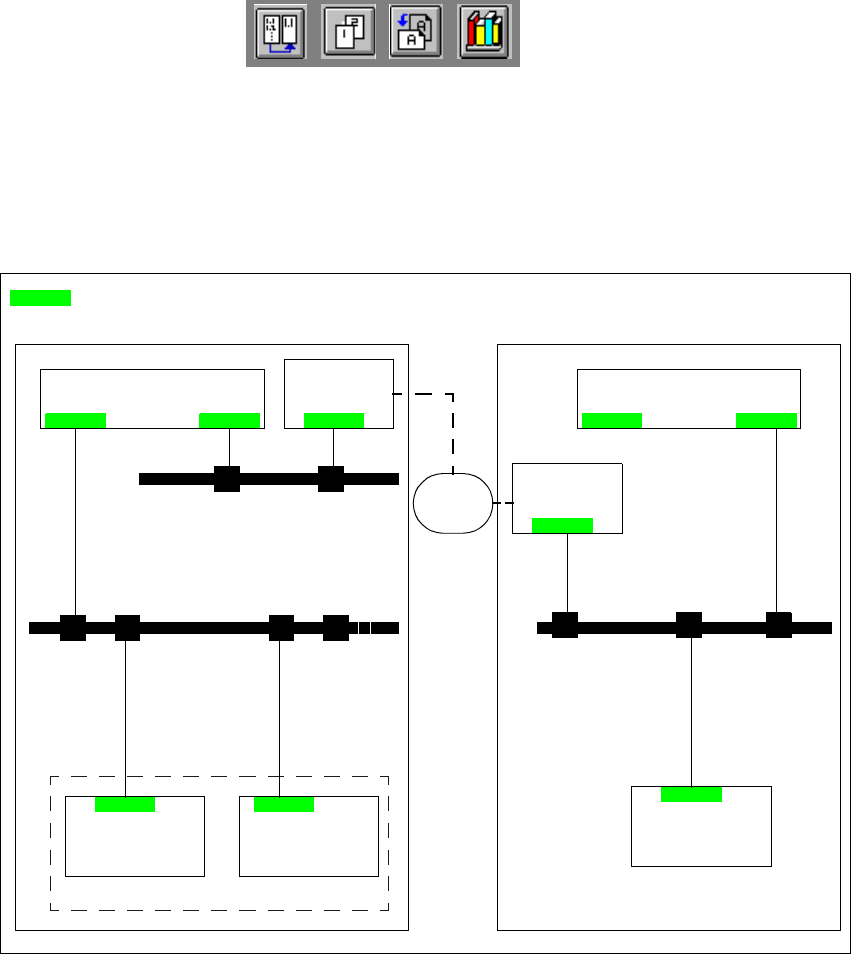
12.1.5.2 Connecting the ISDN router to the customer’s site LAN
The advantage of this alternative is that several placement lines can be addressed via a single
router. 12
12
Fig. 12.1 - 2 Connection to the customer’s site LAN
12.1.6 Procedure and Operation
Å Contact our service center (Munich, Norcross or Singapore).
Å Follow the instructions given by the engineer.
12
12
Line computer
(LC)
Router
Station
computer
Machine
controller
SIPLACE
LAN
Router
Station
computer
LAN
Line computer
(LC)
Service center
Customer‘s central site network
= LAN card
ISDN
network
Customer‘s placement line
User Manual HS-50 13 Software Installation
Software Version SR.501.xx 12/99 Issue US 13.1 General definitions
401
t IIt
13 Software Installation
13.1 General definitions
13.1.1 Initial installation
This is the term used to describe the first time the station software is installed on the computer
system of the SIPLACE HS-50. During this installation, sample machine data is installed on the
station computer’s hard disk in addition to the individual "SC" (station computer) and "MC" (ma-
chine controller) software components. 13
13.1.2 Update
If an initial installation has already been performed and a more recent release of the station
software has to be installed, this is known as an "update". When an update is performed, the
stored machine data is not overwritten!
The release is identified by the last two digits of the software version designation.
Example
SR.501.01 SR = system component 501 = version number 01 = release
(station computer)
NOTE
Software versions with recent releases are debugged versions.
They are NOT functionally different from software versions with older releases and are generally
compatible with them.
13.1.3 Upgrade
The installation of a software version with a higher version number than an already installed
software version is known as an "upgrade".
When an upgrade is performed, the machine data is retained and automatically converted to the
new data format if necessary.
The functionality of the station software is identified by the three-digit number (version number)
of the complete software version designation.
Example
SR.501.xx 501 = version number This identifies the functionality of the software.
13 Software Installation User Manual HS-50
13.2 Installation of the 501.xx station software Software Version SR.501.xx 12/99 Issue US
402
t IIt
13.2 Installation of the 501.xx station software
For the procedure for the installation of the station software, please refer to the software version
description for the corresponding version. 13
NOTE
The software version description is supplied with the software package for the station software.13
13
13
13
13
13.3 Installation of the software for "Remote Service"
(option)
For the procedure for the installation of the "ReachOut" software which is used for the "Remote
Service", please refer to the software version description for the corresponding version. 13
NOTE
The software version description is supplied with the software package for the "ReachOut"
software. 13
13