00191369-02.pdf - 第380页
10 Component handling User Manual HS-50 10.6 Component changeover tables S oftware V ersion SR.501.xx 12/99 Issue US 380 t I I t 10.6.3 Docking the component changeover t able W ARNING 10 Check tha t the plac ement he ad…
User Manual HS-50 10 Component handling
Software Version SR.501.xx 12/99 Issue US 10.6 Component changeover tables
379
t IIt
10
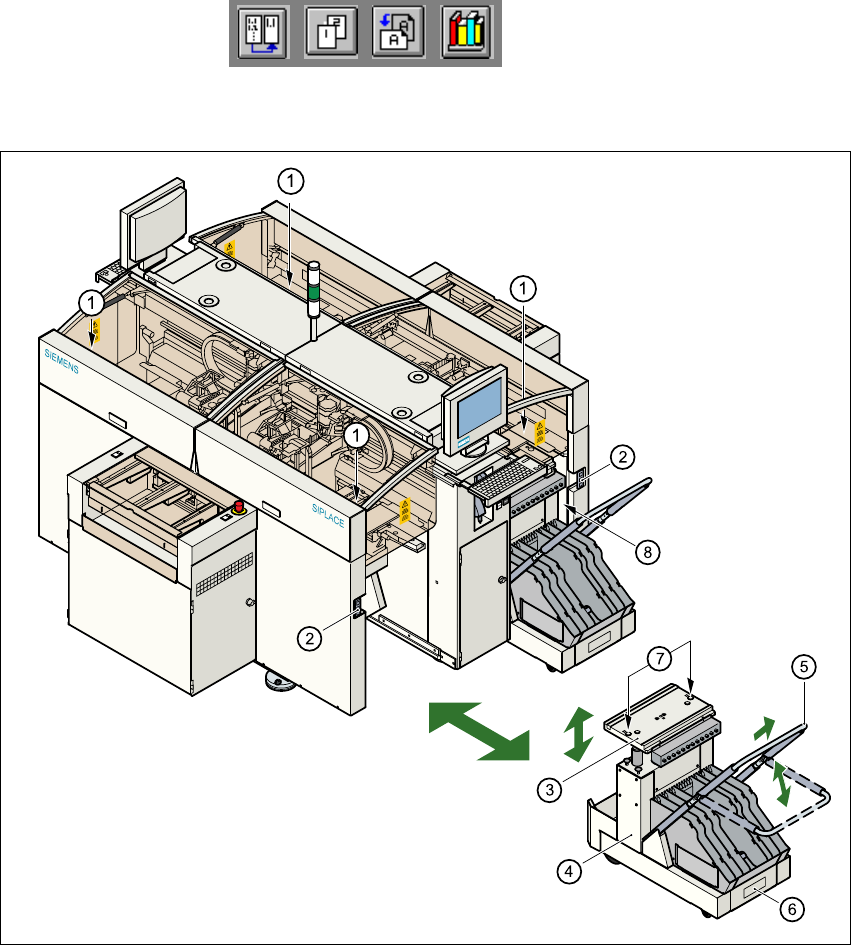
Fig. 10.6 - 2 Changing the component changeover table
(1) Button for raising and lowering the component table plate
(2) Plug for connecting the component changeover table cable
(3) Component table bed, can be raised and lowered
(4) Component changeover table
(5) Bracket
(6) Used tape container
(7) Centering holes for the centering pins
(8) Gap between the component table and machine stand
10 Component handling User Manual HS-50
10.6 Component changeover tables Software Version SR.501.xx 12/99 Issue US
380
t IIt
10.6.3 Docking the component changeover table
WARNING 10
Check that the placement head is outside the range of the component changeover table.
CAUTION 10
When docking the component table, ensure that the table bed is in its top end position and the
clip (item 5) is folded up.
Å Carefully push the component changeover table into the placement system.
Å Plug the connecting cable for the component changeover table into the socket (item 2) in the
placement system.
Å Open the flap over the push-button for raising the component changeover table.
Å Hold down the button (item 1) until the component table bed reaches its top end position.
Å Check that the centering holes in the component table bed are exactly over the centering pins
on the placement system.
Å Then fold down the clip (item 5) of the component changeover table to lower the component
table bed.
Å Ensure that the centering pins engage in the centering holes in the component table bed and
that the component table bed is fully lowered.
Å Close the flap over the push-button (item 1).
Å Close the protective cover.
10
User Manual HS-50 11 Station extensions / hardware
Software Version SR.501.xx 12/99 Issue US 11.1 HS-50 nozzle changer
381
t IIt
11 Station extensions / hardware
11.1 HS-50 nozzle changer
11.1.1 Overview
The placement system is supplied as standard with four revolver heads and four nozzle changers.
As an option, a second nozzle changer can be installed for each revolver head. 11
The nozzle changer consists of at least one, and up to five magazines, each with 12 nozzle ga-
rages (see Fig. 11.1 - 1
). The magazines are seated on a common support and each magazine is
centered using two parallel pins and fixed in place with clips. 11
11.1.2 Technical data
11
Nozzle changer for the revolver head
Dimensions (length x width x height) 472.5 mm x 64 mm x 90 mm
Number of nozzle garages Min. 12 / max. 60
Nozzle types 9xx
Time required to open and close the locking plate < 200 ms
Pneumatic circuit Air line 5.3 bar
Tab. 11.1 - 1