00191369-02.pdf - 第148页
4 Placement Functions User Manual HS-50 4.3 Feeders Software Version SR.501.xx 12/99 Issue U S 148 t I I t NOTE If the "- " chara cter is en tered in this c olumn, th en this mean s that n o barco de is sp ecif…
User Manual HS-50 4 Placement Functions
Software Version SR.501.xx 12/99 Issue US 4.3 Feeders
147
t IIt
4
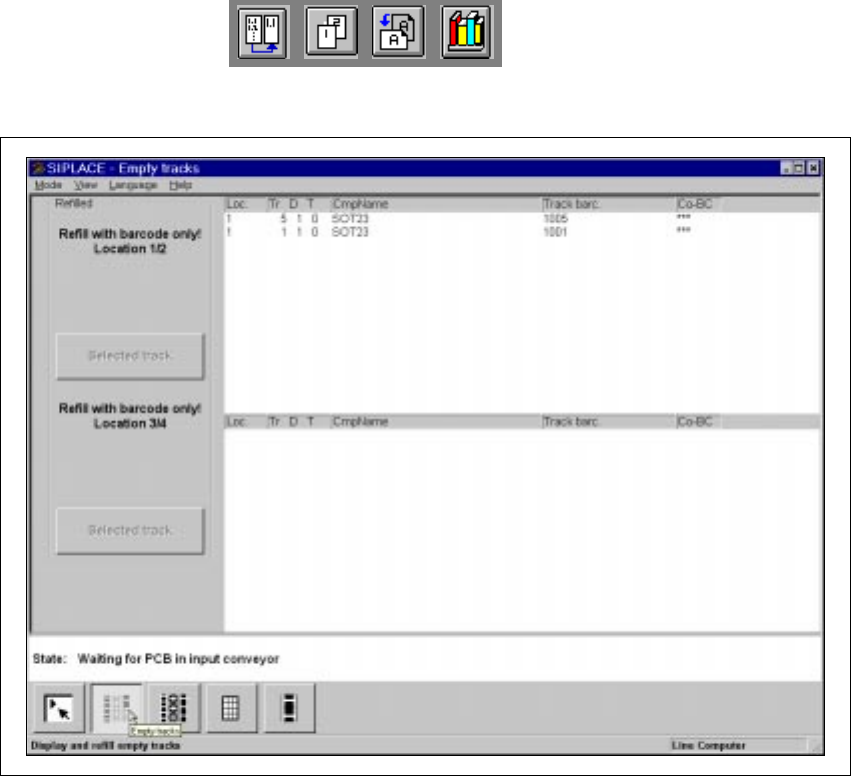
Fig. 4.3 - 2 "Empty tracks" view when the "Component verification with barcode" option is active
4
4.3.1.1 Meaning of the Entries in the Table "Empty tracks"
– Loc.
Number of the location whose track is "empty".
– Tr D T
Number of the "empty" track and of the feeder division for the corresponding component.
The entry for "T" is irrelevant for model SIPLACE HS-50 machines.
(Only valid for automatic machines with wafflepack changers).
– CmpName
Name of the corresponding component.
– Track barc.
The track barcode assigned to the corresponding track is entered in this column.
– CO-BC
This column displays whether or not a component barcode is specified for the corresponding
component in the setup using the "***" or "-" symbol.
4 Placement Functions User Manual HS-50
4.3 Feeders Software Version SR.501.xx 12/99 Issue US
148
t IIt
NOTE
If the "-" character is entered in this column, then this means that no barcode is specified for
the corresponding component. You can therefore manually refill the corresponding track us-
ing "Refill tracks" even if the "Component verification with barcode" option is active (see Sec-
tion 4.3.1.5). 4
4
4.3.1.2 Functions in the "Empty Tracks" View
4
Location 1 4
Confirms that all tracks for location 1 are full. 4
Location 2 4
Confirms that all tracks for location 2 are full. 4
Selected track 4
Confirms that the feeder on the selected track for location 1 or 2 is full. 4
Location 3 4
Confirms that all tracks for location 3 are full. 4
Location 4 4
Confirms that all tracks for location 4 are full. 4
Selected track 4
Confirms that the feeder on the selected track for location 3 or 4 is full. 4
4
4.3.1.3 "Refilling" Empty Tracks
Å Select the entry in the table or the track that is to be confirmed as being "refilled". The line se-
lected is highlighted in light blue in the table and the "Selected track" button is active.
Å Click on the Selected track button when the feeder in this track has been refilled with compo-
nents.
The track is then considered full and the entry is deleted from the list of empty tracks.
The "Selected track" button is not active thereafter.
User Manual HS-50 4 Placement Functions
Software Version SR.501.xx 12/99 Issue US 4.3 Feeders
149
t IIt
4.3.1.4 Refilling All Empty Tracks of a Location
Å Click on the button for the location that is to be confirmed as being "refilled", e.g. Location 1.
All tracks of this location are then considered refilled and the corresponding entries for the
empty tracks in this location are deleted from the list of empty tracks.
The button for the location is not active thereafter.
4.3.1.5 Refilling Empty Track When the "Component Verification With Barcode"
Option is Active
When the "Component verification with barcode" option is active, then empty tracks can normally
only be confirmed as having been "refilled" in the manner described in Section 4.3.1.5
.
The tracks containing components without
component barcodes are an exception. You can man-
ually "refill" here even if the "Component verification with barcode" option is active. 4
Å Select the entry in the table (see Fig. 4.3 - 2) for an empty track that contains components with-
out barcodes (see the note on page 148).
The "Selected track" button is active.
Å Click on the Selected track button when the feeder in this track has been refilled.
The "Selected track" button is not active thereafter.